
PrestaShop EU Return Button – Online Withdrawal Form
PrestaShop module that adds an EU “return button” and a modern online withdrawal form. Supports guests, email confirmations, case statuses, exclusions, and an admin workflow to manage requests. Built for high‑volume stores and compliance-driven processes, with analytics and audit-friendly records.
50.00 €
Galeria 1/28
PrestaShop EU Return Button Pro: Returns & Withdrawal Management
Return Button Pro for PrestaShop streamlines EU Directive 2023/2673 compliance with a seamless, two-step withdrawal form for guests and registered users. It provides a dedicated admin panel for efficient management, offering a clear audit trail, status updates, and proof emails for legal evidence. Merchants can implement smart exclusions for products, categories, or customer groups, and configure order state restrictions and deadlines automatically. The module integrates flexibly across your storefront, including the footer, customer account, and order history, significantly reducing administrative burden and ensuring a professional return experience. Optional IBAN collection further enhances refund efficiency.
Module version:
1.4.1
Shop versions:
9.x8.x1.7.x1.6.x
Works with ThirtyBees:
Yes
Translations:


Hassle-free EU returns.
Return Button Pro for PrestaShop.
Comply with the EU Directive 2023/2673 without the headache. This module adds a seamless, two-step withdrawal form to your store. Customers can easily return orders, while you get a clear audit trail, proof emails, and a dedicated admin panel to manage every case. Perfect for both guests and registered users.
Why you need a dedicated return button
Handling returns manually through emails or basic contact forms is messy. Customers get confused, you lose track of requests, and it's hard to prove compliance with EU consumer laws (like the new Directive 2023/2673).
What you need is a structured, automated process. Return Button Pro adds a clear "Withdraw from contract" button to customer accounts, order history, and your footer. It guides the customer through a simple two-step form, sends automated proof emails, and logs everything securely in your database.
No more guessing which products the customer wants to return. The module handles exclusions, deadlines, and guest access automatically, giving you peace of mind and saving hours of customer support time.
What you get with this module
-
Automated Proof:
Both you and the customer receive confirmation emails with exact timestamps and details for legal evidence. -
Smart Exclusions:
Easily block returns for specific products, categories, or customer groups (e.g., digital goods or B2B). -
Admin Management:
A dedicated back-office tab to track, manage, and update the status of every withdrawal request.
Core capabilities for your store
Two-Step Form & IBAN
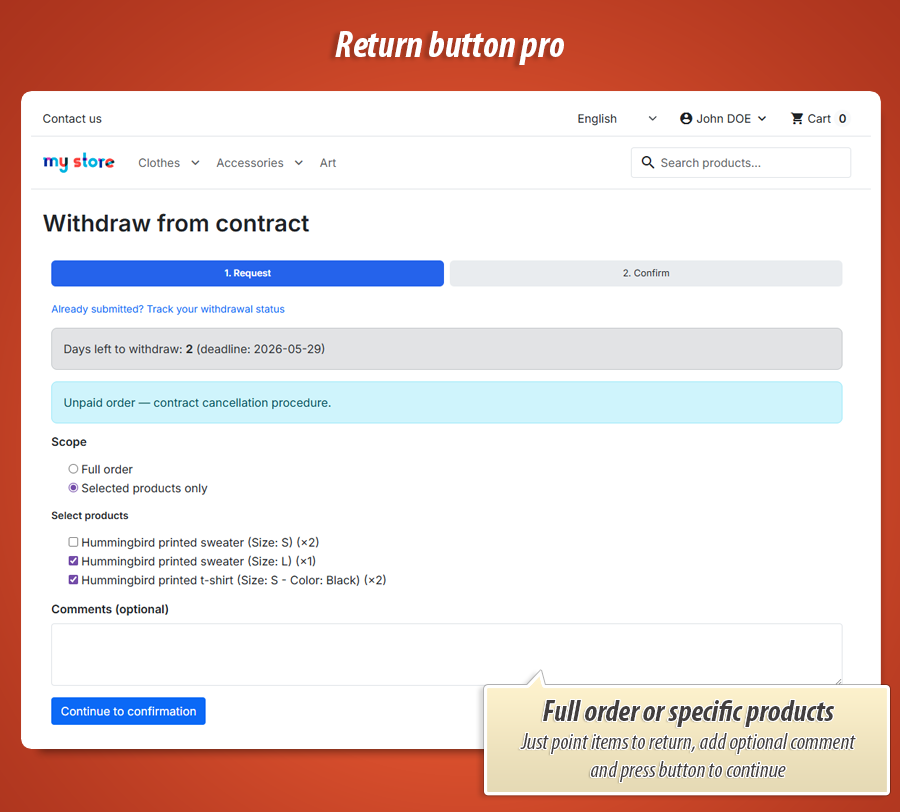
Provide a smooth experience. Customers select the order, choose products to return, and can optionally provide their IBAN for refunds. A mandatory legal checkbox ensures they agree to your terms before submitting.
Smart Exclusions
Not everything is returnable. The module lets you easily exclude specific products , entire categories , manufacturers, suppliers, or even specific customer groups (like wholesale B2B accounts) from the withdrawal process.
Guest Access & Footer
Don't force users to create an account just to return an item. Guests can access the return form using their order reference and email. Add the return link anywhere with automatic footer integration .
Admin Case Management
Manage everything in one place. Track, update, and resolve return requests effortlessly.
A dedicated inbox for returns
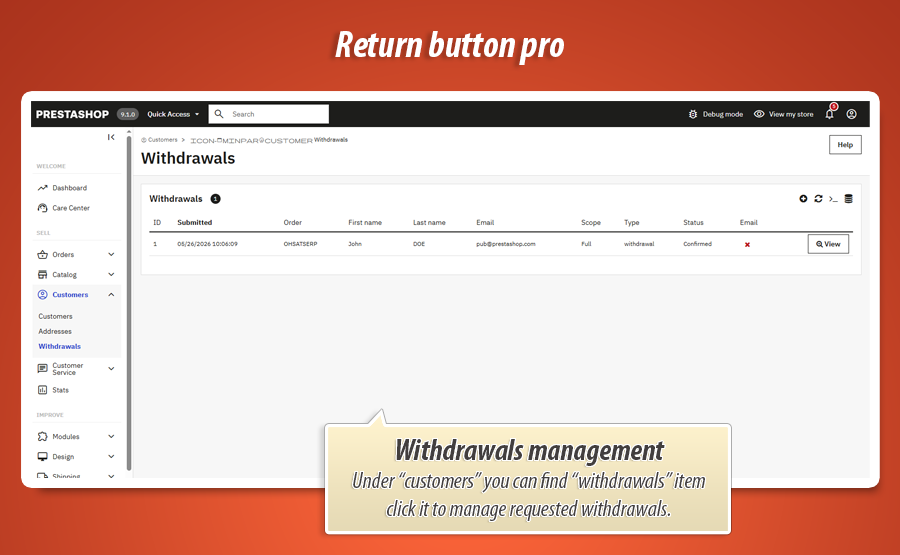
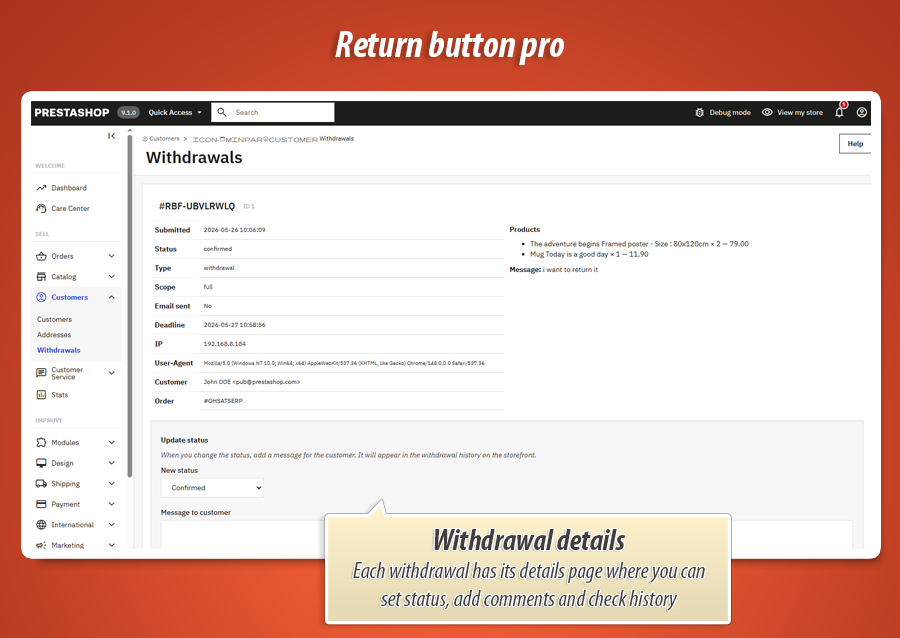
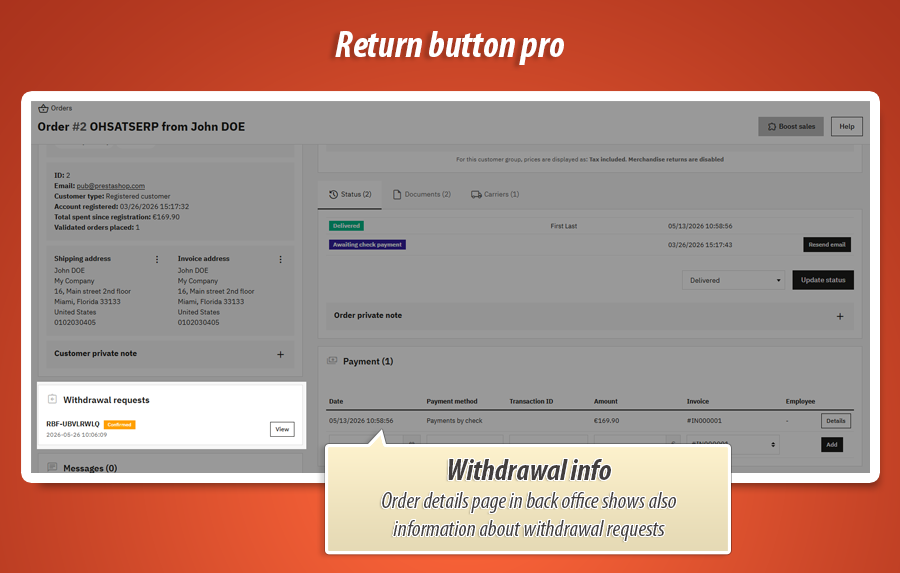
The module adds a dedicated Withdrawals tab in your back office. View all requests, check exactly which products are being returned, read customer notes, and download attachments. You can easily update the status of each case (e.g., pending, approved, refunded).
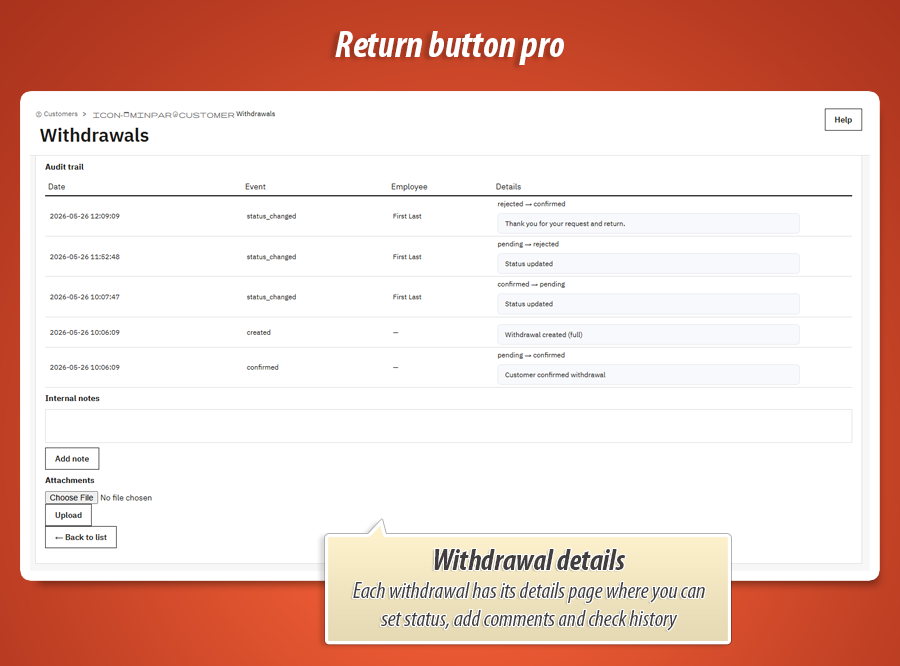
The built-in audit trail keeps a history of all status changes, providing you with permanent legal evidence should a dispute arise.
Flexible Display & Styling
Make it look like it belongs to your store. Seamless integration with your theme.
Fits your brand perfectly
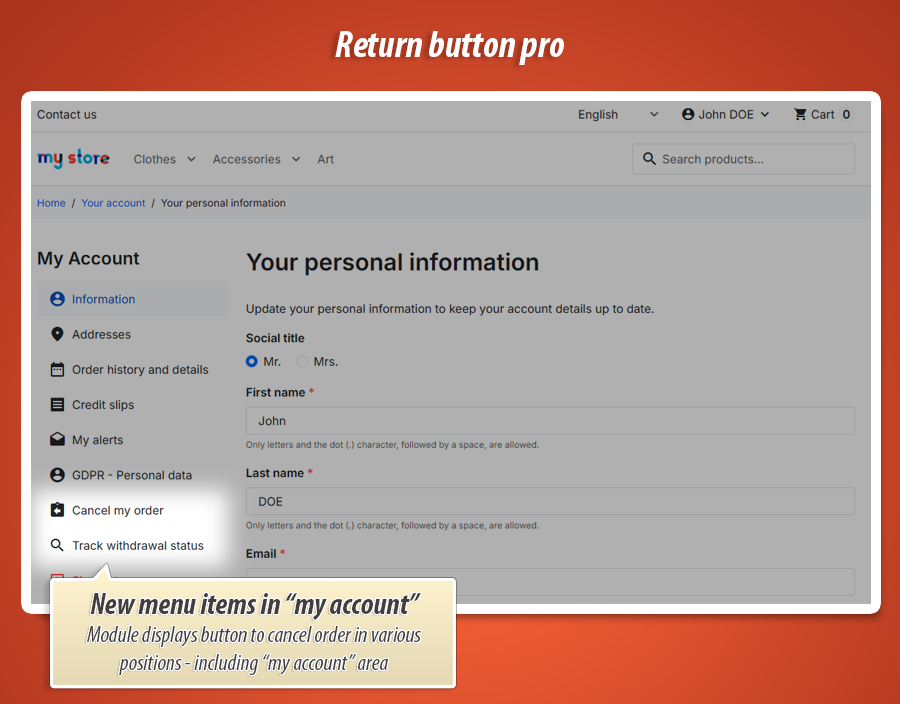
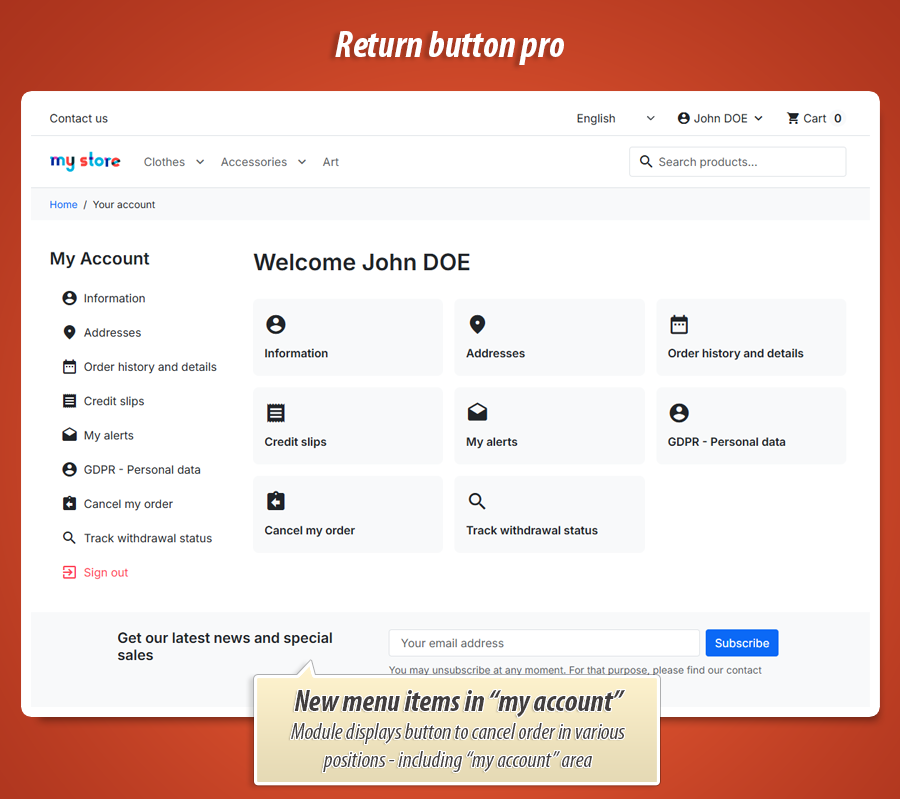
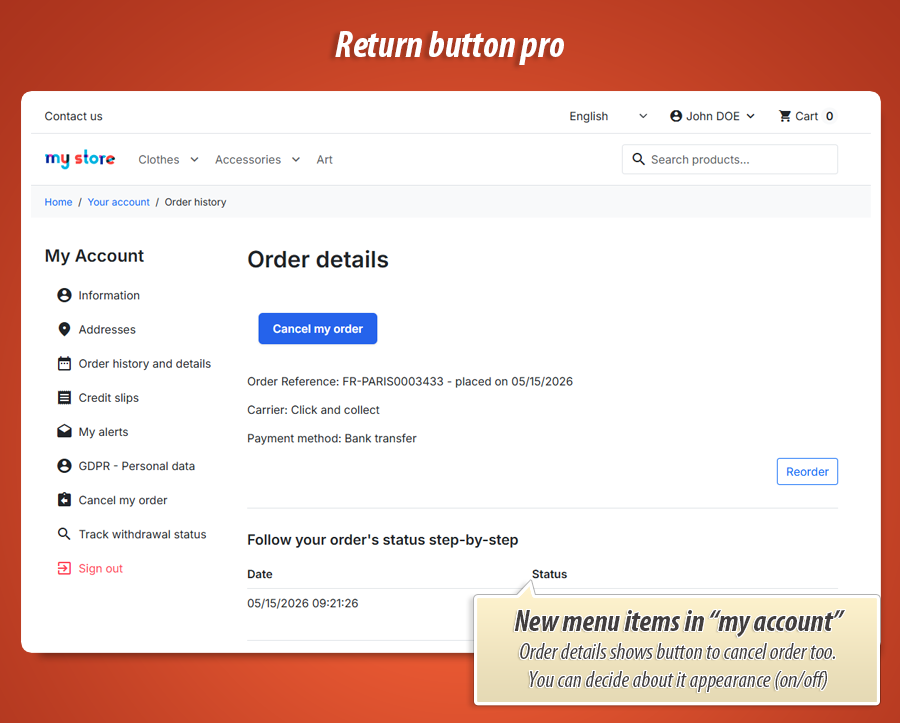
Choose between light and dark themes for the footer link, set custom button colors, or write your own CSS directly in the module configuration. The return button automatically integrates into the customer account page and order history details.
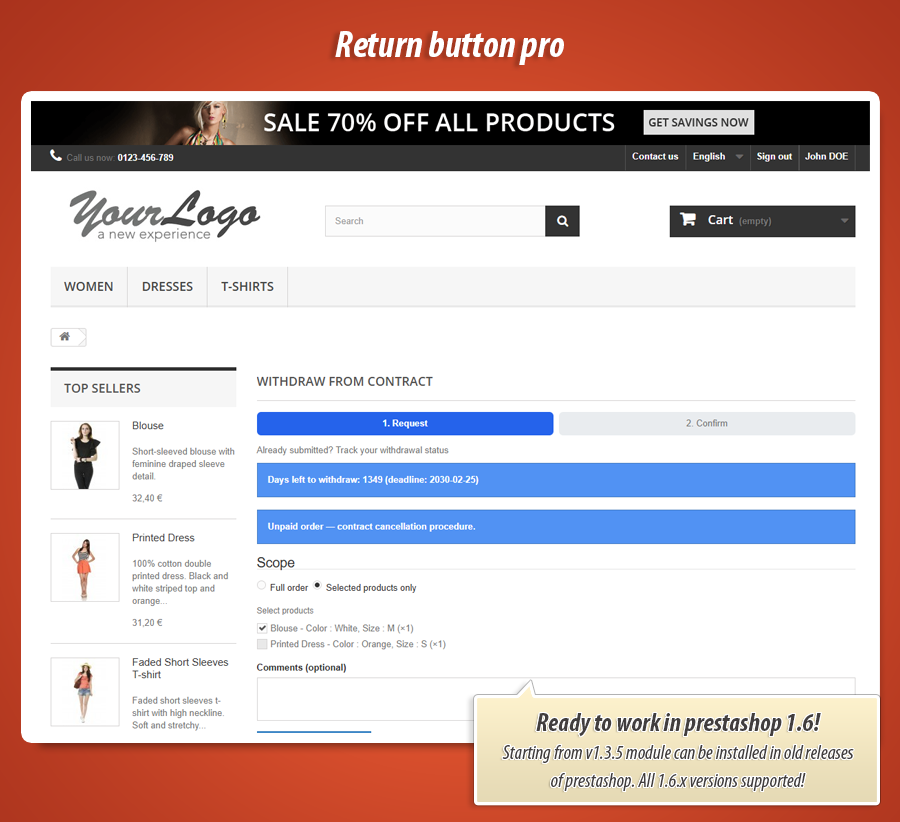
It supports both Classic and Hummingbird themes out of the box, ensuring a native look and feel without any template modifications.
Order State Restrictions
Control exactly when returns are allowed based on order status and deadlines.
Automated rules and deadlines
You can restrict the withdrawal form to specific order statuses (e.g., only allow returns for orders marked as "Delivered"). This prevents customers from trying to return items that haven't even been shipped yet.
Set the legal withdrawal period (e.g., 14 days ) and the module will automatically calculate the deadline. Once the deadline has passed, the return button is automatically hidden, enforcing your return policy without manual checks.
Every setting working for you
Below is the full map of what Return Button Pro can do - grouped the same way you see it in configuration. Each tile tells you what the option is for and how it helps your shop day to day.
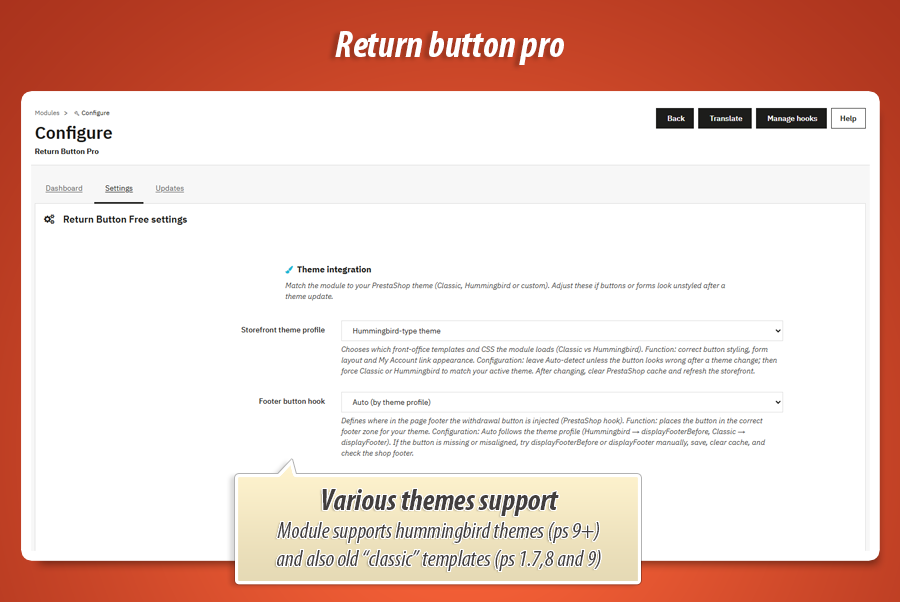
Theme integration
Storefront theme profile
Picks the right front-office templates and CSS for your shop theme—Classic or Hummingbird. Auto-detect is the safe default: the module reads your active theme and loads matching button styles, form layout, and My Account link markup. Force Classic or Hummingbird only if something looks off after a theme switch; then clear PrestaShop cache and refresh the storefront.
Footer button hook
Decides where in the page footer PrestaShop injects the withdrawal button ( displayFooter , displayFooterBefore , displayFooterAfter ). Auto follows your theme profile (Hummingbird often uses displayFooterBefore , Classic uses displayFooter ). If the button is missing or sits in a weird place, try another hook manually, save, clear cache, and check the live footer.
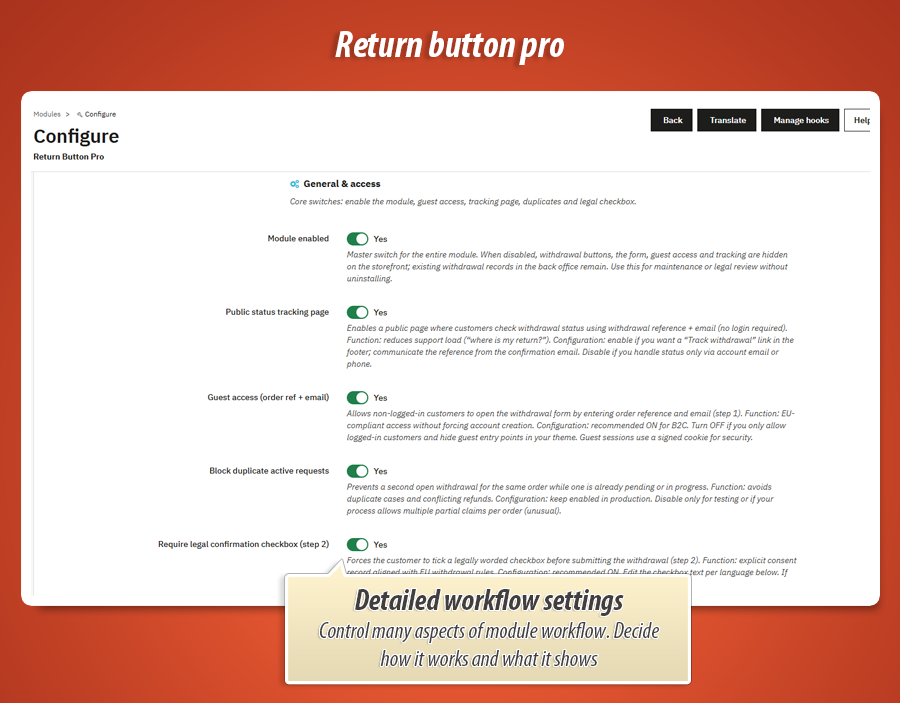
General & access
Module enabled
Master on/off switch for the whole module. When off, customers no longer see withdrawal buttons, the form, guest lookup, or public tracking—but existing withdrawal records stay in the database for legal evidence. Handy during maintenance, legal review, or while you tune settings without uninstalling.
Public status tracking page
Turns on a page where anyone with a withdrawal reference + email can check status—no login needed. Cuts down “where is my return?” emails. Enable it if you want a “Track withdrawal” link in the footer; tell customers to use the reference from their confirmation email. Turn off if you handle updates only by email or phone.
Guest access (order ref + email)
Lets shoppers who are not logged in start a withdrawal by entering order reference and the email used at checkout (step 1). Keeps you EU-friendly without forcing account creation. Recommended for B2C. Turn off if you only allow logged-in customers; guest entry points disappear. Sessions use a signed cookie for security.
Block duplicate active requests
Stops a second open withdrawal for the same order while one is already pending or in progress. Avoids double cases, confused refunds, and duplicate work for your team. Keep this on in production. Only disable for testing—or if your process genuinely allows multiple partial claims per order (unusual).
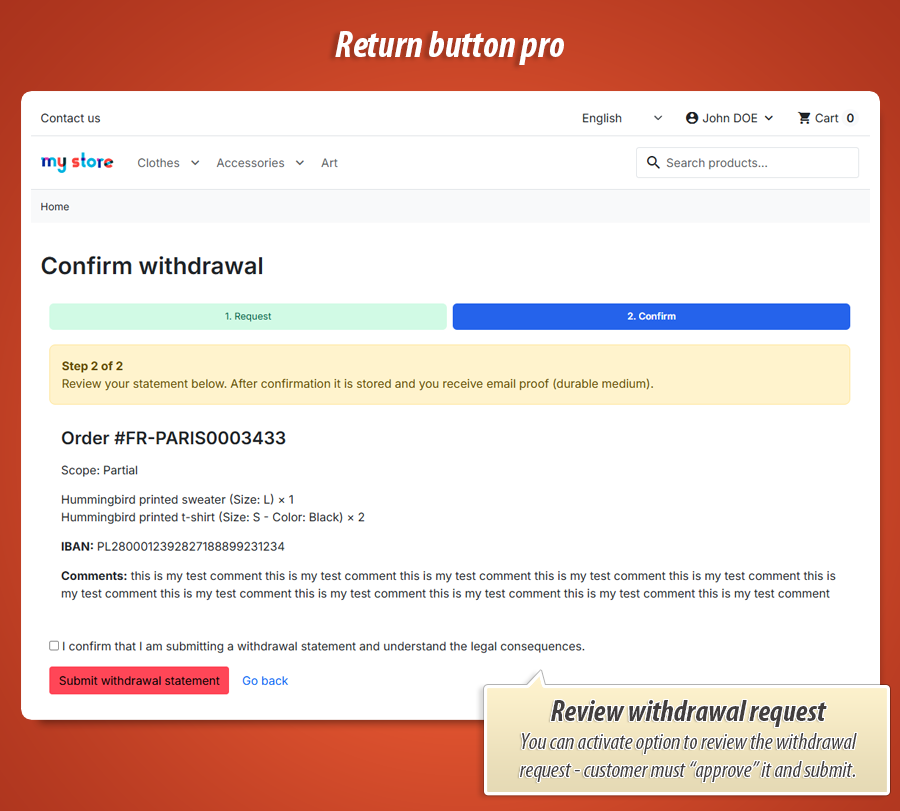
Require legal confirmation checkbox (step 2)
Customer must tick a legally worded checkbox before submitting (step 2). Creates an explicit consent record aligned with EU withdrawal rules. Strongly recommended ON. Edit the checkbox text per language in settings. If disabled, submission is still logged but without a mandatory tick—weaker for disputes.
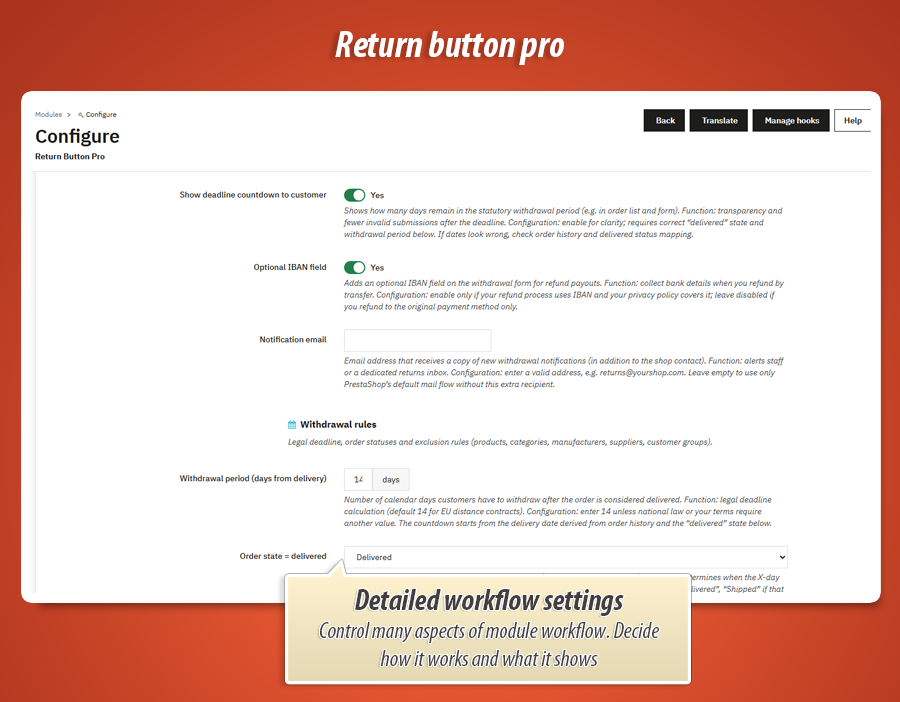
Show deadline countdown to customer
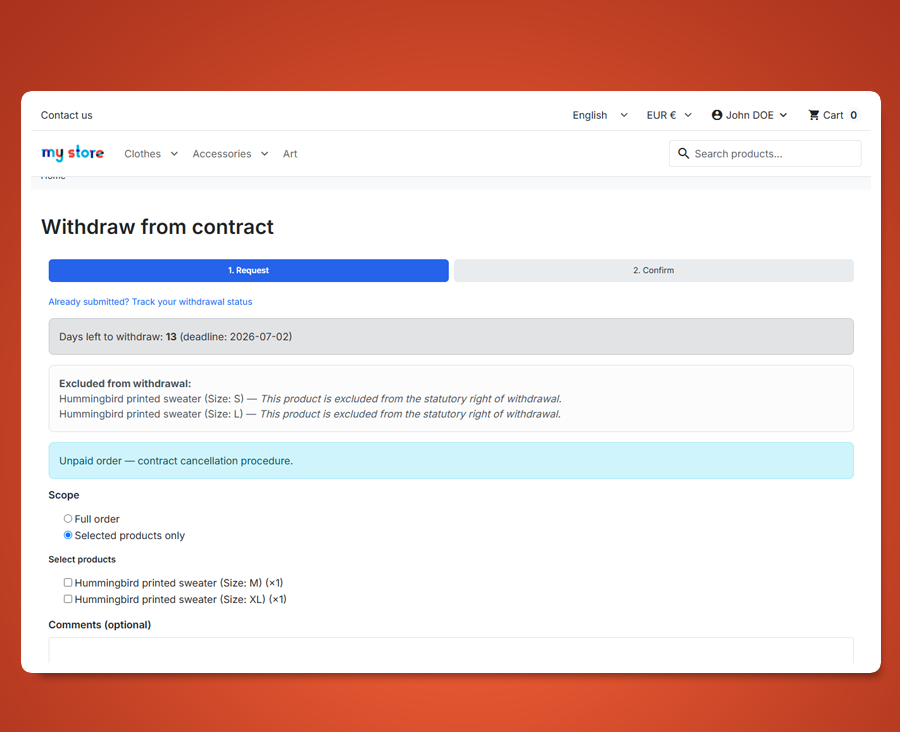
Shows how many days remain in the statutory withdrawal window (order list, form, etc.). Customers see upfront when it is too late—fewer invalid submissions and angry emails. Needs correct “delivered” state mapping and withdrawal period below. If dates look wrong, check order history and your delivered status setting.
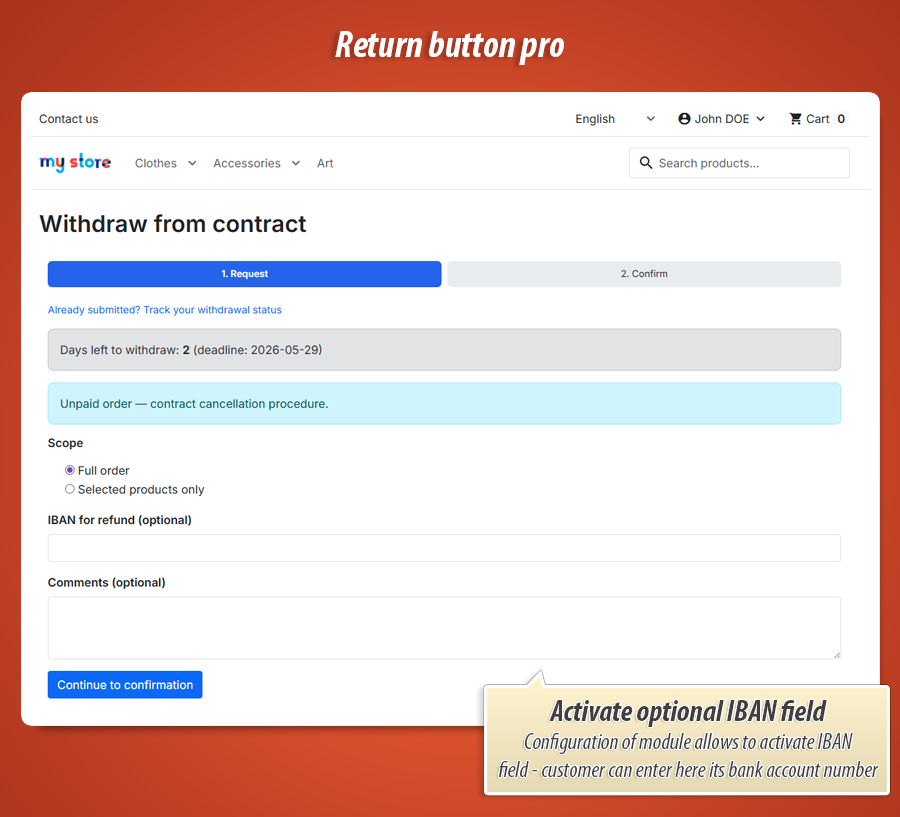
Optional IBAN field
Adds an optional IBAN field on the withdrawal form for bank-transfer refunds. Use only if your refund workflow actually needs bank details and your privacy policy covers storing them. Leave off if you always refund to the original payment method (card, PayPal, etc.).
Notification email
Extra inbox that gets a copy of every new withdrawal (on top of PrestaShop’s normal mail flow). Point it to returns@yourshop.com or a shared mailbox so nothing sits only in one employee’s account. Leave empty if your shop contact email is enough.
Withdrawal rules
Withdrawal period (days from delivery)
How many calendar days the customer has after delivery to withdraw (EU distance sales default is 14). The module counts from the delivery date in order history plus your “delivered” status below. Change only if your national law or terms require a different length.
Order state = delivered
Which PrestaShop status means “parcel delivered” —that moment starts the withdrawal clock. Pick the state you use when goods reach the customer (e.g. Delivered). “Auto” works for many shops; override if deadlines start too early (e.g. still on “Shipped”) or too late.
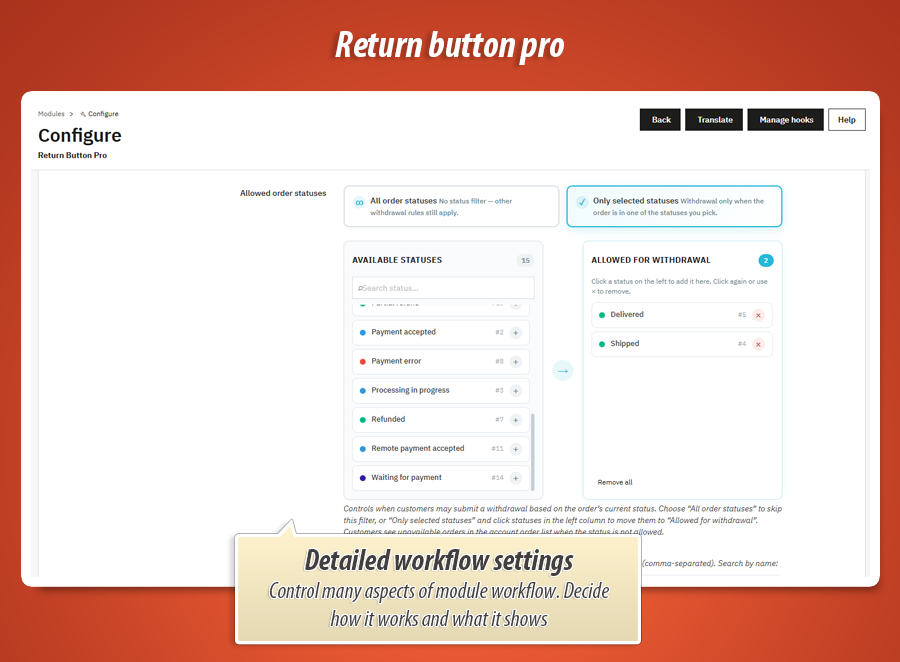
Allowed order statuses
Fine control over when a withdrawal can be filed based on the order’s current status. Choose “All order statuses” to skip this filter, or “Only selected statuses” and move states into the allowed list (visual picker in back office). Orders outside the list stay visible in history but cannot start a new withdrawal—stops returns while the parcel is still being prepared.
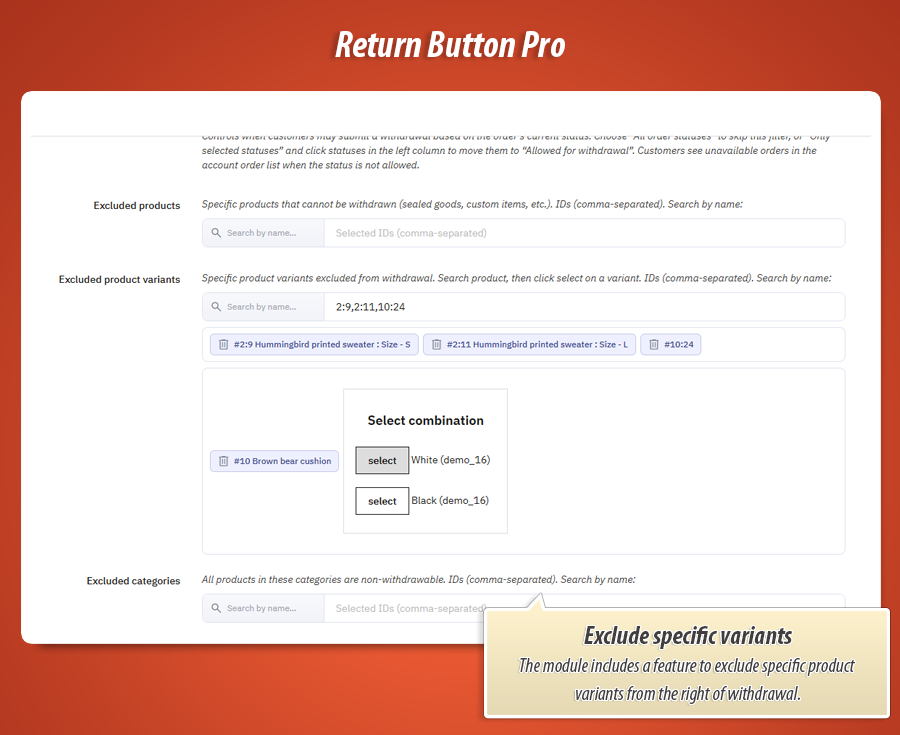
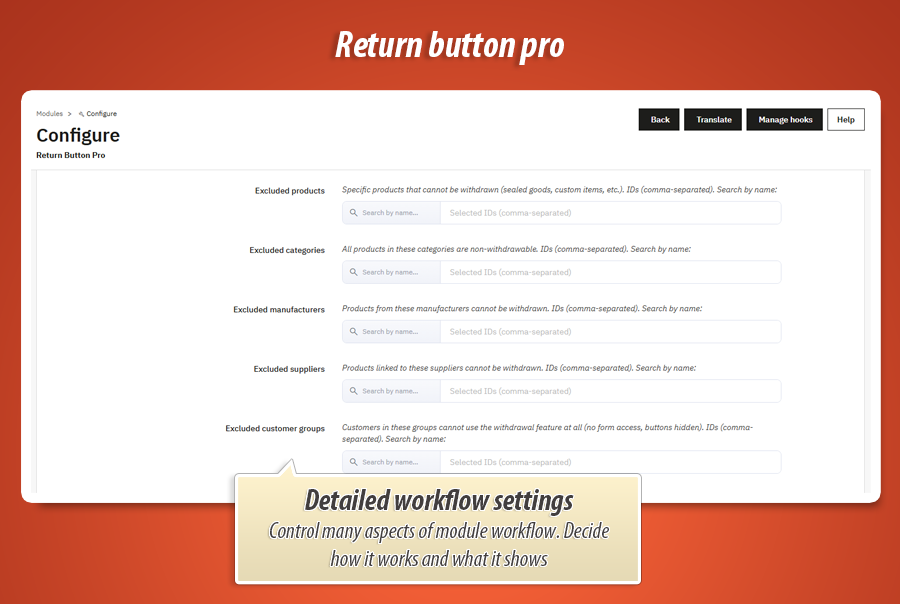
Excluded products
Search and block individual products from withdrawal—sealed hygiene goods, personalised items, digital downloads, etc. Those lines show your exclusion message and cannot be ticked on the form. Use the built-in search tool in settings (same as picking products in back office).
Excluded categories
Everything inside selected categories is non-withdrawable automatically—handy for whole catalog branches (e.g. “Made to order”, “Perishable”). Works together with single-product exclusions; category rules apply to all products in that tree.
Excluded manufacturers
Block withdrawal for all products from chosen brands/manufacturers. Useful when certain suppliers forbid returns or you resell under special terms. Combined with product and category rules at line level on the form.
Excluded suppliers
Same idea as manufacturers, but by supplier link on the product. Handy for dropshipping or marketplace-style catalogs where supplier contracts differ. Products tied to listed suppliers cannot be selected for withdrawal.
Excluded customer groups
Turns off withdrawal completely for selected groups—typical for B2B/wholesale accounts with separate contracts. Those customers won’t see buttons or reach the form. Use when statutory consumer withdrawal does not apply to that audience.
Footer & appearance
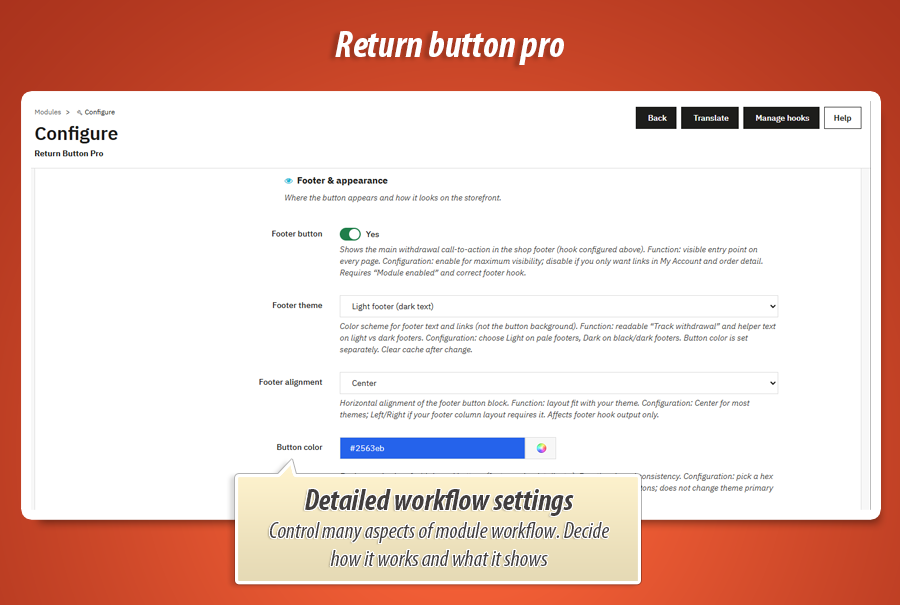
Footer button
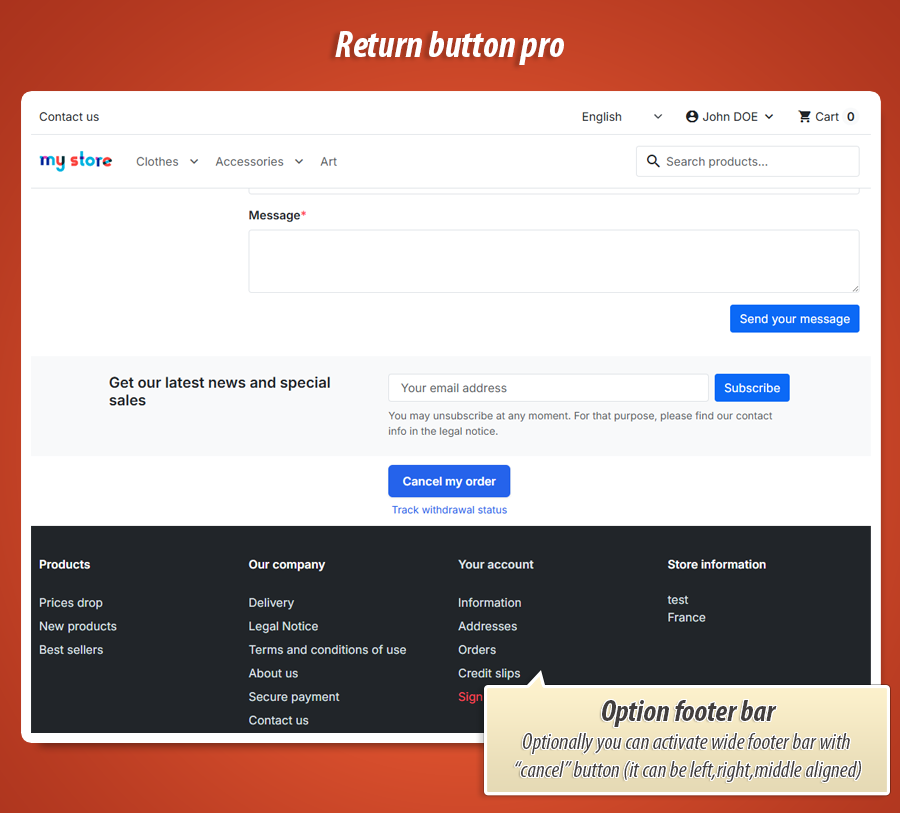
Shows the main “withdraw from contract” call-to-action in the shop footer on every page (using the hook you picked). Maximum visibility for customers who don’t know where to look. Turn off if you only want entry points in My Account and on order details—footer link and tracking helper disappear too.
Footer theme
Light or dark styling for footer text and helper links (not the button fill—that’s separate). Pick Light on pale footers and Dark on black/navy footers so “Track withdrawal” stays readable. Clear cache after changing.
Footer alignment
Aligns the footer button block left, center, or right. Most shops use center . Switch if your theme’s footer columns make a centered button look odd—only affects footer hook output, not account or order pages.
Button color
Background colour for withdrawal buttons (footer, order detail, account). Pick a brand hex with good contrast against white label text (e.g. #2563eb ). Applies inline on module buttons only—not your theme’s global primary colour.
Custom CSS
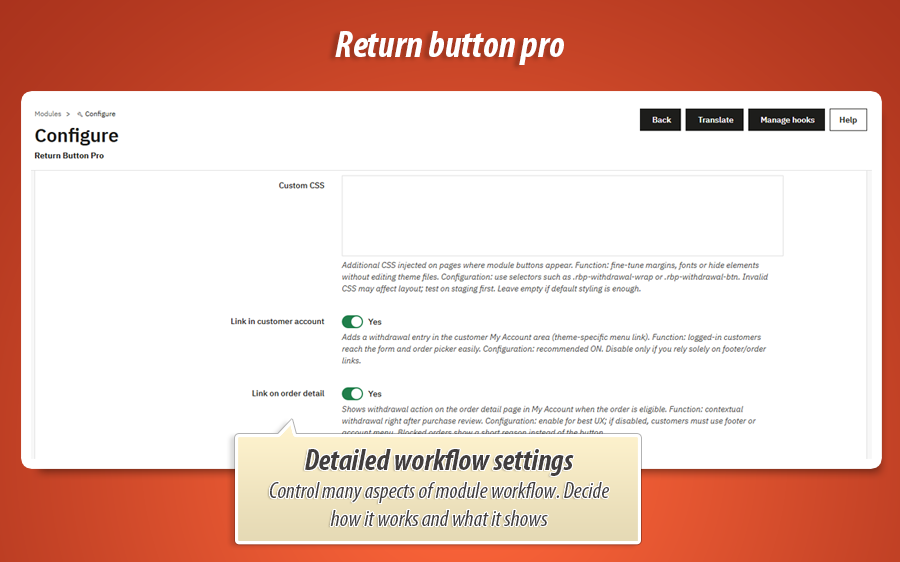
Inject your own CSS on pages where module buttons/forms appear. Tweak margins, fonts, hide elements—without editing theme files. Use selectors like .rbp-withdrawal-wrap or .rbp-withdrawal-btn . Test on staging; bad CSS can break layout. Leave empty if defaults are fine.
Link in customer account
Adds a withdrawal entry in My Account (menu link styled for Classic or Hummingbird). Logged-in customers jump straight to order picker + form. Recommended ON. Turn off only if you rely 100% on footer and order-detail links.
Link on order detail
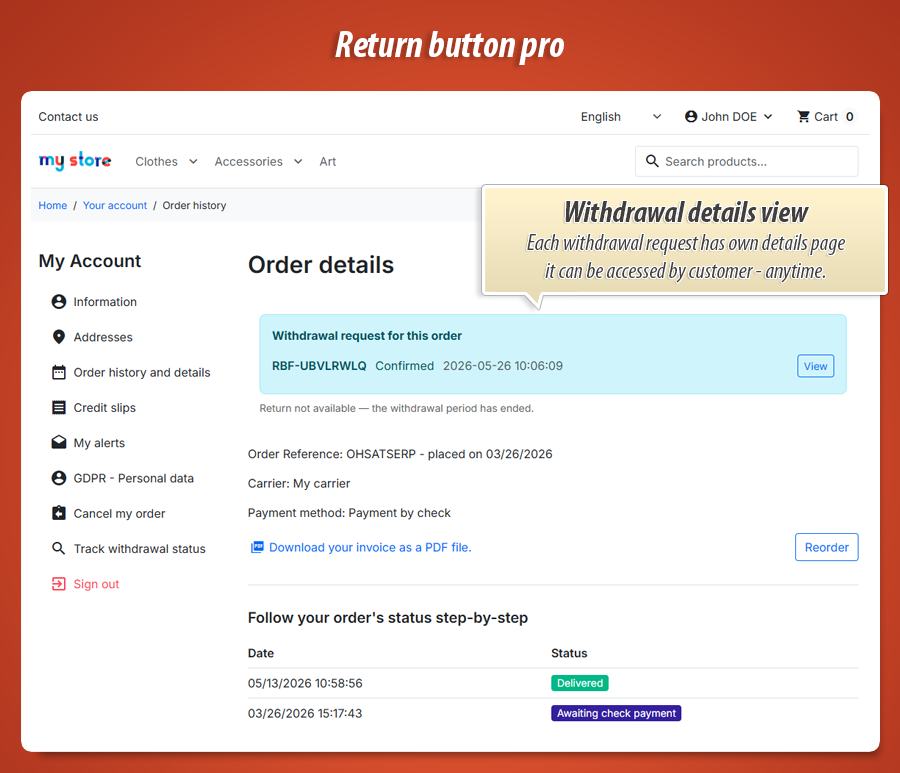
Shows withdrawal action on the order detail page in My Account when the order is eligible. Best UX: customer just opened the order and can withdraw in context. If disabled, they must use footer or account menu. Ineligible orders show a short reason instead of the button.
Texts & SEO
Noindex on form page
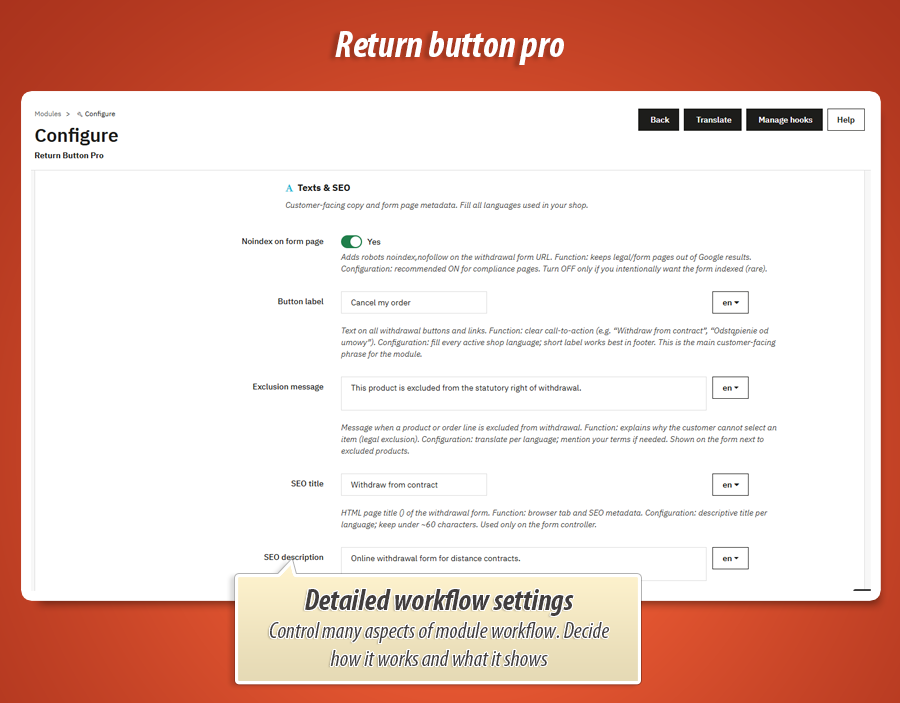
Adds robots noindex,nofollow on the withdrawal form URL so Google usually skips it. Good for legal/compliance pages you don’t want as landing pages. Leave ON unless you deliberately want the form indexed (rare).
Button label
Text on every withdrawal button and link—your main customer-facing phrase (e.g. “Withdraw from contract”, “Right of withdrawal”). Fill each shop language ; short labels work best in the footer. This is what shoppers click before anything else.
Exclusion message
Shown next to products or lines that cannot be withdrawn. Explain why —hygiene, custom-made, digital content, etc. Translate per language; you can mention your terms & conditions. Reduces “why can’t I tick this?” support tickets.
SEO title
Browser tab title (
) for the withdrawal form page. Keep it clear and under ~60 characters per language. Only applies to the form controller—not your whole shop.
SEO description
Optional meta description for the form page (one–two sentences per language). Usually low impact when noindex is on. Use it to describe the online withdrawal form in plain language, or leave blank to omit meta description entirely.
Legal confirmation checkbox text
Label beside the mandatory checkbox on step 2—the customer confirms they submit a binding withdrawal statement and understand consequences. Use lawyer-approved wording per country/language; must be clear, not buried in fine print. Required when “Require legal confirmation checkbox” is enabled.
Customer journey (storefront)
Two-step form (Request → Confirm)
Step 1 — Request: pick order (or guest lookup), choose full or partial withdrawal, select returnable products, optional message and IBAN. Step 2 — Confirm: review summary, tick legal checkbox, submit. Deliberate flow that matches EU expectations and reduces accidental clicks.
Proof emails & printable confirmation
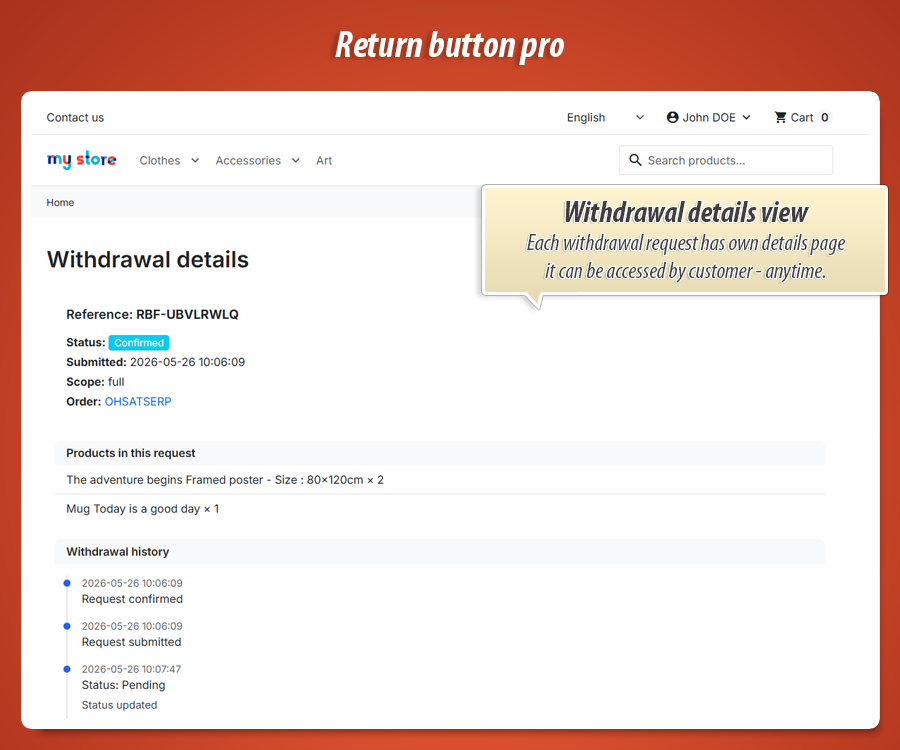
After submit, customer and shop get emails with reference, timestamp, and details—your paper trail. Customer can open a print-friendly proof page (durable medium backup beyond email). Admin can resend confirmation from the case view if someone lost the mail.
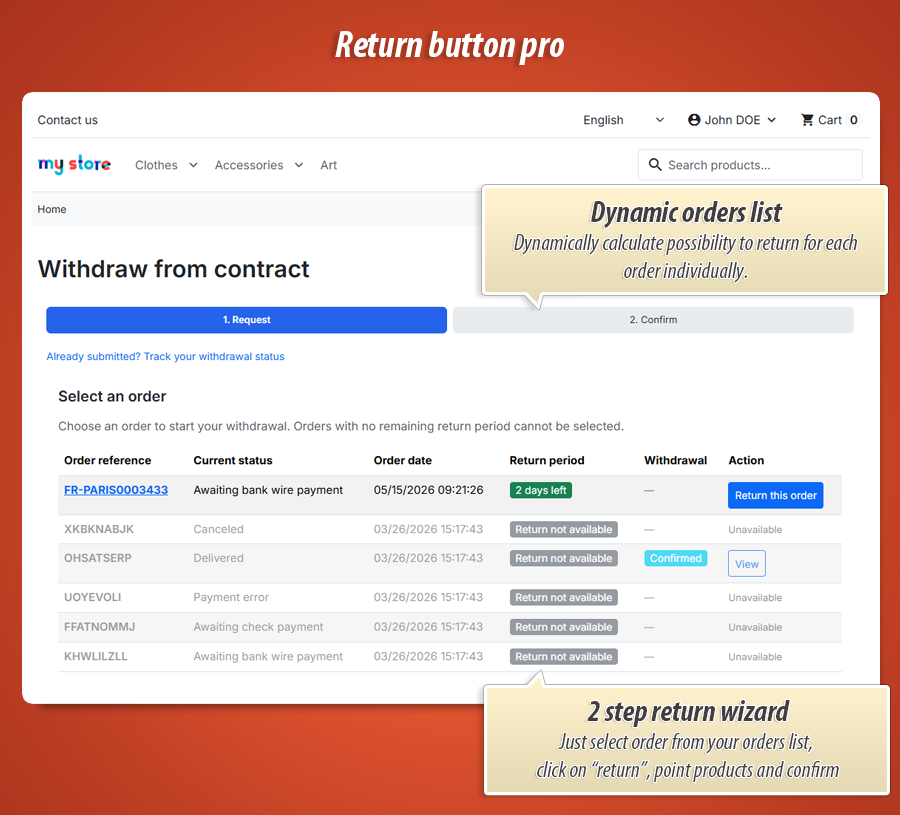
Order list with eligibility at a glance
Logged-in customers see a table: reference, status, date, days left in return period , existing withdrawal status, and action button. Orders past deadline or blocked by rules are greyed out with a clear label—no false hope, no wasted clicks.
Security built in
CSRF tokens on forms, signed guest sessions , and rate limiting on guest order lookup reduce abuse without forcing login. IP address and user-agent stored on each submission for evidence if something looks fishy.
Back office & analytics
Withdrawals list (Customers → Withdrawals)
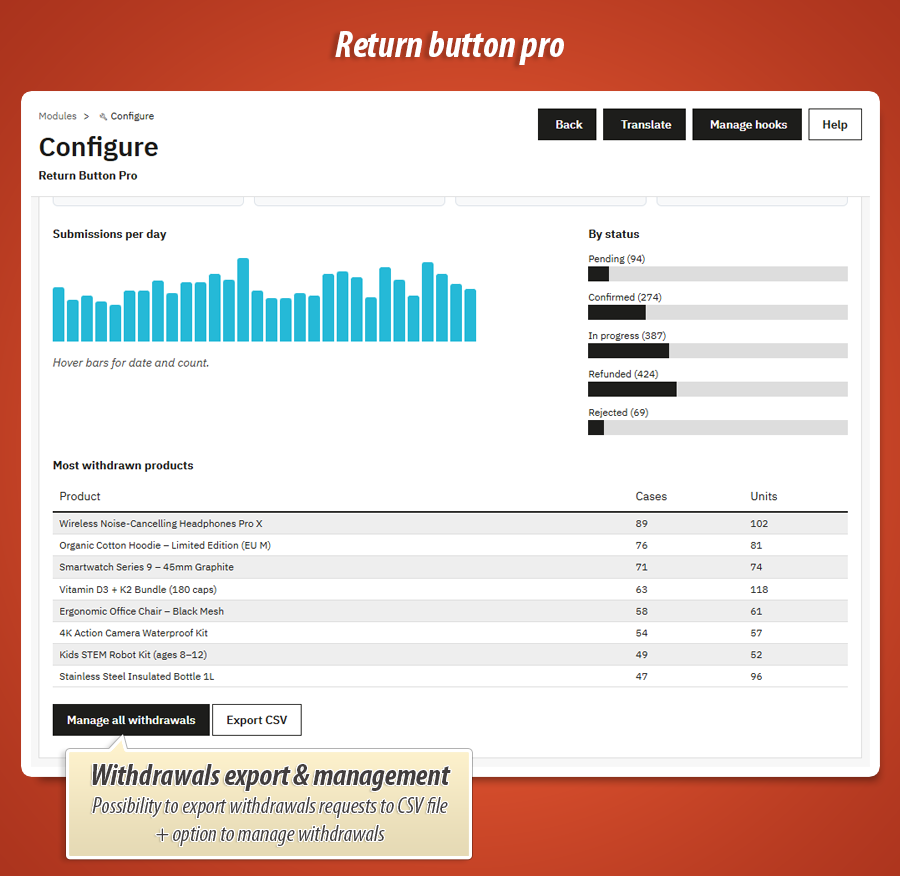
Dedicated menu under Customers. Sortable list with date, order, customer, scope (full/partial), type, status, and whether confirmation email went out. Jump into any case with one click. Export whole list to CSV from the module dashboard for accounting or audits.
Case view: status + customer message
Open a withdrawal to see products, IBAN, message, IP, deadline. Change status (Pending, Confirmed, In progress, Refunded, Rejected) and must add a rich-text message the customer sees in their history on the storefront—no silent status changes.
Audit trail
Every event logged: submission, confirmation, status changes (with old → new), emails resent, attachments added—who did it and when. Your safety net when a customer or authority asks “prove what happened on date X”.
Internal notes & attachments
Staff-only notes on a case (not visible to customer). Upload/download files (PDF, JPG, PNG, GIF up to 10 MB)—return labels, photos of damage, etc. Customer-uploaded proof can sit in the same case file.
Dashboard analytics
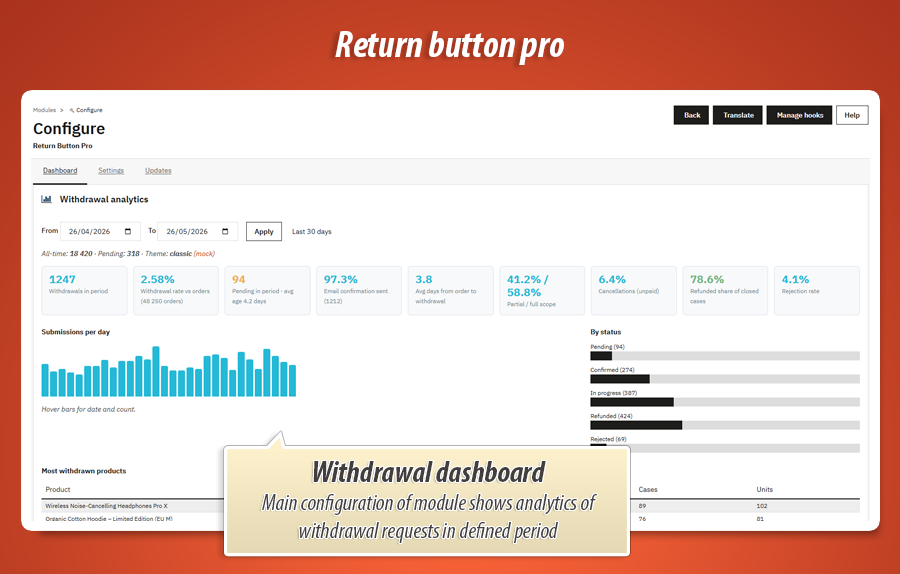
Module config → Dashboard tab: filter by date, KPIs (withdrawal rate vs orders, pending backlog, email confirmation %, partial vs full, rejection rate, refund completion), daily bar chart, status breakdown. Spot trends before they become a support pile-up.
Upgrade from Return Button Free
Pro uses its own tables ( rbp_* ) and settings ( RBP_* ). On install, settings and data can migrate from the free module. Both modules cannot run at once —disable Free before configuring Pro. Uninstall keeps withdrawal records in the database for legal evidence.
Technical specification & compatibility
Standard PrestaShop module. No core overrides. Clean architecture and easy migration from the free version. Safe for updates.
displayCustomerAccount , displayOrderDetail , displayFooter . rbp_withdrawal tables for secure, permanent legal evidence.
50.00 €
Module Gallery 1/28
Why choose our module
EU Return Button – Online Withdrawal Form?
Optimization and Automation
This module automates EU return processes, from customer submission via a two-step form and guest access, to smart exclusions and deadline management. It centralizes requests in a dedicated admin panel with automated proof emails, significantly reducing manual effort and optimizing your return workflow.
Increased Sales
This module drives sales by creating a trustworthy shopping experience. Its compliant, hassle-free return form for guests and registered users, coupled with transparent tracking and efficient management, minimizes purchase friction and boosts customer confidence.
15 years of experience
With 15 years of PrestaShop expertise, our module guarantees seamless EU Directive 2023/2673 compliance. It provides a robust, two-step withdrawal form with audit trails, smart exclusions, and a dedicated admin panel, ensuring legally sound returns for all customers efficiently.
Extensive Customization
The module offers extensive customization, allowing you to tailor its appearance and functionality to your brand. Adjust themes, button colors, footer alignment, and even inject custom CSS for a perfect fit with your PrestaShop store's unique design and legal requirements.
Open Source Code
The module offers full access to its source code and templates, empowering developers with complete control for custom modifications and seamless integrations. No obfuscation or 'ioncube' restrictions, ensuring maximum flexibility and transparency for your PrestaShop store.
License and Updates
Benefit from a lifetime license, ensuring your store remains compliant with EU Directive 2023/2673. A full year of free updates guarantees the withdrawal form consistently meets legal standards. After this initial period, continue receiving updates with substantial renewal discounts.