
PrestaShop Sticky Cart Bar FREE
Keep “Add to cart” visible on long product pages! Sticky Cart Bar FREE shows a slim, sticky strip with live price, stock status, and a real buy button when customers scroll past the main CTA. It’s fully responsive, works with Classic and Hummingbird themes, and requires no coding. Need more control? Upgrade to Sticky Cart Bar PRO for advanced targeting and layout options.
0.00 €
We develop the module for free - if you want - support us!
Galeria 1/7
Sticky Add to Cart Bar Free
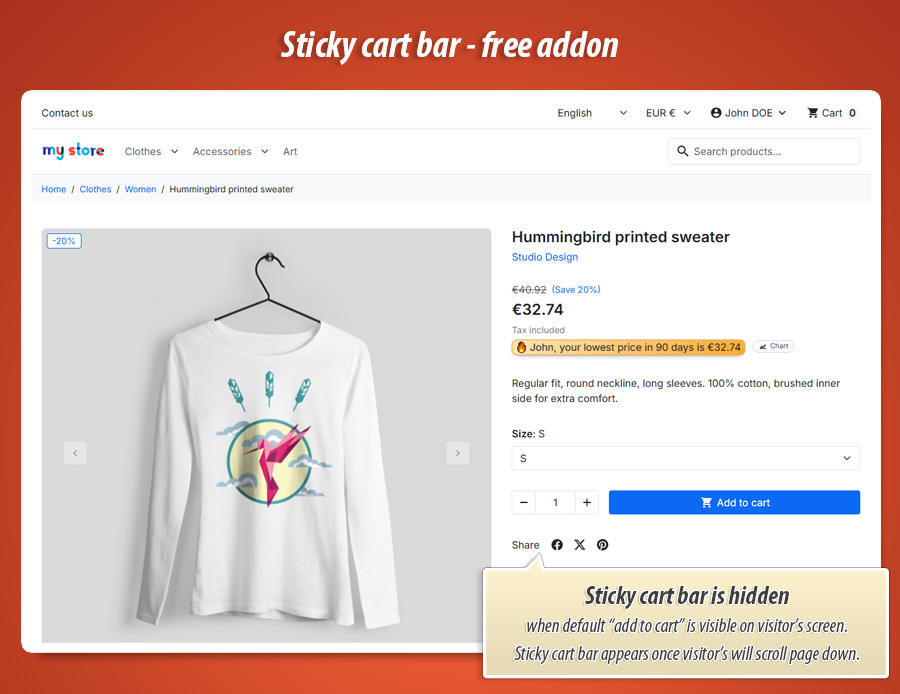
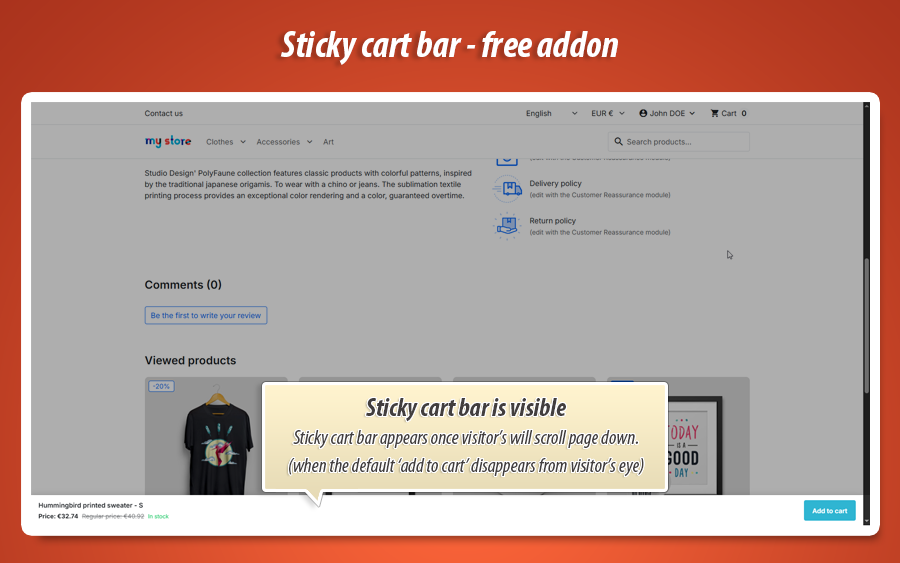
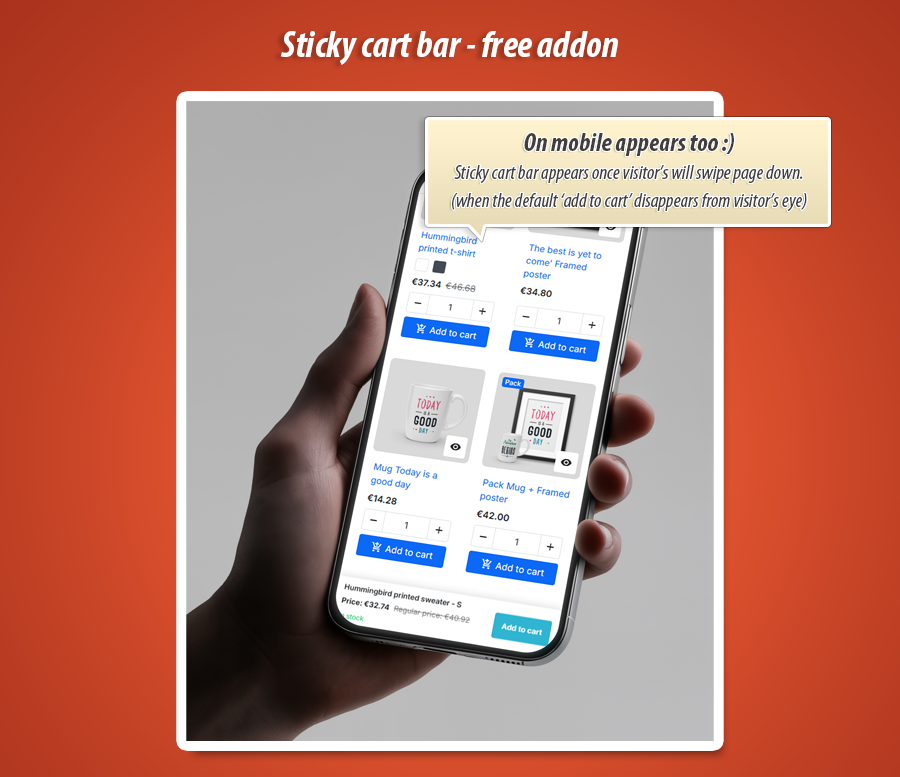
The Sticky Cart Bar FREE PrestaShop module significantly boosts conversions by keeping the "Add to cart" button constantly visible on product pages. When customers scroll past the main purchase area, a slim, sticky bar dynamically appears, displaying essential product information such as the product name, live price, current stock status, and selected variants. This fully functional bar ensures an uninterrupted shopping experience on both mobile and desktop. It seamlessly integrates with your store, respecting all product logic, promotions, and stock availability. Easy to set up without any coding, this module supports Classic and Hummingbird themes, effectively reducing cart abandonment and enhancing user convenience.
Module version:
1.1.0
Shop versions:
9.x8.x1.7.x
Works with ThirtyBees:
No
Translations:


Keep “Add to cart” visible while customers scroll.
Sticky Cart Bar FREE for PrestaShop.
On long product pages, shoppers often scroll past the main buy button — and never come back. Sticky Cart Bar FREE adds a slim sticky strip with the product name, live price, stock status, selected variant and a working Add to cart button. It appears when the customer scrolls past the original button, on mobile and desktop. Simple setup, no coding, ready for Classic and Hummingbird themes.
Why a sticky bar beats “scroll back to buy”
Product descriptions, reviews, size guides, cross-sells — your product page gets long fast. On mobile, the main Add to cart button disappears as soon as the customer reads more. Many leave without buying, not because they changed their mind, but because buying became inconvenient.
A sticky cart bar keeps the purchase path open: same product, same selected size and color, same price rules as on the page. When stock runs out for a combination, the bar reflects that and blocks the button — just like the main form.
Sticky Cart Bar FREE is the no-risk starting point: one bar for your whole shop, essential branding (bar and button colours), and smart sync with PrestaShop’s product page. When you outgrow “one bar fits all”, upgrade to Sticky Cart Bar PRO for visual layout builder, multiple bars, targeting and conversion analytics.
What you get with the free version
-
Sticky bar on product pages:
Appears when the shopper scrolls past the main add-to-cart area — typically fixed at the bottom of the screen. -
Live product data:
Price (including promotions), stock message and selected combination update when the customer changes variants. -
Simple branding:
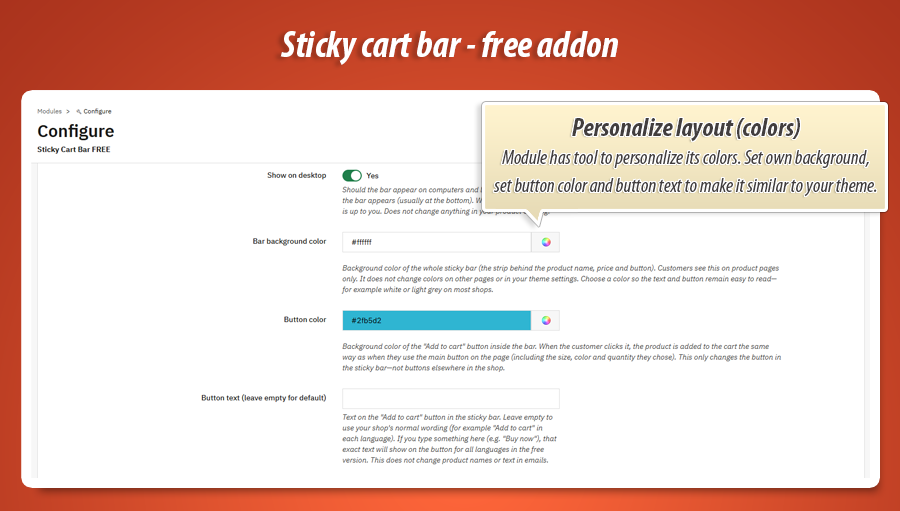
Bar background colour, button colour and optional custom button label. Separate mobile and desktop on/off switches. -
Theme-ready:
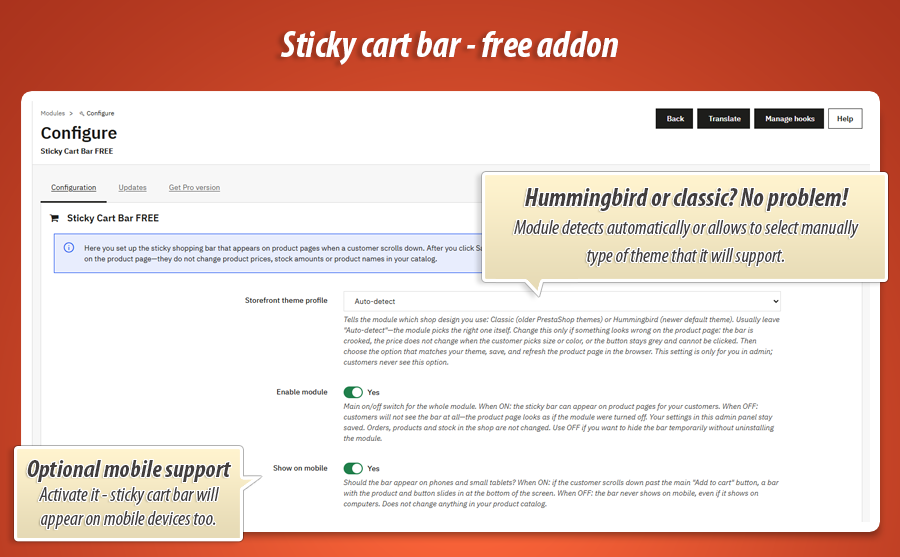
Auto-detect Classic or Hummingbird storefront profiles — or pick manually if your theme needs it.
Core capabilities for your shop
Mobile-first checkout path
Enable the bar on phones and tablets where scrolling pain is highest. Turn it off on desktop only, mobile only, or show everywhere — your choice per device type.
Dynamic price & promotions
The bar reads the same price the customer sees on the product page — including specific prices and crossed-out regular prices during sales. Change a variant, the bar price updates.
Variants & stock awareness
Optional combination label in the title (e.g. size and colour). Stock line mirrors the product page; unavailable combinations disable the sticky button so you avoid frustrated clicks.
Smart show / hide
The bar appears only when it helps — not on top of the main button.
Appears when shoppers need it
The module watches the main add-to-cart zone on the product page. While it is visible on screen, the sticky bar stays hidden so you do not duplicate buttons. Once the customer scrolls further, the bar slides in and stays accessible until they scroll back up.
That behaviour works with typical Classic and Hummingbird product layouts. If your theme uses unusual markup, switch the theme profile in module settings — no code required.
Real add to cart
Same cart action as the main product form.
One click — same basket rules
The sticky button triggers the same add-to-cart flow your theme already uses: selected quantity, combination, minimal quantity and customization fields are respected. Customers do not get a “fake” shortcut that adds the wrong variant.
Need variant dropdowns, mini-cart summary or a post-add upsell popup inside the bar? Sticky Cart Bar PRO adds those conversion blocks plus a visual layout builder.
Quick branding
Match bar and button to your shop colours in minutes.
Looks like part of your store
Pick a background colour for the bar strip and a colour for the call-to-action button. Optionally override the button label (for example “Buy now”) — handy for a single-language shop or a strong CTA test before you upgrade.
Sticky Cart Bar PRO unlocks per-element fonts, spacing, shadows, 30+ layout presets, top/bottom bar position and full Layout Studio.
Configuration in the back office
Install the module, open Modules → Sticky Cart Bar FREE , adjust a handful of switches and colours, save, then open any product page on the storefront. No template edits required for a standard setup.
Visibility & devices
- Master enable / disable for the whole module
- Separate switches for mobile and desktop
- Classic / Hummingbird theme profile (auto-detect recommended)
Content in the bar
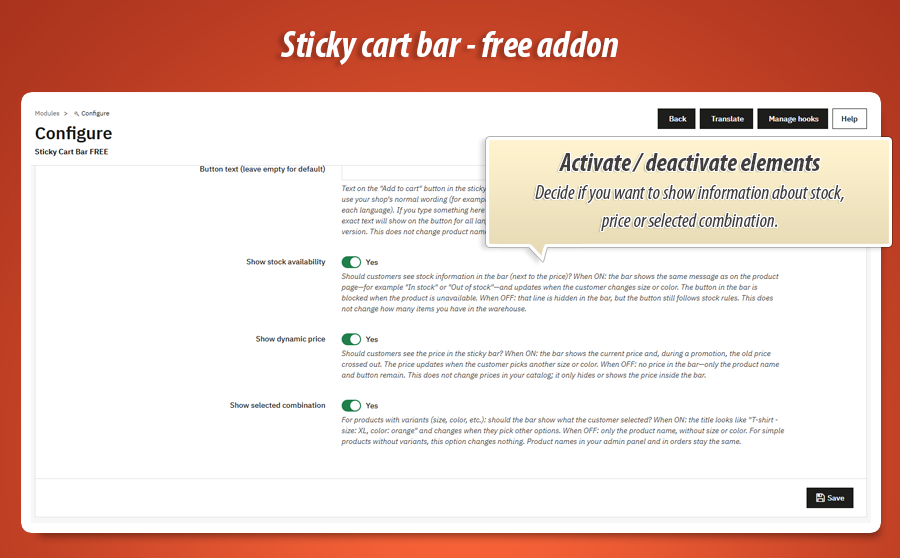
- Show or hide dynamic price
- Show or hide stock availability message
- Show or hide selected combination (size, colour, etc.)
Look & feel
- Bar background colour
- Add to cart button colour
- Optional custom button text
Updates tab
- Built-in MyPresta update checker
- “Get Pro version” tab with feature overview inside the module
Technical specification & compatibility
Standard PrestaShop module ( stickycartbarfree ). Hooks into product footer display. No core overrides. Lightweight assets loaded only on product pages.
Turn the sticky bar into a conversion engine
The free version keeps purchase one scroll away. Sticky Cart Bar PRO is for shops that want to design bars visually, show different bars to different audiences, and measure what works.
Layout Studio & presets
Drag-and-drop rows and blocks, 30+ ready layouts, bar at top or bottom, per-element colours, spacing, typography and hover styles.
Rich bar blocks
Mini-cart summary, variant picker in the bar, product gallery, FOMO timer or low-stock counter — everything synced live with the product page.
Targeting, analytics & upsell
Multiple bars with rules (category, product, customer group, country…), built-in analytics, A/B tests, GA4/Matomo events and cross-sell popup after add to cart.
Upgrade on MyPresta.eu — same module family, more control and measurable growth for your store.
0.00 €
We develop the module for free - if you want - support us!
Module Gallery 1/7
Why choose our module
Sticky Cart Bar FREE?
Optimization and Automation
This module optimizes your product pages by keeping the 'Add to cart' button always visible for scrolling customers. It automates dynamic updates of price, stock, and selected variants, streamlining the purchase path on both mobile and desktop to reduce cart abandonment and boost conversions effortlessly.
Increased Sales
Sticky Cart Bar Free boosts sales by keeping the 'Add to cart' button, live price, and product details always visible as customers scroll. This reduces friction, especially on long product pages and mobile, preventing lost sales and improving conversion rates by making buying effortless.
15 years of experience
Developed with profound PrestaShop knowledge, this module flawlessly integrates with core cart logic, price rules, and variants across 1.7.x to 9.x. Its intelligent theme detection and no-override design demonstrate a deep understanding of the platform's intricacies, honed over years.
Extensive Customization
The Sticky Cart Bar FREE module offers valuable customization. Easily match your brand by adjusting bar and button colors, and setting a custom button label. Control its visibility across devices and decide what product information, like price or stock, is dynamically displayed.
Open Source Code
As a standard PrestaShop module, Sticky Cart Bar Free ensures transparent code and no core overrides. This allows developers full access for custom modifications and seamless integrations, free from hidden functions or encryption.
License and Updates
The Sticky Cart Bar FREE module is 100% freeware, offering unlimited usage without licensing fees. It includes a built-in MyPresta update checker to ensure seamless compatibility and keep it current with PrestaShop 1.7.x, 8.x, and 9.x versions, guaranteeing continuous functionality.