
PrestaShop Deffered Payment
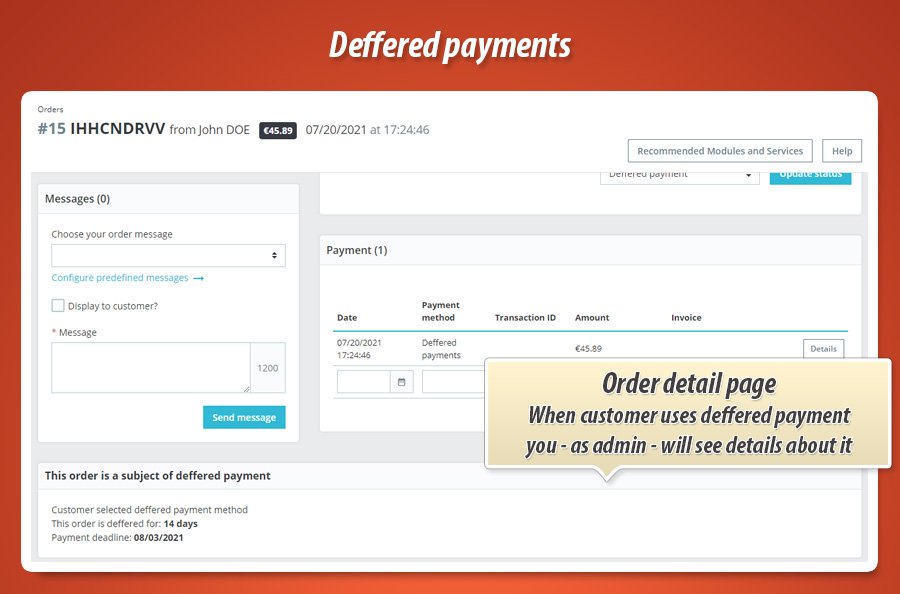
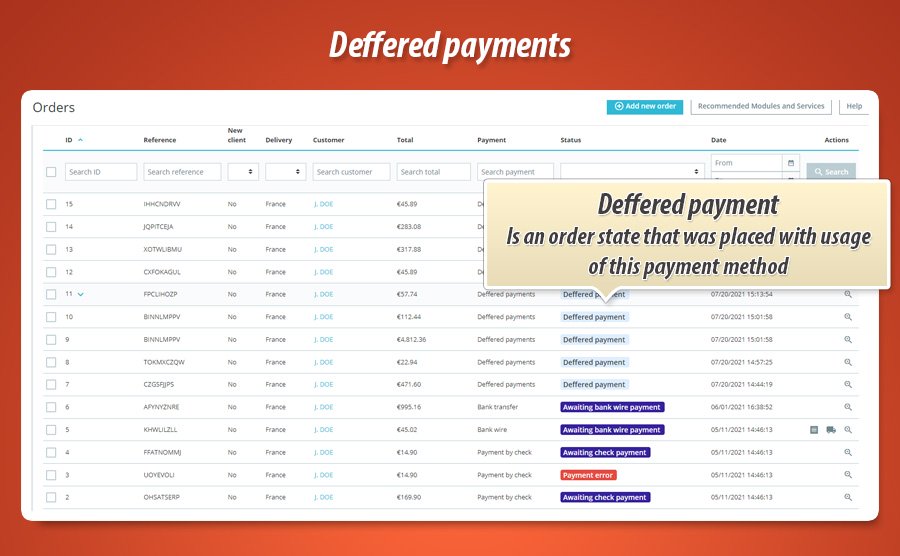
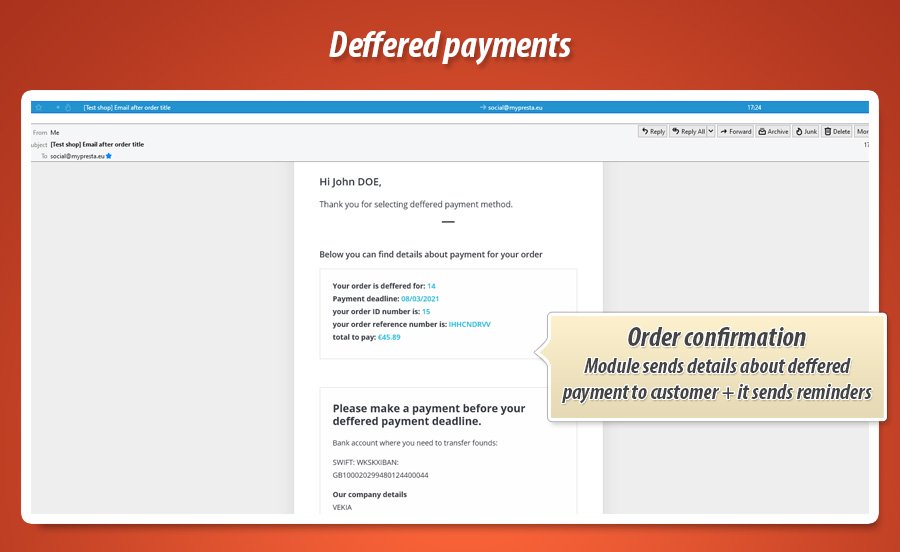
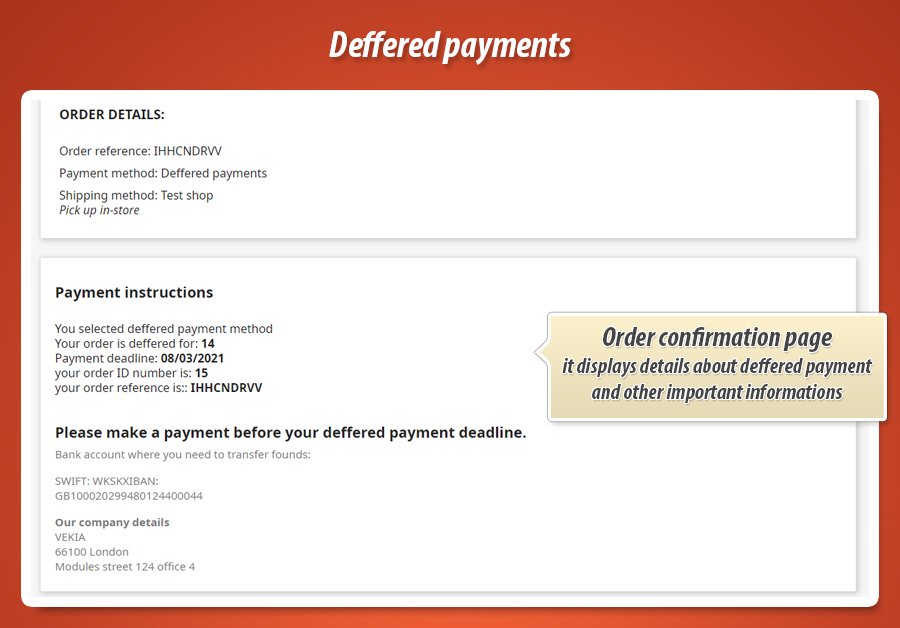
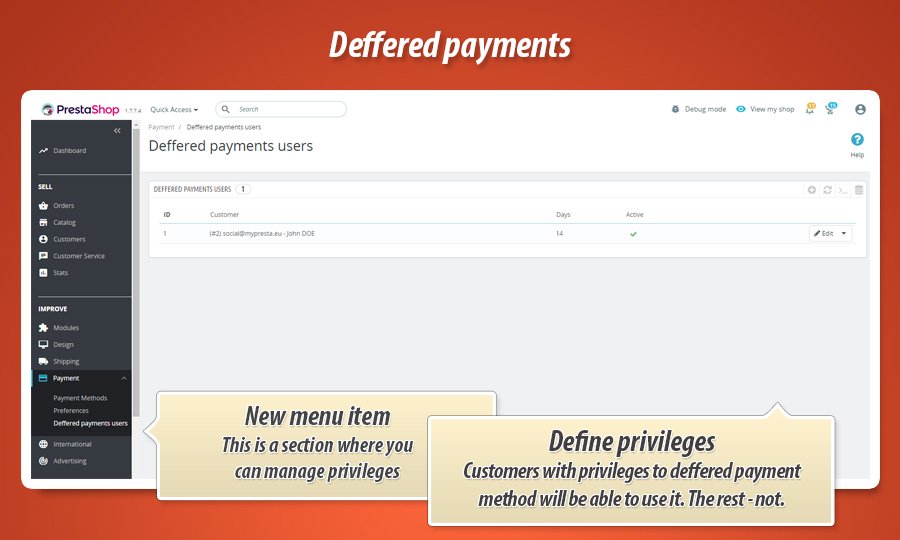
Deffered payment module is a payment method for PrestaShop that gives possibility for privileged group of customers to place an order in your shop with deffered payment. You - as a shop owner decides what customers will have access to this payment method and defines how long you will wait for payment (in days).
49.99 €
Galeria 1/11
B2B Invoice Payment & Net Terms
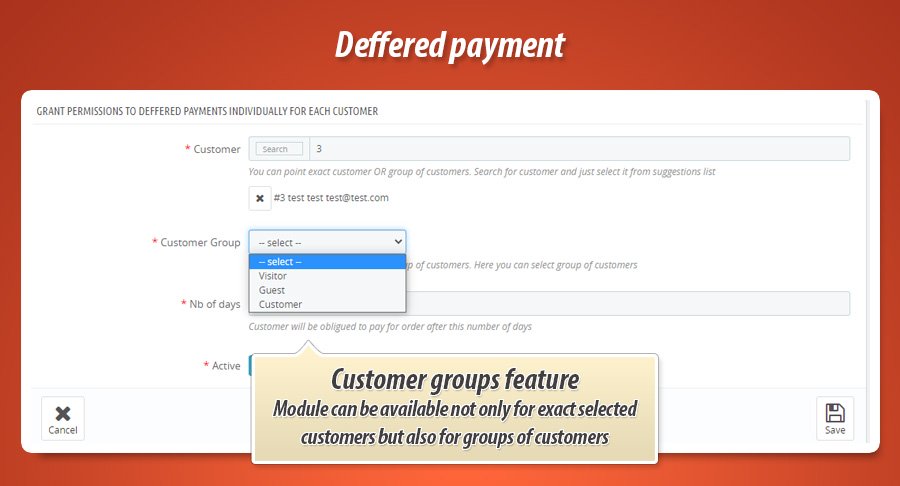
The Deferred Payment module is a professional solution for PrestaShop stores, enabling you to offer trusted customers a "buy now, pay later" option. As the store owner, you gain full control over the entire process. You can precisely decide which customers or customer groups will gain access to this exclusive payment method. Additionally, the module allows you to flexibly define a custom payment term for each order, specified in days. It is an ideal tool for building long-term business relationships and increasing the loyalty of your key partners.
Module version:
2.1.0
Shop versions:
9.x8.x1.7.x1.6.x
Works with ThirtyBees:
Yes
Translations:


Sell on credit. Collect with confidence.
Deferred Payment Pro for PrestaShop.
Your B2B buyers expect net-30 terms. Your shop deserves more than a payment checkbox and a prayer. Deferred Payment Pro is a full credit desk inside PrestaShop: per-customer limits, a live portfolio dashboard, multi-step collection reminders, customer statements with PDF, fraud blacklist, product exclusions, and a complete activity audit trail. One module. Real accounts receivable control.
What Deferred Payment Pro delivers
These are the capabilities that turn deferred payment from a risky checkbox into a managed B2B revenue channel. Built for shop owners who sell on account and need visibility, not guesswork.
Credit portfolio dashboard
Outstanding totals, overdue counts, aging buckets, trend charts, top debtors and one-click blacklist. Your accounts receivable at a glance.
Multi-step collections
Visual escalation timeline with reminders before and after the due date. Custom message per step. Auto-blacklist on the final step if you want it.
Per-customer credit limits
Set limits by customer or customer group. Enforced at checkout before the order is placed. No more manual spreadsheet checks.
Customer statements
Monthly account statements in the customer account area. HTML view and PDF download. Automated email delivery via cron.
Fraud protection
Blacklist customers who abuse deferred payment. Block them at checkout without cancelling existing orders. Blacklist straight from the dashboard.
Full activity audit log
Every payment marked, limit changed, reminder sent and blacklist action logged with employee name, timestamp and detail preview.
Email template editor
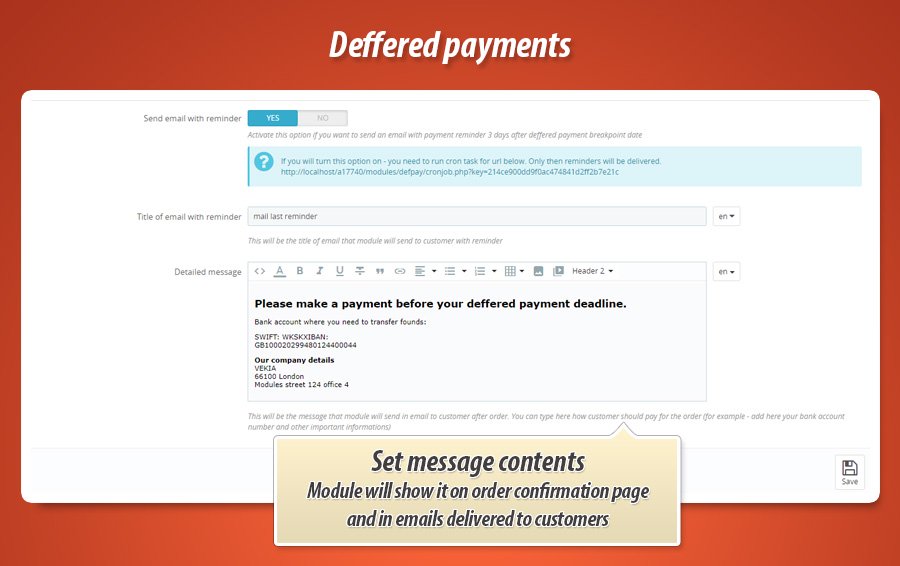
Edit confirmation, reminder, overdue and statement emails from the back office. Placeholders for order details, due dates and amounts.
Product exclusions
Exclude specific products or categories from deferred payment. Fine-grained control over what can be bought on account.
Cron automation
One cron URL runs reminders, statements and escalation steps overnight. Copy-paste setup instructions included in the back office.
Gamechanger
Collections escalation timeline
One reminder email is rarely enough. When a B2B invoice goes overdue, you are left chasing customers manually or hoping they remember.
Before the due date
Configure early and main reminders days before the deadline. Cron sends them automatically so customers pay on time, not after.
After the due date
Escalating overdue notices fire on schedule. Notify your admin team on critical steps. Optional auto-blacklist on the final step for repeat offenders.
Per-step messages
Click Customize message to write step-specific email copy. The module tracks what was sent to which order, so nothing fires twice.
Why this matters: Collections is not a checkbox bolted onto a payment module. It is a dedicated escalation engine with its own database table, cron integration and audit logging. Your shop runs professional accounts receivable without hiring an AR team.
Complete feature guide
Every feature explained in plain language for shop owners. No technical jargon. One by one, so you know exactly what Deferred Payment Pro does for your store.
Deferred payment at checkout
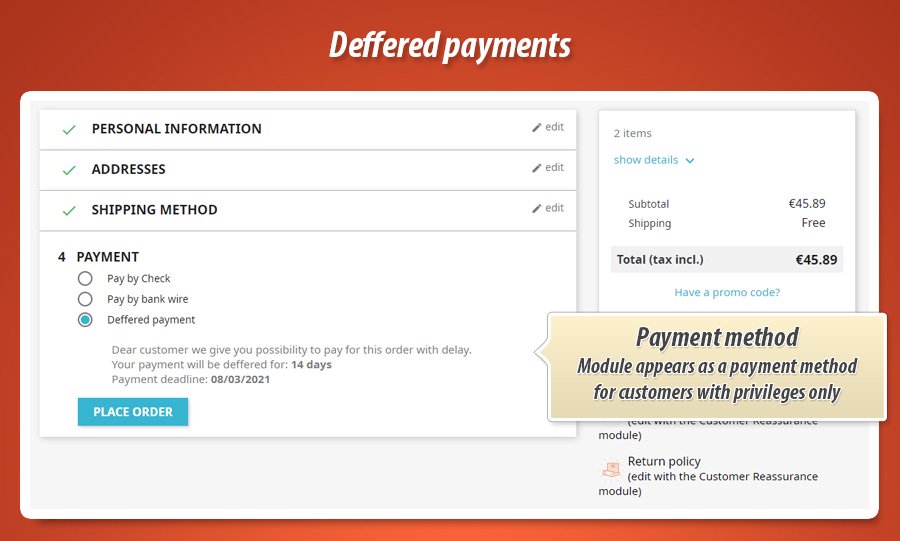
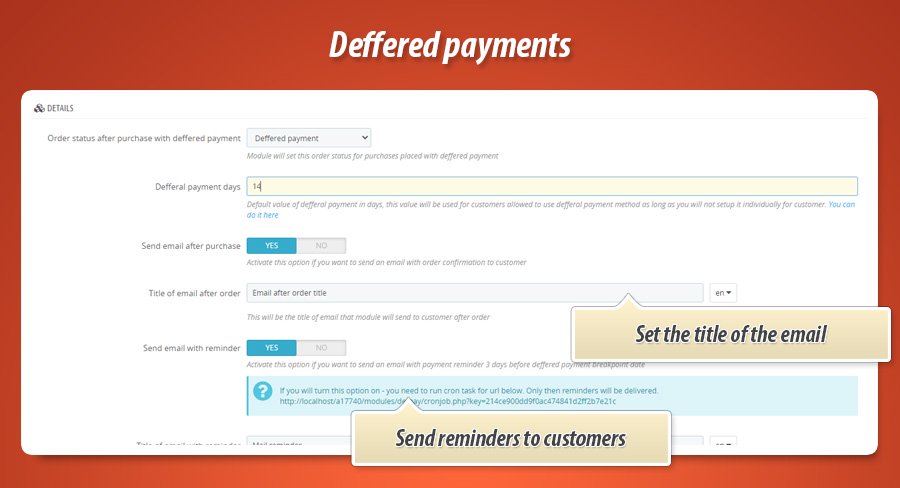
Customers who are eligible see Deferred payment as a payment option during checkout. They choose their payment term (for example 14, 30 or 60 days) from the options you configure in Settings.
Before the order is confirmed, the module checks the customer's credit limit and outstanding balance. If the cart would exceed the limit, deferred payment is hidden and the customer must pay another way. No awkward post-order rejections.
Credit limits and customer portfolio
Open the Customers tab to manage who can buy on account. Assign credit limits per customer or inherit limits from customer groups. See each customer's open orders, outstanding balance and payment history in one portfolio view.
KPI cards show total customers on deferred terms, aggregate exposure and average days to payment. Export data when your accountant asks for it.
Dashboard and analytics
The Dashboard is your credit control room. Six KPI cards show unpaid orders, overdue count, total outstanding, deferred order share, payments received and orders placed in the selected period.
Trend charts track deferred orders and payments over time. The aging report splits outstanding amounts into buckets (current, 1-30 days, 31-60 days and beyond). The top debtors table lists customers with the most open orders and lets you blacklist them in one click.
Export overdue orders to CSV for your accounting software or collection agency.
Collections and payment reminders
The Collections tab is where you configure the full escalation timeline. Enable or disable individual steps, set how many days before or after the due date each step fires, and choose whether to notify your admin team or auto-blacklist the customer.
Default reminder and overdue email bodies stay hidden until you click Customize message. That keeps the settings page clean while still giving you full control over step-specific copy.
Cron runs the escalation engine daily. Each sent reminder is recorded so the same step never fires twice for the same order.
Customer statements
B2B buyers expect a monthly statement of open invoices. Deferred Payment Pro generates account statements listing every unpaid deferred order with reference, order date, due date, amount and overdue status.
Customers access statements from their account area on the storefront. They can view online or download a PDF. Configure automatic monthly statement emails in Settings and let cron deliver them.
Statement emails use a dedicated template you can edit in the Email templates tab.
Fraud protection and blacklist
The Fraud protection tab lists blacklisted customers. Add customers manually or blacklist them directly from the dashboard top debtors table. Blacklisted customers no longer see deferred payment at checkout.
Existing unpaid orders are not cancelled automatically. You decide how to handle them in the Orders panel. The final escalation step can auto-blacklist customers who ignore every reminder.
Product and category exclusions
Not everything should be sold on credit. The Product exclusions tab lets you pick products or entire categories that cannot be purchased with deferred payment. The payment option disappears from checkout when the cart contains excluded items.
Email templates
Four email types ship with the module: order confirmation, payment reminder, overdue notice and monthly statement. Edit subject lines and body text in the Email templates tab.
Use placeholders like customer name, order reference, due date and outstanding amount. Templates are available in seven languages out of the box.
Activity log and payment tracking
The Activity log records every significant action: payments marked as received, credit limit changes, reminders sent, blacklist additions and settings updates. Filter by date, employee or action type.
Click Preview on any entry to see full details in a modal without leaving the list. Mark orders as paid from the order page in the back office or from the admin order hook. Payment date, note and employee are stored and logged.
Cron setup
Open the Cron tab for a ready-to-copy cron URL. One daily call triggers payment reminders, statement emails and escalation steps. Works with standard server cron, hosting panel schedulers or external cron services.
Customer account area
Logged-in customers see their deferred orders and account statements in the storefront account section. They know what they owe and when it is due without calling your support team.
Ten dedicated back office panels
Everything is organised in clear sections. Open the module configuration and jump straight to where you need to be.
Credit and operations
-
DashboardKPIs, charts, aging report, top debtors and overdue orders.
-
SettingsPayment terms, order states, credit defaults and statement options.
-
CollectionsEscalation timeline, per-step messages and reminder defaults.
-
CustomersCredit limits, portfolio KPIs and per-customer exposure.
-
Product exclusionsPick products and categories blocked from deferred payment.
Communication and control
-
Email templatesConfirmation, reminder, overdue and statement emails.
-
Fraud protectionBlacklist management and checkout blocking.
-
Activity logFull audit trail with filters and detail preview modal.
-
CronAutomated reminders, statements and escalation dispatch.
-
UpdatesModule version check and MyPresta update notifications.
Statistics for nerds
Credit enforced at checkout. Escalation dispatched by cron. Liability traced in audit rows. Here is the engineering behind the payment method your customers see as one simple option.
17,500+
Lines of code
PHP, JavaScript, Smarty templates, CSS and SQL powering credit checks, escalation engine, dashboard analytics, statements and audit logging.
10
Dedicated library classes
Credit, escalation, statements, dashboard, portfolio, audit log, admin renderer, product resolver and PS 9 compatibility layer.
10
Back office tabs
Dashboard, Settings, Collections, Email templates, Exclusions, Fraud, Customers, Activity log, Cron and Updates. Each tab is a self-contained panel.
27
Language translations
Ready-made translation files for the back office and module interface. From English and German to Polish, Spanish, French, Italian and markets across Europe and beyond.
Database layer
-
Custom tables:
defpayuserfor credit limits,defpayblacklistfor fraud,defpaylogfor audit,defpay_reminder_sentanddefpay_statement_sentfor cron deduplication. -
Order columns: due date, payment term, reminder flags, paid date, paid note and employee ID stored directly on
ps_orders. -
3 ObjectModels:
defpayuser,defpayblacklistanddefpaylogwith full CRUD.
Architecture
-
7 PrestaShop hooks:
paymentOptions,paymentReturn,displayCustomerAccount,displayOrderDetail,displayAdminOrderand admin media hooks. -
5 front controllers: validation, cron, statement view, activity log admin and customer management admin.
-
DefPayEscalation engine with step offsets, deduplication table and auto-blacklist on final step.
-
PS 9 compatibility layer in
lib/prestashop9compatibility.phpfor price display and API differences across platform generations.
Chart.js
Dashboard JS with weekly, monthly and yearly deferred order and payment trend charts plus CSV export.
5 escalation steps
Default timeline from 7 days before due date through final overdue with optional auto-blacklist.
v2.1.0
Current release. PrestaShop 1.6, 1.7.x, 8.x and 9.x. One codebase, four platform generations.
Credit checked at cart load. Escalation dispatched by cron. Liability traced in audit rows. That is the engineering contract behind Deferred Payment Pro. Your customer sees one payment option. You get a full accounts receivable stack.
17,500+ lines of code across 110+ module files and v2.1.0 of continuous development. Not a weekend project. A B2B credit infrastructure your shop can rely on when invoices go out, deadlines pass and someone has to chase the money.


49.99 €
Module Gallery 1/11
Why choose our module
Deffered Payment?
Optimization and Automation
The Deferred Payment module optimizes customer experience for your key accounts by automating payment flexibility. It streamlines the checkout process for eligible groups, allowing them to place orders with predefined deferred payment terms. This reduces manual interventions and enhances efficiency in managing transactions for specific customer segments, improving overall store automation.
Increased Sales
This module significantly increases sales by offering a flexible deferred payment option to your most valued customers. Removing immediate payment barriers encourages larger orders and enhances customer loyalty, directly boosting conversion rates and repeat purchases from your key segments.
15 years of experience
Drawing on 15 years of PrestaShop experience, we've built a module that addresses a core business need: trusted B2B relationships. Offer deferred payments securely and with full control, backed by our expertise.
Extensive Customization
Customize access by assigning this method to specific customer groups and define personalized payment deadlines, perfectly tailoring the checkout to your business needs.
Open Source Code
This Deffered Payment module offers full open-source code access, empowering you to freely edit and adapt it. Without any obfuscation or proprietary locks, you can easily customize its logic and templates, allowing for advanced modifications and seamless integration within your PrestaShop ecosystem.
License and Updates
Your perpetual license ensures continuous use. Free updates for one year guarantee the deferred payment module remains compliant and secure with PrestaShop's evolving platform. After the first year, significantly discounted renewals provide ongoing access to essential enhancements and dedicated support.