
PrestaShop Order Grid Pro - columns & layout of list of orders
The PrestaShop back-office orders screen (1.7.7+) is built on the Symfony grid: solid for defaults, but rarely enough for warehouses, support, or finance. Order Grid Pro hides unused core columns, adds optional operational fields—phone, tracking, first-line thumbnail, weight, thread snippets, currency ISO, cart rules, and more—and saves column order as JSON with drag and drop. Everything is configured from the module page in separate tabs, using official grid hooks only—no core overrides—so upgrades stay predictable.
70.00 €
Galeria 1/10
PrestaShop Order Grid Pro: Columns, Data & Layout Customizer
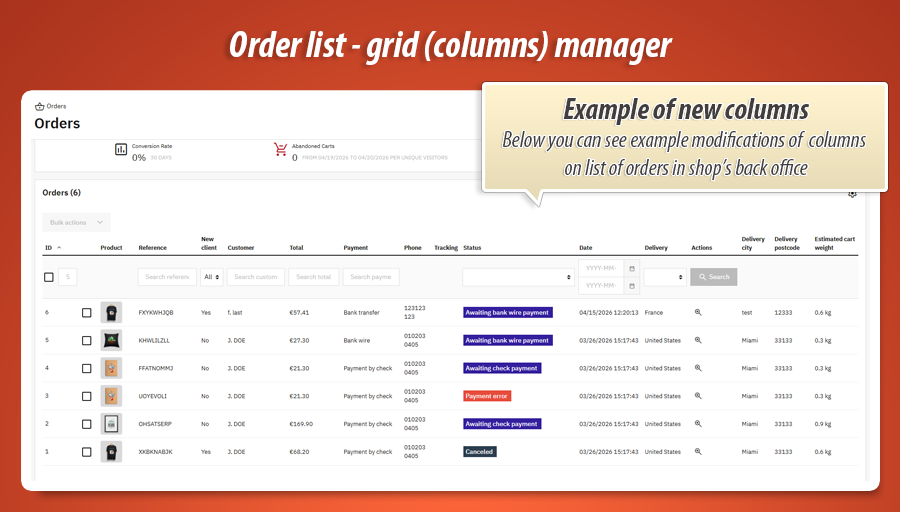
Order Grid Pro revolutionizes the PrestaShop back-office orders list (1.7.7+), transforming it into a powerful, customizable operational hub. This module enables store managers to hide irrelevant core columns and activate a rich suite of new, essential data fields. Easily add critical information like customer phone numbers, tracking details, product thumbnails, last customer messages, estimated cart weight, and currency ISO codes directly into your orders grid. With intuitive drag-and-drop functionality, you can effortlessly reorder columns to match your team's workflow. Order Grid Pro enhances efficiency across warehouse, support, and finance departments, all without modifying PrestaShop's core files.
Module version:
1.0.0
Shop versions:
9.x8.x1.7.7.x1.7.8.x
Works with ThirtyBees:
No
Translations:


Your orders list, rebuilt for real operations.
Order Grid Pro for PrestaShop 1.7.7 through 9.x.
From PrestaShop 1.7.7 onward, the back-office orders screen is powered by the Symfony Grid . The default layout is fine for demos—until your warehouse asks for tracking numbers on the same row, support wants the last customer message, and finance needs currency ISO codes without exporting to Excel. Order Grid Pro plugs into the official grid extension hooks: hide noisy core columns , enable curated extras (phone, thumbnails, cart weight, thread snippets, and more), drag-and-drop column order , and—on older builds—an optional inline status workflow. No core overrides.

Why the default orders grid hits a wall
Every team looks at orders differently. Logistics lives in tracking numbers and carrier names. Support needs phone numbers and the last thread message without opening ten tabs. Merchandising wants a quick product thumbnail next to the reference. Finance juggles multicurrency shops and needs ISO codes beside totals.
The core grid is deliberately conservative: it cannot guess your workflow. Patching it inside /src or overriding theme templates is fragile—every minor PrestaShop upgrade becomes a merge conflict.
Order Grid Pro stays inside the supported extension surface: it modifies the grid definition , the Doctrine query builder , and the hydrated row data through the same hooks PrestaShop documents for order listing extensions. You configure everything from Modules → Order Grid Pro , save per section, reload Orders, and iterate.
What you gain immediately
-
Column hygiene:
Turn off built-in columns you never use (company, multistore name, etc.) so the table breathes on smaller monitors. -
Operational columns:
Phone, tracking list, first-line cover image, customer email, delivery city/postcode, line counts, estimated weight, payment module code, order age, guest vs registered, invoice/delivery numbers, currency ISO, aggregated cart-rule names, and more—each opt-in. -
Stable layout across upgrades:
Column order is stored as JSON and replayed when the grid definition is built—merchandisers keep the same left-to-right story after updates.
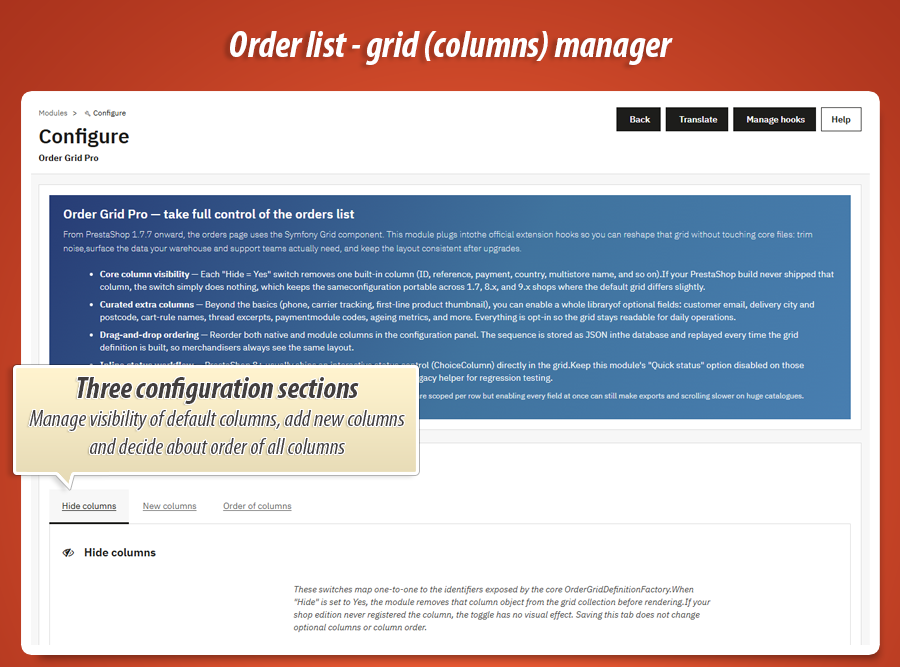
Three configuration pillars
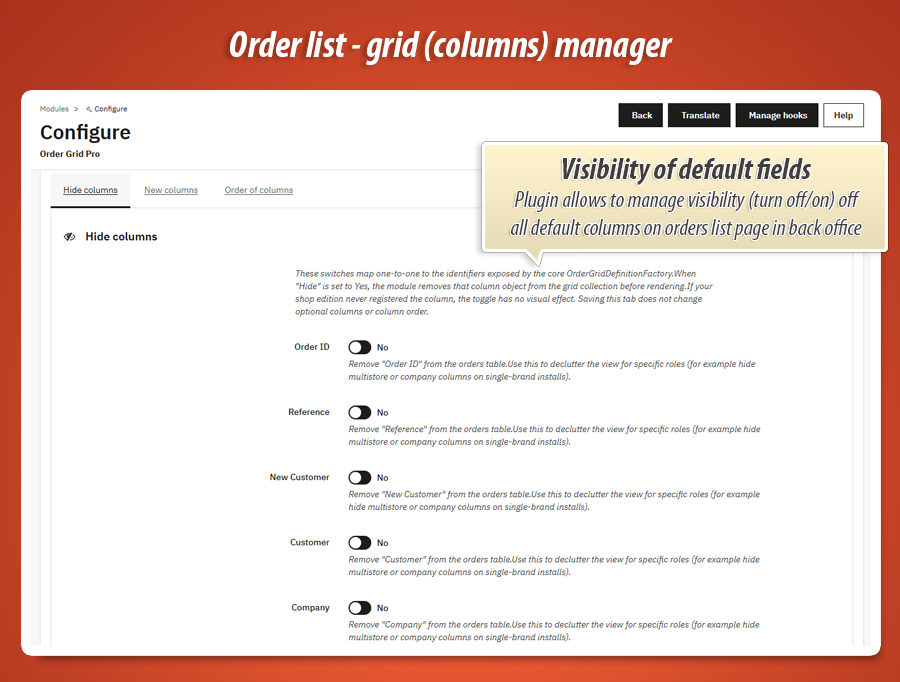
Hide columns
Each switch maps to a core column identifier from the order grid factory. Set Hide = Yes and the module removes that column object before render. If your PrestaShop edition never registered the column, the toggle is harmless—configuration stays portable between 1.7, 8.x, and 9.x.
New columns
Primary extras (phone, tracking, first-line thumbnail, legacy quick status) plus an entire library of insight fields : email, city, postcode, line counts, first product name, estimated cart weight, last customer message snippet, payment module, age in days, account type, invoice/delivery numbers, currency ISO, applied cart-rule names—all disabled by default so you enable only what your SQL budget allows.
Order of columns
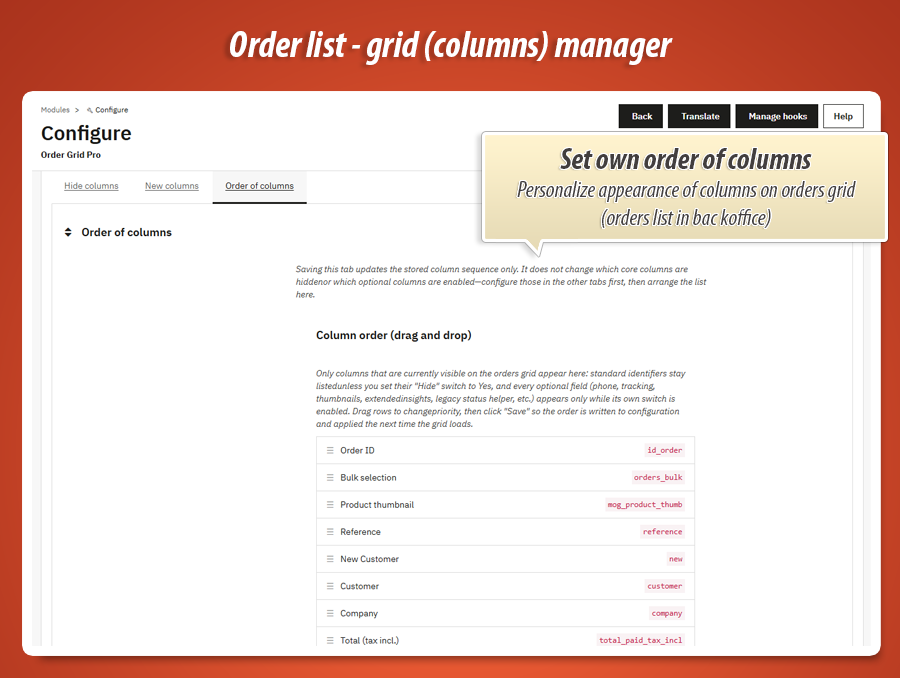
Drag native and module columns in the configuration UI. The list reflects what is currently visible on the grid (respecting hide switches and enabled extras). Save writes sanitized JSON; the module merges it with the live definition so bulk actions, references, and your custom stack stay in the order you trained staff to expect.
Grid definition
Columns appear, disappear, and reorder—without touching core PHP.
hookActionOrderGridDefinitionModifier
The module inspects the ColumnCollection , removes hidden identifiers, injects optional DataColumn instances (and specialized columns where the platform provides them, such as HTML thumbnails), and reorders everything according to your saved sequence. Because this runs at definition time, exports and CSV views inherit the same structure the merchandiser sees on screen.
Tip: configure Hide and New columns first, then open Order of columns so the sorter only lists fields that will actually appear on the live grid.
Query builder
Project only the SQL your enabled columns need.
hookActionOrderGridQueryBuilderModifier
Optional fields are implemented as guarded SELECT fragments—subqueries for counts, snippets, weights, and similar metrics are added only when the matching switch is on. That keeps the default footprint close to core while still allowing power users to stack deep insights when their hardware allows.
Heavy projections are documented inline in the module configuration copy so teams understand trade-offs (for example estimated weight uses parent product mass, not combination-level precision).
Row data & legacy BO
Format cells, labels, and optional AJAX status changes.
hookActionOrderGridDataModifier + AdminOrders assets
hookActionOrderGridDataModifier normalizes presentation: weights in kilograms, human-readable guest flags, safe truncation for thread snippets, and thumbnail HTML when the grid supports it. On PrestaShop below 8.0 , you can enable Quick status change : the module injects a compact dropdown on the orders list and routes updates through a hidden AdminMyordergridproAjax tab with proper permissions—ideal when the native column is still plain text.
On PrestaShop 8+ the core grid already ships interactive status controls in most builds. Keep the legacy option disabled there to avoid duplicate UI unless you explicitly need the helper for staging comparisons.
Back office experience
The module configuration uses Bootstrap nav tabs with three isolated HelperForm instances—each tab saves independently ( Hide columns , New columns , Order of columns ). A guided hero section at the top explains Symfony grid behaviour, compatibility notes, and recommended rollout strategy (start small, save, review Orders, iterate).

Hide columns tab
- One switch per standard identifier (order ID, reference, payment, country, multistore, company, etc.)
- Inline help explains that removing a column only affects the grid collection—not your data
- Saving this tab does not alter optional columns or stored column order
New columns + Order tabs
- Primary switches for phone, tracking, cover image, legacy live status
- Extended insight switches mirror each optional DataColumn with rich descriptions
- Drag-and-drop list + hidden JSON field; duplicate-safe form IDs for valid HTML
- MyPresta update checker integration (optional notifications)
Core columns you can hide
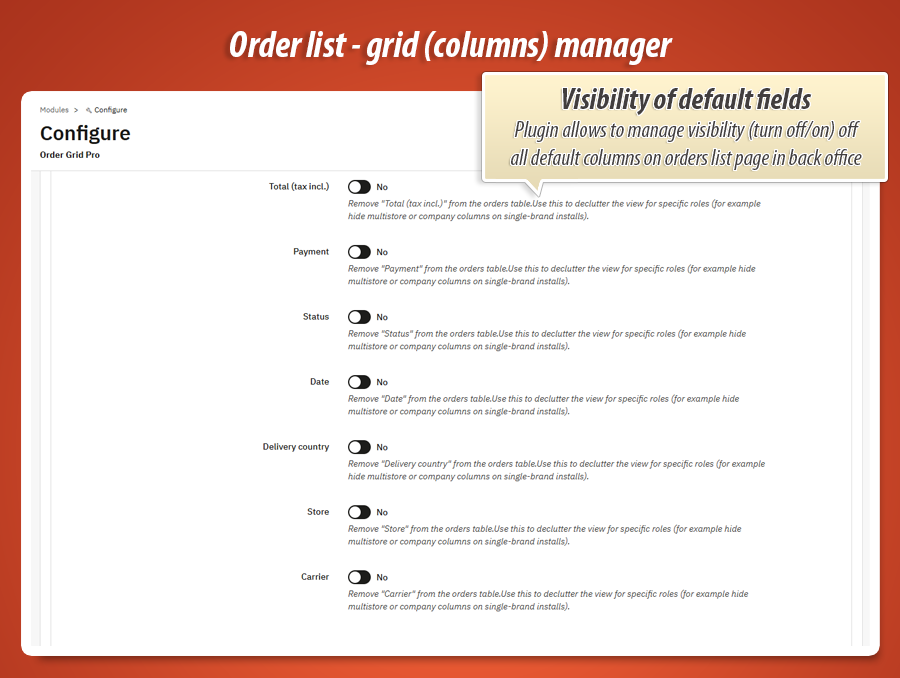
Each row below maps to one switch on the Hide columns tab. Setting Hide = Yes removes that column from the Symfony grid definition only—your orders, addresses, and history in the database are unchanged. If your PrestaShop build never registered a given column identifier, the toggle has no visible effect (configuration stays portable across 1.7 / 8 / 9).
id_order Order ID The numeric PrestaShop primary key of the order ( orders.id_order ). This is the internal reference staff use when opening an order from the list, linking to invoices, or matching API payloads.
reference Reference The public order reference string (often alphanumeric) shown to customers on confirmations and used for quick visual matching in CRMs—distinct from the numeric ID.
new New customer The core “new customer” indicator column (whether the buyer is flagged as new for this shop according to PrestaShop’s rules). Hide it when every row looks the same for your workflow or the badge duplicates information you track elsewhere.
customer Customer The customer display name (and associated link behaviour from the core grid) for the account that placed the order—typically first name, last name, or configured shop format.
company Company The company / organisation field from the order’s address context when B2B data exists—useful for wholesale; hide on purely B2C storefronts where the column is always empty noise.
total_paid_tax_incl Total (tax incl.) The order total paid including tax, as surfaced by the core grid formatter—what the customer was charged for the basket plus shipping/taxes in the shop’s presentation rules.
payment Payment The human-readable payment method label selected at checkout (e.g. bank wire, card module display name)—mirrors what you see in order detail for the chosen carrier of the payment option.
osname Status The current order status name from your configured order states (awaiting payment, shipped, etc.)—the label staff recognise in the workflow, independent of colour badges the theme may add.
date_add Date The order creation timestamp ( orders.date_add )—when the basket was converted into an order record in the database, used for sorting and SLA-style reading.
country_name Delivery country The delivery country name resolved through the address / country join used by the core grid—helps with export compliance and carrier zones at a glance.
shop_name Store The multistore shop name for the order’s originating shop context—critical in multistore setups; safe to hide on single-store installs where the column adds no information.
carrier_name Carrier The selected shipping carrier / method label for the order—the same concept you validate in shipping rules and packing station filters.
Optional columns you can add
The New columns tab groups primary extras (phone, tracking, thumbnail, legacy status) and extended insight fields. Each switch adds a guarded projection or uses data already loaded by the core query—nothing is written back until staff use separate BO actions (except optional legacy status AJAX, which respects order-state permissions).
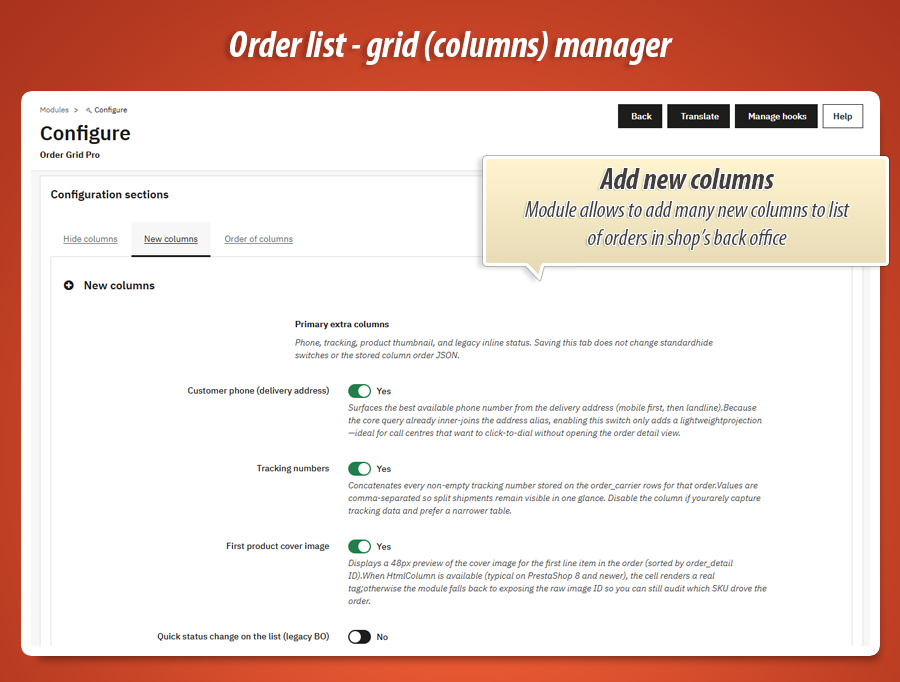
Primary extra columns
mog_customer_phone Customer phone (delivery address) Surfaces the best available phone number from the delivery address: mobile ( phone_mobile ) when non-empty, otherwise the landline ( phone ). The core orders query already inner-joins the address alias, so enabling this column is a lightweight projection—ideal for call centres that click-to-dial without opening each order.
mog_tracking_numbers Tracking numbers Concatenates every non-empty tracking number stored on order_carrier rows for the order. Values are comma-separated so split shipments (multiple parcels) stay visible in one cell. Disable when you rarely capture tracking and prefer a narrower table.
mog_product_thumb First product cover image A ~48px preview of the cover image for the first line item in the order (lowest id_order_detail ). When HtmlColumn is available (typical on PrestaShop 8+), the cell renders a real ; on older grids the module may expose the raw image identifier so merchandisers can still audit which SKU drove the sale.
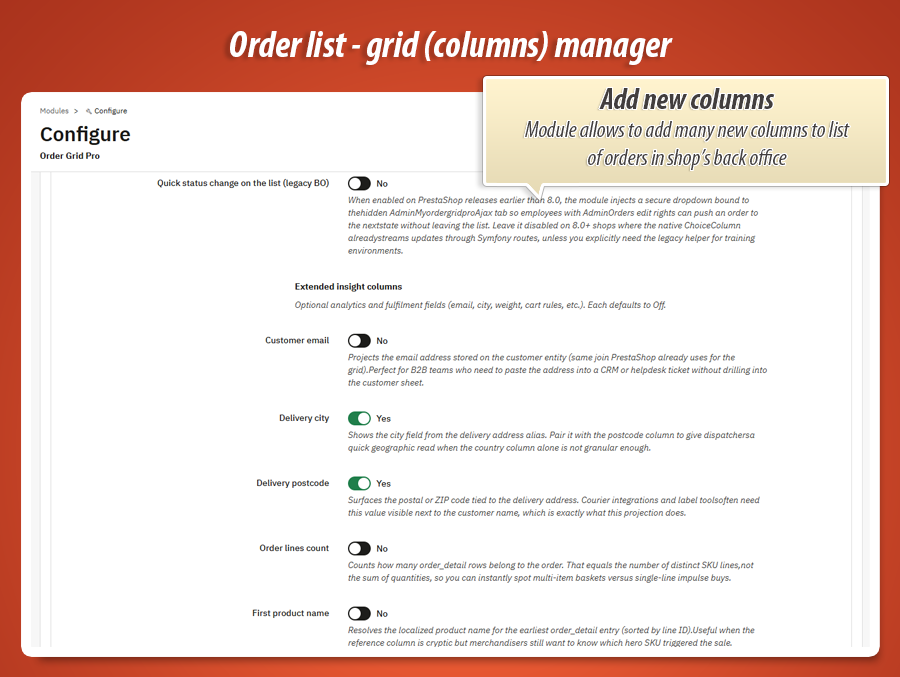
mog_live_meta Status helper (hidden column, legacy BO) When Quick status change is enabled on PrestaShop below 8.0, the module injects a compact hidden/meta cell carrying data-order and current status identifiers so the bundled JavaScript can render an inline dropdown next to the visible status text. It is not meant as a standalone data column for export—keep the option off on 8+ shops where Symfony already provides an interactive status control.
Extended insight columns
mog_customer_email Customer email Projects the email address stored on the customer entity—the same join PrestaShop already uses for the grid query. Suited to B2B teams pasting the address into CRM or helpdesk tickets without opening the customer sheet.
mog_delivery_city Delivery city The city field from the delivery address alias. Pair with postcode when the country column alone is not granular enough for dispatch or courier routing.
mog_delivery_postcode Delivery postcode Postal or ZIP code from the delivery address—what label tools and courier APIs usually need beside the customer name.
mog_order_lines_count Order lines count Counts how many order_detail rows belong to the order = number of distinct SKU lines, not the sum of quantities—useful to spot multi-line baskets vs single-line checkouts.
mog_first_product_name First product name Localised product name for the earliest order_detail row (sorted by line ID). Helps when the reference column is cryptic but you still need to know which hero SKU triggered the sale.
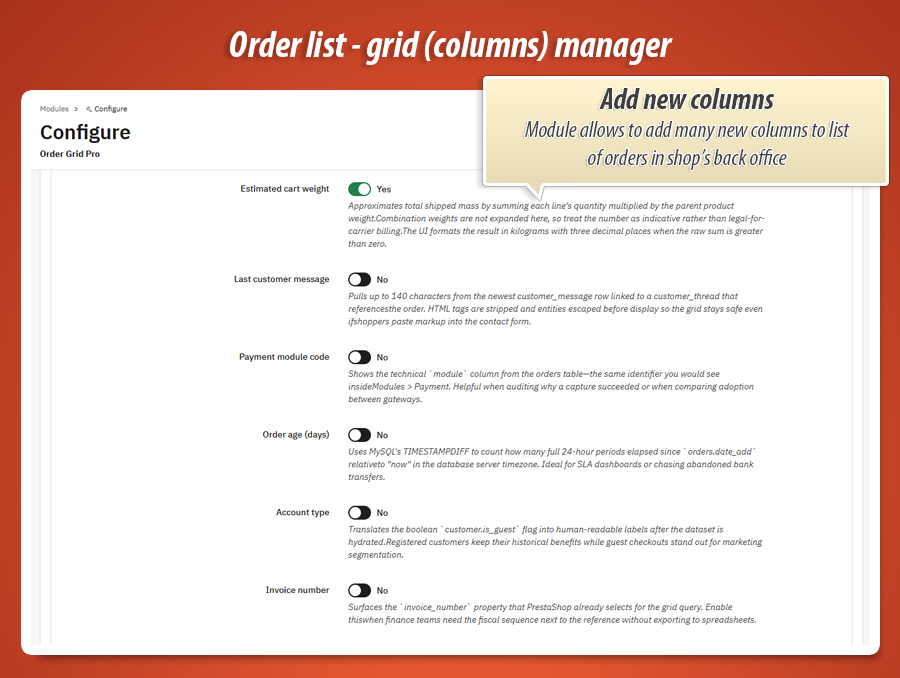
mog_cart_weight_kg Estimated cart weight Approximates shipped mass by summing each line’s quantity × parent product.weight. Combination weights are not expanded—treat the figure as indicative, not legal-for-carrier billing. The UI formats kilograms to three decimals when the raw sum is greater than zero.
mog_thread_snippet Last customer message Up to 140 characters from the newest customer_message linked to a customer_thread that references the order. HTML is stripped and entities escaped so pasted markup from the contact form cannot break the grid.
mog_payment_module Payment module code The technical orders.module value—the same machine identifier you see under Modules > Payment. Ideal for reconciling captures or comparing gateway adoption.
mog_order_age_days Order age (days) Full 24-hour periods between orders.date_add and database “now” via TIMESTAMPDIFF—handy for SLA views or chasing unpaid bank transfers.
mog_account_type Account type Human-readable label derived from customer.is_guest after hydration—separates registered accounts from guest checkouts for segmentation without opening the customer card.
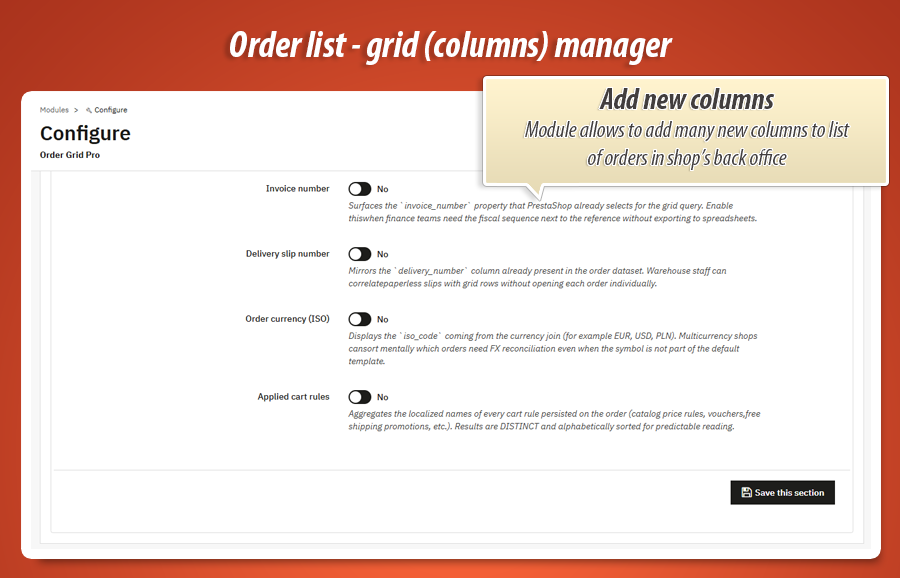
mog_invoice_number Invoice number Surfaces invoice_number already present in the core order dataset—finance can read the fiscal sequence next to the reference without exporting spreadsheets (field empty until an invoice exists).
mog_delivery_number Delivery slip number Mirrors delivery_number from the order row—correlate packing slips or paperless dispatch IDs with list rows without drilling into each order.
mog_currency_iso Order currency (ISO) Currency iso_code from the existing currency join (e.g. EUR, USD, PLN). In multicurrency shops you can mentally flag which rows need FX reconciliation when the symbol is not part of the default grid template.
mog_cart_rule_names Applied cart rules Aggregates localised names of every cart rule persisted on the order (catalog rules, vouchers, free-shipping promos, etc.). Values are DISTINCT and sorted alphabetically for predictable reading in one cell.
Technical specification & compatibility
Standard PrestaShop module package. No overrides of core classes or templates. Requires MySQL/MariaDB features used by subqueries in optional columns (same baseline as modern PrestaShop shops). Tested architecture targets Symfony order grids introduced in 1.7.7+ .
actionOrderGridDefinitionModifier , actionOrderGridQueryBuilderModifier , actionOrderGridDataModifier , actionAdminControllerSetMedia (legacy status assets on AdminOrders). AdminMyordergridproAjax exposes secured JSON endpoints for inline status updates on legacy builds.
70.00 €
Module Gallery 1/10
Why choose our module
Order Grid Pro - columns & layout of list of orders?
Optimization and Automation
Order Grid Pro optimizes operations by customizing your PrestaShop order list. Hide irrelevant columns, enable vital data like phone, tracking, and thumbnails. Drag-and-drop reordering streamlines workflow, while optional inline status changes automate repetitive tasks, boosting overall efficiency and data access.
Increased Sales
Order Grid Pro enhances sales by optimizing back-office operations. Streamlined access to customer details, tracking, and product information enables swift support and efficient fulfillment, boosting customer satisfaction and fostering repeat purchases.
15 years of experience
Leveraging deep PrestaShop expertise cultivated over 15 years, Order Grid Pro meticulously customizes your order list using official Symfony Grid hooks. This ensures unmatched stability across upgrades and optimal performance, providing essential operational data without risky core overrides.
Extensive Customization
Order Grid Pro offers extensive customization, allowing you to perfectly tailor your PrestaShop order list. Hide unwanted core columns, enable dozens of new operational and insight fields, and effortlessly reorder everything via drag-and-drop for a personalized workflow.
Open Source Code
Built as a standard PrestaShop module, Order Grid Pro avoids core overrides and template modifications, ensuring stable upgrades. It integrates via official hooks, providing a clean, transparent, and easily extendable codebase for advanced customization without conflicts.
License and Updates
This module features MyPresta update checker integration for optional notifications, ensuring your order grid functionality remains current and compliant across PrestaShop 1.7.7 through 9.x. Benefit from a stable solution with ongoing improvements.