
PrestaShop Omnibus Directive - Free Addon
Free PrestaShop addon for EU Omnibus compliance. It automatically records price history and shows the lowest price from the last 30 days before a discount. Built for real storefronts, it supports product combinations, multi-currency conversion, and flexible placement via Classic/Hummingbird profiles or custom hooks. Includes a back-office tool for manual data cleanup.
0.00 €
Download for PrestaShop 1.6Download for PrestaShop 1.7Download for PrestaShop 8.xDownload for PrestaShop 9 and newer
Dlaczego jest kilka wersji modułu?
This is due to the fact that different PrestaShop releases use different programming solutions. Features working e.g. in PrestaShop 1.7 may not work in PrestaShop 9. Hence the need to release different versions of the module, which will ensure operation in many different versions of the shop.
This is due to the fact that different PrestaShop releases use different programming solutions. Features working e.g. in PrestaShop 1.7 may not work in PrestaShop 9. Hence the need to release different versions of the module, which will ensure operation in many different versions of the shop.
We develop the module for free - if you want - support us!
Galeria 1/7
EU Omnibus Directive: Lowest 30-Day Price (Free)
The "Omnibus Directive — Free Addon" PrestaShop module automatically records price history, ensuring compliance with the EU Omnibus Directive. It displays the lowest product price from the last 30 days before a reduction, activating the message only during a genuine promotion. The module supports product combinations, converts prices for multi-currency display, and adapts tax presentation. It offers flexible placement options for the message on product pages and listings. The module builds its own verifiable price history from installation, streamlining legal compliance without manual intervention.
Module version:
1.1.0
Shop versions:
9.x8.x1.7.x
Works with ThirtyBees:
No
Translations:


EU Omnibus pricing, done properly.
Omnibus Directive — Free Addon for PrestaShop.
When you run a promotion in the EU, customers must see the lowest price in the last 30 days before the reduction — not a guess, not a manual note in the product description. Omnibus Directive — Free Addon records real price history in your shop, shows the legal line only when a product is actually on sale, supports combinations and multi-currency display, and lets you place the message exactly where your theme shows prices. Free to install. Ready for Classic and Hummingbird themes.
Why “lowest price” cannot be typed by hand
EU Omnibus rules are not about adding a marketing sentence in the product description. When you reduce a price, shoppers must see the lowest price you applied in the 30 days before that reduction — for the same product, in a comparable way to how the current price is shown (including tax treatment shoppers expect).
If you change prices often, run catalog-wide sales, use specific prices, or sell in several currencies, a static “was €99” field in the back office will be wrong tomorrow. You need a system that remembers what the price actually was over time and only speaks up when there is a real discount.
Omnibus Directive — Free Addon does that inside PrestaShop: it snapshots effective prices, stores them in dedicated tables, and prints the compliant message on the storefront when conditions are met. You configure placement and tax display; the module handles the comparison logic.
What you get with the free version
-
Automatic price history:
Snapshots when you save products and when specific prices change — no spreadsheet maintenance. -
Honest display logic:
The Omnibus line appears only when the current price is lower than the regular price (a real promotion), not on every product by default. -
Multi-currency ready:
Stored history is converted to the visitor’s current currency on display, so the message matches what they see at checkout.
Important: history starts when the module is installed
This module does not import old prices from PrestaShop core, ERP systems, or other modules. It builds its own audit trail in dedicated database tables from the moment you install and activate it.
That means the “lowest price in 30 days” value is calculated only from prices the module has recorded itself — typically after product saves, specific-price changes, and day-to-day shop activity. On existing catalogs, allow time for history to grow, or save products after install so snapshots begin. This design is deliberate: you rely on verifiable data the module controls , not reconstructed guesses about the past.
Core capabilities for your shop
30-day lowest price
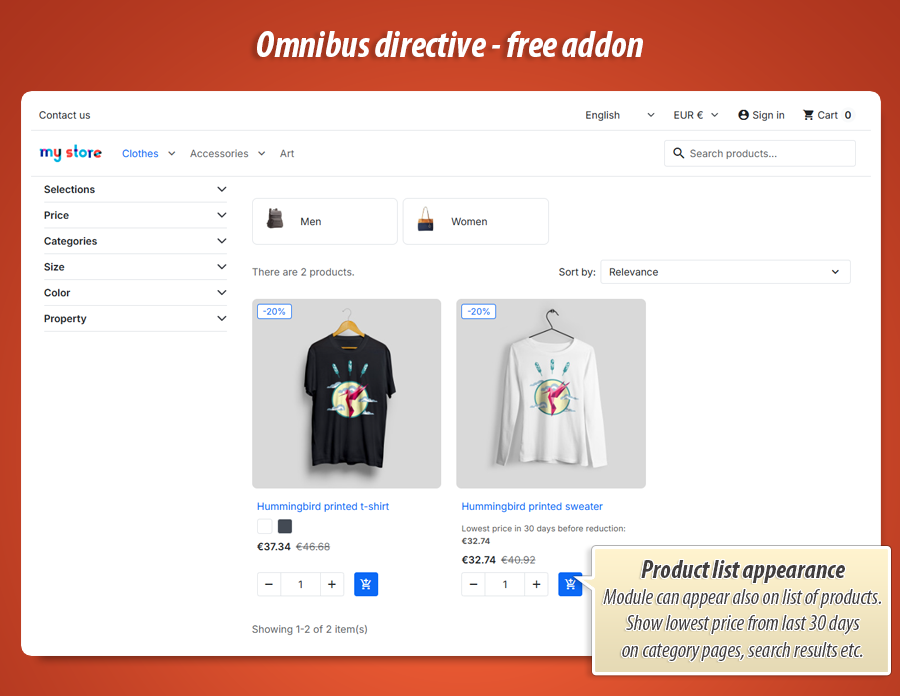
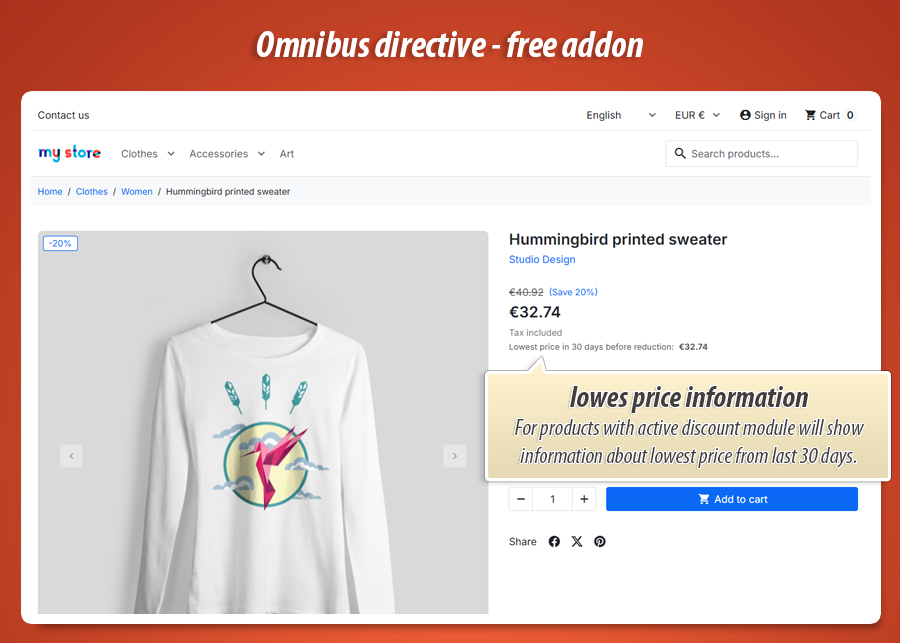
Compares the last 30 days of stored history for the product (and combination) in your shop context. When a promotion is active, customers see the mandatory line with the lowest price before the reduction.
Combinations & context
Each combination can have its own history. The module respects shop, country, customer group, and tax mode so comparisons stay meaningful for how prices are calculated in your store.
Placement you control
Choose where the message appears in the price block on the product page and on listings. Diagnostic mode shows hook positions in your theme. Custom template hook for advanced layouts.
Own price archive
Reliable snapshots — not manual “was” prices.
History you can defend
Every time an effective selling price changes — through product edits or specific prices — the module can store a new row in its history tables. That creates a timeline tied to how your shop actually priced the item, which is what Omnibus comparisons need.
Because data lives in the module’s tables, uninstalling other tools does not silently erase your Omnibus trail (unless you remove the module’s data). You keep a focused record for compliance display, separate from PrestaShop’s catalog tables.
Only when it matters
No clutter on full-price products.
Shown on real promotions, hidden otherwise
The storefront message appears when the current selling price is lower than the regular (base) price — in other words, when shoppers are looking at a genuine reduction. If there is no active discount, nothing is printed. That keeps category pages and product sheets cleaner and avoids misleading “lowest price” text on everyday pricing.
Need a marketing badge when the current price equals the period minimum, or a price chart for transparency? Those advanced presentation tools are part of Omnibus Pro (see below).
Multi-currency
One history, correct currency on screen.
Visitors see numbers in their currency
Prices may be recorded when the shop context used one currency, while the customer browses in another. The free addon converts stored history values to the current display currency before comparing and showing the Omnibus line, so the legal message aligns with the price beside the Add to cart button.
Match the tax included / tax excluded setting to how your theme presents prices (gross for typical B2C, net for B2B) to avoid confusing mismatches.
Themes & hooks
Classic, Hummingbird, or custom templates.
Fits your theme without breaking the layout
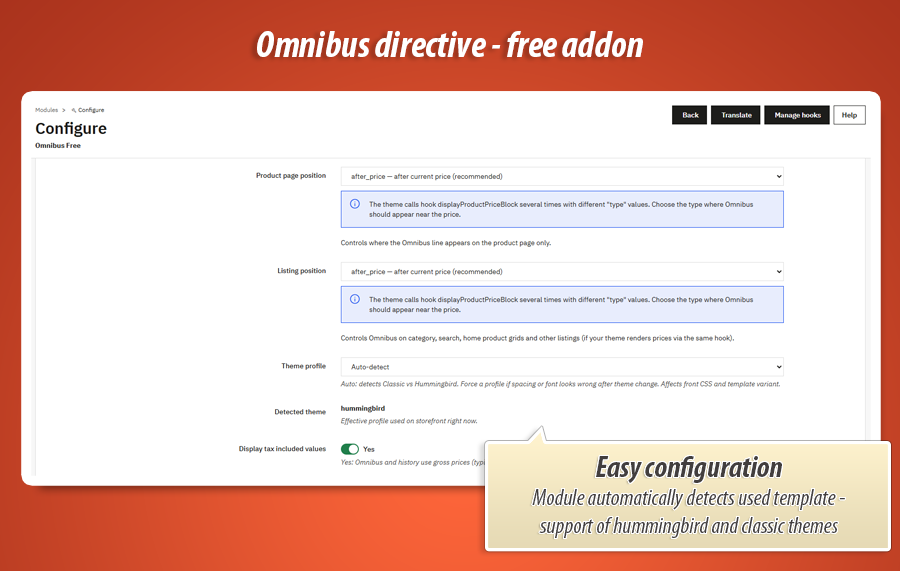
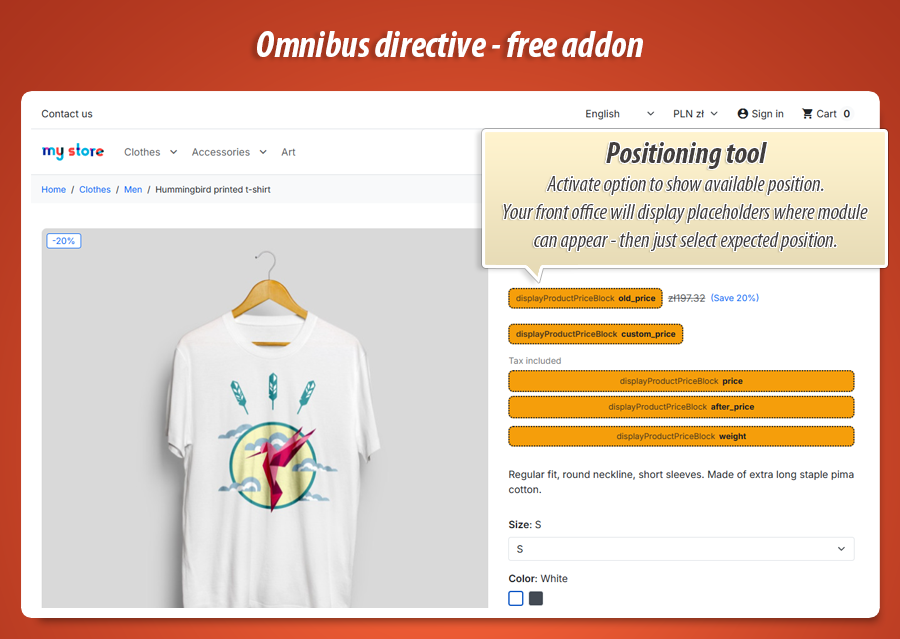
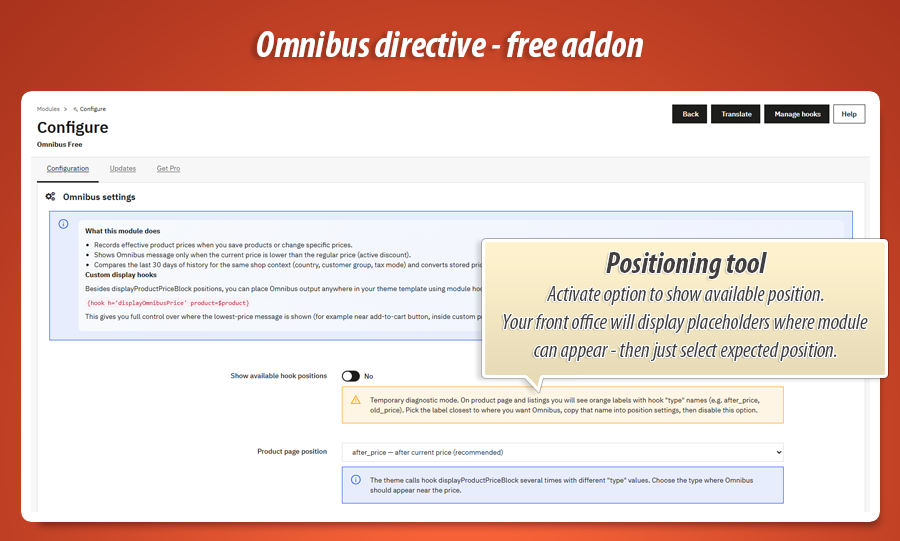
Choose separate hook positions for the product page and for listings (category, search, home grids). Enable diagnostic mode to see orange labels with hook “type” names on the storefront, pick the position closest to your price, then turn diagnostics off.
Auto-detect Classic vs Hummingbird profiles, or force one profile if spacing looks wrong after a theme change. For page builders or custom product heroes, use the displayOmnibusPrice hook in your template to render the line exactly where you want it.
Where customers see the Omnibus line
Product page
Next to the price block (configurable hook type such as after_price). Also available via displayProductAdditionalInfo on supported themes. Ideal for the main compliance message where shoppers decide to buy.
Listings & custom zones
Separate listing position for category, search and home product grids when your theme renders prices through the same hook. For full control, paste the module’s custom hook in any template zone (sticky bar, tabs, builder blocks).
Configuration in the back office
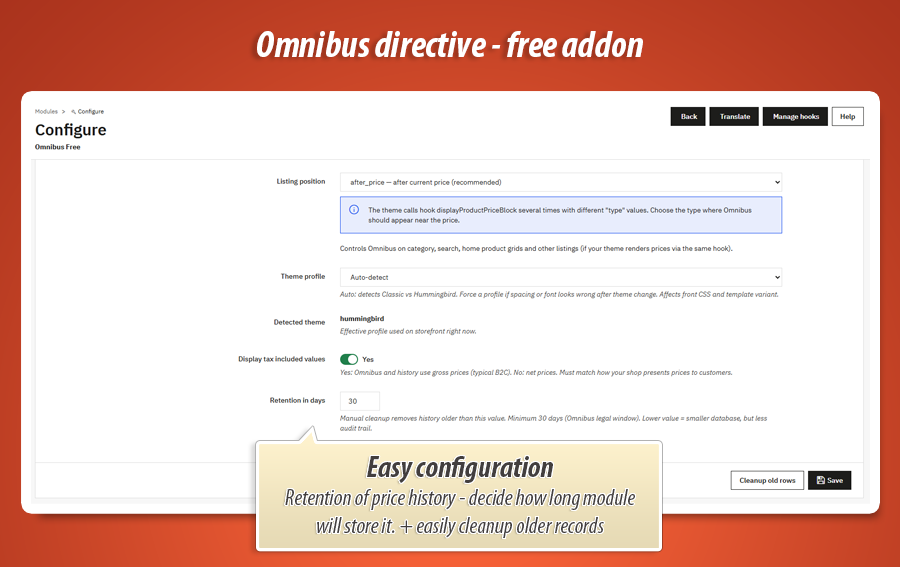
Install the module, open its settings, and work through clear options: hook placement, tax display, theme profile, retention cleanup, and a built-in update checker. A prominent notice explains that history is collected from installation onward.
Display & placement
- Product page and listing hook positions (including custom type)
- Temporary diagnostic labels on the storefront
- Classic / Hummingbird / auto theme profile
Pricing logic
- Tax included or excluded — match your storefront
- Multi-currency conversion on display
- Combination-level history
Maintenance
- Configurable retention (minimum 30 days)
- Manual cleanup of old history rows
- Pro: automated cron cleanup + CSV audit reports
Module tabs
- Configuration, Updates, Get Pro
- MyPresta update notifications
Technical specification & compatibility
Standard PrestaShop module ( omnifree ). No core overrides. Price history stored in dedicated tables while the module is active. Suitable for merchants who want compliant Omnibus display without maintaining custom code.
Legal notice: this module implements technical price recording and display helpers for Omnibus-style rules. It does not replace legal advice — adapt your pricing policy and customer-facing texts with qualified counsel for your markets.
Go beyond compliance — sell the story of your price
The free addon gives you a solid, law-aligned baseline: own history, the 30-day lowest price line, combinations, currencies, and flexible placement. Omnibus Pro is for shops that want merchandising power on top: smart badges, visual styling, interactive charts, back-office analytics, automated cleanup, and granular control over what appears on product pages vs listings — without maintaining custom code.
Smart Badge & Badge Studio
When the current price equals the lowest in a configurable period, show a designed badge instead of duplicating the legal line. Full-screen visual builder: colours, gradients, borders, shadows, icons, animations. Multilingual text for guests and logged-in customers with rich placeholders.
Analytics & front charts
Back-office Analytics tab with multi-line price charts, product search, and legend control. Optional interactive price history chart on the product page (and on listings) so customers can explore recent changes — transparency that builds trust.
Control & maintenance at scale
Separate toggles for product page vs listings (Omnibus line, smart badge, chart button). Independent hook positions. One-click backfill after imports. Scheduled cron cleanup with retention and optional CSV audit before delete. Tracks catalog price rules. Custom displayOmnibusBadge hook.
Everything in Pro at a glance
Upgrade on MyPresta.eu — same compliance foundation, premium merchandising and operations for growing EU stores.
0.00 €
Download for PrestaShop 1.6Download for PrestaShop 1.7Download for PrestaShop 8.xDownload for PrestaShop 9 and newer
Dlaczego jest kilka wersji modułu?
This is due to the fact that different PrestaShop releases use different programming solutions. Features working e.g. in PrestaShop 1.7 may not work in PrestaShop 9. Hence the need to release different versions of the module, which will ensure operation in many different versions of the shop.
This is due to the fact that different PrestaShop releases use different programming solutions. Features working e.g. in PrestaShop 1.7 may not work in PrestaShop 9. Hence the need to release different versions of the module, which will ensure operation in many different versions of the shop.
We develop the module for free - if you want - support us!
Module Gallery 1/7
Why choose our module
Omnibus Directive - Free Addon?
Optimization and Automation
This free module automates EU Omnibus compliance by recording real price history for products and combinations. It optimizes legal messaging, displaying the lowest 30-day price only during genuine promotions, and handles multi-currency conversions automatically, eliminating manual price tracking and display.
Increased Sales
This module builds crucial customer trust through transparent, EU Omnibus-compliant pricing. Automatically displaying the lowest 30-day price during genuine promotions, it enhances shopping clarity and reduces hesitation, directly improving conversion rates and boosting sales.
15 years of experience
With 15 years of PrestaShop expertise, this module ensures precise EU Omnibus compliance. It automatically records accurate price history, including combinations and multi-currency, showcasing our deep understanding of the platform's core and evolving e-commerce regulations.
Extensive Customization
The module offers extensive customization, allowing precise control over Omnibus message placement on product pages and listings through various hook options. Users can also configure tax display, theme profiles, and data retention to suit their store's specific needs.
Open Source Code
As a standard PrestaShop addon, this module provides the `displayOmnibusPrice` custom hook. This allows developers to integrate and precisely place the legal line within any template, supporting flexible modifications and advanced display layouts for your shop.
License and Updates
This module is 100% Free (Freeware), offering full functionality without license fees or time limits. It includes a built-in update checker and MyPresta notifications, ensuring you always have the latest version to comply with EU Omnibus regulations effectively.