Unleash the Full Potential of Your PrestaShop Store

Welcome to MyPresta.eu – Your reliable partner in the e-commerce world. Find innovative modules that will take your business to a new level.

Product page hooks in PrestShop 1.7

As you already know PrestaShop 1.7.x has totally new template called "classic" theme. New version of PrestaShop contains many changes, these changes affects each available visible part of the shop, also from technical point of view. So - new version of PrestaShop 1.7.x has many new hooks, some of old hooks are not available anymore. Because of this it is worth to explain what hooks are available and where exactly. Especially if you want to use some kind of custom contents modules. Below you can find a list of available hooks with short explanation. I added also screenshot where i show where the hooks appear.
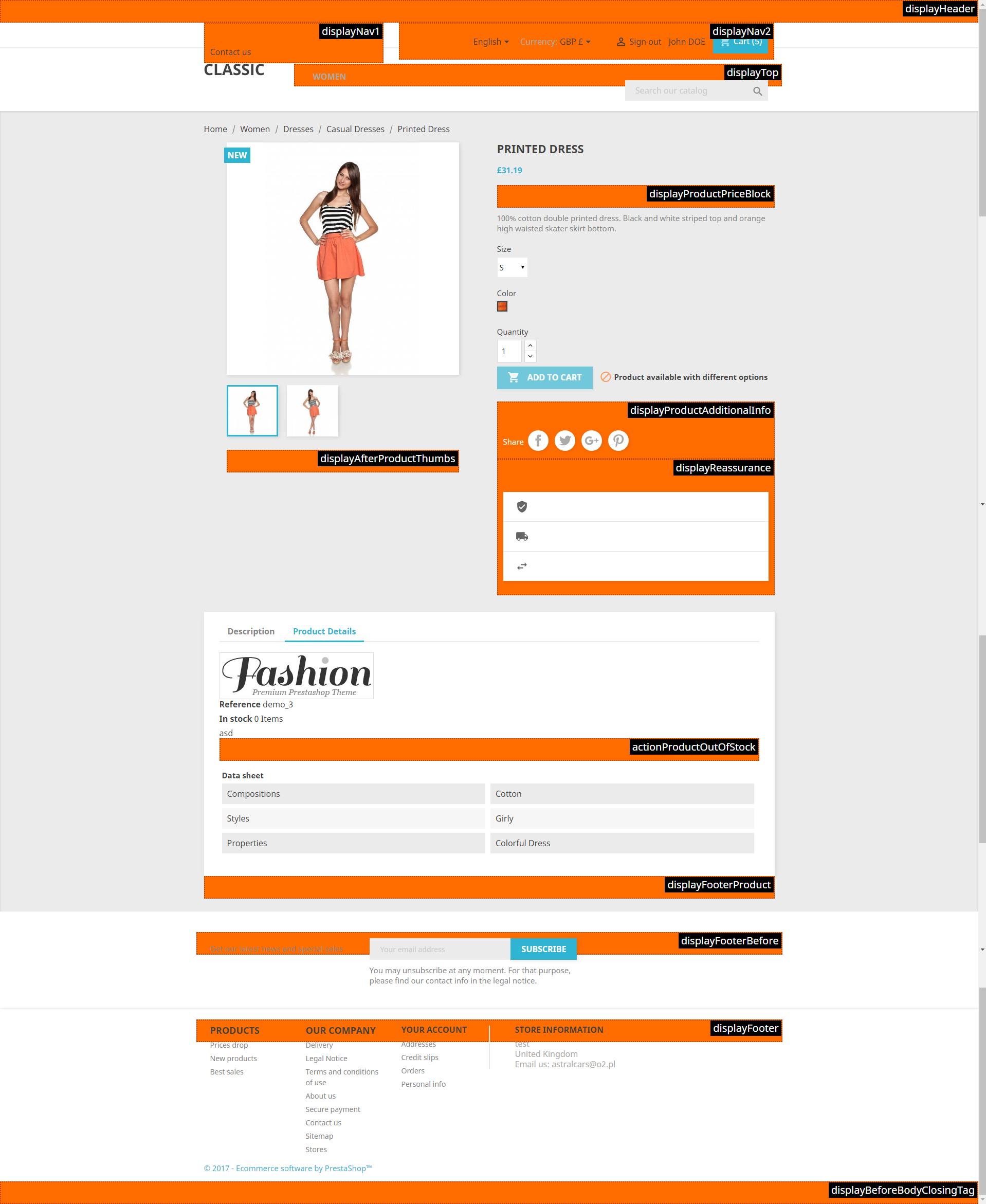
  1. displayHeader
    This is specific position in our template. This hook adds additional elements in the head section of your pages (head section of html). This means that you can load here some scripts, css files, js files or any other element that should be implemented to <head> section of your website.
  2. displayProductFooter
    This is hook where you can add additional product description like videos, pictures, some widgets like facebook comments etc. Simply saying this section allows to display custom contents and from customer point of view - contents available here usually are treated as a part of additional description of product
  3. displayTop
    This position loads wide horizontal menu. Its one from the most visible hooks in the shop, so you can put here important informations or features that allows to navigate through the website. 
  4. displayFooter 
    Footer section is available at the bottom of the page where you can see some navigation items like links to pages, newsletter subscruption etc. With this block you can display own custom contents directly inside the footer block.
  5. actionProductOutOfStock 
    This hook appears when product is out of stock, near the product attributes and quantity field
  6. displayNav1
    this is hook that appears on the left hand side of top bar (prestashop 1.7.x)
  7. displayNav2
    this is hook that appears on the right hand side of the top bar (prestashop 1.7.x)
  8. displayReassurance 
    this is position that appears below the add to cart button  (prestashop 1.7.x)
  9. displayAfterProductThumbs
    this is hook that is visible below the product pictures (prestashop 1.7.x)
  10. displayProductAdditionalInfo
    this is position that is visible below the add to cart button (prestashop 1.7.x.)
  11. actionProductAutOfStock 
    this is position that is visible when product is out of stock in "description" tab of the product (prestashop 1.7.x)
  12. displayBeforeBodyClosingTab
    this is position visible at the end of website, right before body closing tag (prestashop 1.7.x)
  13. displayFooterBefore
    this is the position visible right before the footer section (prestashop 1.7.x)


product page hooks in PrestaShop 1.7.x

Zdjęcie autora: Milosz Myszczuk

Artykuł napisany przez Milosza Myszczuka, eksperta PrestaShop i oficjalnego moderatora społeczności PrestaShop. CEO i założyciel agencji interaktywnej VEKIA. Dowiedz się więcej.

If you like this article, support our work!

Comments
