
PrestaShop Export Products Pro
This PrestaShop module provides a streamlined method for exporting products and combinations to a CSV file, facilitating seamless integration with other PrestaShop systems. The module's advanced functionality allows for granular control over exported data, enabling you to select specific products based on criteria such as manufacturer, supplier, and more. This targeted approach ensures efficient data transfer and minimizes the need for manual data manipulation.
35.00 €
Galeria 1/9
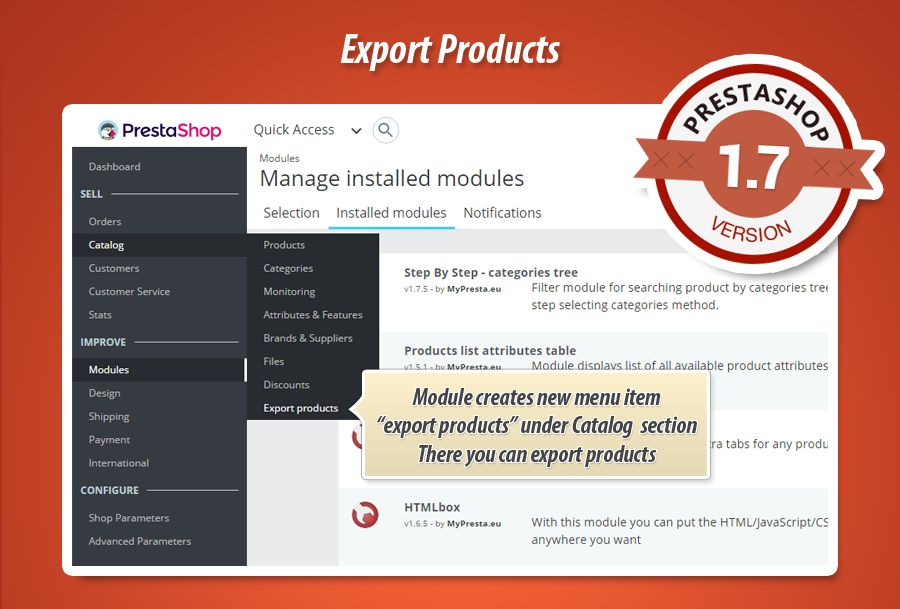
PrestaShop Product & Category Export: CSV XML Feed Pro
This module provides a powerful solution for exporting PrestaShop products and categories, compatible with versions 1.7, 8.0, and earlier. It efficiently generates thousands of products into .csv files, perfectly formatted for PrestaShop's default import tool, or .xml for price comparison websites. Users benefit from flexible export options, including downloadable files and automatically updated online feeds via URL. Advanced filtering allows precise selection by language, manufacturer, supplier, or category, ensuring tailored data exports. The module supports comprehensive product information and combinations, offering unparalleled flexibility for data migration and external system integrations.
Module version:
2.1.1
Shop versions:
9.x8.x1.7.x1.6.x
Works with ThirtyBees:
Yes
Translations:


This module that works with new PrestaShop 1.7 and 8.0 allows to easily and quickly export thousands of products to .csv file that can be imported in other prestashop instance - file is ready to import to prestashop. Many features available in module allows to export products precisely and in each available language in your shop. Details about module you can find below.
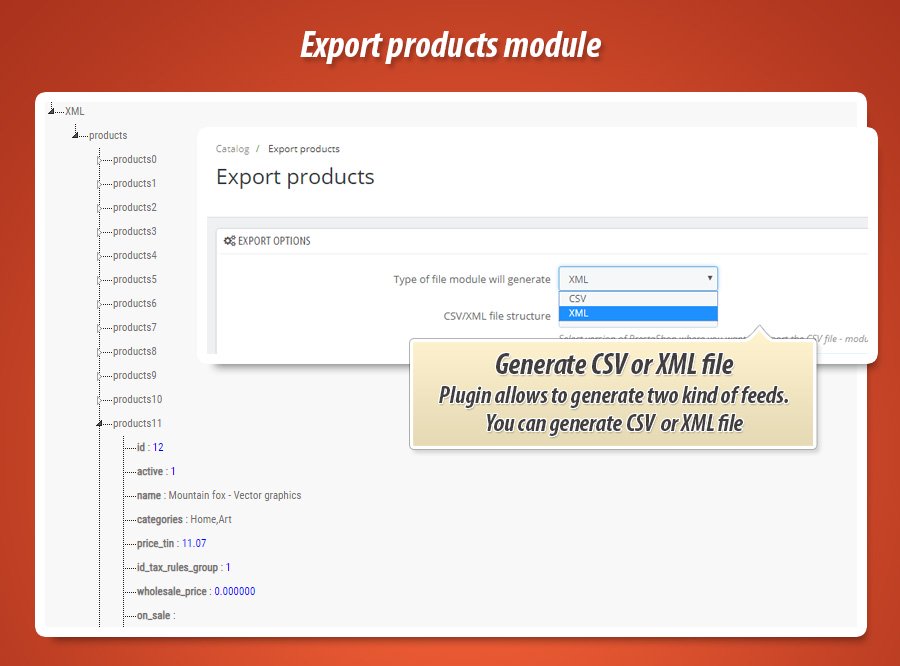
| Two file formats | |
| CSV file | XML file |
| exported file will be in csv format, this format is accepted by default prestashop's IMPORT CSV tool | exported file will be in xml format, this format is widely accepted by price comparison websites |
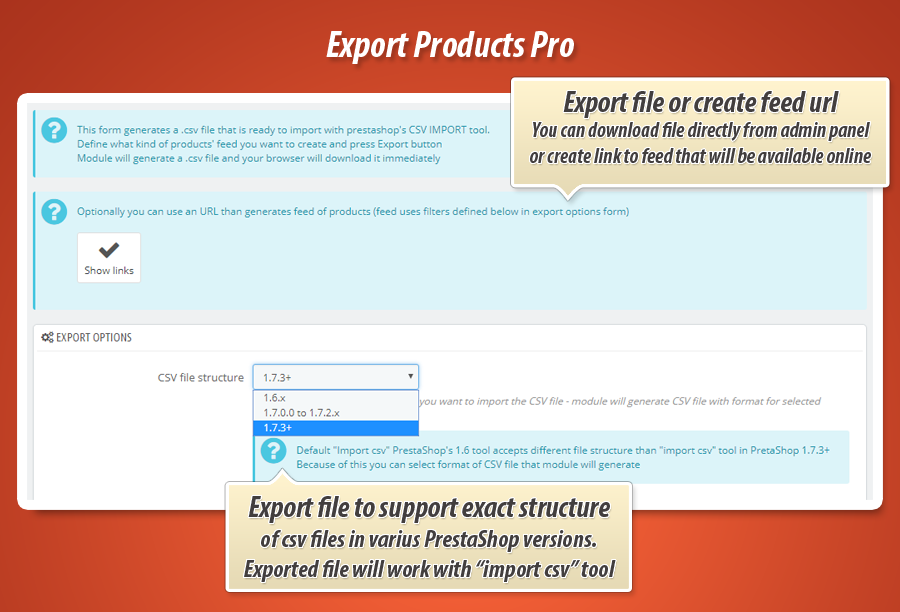
This module generates a feed for prestashop's import CSV tool purposes. This tool requires very specific format of files and very specific order of datasets in this file. Generated CSV file must be encoded with UTF-8 standard - only then descriptions and names will contain special characters.
| Two export possibilities | |
| CSV / XML Downloadable file | CSV / XML file available online |
| As a shop owner you can create a feed of products and download it from shop back office as a .csv file. You can use all available filters to filter the products that will be available in the feed | .CSV file that will be available on defined URL. File will contain always up to dated list of products automatically generated - also in .CSV format (also supports all available filters) |
This module exports files for prestashop "IMPORT CSV" tool purposes (default import tool in prestashop)
| Various CSV / XML files Format | |||
|
PrestaShop 1.5 - 1.6 |
PrestaShop 1.7.0.0 - 1.7.2.x |
PrestaShop 1.7.3.0 - 1.7.6.9 |
PrestaShop 1.7.7+ and 8.0 |
| Each version of PrestaShop has feature named "CSV IMPORT" where you can import .csv files generated by this module. Each version of PrestaShop accepts a little different structure o CSV file. Because of this during export process you can select the structure of file - module will generate file for selected version of PrestaShop |
|||

Main features available in the module
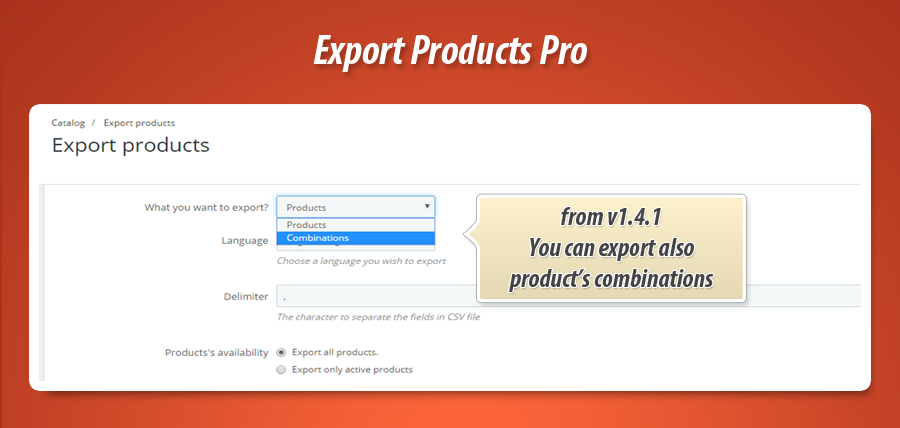
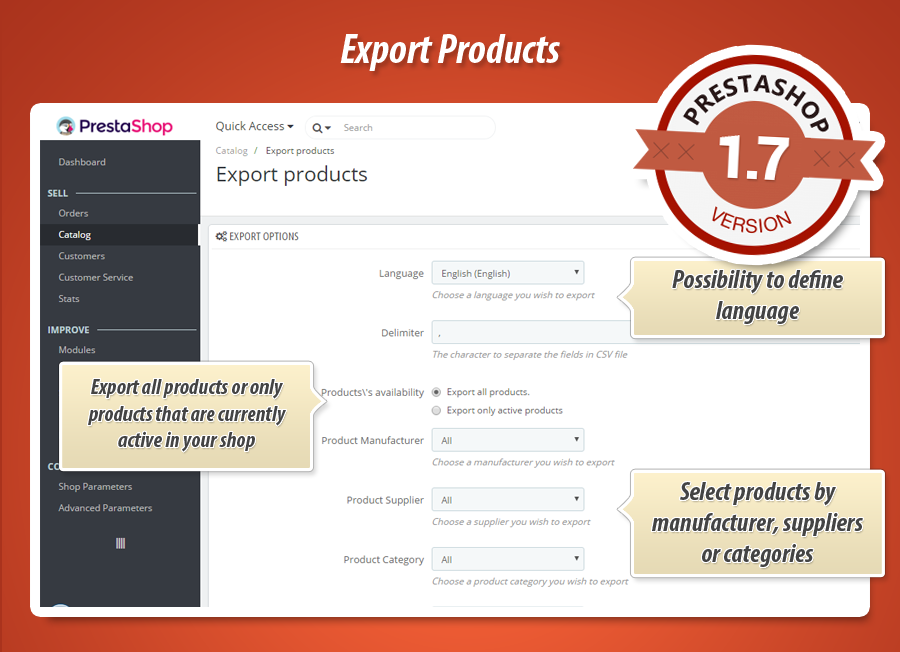
As you already know - main feature of this module is a possibility to export products to csv file. Module has additonal features that allows to customize exported products' feed. Module allows to export also products' combinations (attributes). On module configuration page you can define options like:
- Possibility to define language of the products' feed (you can select all available languages in your shop)
- Possibility to define a character that will separate fields in CSV file
- Possibility to select what kind of products' module will export (active products only or all catalog)
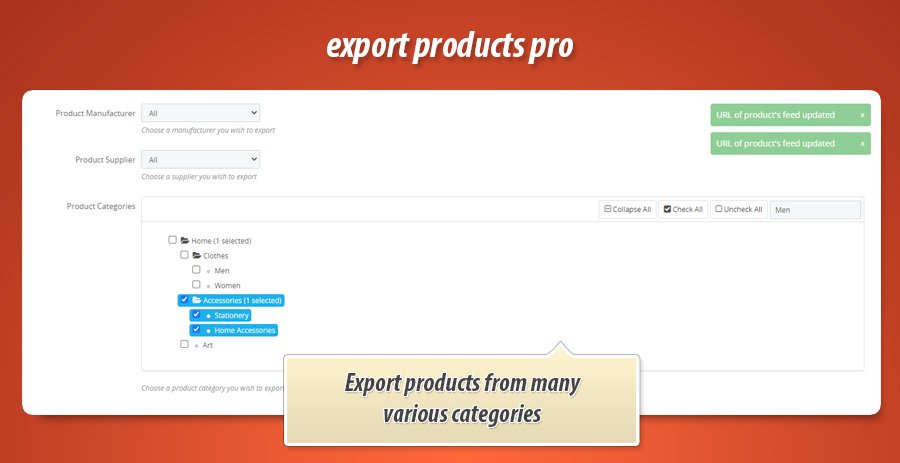
- Possibility to select manufacturer - module will export products associated with selected manufacturer only
- Possiblity to select supplier - module will export products associated with selected supplier only
- Possibility to select category - module will export products associated with selected category only
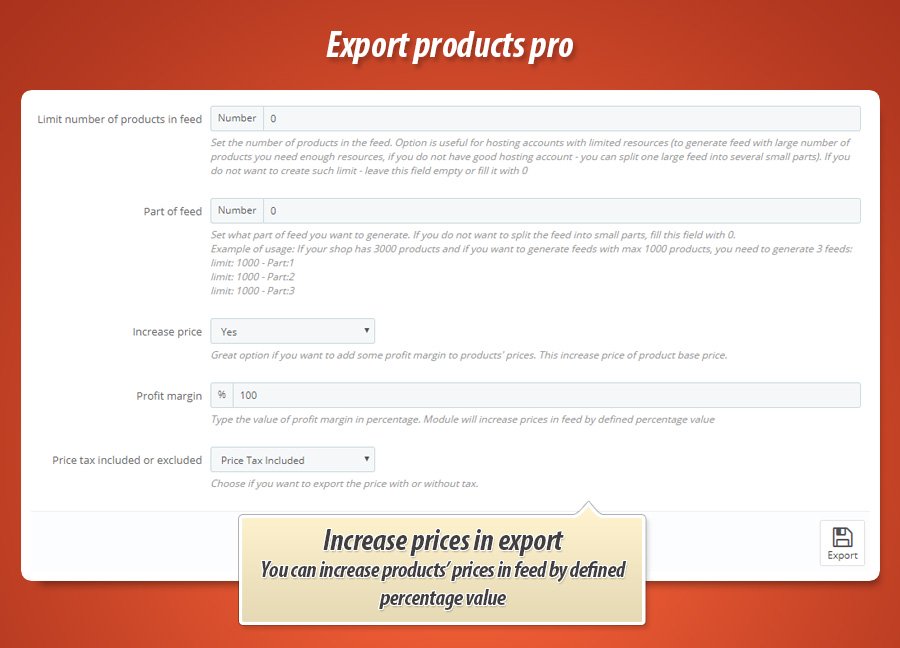
- Feature to partially generate the feed (useful on hosting environments with limited resources)
- Possibility to define type of price that will be included to export feed (tax included / tax excluded)
Of course you can select and combine several options at the same time, so you can export exact products easily and prepare CSV files with selected products only.
List of fields that module exports
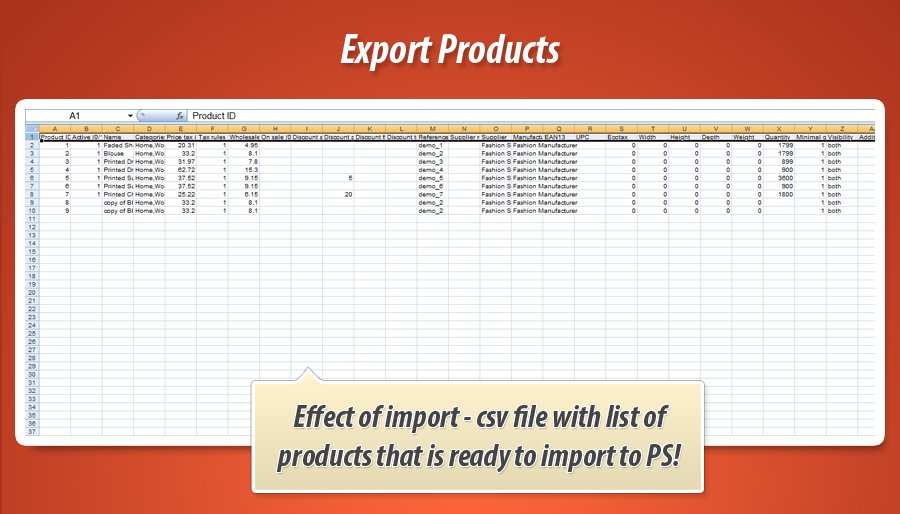
Module exports full information about product. CSV file contains many informations - list of them you can find below
| Field name | Description |
| Product ID | Unique product's identification number |
| Active (0/1) | Information if product is active or not, 0 - product is not active 1 - product is active |
| Name | Product name (in selected language) |
| Categories (x,y,z...) | List of all categories, product is assigned to these categories |
| Price tax included | Price of the product (tax included) |
| Tax rules ID | ID of used tax rules |
| Wholesale price | Value of wholesale product's price |
| On sale (0/1) | Information if product is marked as a product "on sale". 1 - if product is on sale, 0 - if product isn't marked as "on sale" product |
| Discount amount | Value of discount (amount) |
| Discount percent | Value of discount (percent) |
| Discount from (yyyy-mm-dd) | Information about discount availability - in this case - about discount start date |
| Discount to (yyyy-mm-dd) | Information about discount availability - in this case - about discount exipiry date |
| Reference # | Unique product's reference number |
| Supplier reference # | Unique product's reference associated with selected supplier |
| Supplier | Supplier ID |
| Manufacturer | Manufacturer ID |
| EAN13 | product's EAN13 code |
| UPC | Product's UPC code |
| Ecotax | information about product's Ecotax |
| Width | Information about product's width |
| Height | Information about product's height |
| Depth | Inforamtion about product's depth |
| Weight | Information about product's weight |
| Quantity | Information about product's quantity |
| Minimal quantity | Information about minimal product's quantity |
| Visibility | Information about visibility of product |
| Additional shipping cost | Information about additional shipping cost |
| Unit for the unit price | Information about unit for product's unit price |
| Unit price | Product's unit price |
| Short description | Product's short description (in selected language) |
| Description | Product's description (in selected language) |
| Tags (x,y,z...) | List of all tags associated with this product |
| Meta title | SEO meta title of product |
| Meta keywords | SEO meta keyword of product |
| Meta description | SEO meta description of product |
| URL rewritten | SEO rewritten url of product |
| Text when in stock | Text that will appear when product is in stock |
| Text when backorder allowed | Text when product is available to "backorder" |
| Available for order (0 = No, 1 = Yes) | Information if product is available for order |
| Product available date | Availibility date of product |
| Product creation date | Information about product creation date |
| Show price (0 = No, 1 = Yes) | Information if product page will display price or not |
| Image URLs (x,y,z...) | List of all images uploaded to this product (urls to images) |
| Delete existing images (0 = No, 1 = Yes) | Information about deleted existing images |
| Feature (Name:Value:Position:Customized) | Information about features associated with this product (list of them) |
| Available online only (0 = No, 1 = Yes) | Information if product is available online only |
| Condition | Information about product condition (new, used, refubrished etc.) |
| Customizable (0 = No, 1 = Yes) | Information, if product is customized or not (customization option) |
| Uploadable files (0 = No, 1 = Yes) | Information, if product has uploaded files, or not (customization option) |
| Text fields (0 = No, 1 = Yes) | Information, if product has "text" fields (customization option) |
| Action when out of stock | What to do if product is out of stock |
| ID / Name of shop | ID of shop |
| Optional url to product page | Option if enabled allows to include link to product page to csv file |
Export categories of products
Module is ready to export also categories. Exported categories to CSV file will contain all required fields to import them to prestashop with "import csv" tool available in shop by default.


35.00 €
Module Gallery 1/9
Why choose our module
Export Products Pro?
Optimization and Automation
Export Products Pro automates and optimizes product data management. It rapidly generates import-ready CSV/XML files for PrestaShop or external systems, offering scheduled online feeds for always up-to-date inventory. This streamlines data transfer, reduces manual effort, and ensures efficient platform synchronization.
Increased Sales
This module boosts sales by exporting products to XML for price comparison sites and CSV for targeted promotions. It supports multi-language exports and includes discount details, ensuring accurate and appealing product listings to reach a wider audience.
15 years of experience
Leveraging 15 years of PrestaShop experience, this module meticulously crafts product exports. It perfectly matches varied PrestaShop CSV import formats across versions (1.5-8.0), handling all product details, combinations, and multilingual data for seamless, reliable transfer.
Extensive Customization
With extensive customization, this module precisely tailors product exports. Choose languages, file formats, delimiters, and price types. Filter by category, manufacturer, supplier, or status, ensuring your exported data perfectly matches unique requirements.
Open Source Code
The module offers a fully open-source codebase, granting you complete freedom to review, modify, and enhance its features. This ensures deep customization and integration capabilities, free from 'ioncube' or hidden code.
License and Updates
The module's perpetual license ensures long-term usability. Free updates for one year guarantee compatibility with new PrestaShop versions (1.7 and 8.0) and evolving import requirements, ensuring your export functionality remains robust and up-to-date.