
PrestaShop Payment Discount or Fee
Charge or reward customers by payment method in PrestaShop. Apply automatic discounts or surcharges when shoppers pick card, bank transfer, COD, or any gateway at checkout. Rules support cart minimums, customer groups, countries, and product exclusions. Live totals, checkout badges, audit log, and dashboard analytics. Works with PrestaShop 1.7, 8 and 9.
50.00 €
Galeria 1/18
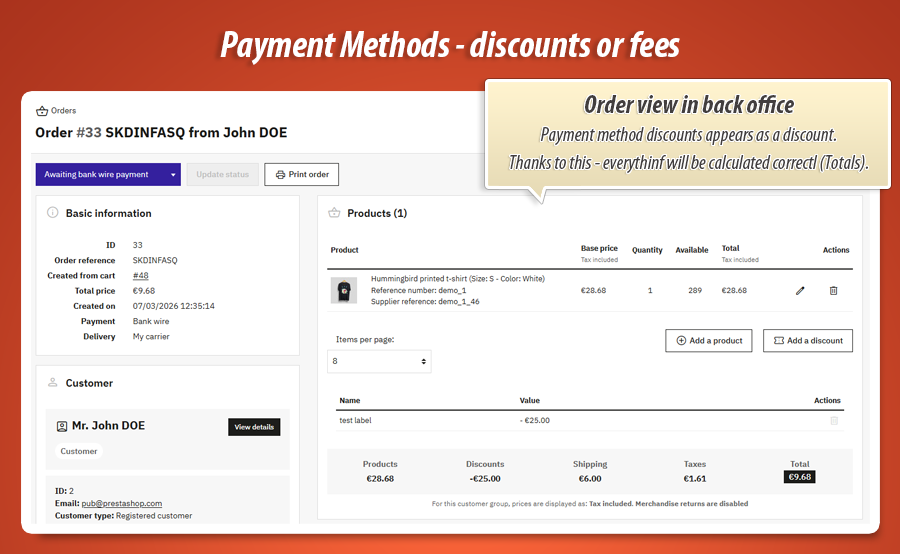
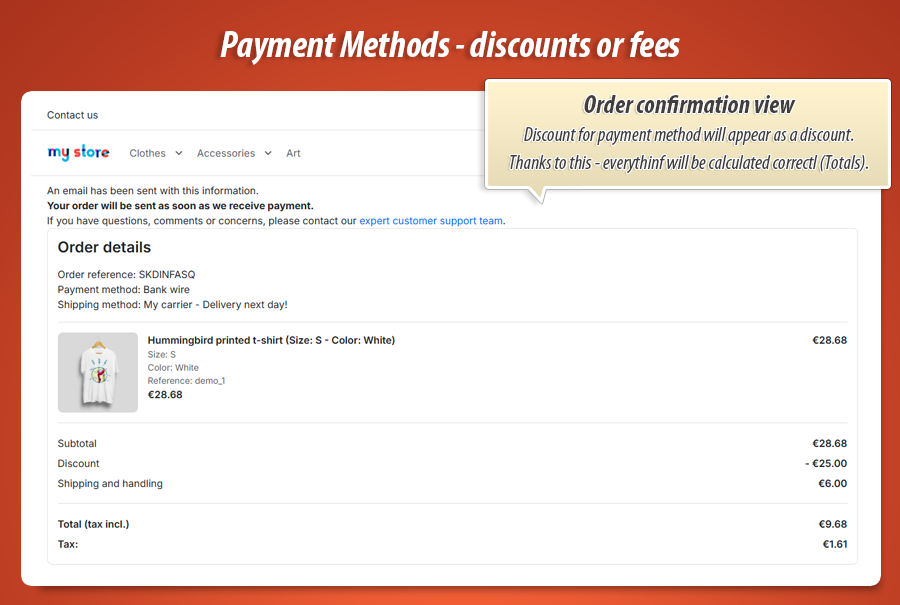
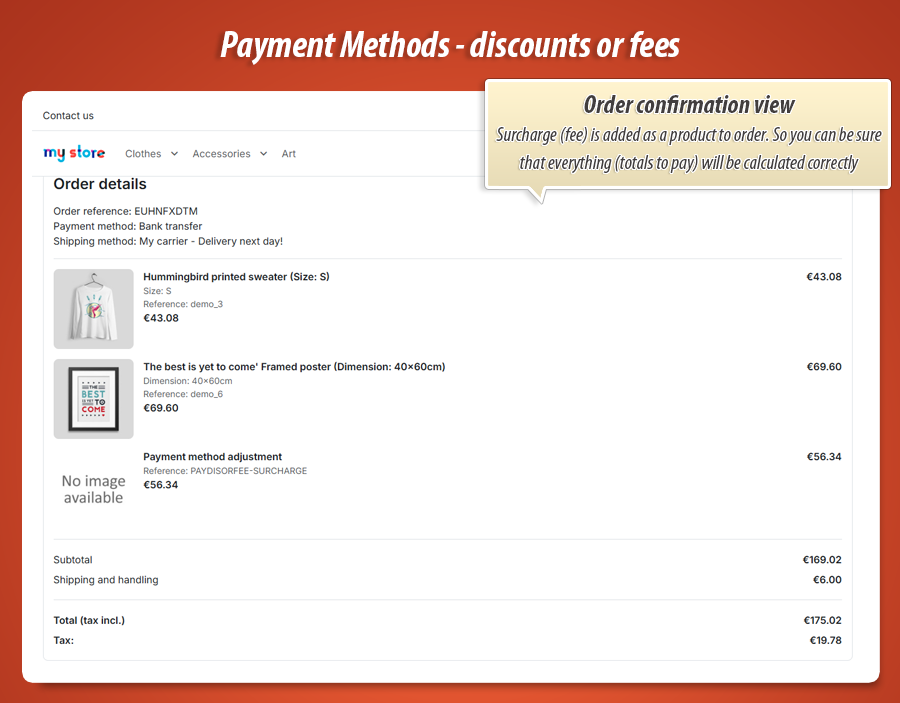
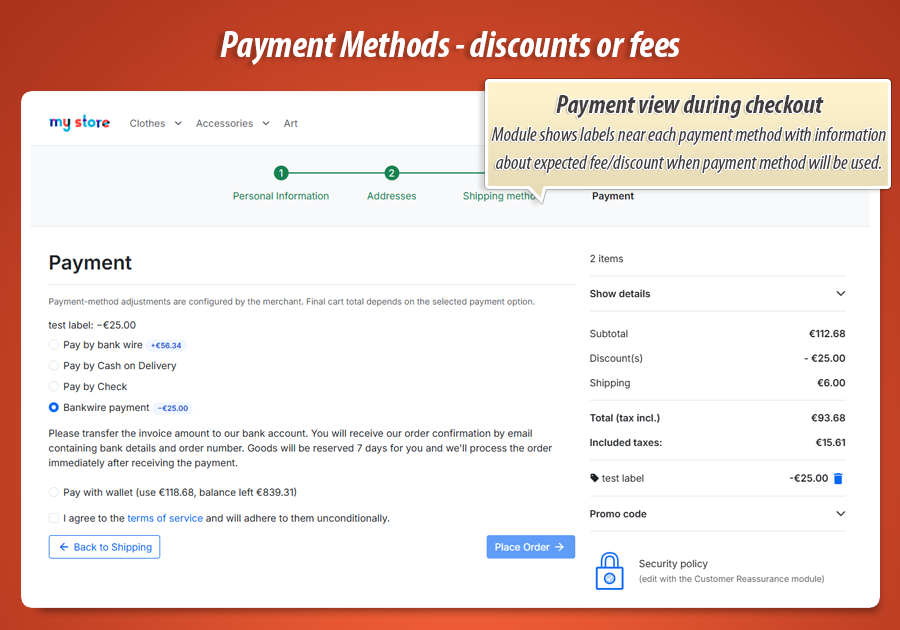
Live Payment Method Discounts & Surcharges
The "Payment Discount or Fee" module for PrestaShop enables dynamic price management based on the chosen payment method. It allows applying discounts for preferred methods (e.g., bank transfer) or surcharges for more expensive options (e.g., credit cards). It features real-time cart total updates during checkout, ensuring a seamless customer experience. Pricing rules can be precisely defined, considering country, cart value, or customer group, along with product exclusions. The module ensures secure management of discounts and fees, complete with a full audit log and an analytics dashboard.
Module version:
1.1.6
Shop versions:
9.x8.x1.7.x
Works with ThirtyBees:
No
Translations:


Discounts or fees by payment method.
Live checkout. Scoped rules. Audit log. Analytics.
Most payment-fee modules slap a static surcharge on the cart and pray the checkout still works. Payment Discount or Fee prices every gateway properly: reward bank transfer with a discount, recover card fees with a surcharge, update the cart total live as the customer clicks each payment option, scope rules by country and cart value, and track every adjustment in a built-in audit log and analytics dashboard. One module. Real payment-method pricing.
What Payment Discount or Fee has. What others don't.
These are the features that set this module apart from a basic payment surcharge label or a manual voucher workaround. Built for shops that want to steer customers toward cheaper gateways without breaking checkout or losing margin on expensive ones.
Live checkout recalculation
Click card, transfer or COD and the cart total updates instantly. Serialized AJAX keeps fast clicks in order. Old discounts are cleared before new ones apply.
Others: static label, wrong total
Discount OR surcharge
Same rule engine, two directions. Push customers to bank transfer with a discount, or add a card-processing fee. Percent or fixed, per gateway.
Others: surcharge only, if anything
Checkout-safe surcharge engine
Surcharges persist as checkout state during payment step, then materialize as a hidden fee product only when the order is placed. Checkout does not jump back to addresses.
Others: fee line breaks checkout flow
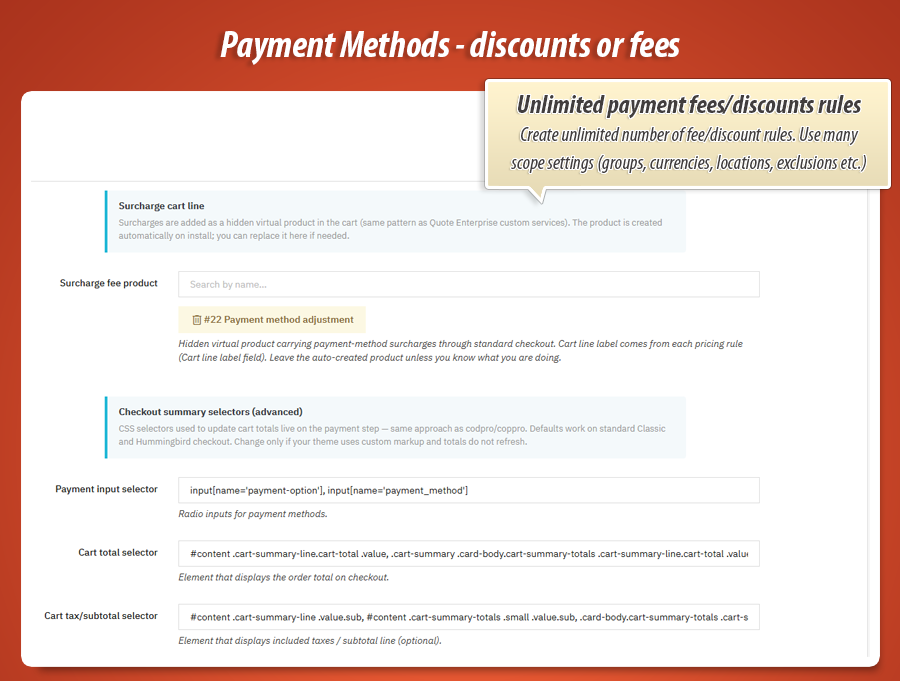
Scoped pricing rules
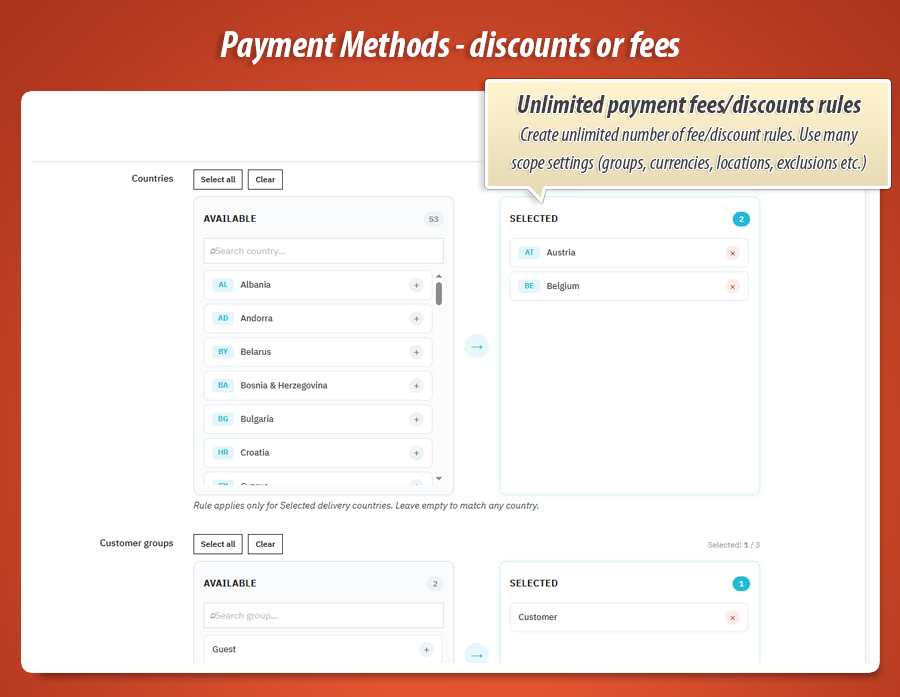
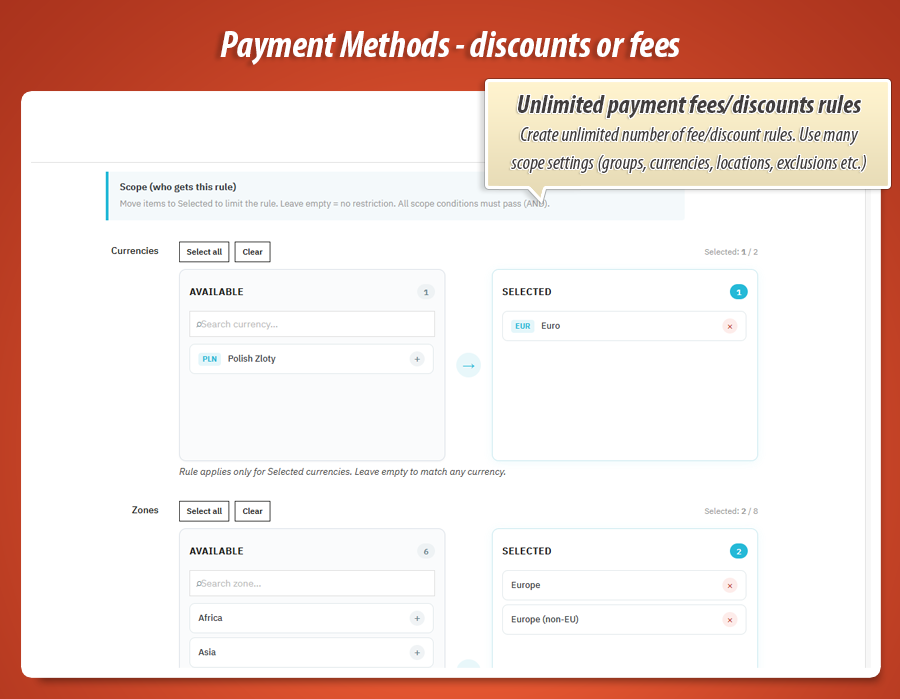
Filter by currency, country, zone, customer group, cart min/max and payment module. Different incentives per market without duplicate shops.
Others: one global fee for all
Search-by-name exclusions
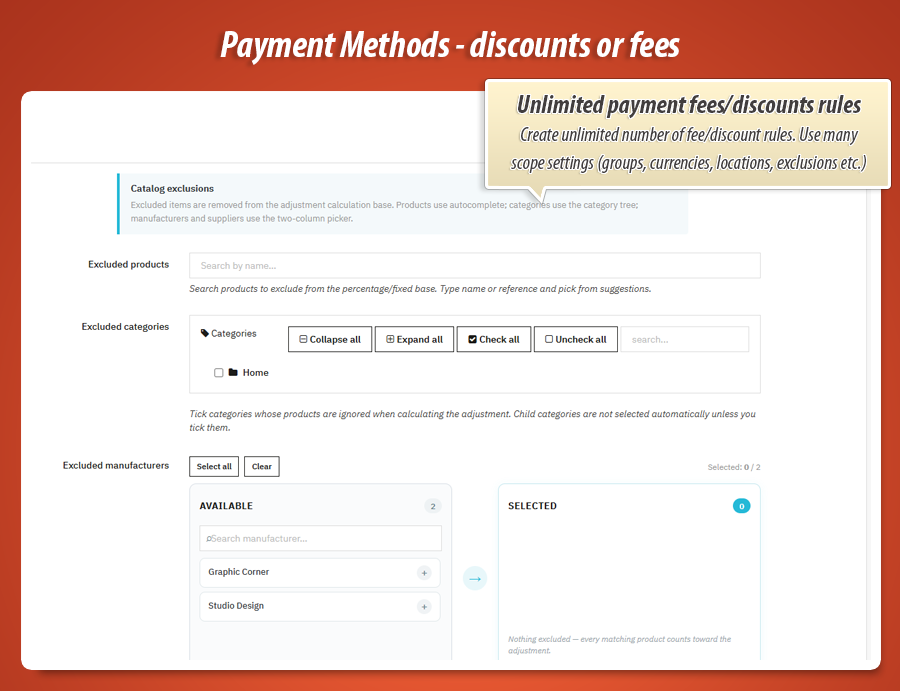
Exclude products, categories, manufacturers and suppliers with autocomplete pickers. Percent fees skip low-margin or gift-card lines correctly.
Others: comma-separated ID guessing
Secured dynamic cart rules
Discounts use unpredictable PDF-* codes bound to the cart and customer. Manual voucher abuse is blocked. Orphan rules are purged by cron.
Others: guessable codes, cart rule clutter
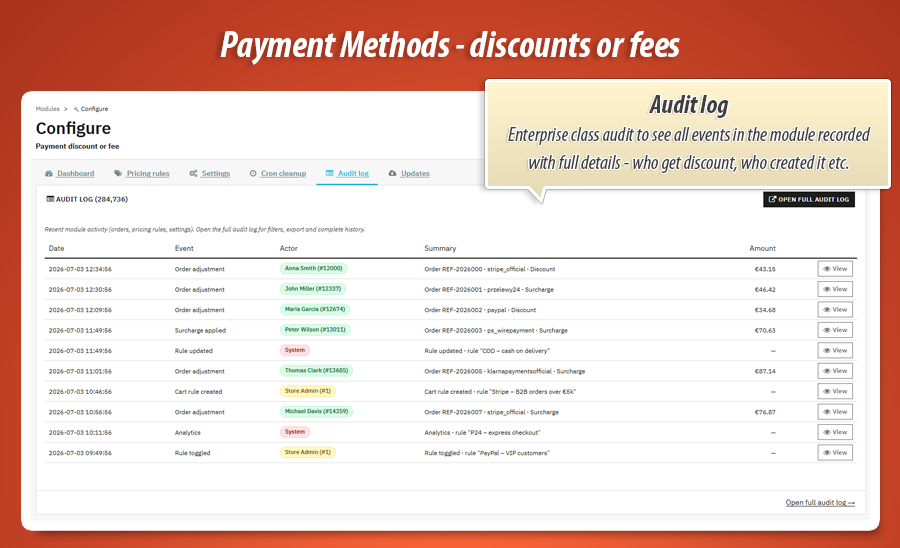
Full audit log
Orders, rule edits, cart rule create/delete, surcharge apply/remove. Actor pills show customer, staff, system or cron. Read-only back-office grid.
Others: no trail at all
Analytics dashboard
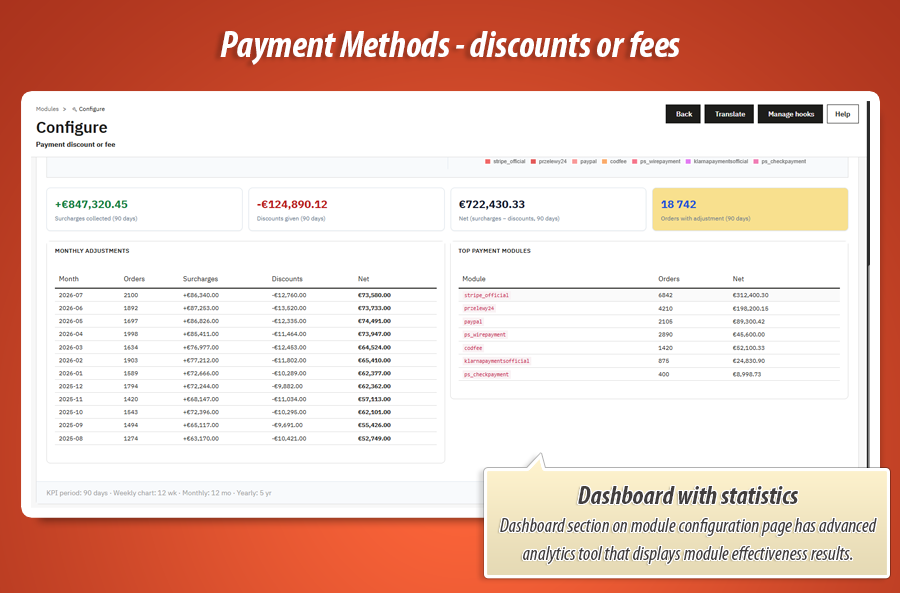
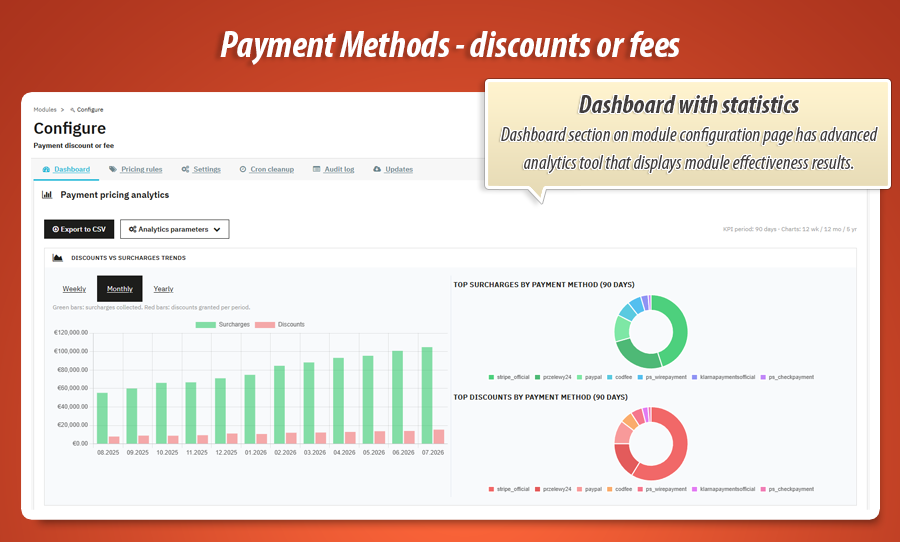
Surcharges vs discounts split, net revenue, top payment modules, monthly table and Chart.js trends. Export order data to CSV.
Others: you never see the impact
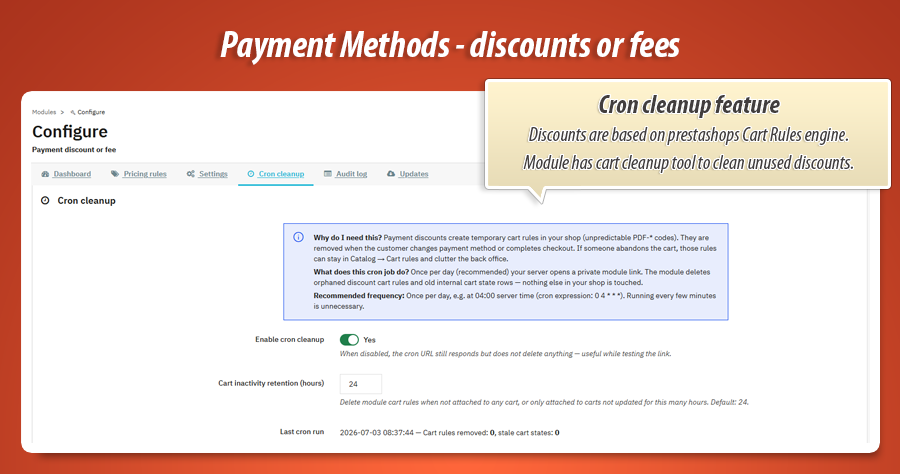
Cron cleanup for orphan rules
Abandoned carts leave temporary cart rules behind. Token-protected cron URL purges stale PDF-* rules and cart states. Hosting setup guides included.
Others: manual cart rule housekeeping
Gamechanger
Live payment-method pricing that does not break checkout
Most payment-fee add-ons either show a static note next to the gateway or shove a fee product into the cart immediately. On PrestaShop checkout that often resets the customer to the address step or leaves the wrong total on screen. Payment Discount or Fee is built around the payment click itself: preload every scenario, recalculate on each selection, clear the previous discount before applying the next one, and hold surcharges in lightweight checkout state until the order is validated. The customer sees the right price. The checkout flow stays put. You still get a full audit trail.
Instant totals on every payment click
Checkout JavaScript preloads all rule outcomes, patches the summary live and syncs the cart through a dedicated AJAX controller. Serialized requests prevent race conditions when customers click quickly between card, transfer and COD.
Two engines, one payment step
Discounts become secured dynamic cart rules with unpredictable PDF-* codes. Surcharges stay in module state during checkout and materialize as a hidden fee product only at order placement. Same rule builder, different delivery mechanism, zero checkout regression.
Switch gateway, old adjustment gone
Changing payment method clears the previous discount or surcharge before the new rule applies. Cart refresh runs when a voucher line must disappear. Enforcement hooks remove unauthorized module cart rules if anything slips through.
Why this matters: payment-method pricing is not a label in the payment list. It is a live loop between scoped rules, cart state, dynamic cart rules, fee product materialization, audit events and analytics. You steer customers toward cheaper gateways or recover processing cost without teaching shoppers to distrust your checkout total.
Complete feature guide
Every feature explained in plain language for shop owners. No technical jargon. One by one, so you know exactly what Payment Discount or Fee does for your business.
What does the module do at checkout?
When a customer reaches the payment step, the module watches which gateway they select. For each installed payment module you can define a pricing rule: either a discount (cart total goes down) or a surcharge (cart total goes up). The adjustment appears in the order summary, optional badges next to payment names, and on the final order record.
Typical uses: -2% for bank transfer, +3% for card, fixed COD fee, B2B group exceptions, country-specific incentives. You are pricing the payment choice, not editing product prices manually.
Pricing rules builder
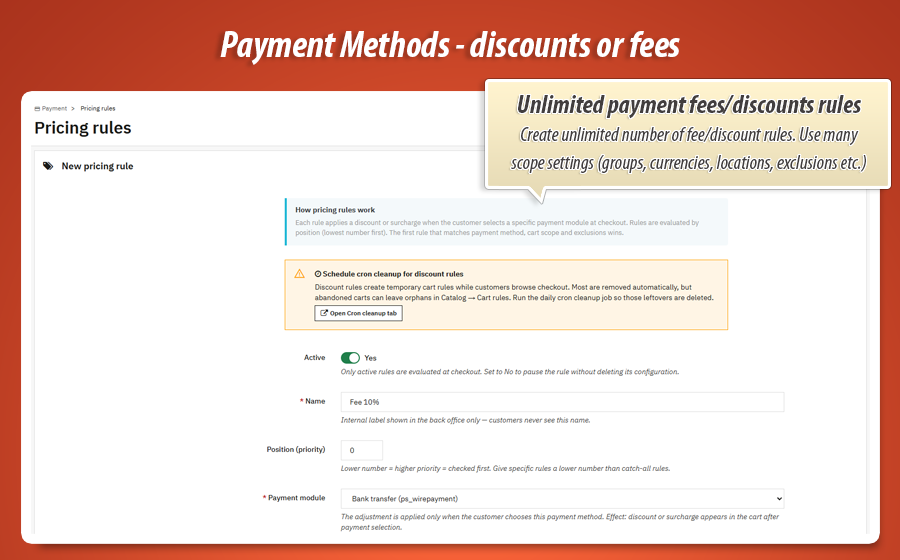
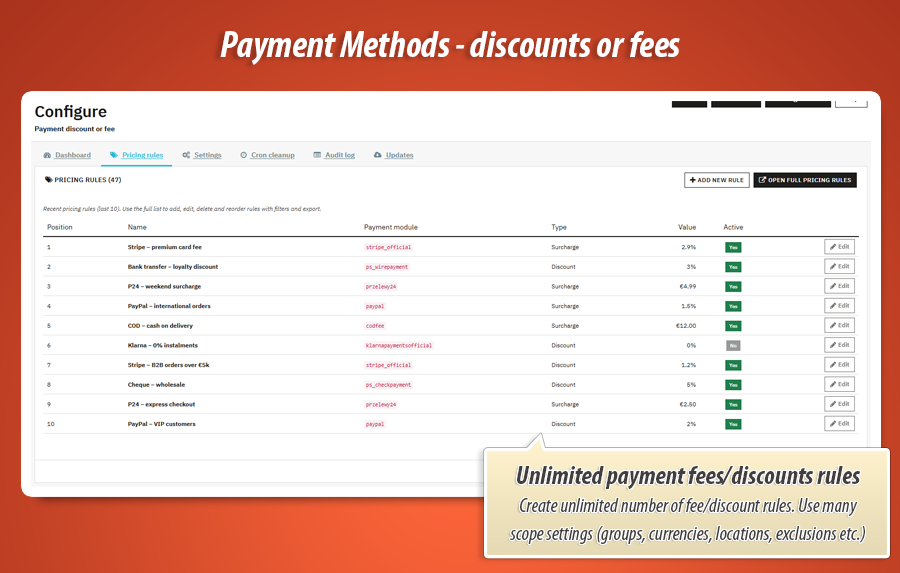
The Pricing rules tab is a full rule manager with preview grid and add/edit form. Each rule targets one payment module and defines:
-
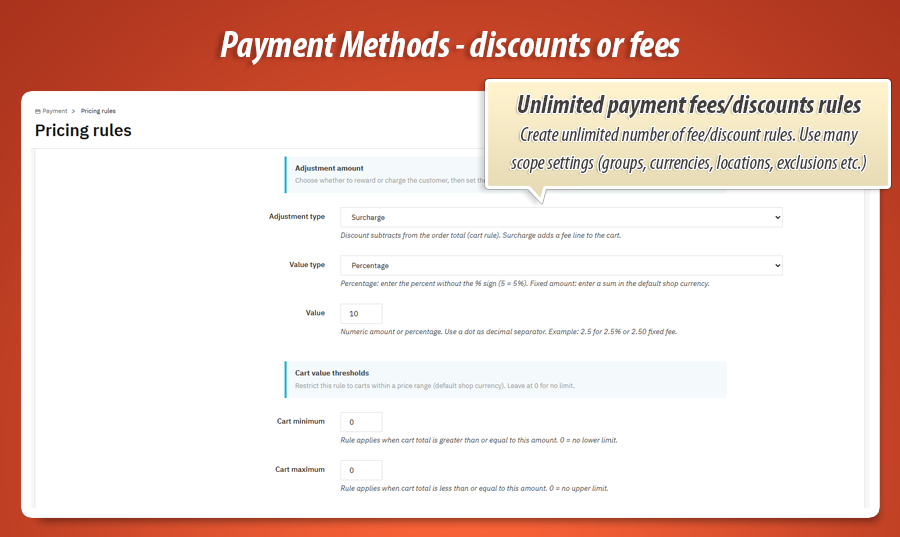
Adjustment type - discount or surcharge
-
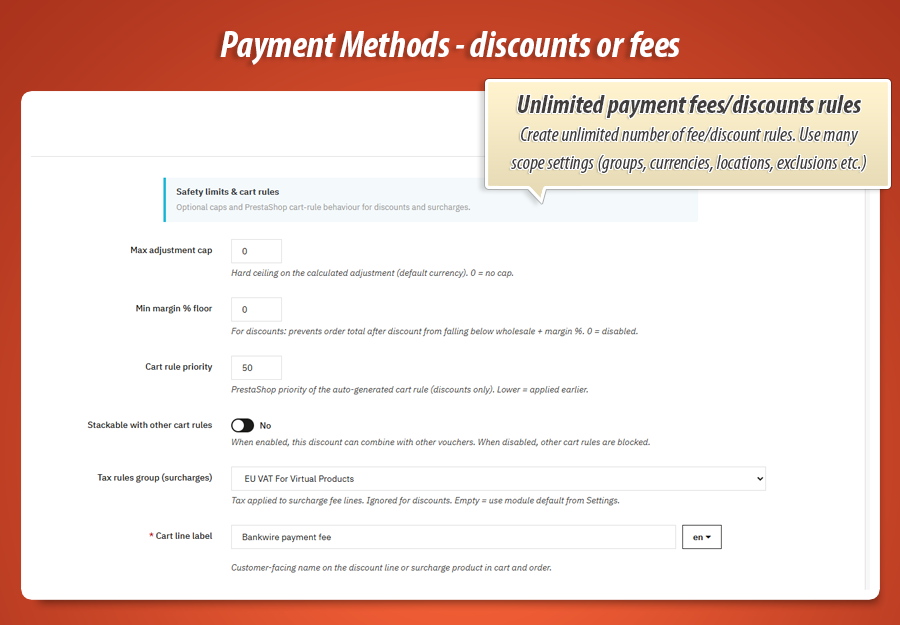
Value - percent or fixed amount, with cart min/max and max adjustment cap
-
Scope - currencies, countries, zones, customer groups via visual selectors
-
Exclusions - products, categories, manufacturers, suppliers (searchTool autocomplete)
-
Multilingual checkout label shown next to totals and on payment badges
Discount engine (dynamic cart rules)
Discounts are applied as native PrestaShop cart rules created on the fly. Each cart gets an unpredictable PDF-* code stored in module state. Rules are bound to the logged-in customer when applicable, protected against manual reuse, and deleted when the customer switches payment method or completes the order.
The audit log records every cart rule creation and deletion with actor, cart ID and cleanup reason (payment change, cron, post-order sync). Your Catalog > Cart rules list stays clean.
Surcharge engine (hidden fee product)
Surcharges use a dedicated hidden fee product configured in Settings. During checkout the amount is stored in module cart state and shown as a subtotal line without mutating cart composition. When the customer places the order, the fee product is materialized with the correct tax rule and amount.
Price calculation hooks lock the fee line to the computed surcharge so PrestaShop totals stay consistent. Surcharge apply and remove events are written to the audit log with customer or system actor.
Settings, badges and checkout integration
-
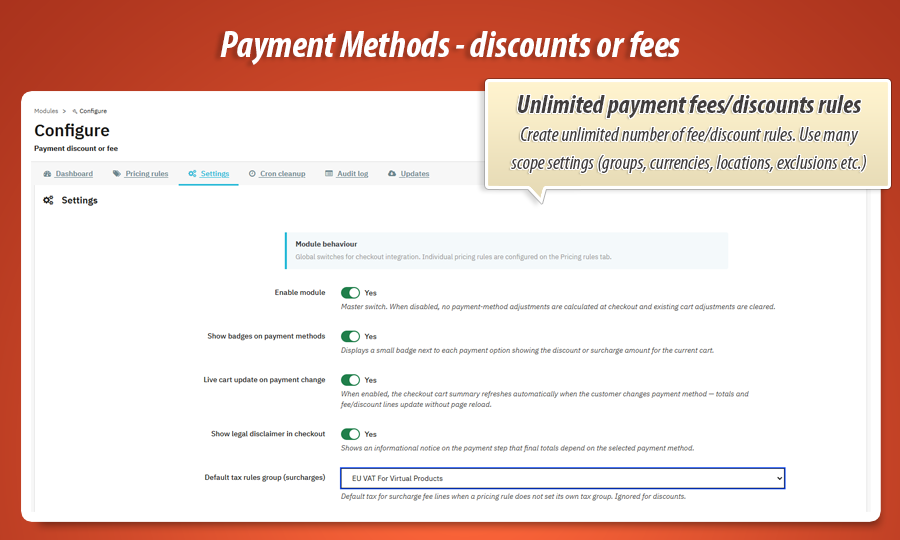
Global switchesEnable module, live total updates, payment badges and optional legal disclaimer on the payment step.
-
Surcharge fee product pickerStandard HelperForm field to select or auto-create the hidden fee product used for surcharges.
-
Theme-friendly checkout JSWorks with classic and modern checkout themes. Configurable CSS selectors for cart total patching when needed.
Dashboard and audit log
The Dashboard tab shows KPI cards for surcharges, discounts and net impact over a selectable period. Chart.js graphs cover weekly, monthly and yearly trends. Tables break down totals by month and top payment modules. Export order-level data to CSV for accounting.
The Audit log tab (dedicated admin controller) is read-only and colour-coded: orders, rule CRUD, settings changes, cart rule lifecycle, surcharge events. Actor pills identify customer, employee, system or cron. Every pricing decision leaves a trace.
Cron cleanup and order integration
The Cron cleanup tab explains why orphan cart rules appear, gives you a secret URL with regenerate button, and documents setup for cPanel, DirectAdmin, Plesk, SSH and external cron services. Maintenance purges stale PDF-* rules and idle cart states automatically.
On each order the module stores paydisorfee_amount, type and rule ID on the order row, validates that the placed payment matches the applied adjustment, logs the event, then clears cart state. A hook on the admin order page shows the adjustment summary for support staff.
Payment Discount or Fee in one sentence
Price every payment gateway with scoped discounts or surcharges, update checkout totals live as customers choose how to pay, secure dynamic cart rules, materialize fees safely at order time, and prove the business impact in analytics and audit logs. One PrestaShop module that does what static fee labels and manual vouchers cannot.
Statistics for nerds
The technical side of Payment Discount or Fee. Not a payment-method label with a hardcoded fee. A full checkout pricing engine for PrestaShop 1.7, 8 and 9 with dual adjustment mechanics, security hardening and observability built in.
9,400+
Lines of code
PHP, SQL, JavaScript, CSS and Smarty across the engine, admin workspace, checkout sync, dashboard charts and cron maintenance.
1,640+
Lines in cart engine
PaydisorfeeEngine handles apply/clear/sync, discount cart rules, surcharge state, security enforcement, order validation and maintenance cleanup.
6
Admin config tabs
Dashboard, Pricing rules, Settings, Cron cleanup, Audit log and Updates. Each tab is a focused workspace, not one endless scroll.
8
Dedicated PHP classes
Engine, Rule, CartState, AuditLog, Dashboard, Admin, FeeProduct and Compatibility. Clear separation between pricing logic, logging and back-office UI.
Database and logging layer
-
3 custom tables:
paydisorfee_rule,paydisorfee_cartandpaydisorfee_logfor rules, live cart state and unified audit. -
Order columns:
paydisorfee_amount, type, rule ID and payment module stored on each order for reporting. -
Event types: order applied, rule CRUD, cart rule created/deleted, surcharge applied/removed, settings and analytics updates.
Architecture and hooks
-
11+ native hooks including payment top, cart save, order validation, cart rule validation, price calculation and admin order display.
-
2 front controllers:
ajaxfor checkout sync andcronfor token-protected maintenance. -
searchTool library bundled for product, manufacturer and supplier exclusion pickers in the rule form.
-
PrestaShop compatibility layer in
lib/prestashop9compatibility.phpfor consistent price display and checkout integration across 1.7, 8 and 9.
Chart.js
Dashboard JS with weekly, monthly and yearly surcharge vs discount charts plus CSV export.
Secured PDF-*
Unpredictable
PDF-* codes, customer binding and multi-layer cart-rule enforcement block manual abuse.v1.1.6
Current release. PrestaShop 1.7, 8 and 9. One codebase with MyPresta update checker built in.
The customer clicks a payment method. Under the hood: scoped rule matching, a 1,640-line cart engine, dual discount/surcharge paths, serialized checkout AJAX and an audit log that records every cart rule and fee line lifecycle. It looks like a total update on screen. The stack behind it is not.
50.00 €
Module Gallery 1/18
Why choose our module
Payment Discount or Fee?
Optimization and Automation
"Payment Discount or Fee" optimizes your store's profitability by automating dynamic pricing for payment methods. It automatically applies discounts or surcharges live at checkout, preventing manual adjustments. With its scoped rule engine and cron cleanup, it streamlines complex pricing management, ensuring efficient operations and providing valuable analytics for informed business decisions.
Increased Sales
The Payment Discount or Fee module enhances sales by dynamically incentivizing preferred payment methods with live discounts. This transparent, checkout-safe pricing strategy effectively steers customers towards completing purchases, significantly reducing abandonment rates and fostering higher conversion.
15 years of experience
Leveraging 15 years of PrestaShop expertise, Payment Discount or Fee seamlessly integrates advanced pricing directly into checkout. This module expertly handles dynamic cart rules and hidden fee products, ensuring stable live updates without disrupting the customer journey across PrestaShop 1.7-9.
Extensive Customization
The "Payment Discount or Fee" module offers extensive customization through its powerful pricing rules. Define discounts or surcharges by payment method, scope them by country, currency, customer group, and cart value, and even exclude specific products, ensuring a perfect fit for your store's unique pricing strategies.
Open Source Code
Payment Discount or Fee provides full access to its PHP, SQL, JavaScript, CSS, and Smarty source code. Unlike 'ioncube' protected modules, this allows for advanced modifications and seamless integrations, ensuring you can completely tailor this powerful payment pricing engine to your PrestaShop store's specific requirements.
License and Updates
The 'Payment Discount or Fee' module is continuously updated, ensuring precise live checkout adjustments. Your one-time license offers unlimited usage, with free updates for a full calendar year. After that, renew access to critical updates for your payment pricing rules with discounts up to 90%.