

PrestaShop Free Shipping Progress Bar Pro
Free Shipping Progress Bar Pro shows shoppers exactly how much is left to unlock free shipping — updated live after every cart change. Set default, country and customer-group thresholds, dynamic messages with placeholders, and A/B tests with conversion analytics. Visual designer, sticky bar, multiple display positions (cart, product, navigation), Classic and Hummingbird themes. No coding required — ready to launch in minutes.
40.00 €
Galeria 1/15
Smart Free Shipping Progress Bar & AOV Booster Pro
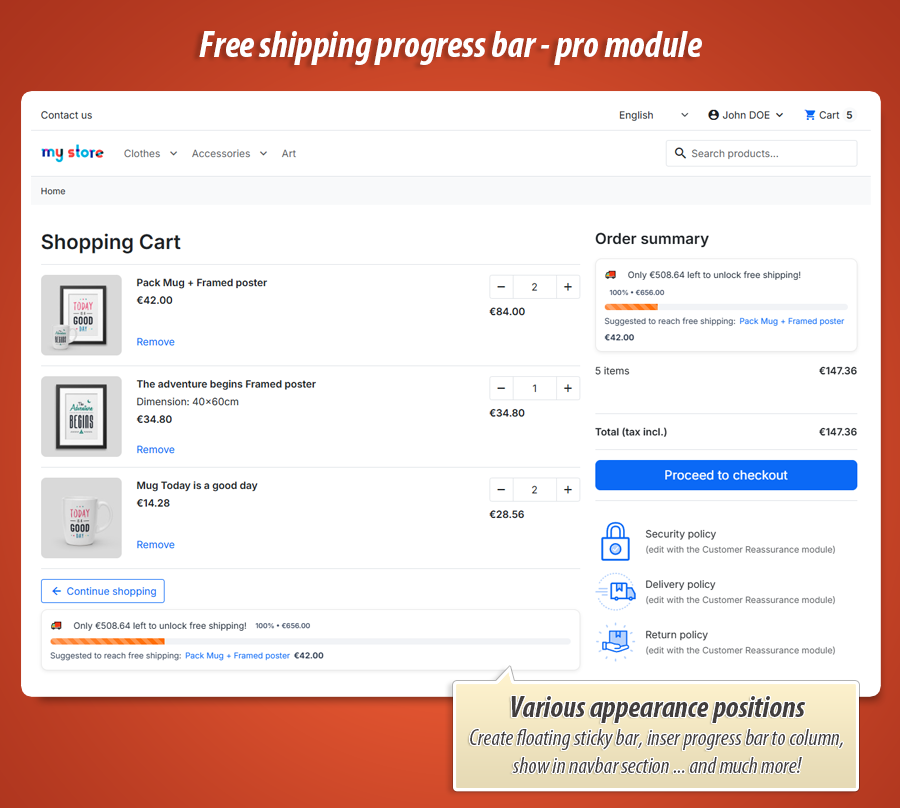
Smart Free Shipping Progress Bar Pro for PrestaShop dynamically boosts Average Order Value by displaying a customizable progress bar towards free delivery. It actively shows customers how much more they need to spend, featuring intelligent product suggestions tailored to their cart. The module supports specific free shipping thresholds based on country and customer groups, enhancing personalization. With real-time AJAX updates, A/B testing for messages, and flexible placement options including a sticky bar, it encourages additional purchases and optimizes conversion rates efficiently.
Module version:
1.1.0
Shop versions:
9.x8.x1.7.x
Works with ThirtyBees:
No
Translations:


Increase your Average Order Value with
Smart Free Shipping Progress Bar Pro
Stop losing potential sales because customers don't know how close they are to free delivery. This module adds a live, fully customizable progress bar to your store. It automatically calculates the missing amount, displays dynamic messages, and suggests specific products to help customers reach the threshold. With smart rules for different countries and customer groups, you can perfectly tailor your free shipping strategy to maximize profits.
Why a static “free shipping from €50” line is not enough
You already offer free delivery above a threshold—but most themes only show a fixed sentence in the footer or carrier settings. Customers do not feel the gap between their cart and the reward. They leave with a half-full basket.
What works is a visible progress bar: “Only €12.40 left to unlock free shipping,” updating as they add products. It creates a small, honest goal—and when you suggest one product that closes the gap, conversion often follows.
Smart Free Shipping Progress Bar – Pro does that end to end: dynamic copy in every shop language, thresholds per country and customer group, optional sticky bar, visual designer with live preview, A/B message tests, and stats on who actually reached free shipping. No core overrides—just hooks and a widget that fits Classic and modern themes.
What you get with this module
-
Live progress bar:
Shows remaining amount, percentage, and success state when the threshold is reached. -
Smart upsell:
Suggests a catalog product based on cart categories and the missing amount—or pin a manual product as fallback. -
Segmentation & analytics:
Different thresholds per country and VIP/wholesale groups; A/B copy with conversion reporting.
Dynamic messages
Speak to each visitor in their language—with numbers that update automatically.
Copy that writes itself (almost)
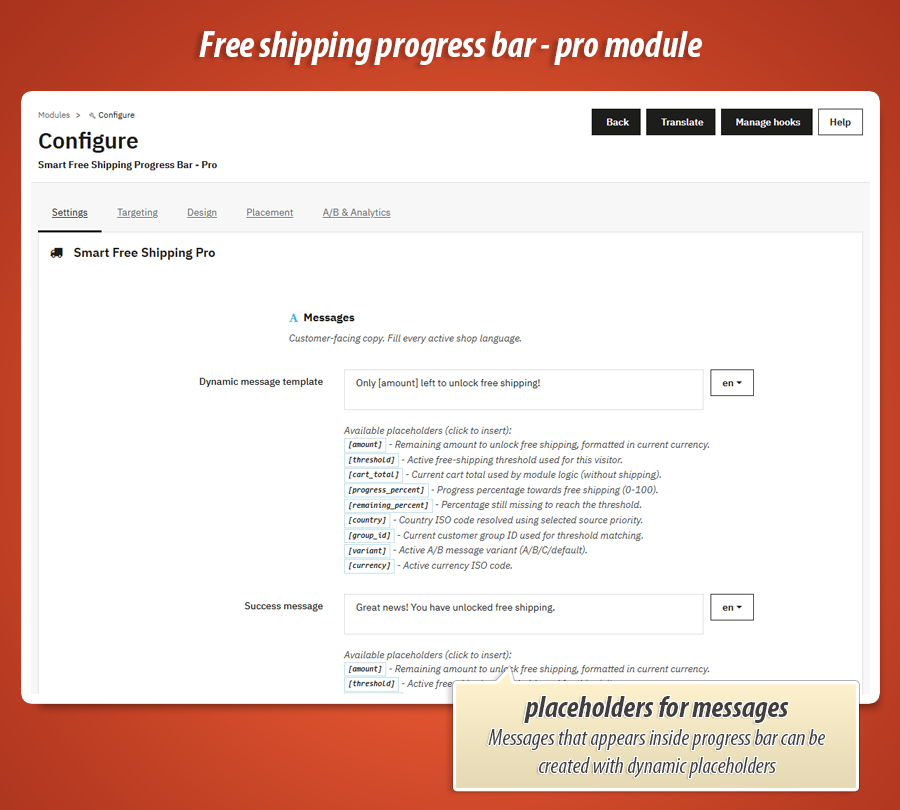
Define a message template and success text for every active language. Use placeholders such as [amount], [threshold], [cart_total], [progress_percent], [country], and [currency]. The module fills in live values on every page load and after each cart update. When the cart crosses the line, the bar switches to your celebration message.
The front office refreshes the bar via AJAX after cart changes, with optional visual feedback (wiggle, flash, glint) when the total moves, drawing the customer's eye to their progress.
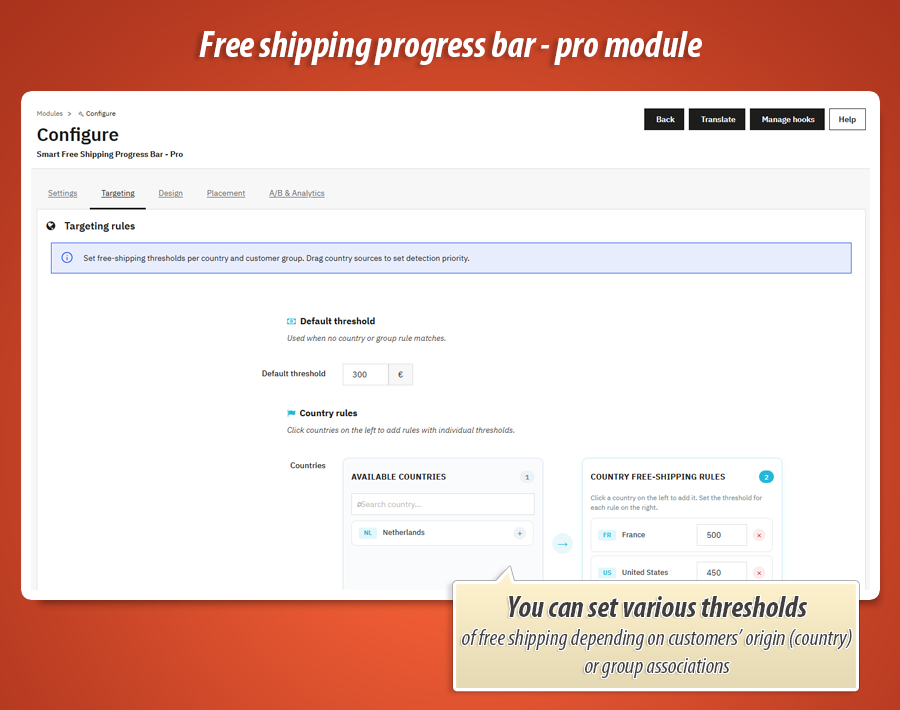
Country & group rules
One default threshold—or many, tuned to where your customer shops and who they are.
Thresholds that match real customers
Set a shop-wide default, then add per-country free-shipping amounts. Do the same for customer groups—ideal for VIP or wholesale buyers with lower thresholds. Reorder detection sources (delivery address, invoice address, GeoIP) so the module picks the right country even before checkout.
GeoIP fallback uses PrestaShop’s own geolocation first; optional external API only when needed. Cart totals exclude shipping—aligned with how carriers usually calculate free delivery.
Smart upsell
Suggest the product that closes the gap—not a random bestseller.
One click away from free shipping
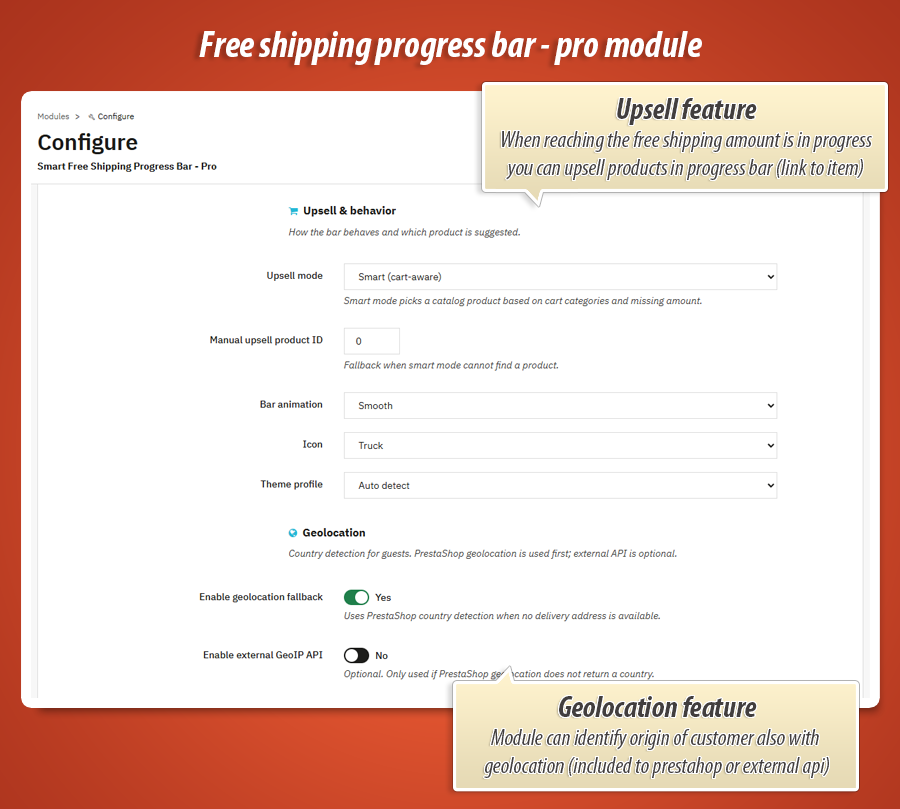
In smart mode, the module analyses cart categories and the remaining amount to pick a suitable product from your catalog, then shows name, link, and price under the bar. Prefer full control? Switch to manual mode and set a fixed product ID as fallback when smart mode finds nothing.
You can hide the upsell block in the visual designer if you only want the progress message—handy for minimalist themes.
Placement & sticky bar
Show the bar where shoppers actually look—without editing theme files.
Hooks you toggle on and off
Enable the widget per theme hook: top navigation, homepage, columns, product reassurance, cart footer, checkout subtotal, footer, and more. Defaults turn on common spots (e.g. primary nav and cart footer); you decide how many are active so the store does not feel crowded.
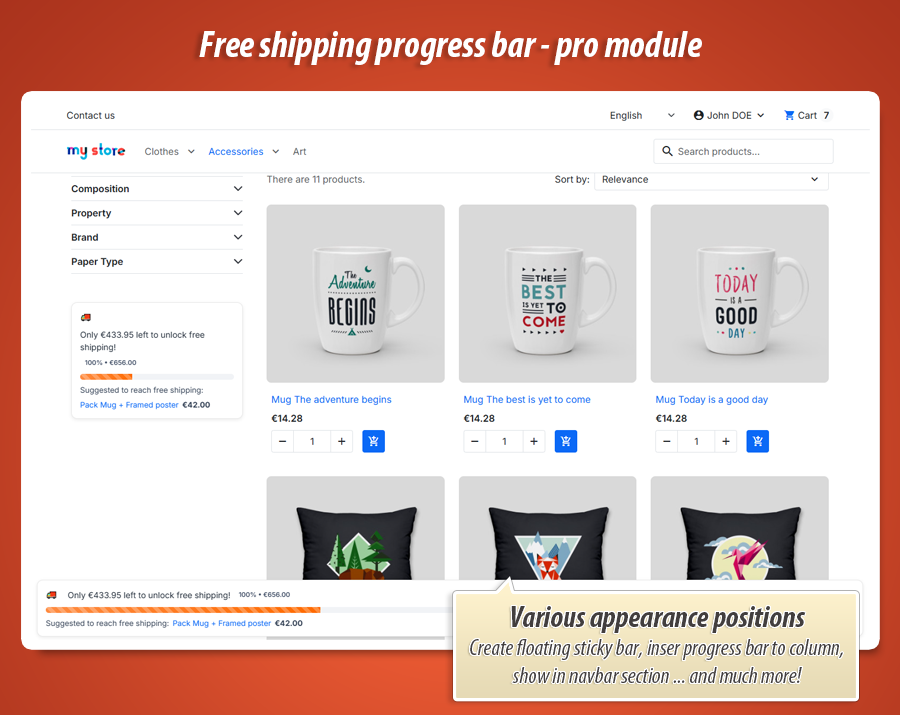
Optional sticky bottom bar stays visible across pages while browsing—strong for mobile shoppers who never scroll back to the cart summary. Works alongside inline instances on cart and product pages.
Below you will find every option from the module configuration, explained in plain language: what it does, why it matters, and how it helps your store sell more with less friction.
Engaging Messages & Smart Behavior
Communicate clearly with your customers and guide them towards completing their purchase with dynamic text, smart product suggestions, and intelligent geolocation.
Messages
Customer-facing copy for every active shop language. You are not limited to one static sentence—the bar speaks in real numbers that update as products are added or removed.
Dynamic message template
This is the main text shown while the customer has not yet reached free shipping. You write one template per language; the module fills in live values on every page load and after each cart update.
What it does: Replaces placeholders with the current remaining amount, threshold, cart total, progress percentage, country code, customer group, A/B variant label, and currency—formatted for the visitor’s context.
Why it helps: Shoppers see exactly how much is left (“Only €14.20 left to unlock free shipping!”) instead of a vague promise. That clarity reduces abandonment and nudges them to add one more item. You can easily insert dynamic placeholders to personalize the experience: [amount], [threshold], [cart_total], [progress_percent], [remaining_percent], [country], [group_id], [variant], [currency].
Success message
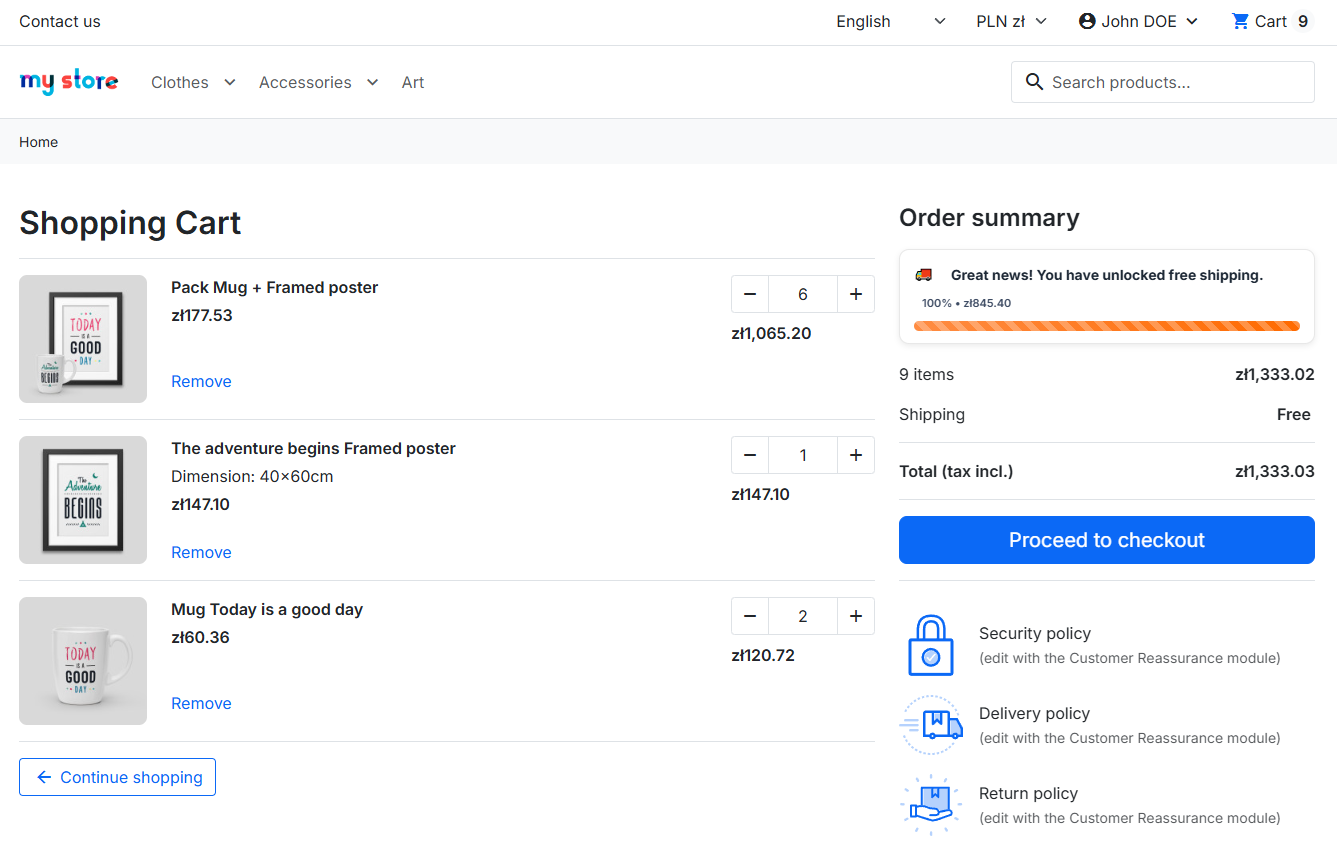
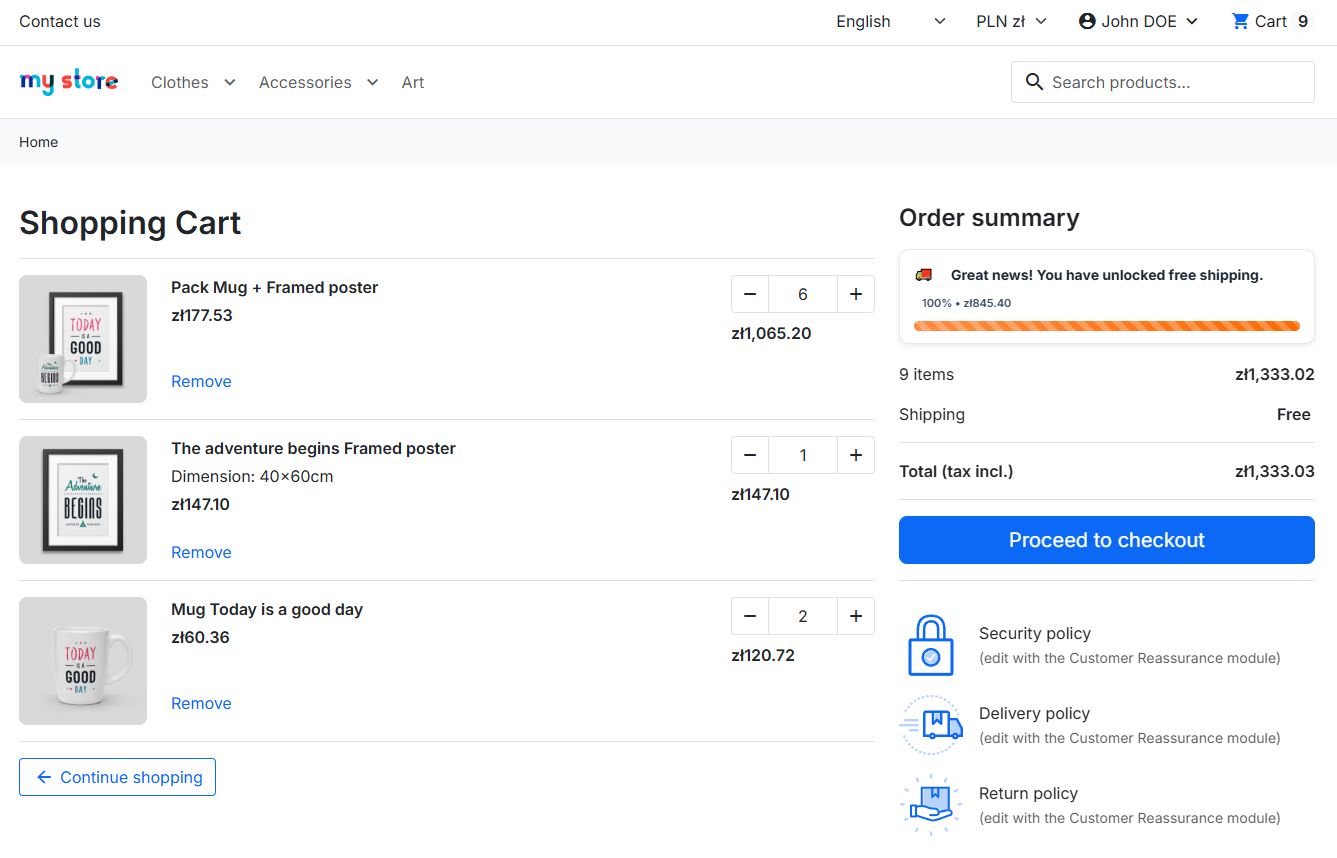
Shown when the cart total meets or exceeds the active free-shipping threshold for that visitor. The progress bar fills to 100% and the dynamic template is replaced by your celebration copy.
Why it helps: Confirms the reward immediately—“Great news! You have unlocked free shipping”—so customers feel they achieved something and proceed to checkout with confidence. Supports the same placeholders if you want to repeat the threshold or cart total in the success line.
Upsell & behavior
Controls motion, branding of the icon, theme compatibility, and the optional product recommendation under the bar.
Upsell mode
Smart (cart-aware): The module searches your catalog for a product that fits the cart’s categories and is priced close to the missing amount needed for free shipping. It displays the product name, link, and price below the bar.
Manual product ID: You always show one fixed product you choose—useful when you want to promote a specific add-on (samples, warranty, bestseller pouch) regardless of cart content.
Why it helps: Smart mode turns the progress bar into a guided upsell: one relevant product that closes the gap, not a random cross-sell. That typically converts better than showing unrelated items.
Manual upsell product ID
Enter the PrestaShop product ID used when upsell mode is manual, or as a fallback when smart mode cannot find a suitable product in the catalog.
Why it helps: You never show an empty upsell block. Even with a sparse catalog or unusual cart, you can fall back to a safe default product you know ships well and margins accept.
Bar animation
None: Static bar—minimal distraction, best for very clean themes.
Smooth: Gentle transition when the fill percentage changes after cart updates.
Pulse: Subtle pulsing on the progress fill to draw attention without being aggressive.
Why it helps: Motion signals that the bar is live and tied to the cart, which reinforces the “almost there” feeling and can increase add-to-cart on the next product.
Icon
Choose the pictogram next to the message: Truck (delivery focus), Gift (reward focus), or Star (premium / special offer tone).
Why it helps: A small visual cue makes the bar scannable in busy headers or cart areas. You match the mood of your brand without custom graphics.
Theme profile
Auto detect: The module adapts styling hooks to the active theme when possible.
Classic or Hummingbird: Force compatibility profile for PrestaShop’s main theme families when auto detection is not enough.
Why it helps: The bar looks native on the storefront—correct spacing and contrast—without editing theme templates.
Geolocation
Country detection for guests and early-session visitors. Used together with the Targeting tab so the right threshold applies before the customer enters a delivery address.
Enable geolocation fallback
When no delivery address exists yet, the module uses PrestaShop’s built-in country detection (GeoIP) to guess the visitor’s country and apply the matching country rule from Targeting.
Why it helps: International shops show the correct free-shipping target from the first page view—not a generic default that confuses foreign buyers.
Enable external GeoIP API
Optional second layer. Called only if PrestaShop geolocation does not return a country. Useful on hosts where native GeoIP is disabled or inaccurate.
Why it helps: More reliable country rules for guests without forcing them to select country manually at the start of the visit.
External API URL
Endpoint template for the external service. Must include %s where the visitor IP is inserted (example format: https://ipapi.co/%s/country/).
Why it helps: You stay in control of which provider you trust and can switch APIs without code changes.
API timeout (seconds)
Maximum wait time for the external GeoIP request. Keeps the storefront fast if the API is slow or down.
Why it helps: Protects page performance— the bar still appears using fallback logic instead of blocking the shop.
Precision Targeting & Rules
Not all customers are the same. Set the perfect free shipping threshold for different markets, VIP clients, or wholesale buyers to maximize your margins.
Default threshold
Default threshold
The shop-wide minimum cart value (products only, shipping excluded) required for free delivery when no country rule and no customer-group rule applies.
Why it helps: One safety net for all visitors. Amounts are entered in the shop default currency and converted automatically when the customer switches currency—so mult currency stores stay consistent.
Country rules
Countries (visual country picker)
Interactive list of all active countries. Click a country on the left to add it to your rules; set an individual free-shipping threshold for each on the right. Search helps large catalogs.
What it does: Stores rules as structured data (country ISO code + threshold). When the module resolves the visitor’s country, it uses the matching rule instead of the default.
Why it helps: Run fair economics per market—higher threshold for remote countries, lower for domestic—without separate shops or manual theme edits. Removes “remove all rules” when you need to reset quickly.
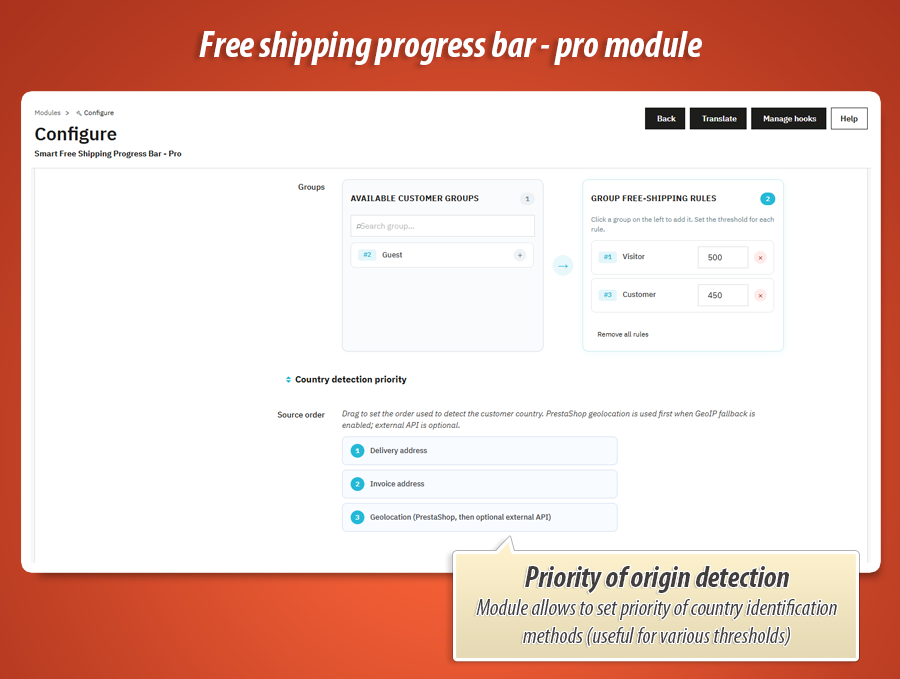
Customer groups
Groups (visual group picker)
Same workflow as countries: pick a group (VIP, wholesale, employees, etc.) and assign its own threshold. Search and bulk remove are built in.
Why it helps: Reward loyal or B2B buyers with a lower free-shipping bar while keeping a higher bar for retail guests—directly in the progress message they see while shopping.
Country detection priority
Source order (drag to reorder)
Three sources, in your chosen order:
- Delivery address — country from the cart’s delivery address when available.
- Invoice address — fallback to invoice country if delivery is not set.
- GeoIP — geolocation from Settings when addresses are missing (guest browsing).
Why it helps: You control legal and commercial logic explicitly—e.g. prioritize delivery country at checkout but GeoIP on the homepage—so the bar always shows the threshold you intend for that moment in the journey.
Stunning Visuals & Live Customization
Make the progress bar a seamless part of your store's branding. With the built-in visual editor, you have full control over every color, shadow, and animation—all with a real-time preview.
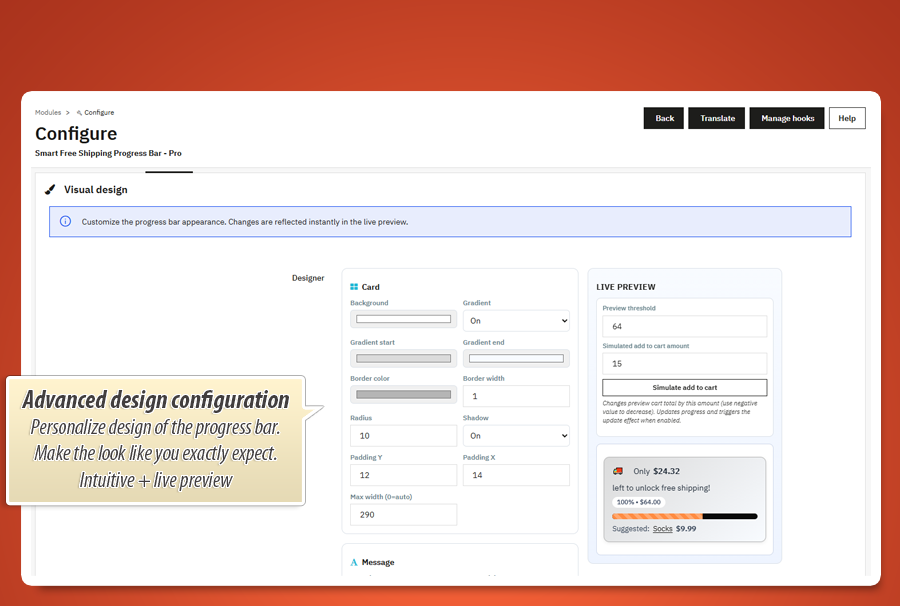
Real-Time Preview Tools
Live preview
A real-time rendering of the bar as customers will see it, using your current design settings and sample copy.
Why it helps: You design with confidence—colours, radius, and typography are WYSIWYG before publishing.
Preview threshold
Sets the simulated free-shipping target in the preview (e.g. €64) so you can see how the bar looks at different goal levels.
Simulated add to cart amount & Simulate add to cart
Add or subtract a value from the preview cart total to mimic products being added or removed. Triggers progress recalculation and, when enabled, the update effect animations—exactly as on the live shop after AJAX cart refresh.
Why it helps: You tune motion and colours while watching the bar react, not guessing from static screenshots.
Card Styling
Background, gradient, border, radius, shadow, padding, max width
Background color or gradient (on/off with start/end colours) for the card behind the message and bar.
Border color & width and radius shape the container—from flat minimal strips to soft rounded cards.
Shadow (on/off) adds depth so the bar stands out in the header or cart.
Padding Y / Padding X control internal spacing; max width (0 = full width) keeps the bar readable on ultra-wide layouts.
Why it helps: The progress block matches your brand guidelines instead of looking like a generic plugin dropped into the theme.
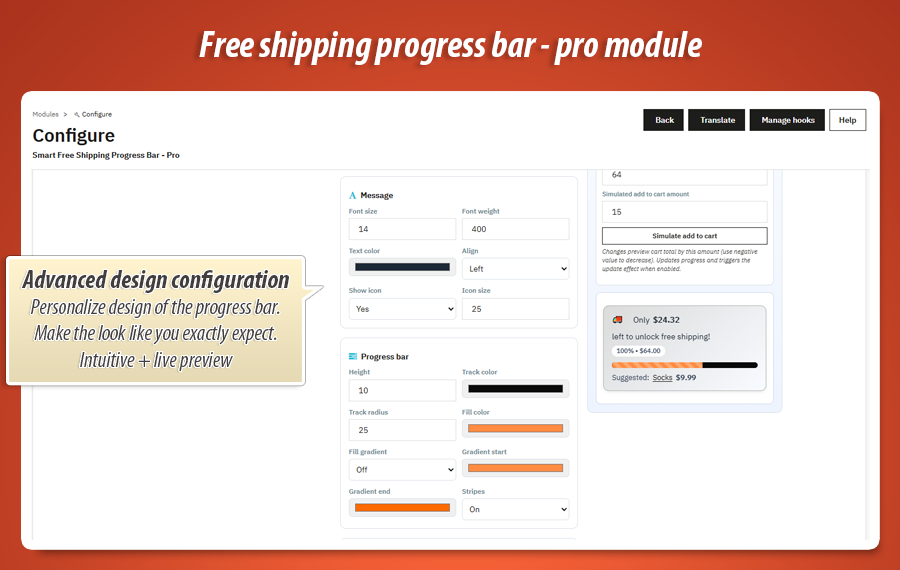
Typography & Icons
Font size, font weight, text color, alignment, show icon, icon size
Typography and layout of the main line: left, center, or right aligned.
Show icon toggles the truck/gift/star from Settings independently of text; icon size scales it for mobile headers or large cart panels.
Why it helps: Readable on small screens, prominent on desktop—without conflicting with theme fonts if you align sizes deliberately.
Progress Bar Aesthetics
Height, track color, track radius, fill color, fill gradient, stripes
Bar height and track color/radius define the empty part of the meter.
Fill color or gradient fill (two colours) is the completed portion—your brand accent or a conversion-focused highlight.
Stripes (on/off) add a subtle animated pattern on the fill for extra visibility.
Why it helps: The progress line becomes a branded UI element customers recognise across pages, not a default grey Bootstrap bar.
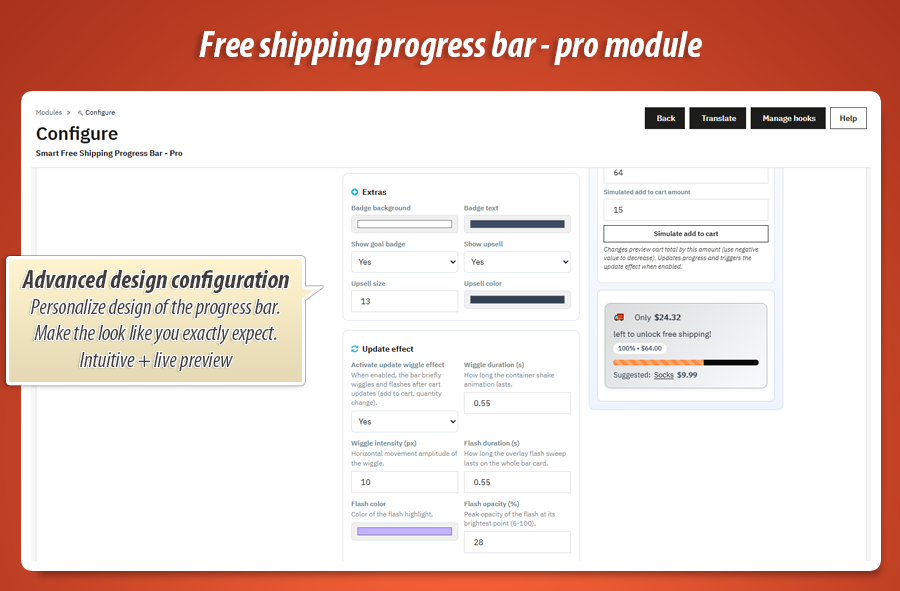
Badges & Upsell Display
Goal badge, upsell line, colours and sizes
Show goal badge displays a compact pill (e.g. threshold summary) next to the message when enabled.
Badge background & text colour style that pill.
Show upsell toggles the product suggestion block from Settings without disabling upsell logic entirely.
Upsell font size & colour keep the recommendation readable but secondary to the main message.
Why it helps: You can run a message-only bar on minimalist themes, or a rich bar with badge + product link where space allows.
Engaging Animations
Activate update wiggle effect
When enabled, the whole bar card briefly wiggles, flashes, and shows a glint across the progress track after each cart update (add, remove, quantity change) on the storefront.
Why it helps: Draws the eye to progress moving upward—“you are closer now”—which reinforces the goal without pop-ups.
Wiggle duration & intensity
Controls how long the container shake lasts and how many pixels it moves horizontally. Short and subtle feels premium; longer reads more playful.
Flash duration, flash color, flash opacity, flash spread
A light sweep across the card: colour, how bright the peak is, and how wide the bright band is. Tuned to match brand highlights or seasonal campaigns.
Bar glint duration & width
A moving shine along the progress track—duration and stripe width in pixels—so the fill itself feels “charged” when the cart grows.
Strategic Placement & Visibility
Display the progress bar exactly where your customers are looking. Whether it's the top navigation, the shopping cart, or a sticky bar that follows them, you have complete control over its visibility.
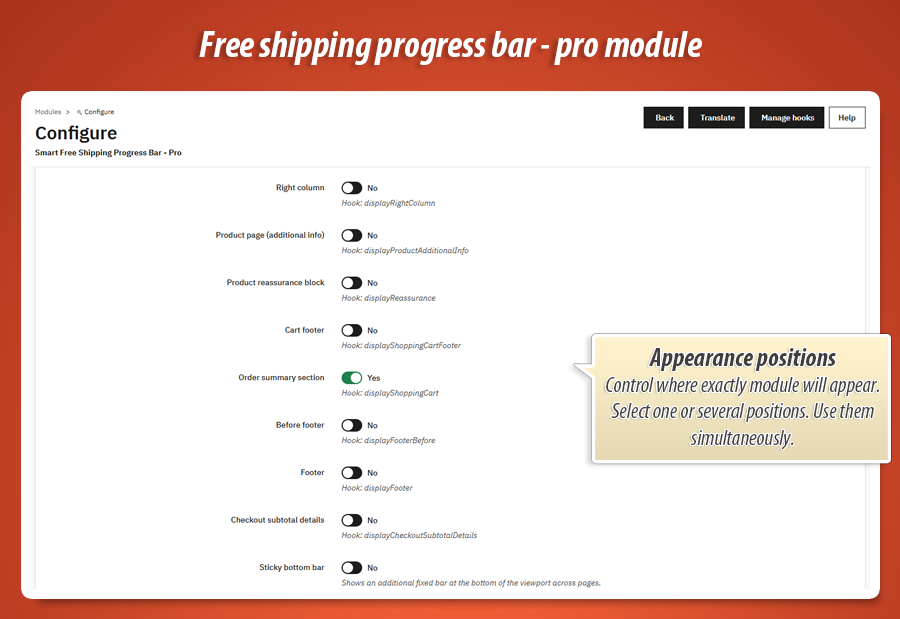
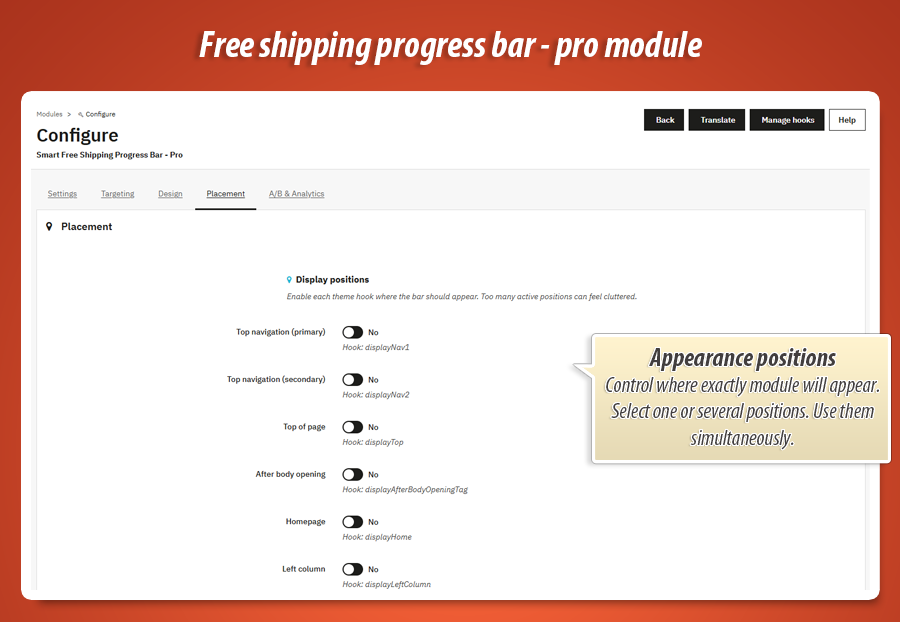
Display positions
Top navigation (primary) — displayNav1
Visible in the main header nav area on every page where the hook runs. Enabled by default. Ideal for reminding guests of free shipping while they browse categories.
Top navigation (secondary) — displayNav2
Secondary header row on themes that split navigation. Use when the primary row is crowded but you still want top-of-page visibility.
Top of page — displayTop
Full-width area below the header on many Classic layouts. Strong visibility without sitting inside the menu links.
After body opening — displayAfterBodyOpeningTag
Very top of the document. Useful for sticky-style campaigns or themes with minimal header hooks.
Homepage — displayHome
Home page content zone. Sets expectations before the customer opens a product—especially effective with country-based thresholds.
Left column — displayLeftColumn
Sidebar on catalog and CMS pages. Keeps the goal visible while filtering categories (themes with a left column).
Right column — displayRightColumn
Same as left column for right-sidebar layouts. Pair with cart block if your theme stacks widgets there.
Product page (additional info) — displayProductAdditionalInfo
Under product actions on the product sheet. Shows how this item contributes to free shipping while the buyer decides quantity.
Product reassurance block — displayReassurance
PrestaShop reassurance zone (trust badges area). Positions free shipping as a trust benefit next to returns or security icons.
Cart footer — displayShoppingCartFooter
Bottom of the cart page. Enabled by default. Highest intent: the customer is reviewing the basket—perfect moment for remaining amount + upsell.
Order summary section — displayShoppingCart
Inside the cart summary block (mini-cart or full cart, depending on theme). Keeps progress visible next to totals.
Before footer — displayFooterBefore
Strip above the site footer on pages that expose this hook. Last chance reminder before the customer leaves the page.
Footer — displayFooter
Inside the footer column area. Lower prominence but always on wide layouts that render footer hooks globally.
Checkout subtotal details — displayCheckoutSubtotalDetails
Checkout funnel beside subtotal lines. Reduces surprises at the last step—“you are €3 away” right where payment decisions happen.
Sticky bottom bar
Sticky bottom bar
Adds a second instance fixed to the bottom of the viewport on all pages (in addition to any hook-based instances you enabled). Stays visible while scrolling on mobile and desktop.
Why it helps: Many buyers never return to the cart drawer after adding a product. A persistent bar keeps the free-shipping goal in view until they complete the threshold—especially powerful together with smart upsell.
A/B Testing & Performance Tracking
Stop guessing and start optimizing. Test different messages to see which one drives the most sales, and track your success with built-in analytics.
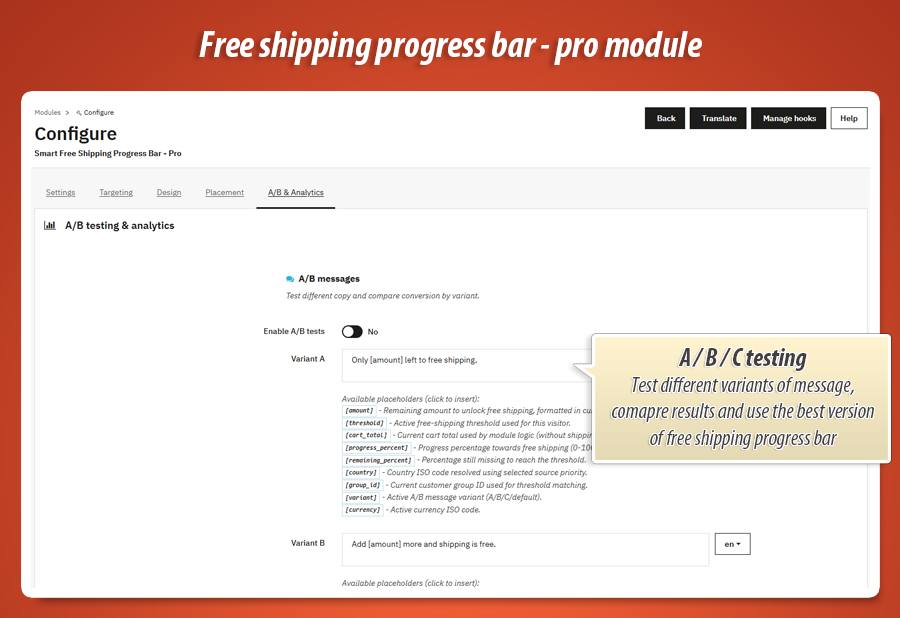
A/B messages
Enable A/B tests
Turns on automatic rotation between message variants instead of always showing the default dynamic template from Settings. Each visitor is assigned a variant for the session; impressions and conversions are recorded.
Why it helps: Small copy changes (“Only [amount] left” vs “Add [amount] more for free delivery”) can shift average order value—you measure it with data, not gut feeling.
Variant A, Variant B, Variant C
Three independent message templates per language, each supporting the same placeholders as the main dynamic message. Example angles: urgency, reward framing, or percent complete ([progress_percent]).
Why it helps: Run proper multivariate copy tests without duplicate modules or theme hacks.
Weight A (%), Weight B (%), Weight C (%)
Traffic split between variants (e.g. 40% / 35% / 25%). Controls how often each message is shown to new sessions.
Why it helps: You can favour a promising variant while still gathering data on challengers, or evenly split for a clean three-way test.
Performance
Conversion by variant (chart)
Visual report of impressions, conversions, and conversion rate per variant (A, B, C, or default when A/B is off). A conversion is recorded when the customer’s cart reaches the free-shipping threshold; an impression is counted when they see the bar.
Why it helps: You pick the winning message and disable weaker variants—direct impact on revenue per visitor.
Total customers who reached free shipping
Running counter of how many times shoppers hit the goal (all variants combined). Shows whether your threshold and placement strategy are achievable in practice—not just how many people saw the bar.
Why it helps: If impressions are high but goal hits are low, you may lower a threshold, improve upsell, or test sharper copy—using one number the whole team understands.
How it works on the storefront (automatic)
These behaviors are not separate settings but part of the module experience your customers get once configuration is saved:
-
Live AJAX refresh: After add-to-cart, quantity change, or cart delete, the bar updates without a full page reload via the module refresh endpoint—percent, message, and upsell stay accurate.
-
Widget-ready: Implements PrestaShop’s widget interface so the bar can be placed through hooks and theme integration patterns supported by 1.7+.
-
Cart total logic: Progress is based on product value in the cart (shipping excluded), aligned with typical carrier free-delivery rules.
Technical specification & compatibility
Built according to modern PrestaShop standards. The module uses the Widget Interface, relies on AJAX for asynchronous updates, and does not modify core files.
WidgetInterface, allowing the bar to be placed seamlessly in over 14 different hooks (e.g., displayNav1, displayShoppingCartFooter).
40.00 €
Module Gallery 1/15
Why choose our module
Free Shipping Progress Bar Pro?
Optimization and Automation
This module optimizes sales by automating dynamic free shipping progress bars and smart product upsells. It supports A/B message testing, geo-targeting, and customer group rules to boost average order value and streamline customer journeys.
Increased Sales
This module significantly boosts sales by displaying a live, dynamic free shipping progress bar. It uses smart upsell, country-specific targeting, and A/B message testing to effectively motivate customers to increase their cart value, enhancing average order value and conversion rates.
15 years of experience
Our 15 years of PrestaShop experience are baked into this module. It ensures seamless, robust free shipping. With smart upsells, dynamic messages, and A/B testing via modern hooks, it perfectly optimizes your average order value.
Extensive Customization
This module offers extensive customization: visually design your progress bar with precise control over colors, fonts, and animations. Tailor dynamic messages, define targeted thresholds for countries and customer groups, and A/B test content for optimal store integration and conversion.
Open Source Code
This module boasts 100% independent architecture, providing full access to its source code, templates, CSS, and JS. This enables advanced modifications, custom integrations, and ensures safe PrestaShop upgrades, free from core overrides or hidden functions.
License and Updates
Ensures long-term value and stability, fully compatible with PrestaShop 1.7.x, 8.x, 9.x, and all modern PHP versions. Its independent architecture guarantees seamless, safe upgrades and future-proof functionality, keeping your store always up-to-date.