
PrestaShop Currency and language by country
This is free golocation module for PrestaShop that allows to set the currency and language for selected country. Module will disable the rest of languages and currencies for visitor from defined country. It is a free version of our geolocation pro addon.
0.00 €
Download for PrestaShop 1.6Download for PrestaShop 1.7Download for PrestaShop 8.xDownload for PrestaShop 9 and newer
Dlaczego jest kilka wersji modułu?
This is due to the fact that different PrestaShop releases use different programming solutions. Features working e.g. in PrestaShop 1.7 may not work in PrestaShop 9. Hence the need to release different versions of the module, which will ensure operation in many different versions of the shop.
This is due to the fact that different PrestaShop releases use different programming solutions. Features working e.g. in PrestaShop 1.7 may not work in PrestaShop 9. Hence the need to release different versions of the module, which will ensure operation in many different versions of the shop.
We develop the module for free - if you want - support us!
Galeria 1/2
Automatic Geolocation Currency & Language Switcher
This complimentary PrestaShop geolocation module dynamically tailors currency and language based on customer's geographical location. It automatically detects the country to display prices in the appropriate currency, simplifying purchases for international customers and eliminating conversion confusion. Simultaneously, it switches the storefront language to match, creating a more welcoming and engaging environment. This personalization significantly enhances user experience, reducing barriers for global shoppers, and positively impacts SEO performance through localized content. Free and easy to install, this module boosts customer satisfaction and encourages exploration of your product offerings, leading to increased conversions.
Module version:
1.2.8
Shop versions:
9.x8.x1.7.x1.6.x
Works with ThirtyBees:
Yes
Translations:


One country, one experience.
Free Geolocation Currency + Language for PrestaShop.
Out of the box, every visitor sees the same currency and language. If you sell mainly to one country—or want to give visitors from that region a dedicated, localised experience—you need automatic detection and switching. This free module uses PrestaShop’s built-in GeoIP to detect the visitor’s country and, when they match your chosen country, sets the store currency and/or language in one go. No manual switching, no guesswork. One form in the back office, zero cost.

Why showing the same currency and language to everyone is not enough
When you target a specific country—for example, you run a local store that also ships to a neighbouring country, or you have a dedicated offer for one market—visitors from that region expect to see prices in their currency and content in their language. Forcing them to hunt for the language or currency selector adds friction and can cost you sales.
PrestaShop already ships with geolocation (GeoIP): it can detect the visitor’s country from their IP address. What’s missing is a simple way to say: “When the visitor is from country X, use currency Y and language Z automatically.” No redirects, no third-party APIs—just one configured country and the currency and language you want for that audience.
Free Geolocation Currency + Language does exactly that. You pick the country, optionally enable currency switching and choose the currency, optionally enable language switching and choose the language. Visitors from that country get the right experience from the first page load. Everyone else sees the default shop behaviour. One module, one form, fully free.
What you get with this module
-
Automatic currency for one country:
Visitors from the selected country see prices in the currency you choose. No manual switch; the module sets the context on each request. -
Automatic language for one country:
Same idea for language: visitors from the selected country get the storefront in the language you configure. One language for that region, applied automatically. -
PrestaShop GeoIP only:
Uses the same GeoIP database and mechanism as PrestaShop (GeoLite2 City in/app/Resources/geoip/). No external services, no API keys.
What the module does
Currency by country
Turn on currency change by visitor’s origin and select the currency. When the visitor’s country (from GeoIP) matches the configured country, the shop context is set to that currency. Prices and cart use it automatically; for that country you can effectively offer a single-currency experience.
Language by country
Turn on language change by visitor’s origin and select the language. For visitors from the selected country, the storefront language is set to that language. Descriptions, navigation, and emails (where applicable) follow the same locale. You decide the single language for that market.
Simple back-office form
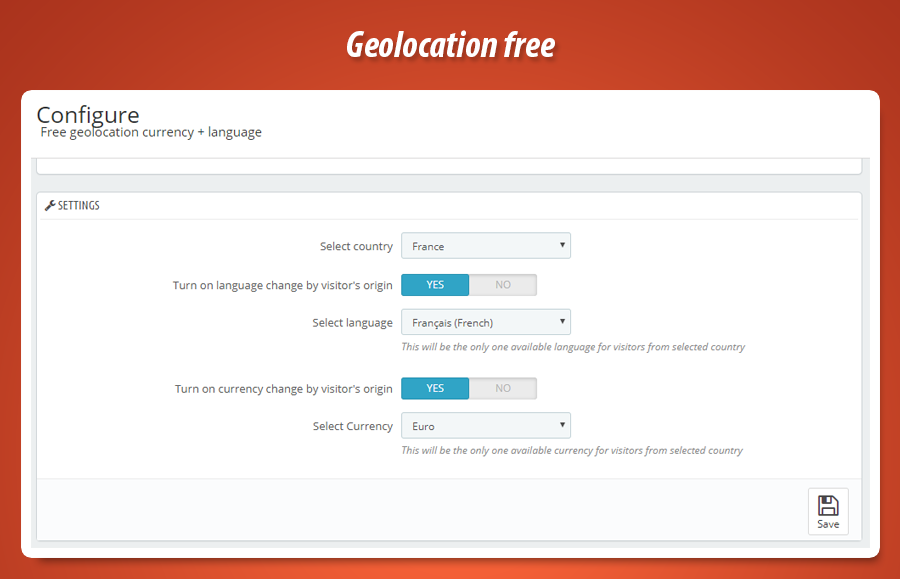
One configuration screen: select country from the dropdown (all PrestaShop countries), then enable or disable language switching and pick the language, enable or disable currency switching and pick the currency. Save. The module runs on actionFrontControllerAfterInit and applies the context before the page is rendered.
Geolocation = GeoIP
The module uses PrestaShop’s built-in GeoIP (GeoLite2 City). Make sure the database file is in place so country detection works.
How country detection works
Visitor country is resolved from their IP using the same GeoIP database that PrestaShop uses: the GeoLite2 City file in /app/Resources/geoip/. If that file is missing, the module shows an alert in the back office with a link to download it and instructions to extract it into the correct directory. On localhost, geolocation typically won’t resolve to a real country, so the module displays a warning—behaviour is reliable when the site is online with a public IP.
When the detected country matches the configured Select country, the module sets the cookie and context for currency and/or language (depending on your toggles). For that visitor, the shop then uses only the chosen currency and language until they change it or come from another country. No redirects; the switch happens at the start of the request.
Currency & language toggles
Enable currency and/or language independently. One country, your chosen currency and language for that country.
Independent control
You can enable language change by visitor’s origin and leave currency change off (or the opposite). So you might show a single language for a given country but keep the default currency, or force one currency and keep the default language. The form makes it clear: “This will be the only one available language for visitors from selected country” and the same idea for currency. So you tailor the experience exactly to what you need for that one target country.
Alerts & updates
Back office alerts for localhost and missing GeoIP. MyPresta update checker built in so you stay on the latest version.
Helpful back-office messages
When you open the module configuration, it may show: (1) a warning if you’re on localhost—geolocation will only identify the country when the site is online; (2) a danger alert if the GeoIP database file is missing, with a direct link to download the file and instructions to extract it into /app/Resources/geoip/. Once the file is in place and the site is live, the module runs without extra setup. The page also includes the MyPresta update checker so you can see if a new version is available and open the changelog.
Simple configuration in the back office
One screen: choose the target country, then enable and select the language and/or currency for visitors from that country. No tabs, no clutter.
Form fields
- Select country (dropdown: all PrestaShop countries)
- Turn on language change by visitor’s origin (Enabled/Disabled)
- Select language (single language for that country)
- Turn on currency change by visitor’s origin (Enabled/Disabled)
- Select currency (single currency for that country)
Behaviour
- Visitor country from PrestaShop GeoIP (GeoLite2 City)
- Match = set currency and/or language context on each request
- No match = default shop currency and language
- MyPresta update checker and alerts (localhost, GeoIP file) on config page
Technical specification & compatibility
Uses PrestaShop’s GeoIP and runs early in the request. Optional overrides for Currency and Language classes so that the chosen currency/language are enforced for the target country. Safe for multistore and updates when used as intended.
actionAdminControllerSetMedia, actionFrontControllerAfterInit, actionDispatcherBefore._PS_GEOIP_DIR_. No external APIs.Currency and Language classes to restrict available currency/language for the target country when module is active.


0.00 €
Download for PrestaShop 1.6Download for PrestaShop 1.7Download for PrestaShop 8.xDownload for PrestaShop 9 and newer
Dlaczego jest kilka wersji modułu?
This is due to the fact that different PrestaShop releases use different programming solutions. Features working e.g. in PrestaShop 1.7 may not work in PrestaShop 9. Hence the need to release different versions of the module, which will ensure operation in many different versions of the shop.
This is due to the fact that different PrestaShop releases use different programming solutions. Features working e.g. in PrestaShop 1.7 may not work in PrestaShop 9. Hence the need to release different versions of the module, which will ensure operation in many different versions of the shop.
We develop the module for free - if you want - support us!
Module Gallery 1/2
Why choose our module
Currency and language by country?
Optimization and Automation
This module automates currency and language display based on customer location, optimizing the international shopping experience. It streamlines operations, eliminates manual conversions, and enhances SEO performance through dynamic localization, making your store more efficient.
Increased Sales
Increase sales by delivering a seamless, localized experience. Automatically displaying local currency and language reduces buying friction, boosts customer confidence, and significantly improves conversion rates for international shoppers, turning visitors into loyal customers.
15 years of experience
Backed by 15 years of PrestaShop development insight, this module delivers robust geolocation for currency and language. We engineered it to perfectly address critical internationalization challenges, ensuring your store provides a seamless, localized experience globally, maximizing conversions.
Extensive Customization
This module dynamically tailors the customer experience, effectively leveraging your store's existing extensive currency and language configurations. It ensures a personalized, localized display, perfectly fitting your diverse customer base by automatically applying your defined settings based on their geography.
Open Source Code
This free module grants full access to its source code, free from obfuscation like ioncube. Users can freely inspect, modify, and integrate its functionalities, enabling advanced customization to perfectly align with specific e-commerce requirements and enhance store operations.
License and Updates
This complimentary module is offered completely free of charge, eliminating any licensing fees. Updates, when available, are also provided free, ensuring continuous compatibility with PrestaShop versions and reliable automatic currency and language switching.