
PrestaShop Order Grid Manager Free
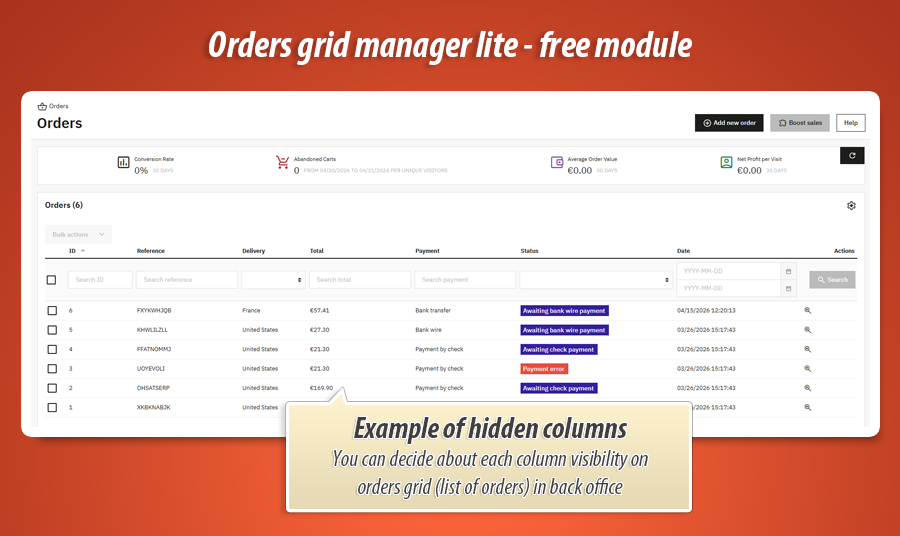
Order Grid Manager Free Module helps you declutter the PrestaShop Back Office by hiding unnecessary default columns in the orders list. Keep your team focused on the data they really need and speed up everyday order handling with simple on/off switches.
0.00 €
We develop the module for free - if you want - support us!
Galeria 1/4
PrestaShop Orders Grid Column Visibility Lite
"Order Grid Manager Lite" is a free PrestaShop module designed to streamline back office order management. It allows users to hide selected built-in columns from the order list using simple Yes/No switches. The module seamlessly integrates with PrestaShop's Symfony order grid, removing unnecessary information and enhancing the daily efficiency of packing and support teams. This ensures a clear, customized order list tailored to specific needs, without requiring database or theme modifications. Boost productivity and minimize errors by personalizing your order grid view.
Module version:
1.0.0
Shop versions:
9.x8.x1.7.7.x1.7.8.x
Works with ThirtyBees:
No
Translations:


A cleaner orders list in the Back Office.
Order Grid Manager Lite for PrestaShop.
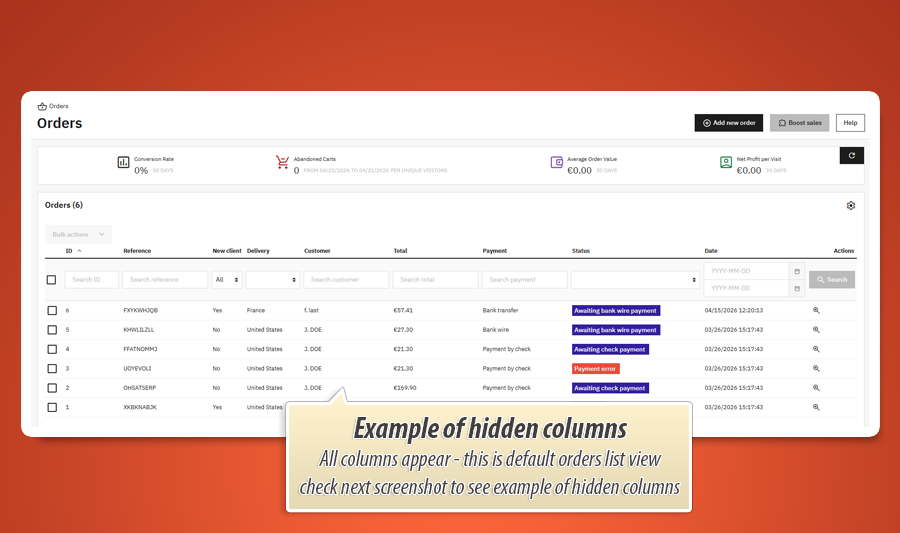
The default orders grid shows every standard column - great for audits, overwhelming for daily packing. Order Grid Manager Lite is a free MyPresta.eu module that lets you hide selected built-in columns from the main orders list with simple Yes/No switches. No database hacks, no theme edits: it plugs into PrestaShop’s Symfony order grid and removes only what you choose.
Why trim the orders grid?
Different teams need different data. Warehouse staff may only care about reference, carrier, and country. Support might focus on customer and payment. When every column stays visible, horizontal scrolling slows everyone down and increases mistakes.
PrestaShop’s modern orders list is built as a Symfony grid. This module listens to actionOrderGridDefinitionModifier and removes the column definitions you mark as hidden - so the list truly reflects your workflow, not a one-size-fits-all layout.
Order Grid Manager Lite keeps the scope honest: it is about visibility of standard columns. Need custom fields, drag-and-drop order, or inline status edits? The configuration screen includes a clear path to the Pro edition when you outgrow the free feature set.
Ten switches, ten stories
Lite does not invent mystery columns - it speaks the same language as PrestaShop’s order grid. Each switch is a polite “please step out of the frame” to one built-in column. The detailed catalog below tells you exactly what story that column tells on the screen, so you can decide whether your team still needs to hear it every morning.
Tip: “Yes” on a switch means hide that column; “No” keeps it in the spotlight.
The complete column catalog
These are the ten standard columns exposed in the module configuration (names match the Back Office grid). Flip a switch when that piece of information is noise for your current process - not because the data is useless, but because context is a luxury and screen width is not.
Below: what each column means in practice - who squints at it, what decision it supports, and the kind of day when hiding it feels like clearing fog off the windshield.
Order ID
Switch label in config: Order ID
This is PrestaShop’s internal fingerprint: the immutable numeric spine every log line, export row, and payment callback secretly agrees on. Accountants love it; barcode scanners rarely whisper it aloud. Keep it visible when you are reconciling gateways, grepping support tickets, or training someone to think in “cart #48291” instead of pretty references. Hide it when your fulfilment crew already lives inside the Reference column and the big integer column is just visual static between them and the packing slip.
Reference
Switch label in config: Reference
The human-facing alias customers repeat on the phone - “It’s order ABCDEF.” It is the string your warehouse writes on boxes, your courier apps search for, and your marketing team screenshots when bragging about volume. Show it when the grid is your command centre for matching physical parcels to digital rows. Hide it only when every downstream tool already injects that same string elsewhere on screen (or when you are doing deep forensic work where the numeric ID matters more than the friendly mask).
New Customer
Switch label in config: New Customer
A quiet badge that answers: Has this human ever trusted us with money before? It nudges support to send the warmer welcome template, lets marketing spot first-time buyers in the wild, and reminds fraud reviewers that novelty is not guilt - but it is a signal. Keep it when onboarding is a KPI or when your team still hand-wraps “first order” notes. Hide it once everyone assumes most traffic is new anyway, or when that micro-celebration belongs in CRM, not in the same row as carrier cut-offs.
Status
Switch label in config: Status
The coloured heartbeat of the order: awaiting payment, processing, shipped, on hold - whatever vocabulary your shop wired into order states. This column is the fastest way to sort chaos into queues without opening each row. Hide it only in very narrow scenarios (for example a dedicated “already paid, ship today” view where status is implied), or when you are prototyping a minimalist kiosk view - otherwise, removing status is like removing the fuel gauge because the engine sounds fine.
Customer Name
Switch label in config: Customer Name
The living signature on the contract: who gets the apology email, who gets the replacement, who shouted your brand name on socials. It anchors empathy in a grid that could otherwise feel like vending-machine receipts. Keep it for support triage, VIP spotting, or B2B desks where “Acme Ltd.” is more important than the street address. Hide it in high-throughput packing lanes where privacy policies (or sheer speed) say “we only need reference + destination”, or when GDPR-minded workflows prefer not to parade full names in a shared control room.
Total Price (Gross)
Switch label in config: Total Price (Gross)
The number that ends arguments: what actually landed in your books after tax, before romance. It is the headline managers screenshot for Monday meetings and the sanity check when a discount rule went rogue. Keep it visible for finance, for “sort by who spent the most”, and for catching under-paid abandoned carts that somehow slipped through. Hide it when the grid is purely operational - labels, carriers, countries - because money already lives in your ERP and duplicating euros on every row only tempts people to mentally resum the same column all day.
Payment Method
Switch label in config: Payment Method
The river the money swam in: card, bank wire, cash on delivery, wallet-of-the-week. It explains why settlement feels instant for one row and glacial for the next, and it saves support from opening the order just to answer “Did they pay with…?”. Keep it when chargebacks, reconciliation delays, or COD handling rules your week. Hide it when every open order on that screen is already card-captured, or when payment nuance is delegated to the accounting export and the grid should stay about movement of boxes, not movement of funds.
Carrier
Switch label in config: Carrier
Who is physically responsible for bridging the gap between your shelf and their doorstep: courier A with optimistic tracking, courier B with Saturday surcharges, or “pickup in store” which is not a truck but still counts as logistics. This column is the map legend for warehouse cut-offs, label printers, and “why is this box still here?” stand-ups. Keep it when routes, manifests, or multi-carrier chaos rule your day. Hide it for purely financial audits where the vehicle brand is irrelevant, or when your WMS already paints carrier on every line in neon elsewhere.
Date Added
Switch label in config: Date Added
The moment the order crystallised out of the internet ether into your database - your anchor for SLAs, “how stale is this row?”, and gentle shame when something sat in Payment accepted since Tuesday. It is the timeline spine for escalations and for spotting cron jobs that stopped breathing. Keep it when freshness matters. Hide it on screens where everything is intrinsically “today” anyway, or when you have trained the team to think in status age instead of clock time - just remember: removing the clock does not slow the hourglass.
Delivery Country
Switch label in config: Delivery Country
The geopolitical hint taped to every parcel: which customs mindset, which public holidays, which “sorry, we do not ship batteries there” rule silently applies. It is invaluable for splitting queues by export paperwork, for spotting unexpected cross-border spikes, and for training seasonal staff who still confuse ISO codes with shoe sizes. Hide it when your operation is genuinely single-country and the column duplicates what the warehouse floor already knows by heart - or when you have moved that intelligence into a dedicated shipping dashboard and want the order grid to breathe.
How the Lite edition helps your team
Focused grid, fewer distractions
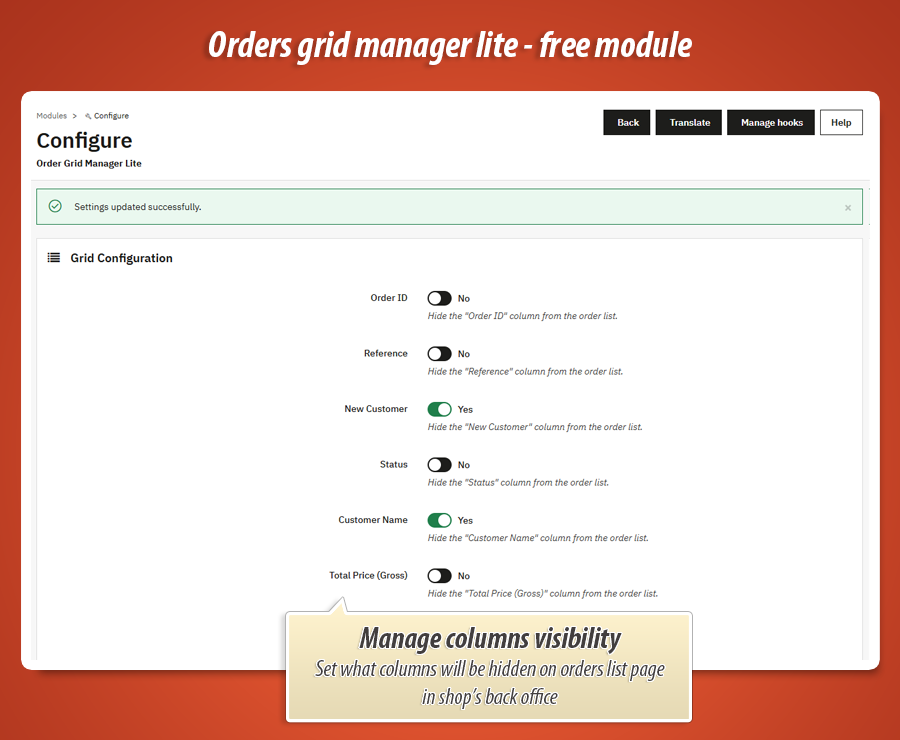
Each switch maps to exactly one of the ten catalogued columns above (same labels as in Grid Configuration). Set Yes to hide that column from the orders list; No keeps it visible. Changes apply the next time the orders page loads.
One configuration screen
Open the module’s configuration from Modules. You get a single Grid Configuration form with Bootstrap switches, save, and you are done. No SQL, no overrides, no hunting through hidden menus.
MyPresta update helper
The same page includes the familiar MyPresta Updates block: optional automatic version checks, manual “Check now”, and a link to the official product page - so you hear about maintenance releases without leaving the Back Office.
Symfony grid integration
Works with PrestaShop’s native order grid definition - no front-office impact.
Native hook, predictable behaviour
On install the module registers actionOrderGridDefinitionModifier. When the Back Office builds the orders grid, the hook receives the grid definition; for every column you chose to hide, the module removes that column from the collection before the grid renders.
Uninstall cleans up
Removing the module deletes its configuration keys for the column switches, so you are not left with orphaned settings.
When you need more than hide/show
The Lite edition is intentionally small - the Pro edition extends the same idea.
Upgrade path to Order Grid Pro
The configuration page highlights what the commercial Order Grid Pro build adds: custom columns (for example product thumbnails, customer phone, tracking numbers), drag-and-drop column reordering, and live status editing straight from the list - features the free module does not ship.
Use Lite to declutter today; move to Pro when your operations team needs richer grids without exporting to spreadsheets.
Simple configuration in the Back Office
Install the module, open its configuration, and adjust the switches under Grid Configuration. Save once; the orders list respects your choices immediately. Optional advertisement panel and MyPresta update controls live on the same screen.
Column visibility
- Per-column Yes/No to hide from the orders grid
- Exact set of ten: Order ID, Reference, New Customer, Status, Customer Name, Total Price (Gross), Payment Method, Carrier, Date Added, Delivery Country
Maintenance
- Automatic update checks (optional) with manual refresh button
- Link to official module page and changelog context
Technical specification & compatibility
Administration-only module. It adjusts the Back Office order grid definition; it does not alter storefront behaviour or order records.
actionOrderGridDefinitionModifier - modifies the Symfony grid column set. Configuration keys ( MOG_HIDE_* ) created on install and removed on uninstall.
0.00 €
We develop the module for free - if you want - support us!
Module Gallery 1/4
Why choose our module
Order Grid Manager Free?
Optimization and Automation
Optimize your PrestaShop Back Office efficiency by streamlining the orders grid. This module automates column visibility, letting you hide irrelevant data to reduce clutter and accelerate daily tasks like packing and support, significantly enhancing workflow and operational optimization.
Increased Sales
By optimizing back-office order grids, Order Grid Manager Lite reduces processing errors and speeds up fulfillment. This enhanced efficiency leads to faster, more accurate deliveries, boosting customer satisfaction and encouraging repeat purchases, directly contributing to increased sales.
15 years of experience
With 15 years of PrestaShop expertise, we designed Order Grid Manager Free to perfectly integrate with the Symfony grid. This module addresses a common pain point by allowing you to easily declutter your Back Office orders list, making daily operations smoother and more efficient.
Extensive Customization
Order Grid Manager Lite offers focused customization, enabling you to precisely hide ten standard order grid columns with simple switches. Tailor your Back Office view for specific team needs, ensuring a streamlined and personalized daily workflow that fits your store's unique operations.
Open Source Code
This free module integrates cleanly using native PrestaShop hooks, ensuring transparent operations. Its design implies full access to the source code, allowing developers to easily inspect, modify, and extend its functionality for custom needs without any hidden limitations or obfuscation.
License and Updates
This free "Lite" edition module from MyPresta.eu offers open-ended usage without license fees. It includes an integrated update helper for optional automatic version checks and manual refresh, ensuring you consistently receive maintenance releases directly within your Back Office.