
PrestaShop Free mass products prices update
Mass prices update is a free module that allows you to quickly alter prices of selected products. Thanks to this module you will be able to mass increase or decrease prices of all products in your shop by defined percentage value. Module updates all products in bulk.

0.00 €
Download for PrestaShop 1.6Download for PrestaShop 1.7Download for PrestaShop 8.xDownload for PrestaShop 9 and newer
Dlaczego jest kilka wersji modułu?
This is due to the fact that different PrestaShop releases use different programming solutions. Features working e.g. in PrestaShop 1.7 may not work in PrestaShop 9. Hence the need to release different versions of the module, which will ensure operation in many different versions of the shop.
This is due to the fact that different PrestaShop releases use different programming solutions. Features working e.g. in PrestaShop 1.7 may not work in PrestaShop 9. Hence the need to release different versions of the module, which will ensure operation in many different versions of the shop.
We develop the module for free - if you want - support us!
Galeria 1/2
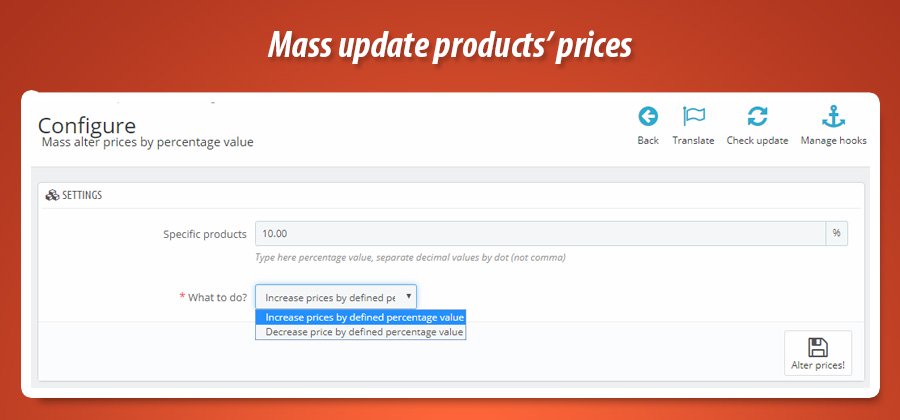
Bulk Product Price Percentage Update
The Bulk Product Price Update module for PrestaShop revolutionizes pricing management. It allows store owners to efficiently modify product prices across their entire catalog. Users can swiftly increase or decrease prices by a specified percentage, eliminating the need for tedious manual updates. This powerful tool significantly streamlines operations, saving valuable time and effort, especially for large inventories. By automating price adjustments, the module ensures consistency, enhances pricing control, and enables rapid responses to market changes or promotional strategies, ultimately optimizing profitability and improving overall business efficiency.
Module version:
1.2.7
Shop versions:
9.x8.x1.7.x1.6.x
Works with ThirtyBees:
Yes
Translations:


Stop editing prices one by one.
Mass alter prices by percentage for PrestaShop.
Raise or lower your entire catalog—or just selected categories—with a single percentage value. This free module updates product prices and combinations in bulk: choose increase or decrease, pick the shop and categories, hit one button. No CSV, no scripts. Perfect for seasonal adjustments, margin changes, or multi-shop pricing.
Why manual price updates don't scale
When you need to adjust margins, run a store-wide promotion, or react to exchange rates, editing each product in the back office is a dead end. Hundreds or thousands of products mean hours of work—and the risk of missing items or typos. Exporting to CSV, editing in a spreadsheet, and re-importing works, but it's slow and error-prone.
Mass alter prices by percentage gives you a single form: choose the percentage, choose increase or decrease, optionally limit by shop and category, then apply. The module updates base product prices and/or combination prices in one go. You keep full control—which shop, which categories, whether to round prices—without leaving the module configuration.
Ideal for seasonal markups, margin corrections, multi-shop pricing, or quick campaign adjustments. No coding, no extra tools. One screen, one click.
What you get with this module
-
Percentage-based updates:
One value applies to all selected products. Increase or decrease by the same % everywhere. -
Shop & category scope:
Limit changes to one shop and/or selected categories. No accidental updates elsewhere. -
Products, combinations, or both:
Update only simple product prices, only combination prices, or both in one run.
Key features at a glance
One percentage, one action
Enter a single percentage value (e.g. 10 or 5.5). Choose Increase or Decrease. The module recalculates every selected price in one run. Decimal values use a dot. No per-product forms.
Shop and category filter
Select the shop where prices will change (multistore-safe). Optionally select categories: only products whose main category or category assignment is in the list are updated. Leave categories empty to affect the whole catalog for that shop.
Products, combinations, or both
Choose what to update: products only (base price), combinations only (attribute prices), or products and combinations. Handy when you want to tweak only variant prices or only simple product prices without touching the rest.
Increase or decrease
One setting: apply the percentage as a markup or a discount. Same form for promotions and margin bumps.
Full control over direction
Select Increase prices by defined percentage value to raise every selected price (e.g. +15% for a margin adjustment). Select Decrease price by defined percentage value to apply a discount (e.g. -20% for a sale). The same percentage field is used for both; only the action changes. No need to enter negative numbers—the module handles the sign.
Optional rounding
Turn on "Round up prices" to get whole numbers. Or leave decimals for precise pricing.
Clean prices, no odd cents
After applying a percentage, prices can end up with many decimal places. Enable Round up prices and the module rounds each updated price to the nearest integer (e.g. 12.78 → 13). Disable it if you want to keep exact calculated values. The choice applies to both product and combination updates.
Category scope
Limit updates to products in selected categories. Tree picker with checkboxes. Empty = all products.
Update only what you select
In the By category field you get a category tree with checkboxes. Select one or more categories: the module will change prices only for products whose default category is in the list, or that are linked to one of the selected categories via category_product. If you leave no categories selected, the percentage is applied to all products in the chosen shop. Perfect for category-specific promotions or margin updates by department.
One-screen configuration
All options live on a single form: shop, percentage, categories, action (increase/decrease), product type (products / combinations / both), and rounding. Click Alter prices! and the module applies the changes. Cache is cleared automatically after the update.

Scope & value
- Shop: select which shop to update (multistore)
- Increase / decrease by: percentage (e.g. 10 or 5.5, use dot for decimals)
- By category: optional category tree; empty = all products
Behaviour
- What to do: Increase or Decrease by the defined %
- Type of products: products only / combinations only / both
- Round up: yes / no (integer prices vs exact decimals)
- MyPresta update notifications (optional)
Technical specification & compatibility
Standard PrestaShop module. Updates prices via direct SQL on product_shop and product_attribute_shop. No core file overrides. Clears Smarty cache after each run. Safe for multistore and PrestaShop upgrades.
HelperForm and category tree. MyPresta update checker built in.product_shop.price and product_attribute_shop.price; category filter via default category and category_product.


0.00 €
Download for PrestaShop 1.6Download for PrestaShop 1.7Download for PrestaShop 8.xDownload for PrestaShop 9 and newer
Dlaczego jest kilka wersji modułu?
This is due to the fact that different PrestaShop releases use different programming solutions. Features working e.g. in PrestaShop 1.7 may not work in PrestaShop 9. Hence the need to release different versions of the module, which will ensure operation in many different versions of the shop.
This is due to the fact that different PrestaShop releases use different programming solutions. Features working e.g. in PrestaShop 1.7 may not work in PrestaShop 9. Hence the need to release different versions of the module, which will ensure operation in many different versions of the shop.
We develop the module for free - if you want - support us!
Module Gallery 1/2
Why choose our module
Free mass products prices update?
Optimization and Automation
This module automates bulk product price updates, optimizing pricing strategy and enhancing store efficiency. It streamlines adjustments, saving time and boosting profitability.
Increased Sales
Boost sales by quickly adjusting prices store-wide based on percentage changes, enabling strategic promotions and competitive pricing for increased conversions and revenue.
15 years of experience
Leveraging 15 years of PrestaShop expertise, this module swiftly adjusts prices across your entire catalog, ensuring accurate percentage-based changes based on market trends and promotions.
Extensive Customization
This module, while not offering granular customization, provides store-wide percentage-based price adjustments, enabling centralized price management across your entire catalog.
Open Source Code
Full access to unencrypted source code allows for total customization, integration with other systems, and security audits, ensuring complete control over your pricing update process.
License and Updates
The perpetual license grants unlimited usage. Stay current with free updates for a year, ensuring compatibility and optimal performance of mass price adjustments. Benefit from substantial renewal discounts (up to 90%) to continuously optimize your pricing.