
PrestaShop Database Optimization
Your store is slow? You don't know what to do? This modue may be solution! This free prestashop addon removes all unwanted informations from database. Speed up your store, clean your store database for free.

0.00 €
Download for PrestaShop 1.4/1.5Download for PrestaShop 1.6Download for PrestaShop 1.7Download for PrestaShop 8.xDownload for PrestaShop 9 and newer
Dlaczego jest kilka wersji modułu?
This is due to the fact that different PrestaShop releases use different programming solutions. Features working e.g. in PrestaShop 1.7 may not work in PrestaShop 9. Hence the need to release different versions of the module, which will ensure operation in many different versions of the shop.
This is due to the fact that different PrestaShop releases use different programming solutions. Features working e.g. in PrestaShop 1.7 may not work in PrestaShop 9. Hence the need to release different versions of the module, which will ensure operation in many different versions of the shop.
We develop the module for free - if you want - support us!
Galeria 1/3

PrestaShop Database Cleanup & Speed Optimizer
This essential PrestaShop module optimizes your store's database for peak performance and faster load times. It efficiently cleans unnecessary data, tackling large entries like abandoned carts, connection details, guest information, and visit sources. By removing these unneeded records, the module resolves performance bottlenecks caused by oversized tables. This ensures a significantly more responsive shopping experience, improving overall store speed and efficiency. Please note, this process includes the removal of certain statistical data.
Module version:
1.4.1
Shop versions:
9.x8.x1.7.x1.6.x
Works with ThirtyBees:
Yes
Translations:


A lighter database. A faster store.
Database Optimization for PrestaShop.
PrestaShop stores a lot of data you don't need forever: abandoned carts, visitor logs, connection stats, guest sessions. Over time these tables grow huge and slow down your shop. This free module lets you clean them in one click—select only what you want to remove, see record counts and last cleaned dates, and reclaim space without touching orders or customer data. Built with modern HelperForm. No core overrides.
Need automatic database cleanup? The Pro version runs on a schedule: clean your database with cron jobs and remove only entries older than a defined number of days—no manual clicks required. Try the extended addon: Database Optimization Pro.
Why a bloated database hurts your store
PrestaShop keeps connections, connections_page, connections_source, guest and thousands of abandoned carts in the database. Every visit, every page view, every cart that never became an order adds rows. On busy shops these tables can grow to hundreds of thousands of records—slowing down queries, backups, and the back office.
You don't need that data forever. Old visitor stats are rarely used if you rely on Google Analytics. Abandoned carts that never converted can be removed safely. Clearing them frees space and often improves response times. The problem is doing it safely: you must not touch carts that have orders, and you should know exactly what you're cleaning.
Database Optimization gives you a single back-office screen with one switch per table. You see how many records will be removed and when each table was last cleaned. You choose what to clean and click once. Carts: only those with no associated order are deleted. Statistics tables: truncated. No core hacks, no SQL by hand—just a free addon that keeps your store lean.
What you get with this module
-
Selective cleanup:
Turn on only the tables you want to clean. No blind "clean all"—you stay in control. -
Record count & last cleaned:
Each option shows how many rows will be removed and the date of the last cleanup. No guesswork. -
Safe cart handling:
Only carts that have no linked order are deleted. Completed orders and their carts are never touched.
What you can clean (and why it matters)
Unwanted carts
Removes only abandoned carts—carts that were never converted into orders. Frees a lot of space on busy stores. Carts linked to existing orders are never deleted.
Connections
Basic visitor connection logs (IP, time, etc.) used by native PrestaShop statistics. Safe to clear if you use external tools like Google Analytics.
Connections Page
Stores the path of pages visited per connection. This table can grow very large and slow down the database. Safe to remove.
Connections Source
Referrer data (where the visitor came from). Clearing this affects native statistic reports on traffic sources. Optional if you use other analytics.
Guests
Information about unregistered visitor sessions, linked to the connections table. Registered customers are not affected. Clearing guests helps keep the database lean when you also clean connections.
Choose what to clean
One switch per table. No blind cleanup. You decide which data to remove.
Full control over cleanup
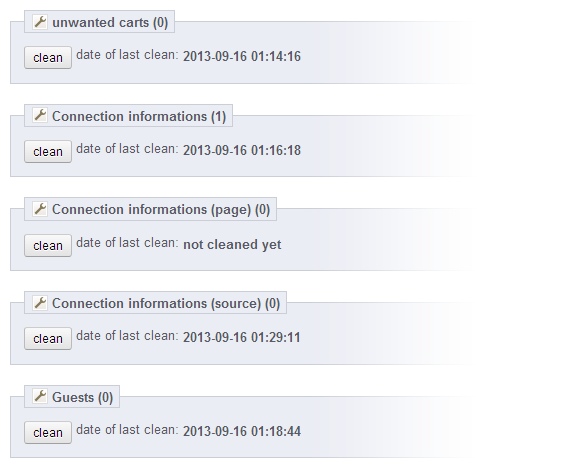
The module does not force a single "clean all" action. In the back office you see five options: Unwanted carts, Connections, Connections Page, Connections Source, and Guests. Each has a switch (Yes/No). You enable only the tables you want to clean and click Clean selected tables. The module shows how many records will be affected and when each table was last cleaned—so you can clean statistics regularly but keep cart cleanup for when you really need it.
Safe cart logic
Only abandoned carts are deleted. Orders and their carts stay intact.
Carts: delete only what's safe
For the cart table the module does not truncate. It runs a DELETE that removes only rows whose id_cart does not appear in orders. So every cart that led to an order is kept; only abandoned carts are removed. For the other four tables the module uses TRUNCATE (fast and resets auto-increment), which is appropriate for statistics and guest data. After each cleanup it saves the date in configuration, so you always see "Last cleaned" per table.
HelperForm & updates
Modern back-office form. Built-in MyPresta update checker so you stay up to date.
Clean interface, optional update notifications
The configuration screen is built with PrestaShop HelperForm: one legend ("Database Tables to Optimize"), a short note recommending a database backup before cleaning, and five switch inputs. Each option displays the current record count and last cleaned date. At the bottom, a single submit button runs the cleanup for the selected tables. The module also includes the MyPresta updates section: you can enable update notifications and use "Check now" to see if a newer version is available, with a direct link to the module page and changelog.
One screen, five switches, one click
The module has a single configuration screen. You see the list of tables to optimize, each with a switch, the number of records to clean, and the last cleaned date. Select the tables you want, then click Clean selected tables. A backup before cleaning is recommended.
Tables you can clean
- Unwanted carts (abandoned only)
- Connections (visitor logs)
- Connections Page (visited paths)
- Connections Source (referrers)
- Guests (unregistered sessions)
What you see per option
- Record count (how many rows will be removed)
- Last cleaned date (or "Never")
- Short description of what the table stores
- MyPresta update checker (optional notifications)
Technical specification & compatibility
Standard PrestaShop module. No core overrides. Uses native Db and HelperForm. Safe for upgrades and multistore.
orders. Others: TRUNCATE.


0.00 €
Download for PrestaShop 1.4/1.5Download for PrestaShop 1.6Download for PrestaShop 1.7Download for PrestaShop 8.xDownload for PrestaShop 9 and newer
Dlaczego jest kilka wersji modułu?
This is due to the fact that different PrestaShop releases use different programming solutions. Features working e.g. in PrestaShop 1.7 may not work in PrestaShop 9. Hence the need to release different versions of the module, which will ensure operation in many different versions of the shop.
This is due to the fact that different PrestaShop releases use different programming solutions. Features working e.g. in PrestaShop 1.7 may not work in PrestaShop 9. Hence the need to release different versions of the module, which will ensure operation in many different versions of the shop.
We develop the module for free - if you want - support us!
Module Gallery 1/3
Why choose our module
Database Optimization?
Optimization and Automation
This module optimizes your PrestaShop database, removing unwanted data like abandoned carts and visitor logs to boost performance and reduce load times. For advanced automation, an extended version offers scheduled cleanups via cron jobs.
Increased Sales
This module optimizes your store's database, leading to faster load times and improved performance. A quicker, smoother shopping experience directly enhances customer satisfaction, reduces bounce rates, and boosts conversion likelihood, ultimately driving increased sales.
15 years of experience
Leveraging 15 years of PrestaShop expertise, this module meticulously cleans your database, removing unnecessary abandoned carts, visitor stats, and connection data to significantly boost performance and load times.
Extensive Customization
This module offers extensive database cleaning options, providing broad personalization for your store. By removing unnecessary data such as abandoned carts and guest info, it's a perfect fit for tailoring your store's unique performance needs.
Open Source Code
This module offers a transparent solution for optimizing your PrestaShop database. Its open source code grants full access, enabling complete customization, advanced modifications, and seamless integration to perfectly suit your store's unique performance needs and development practices.
License and Updates
This free Database Optimization module offers a perpetual license for unlimited use. Regular updates are vital to ensure its cleaning functions, like removing abandoned carts and old visitor data, remain compatible, decreasing website load time effectively.