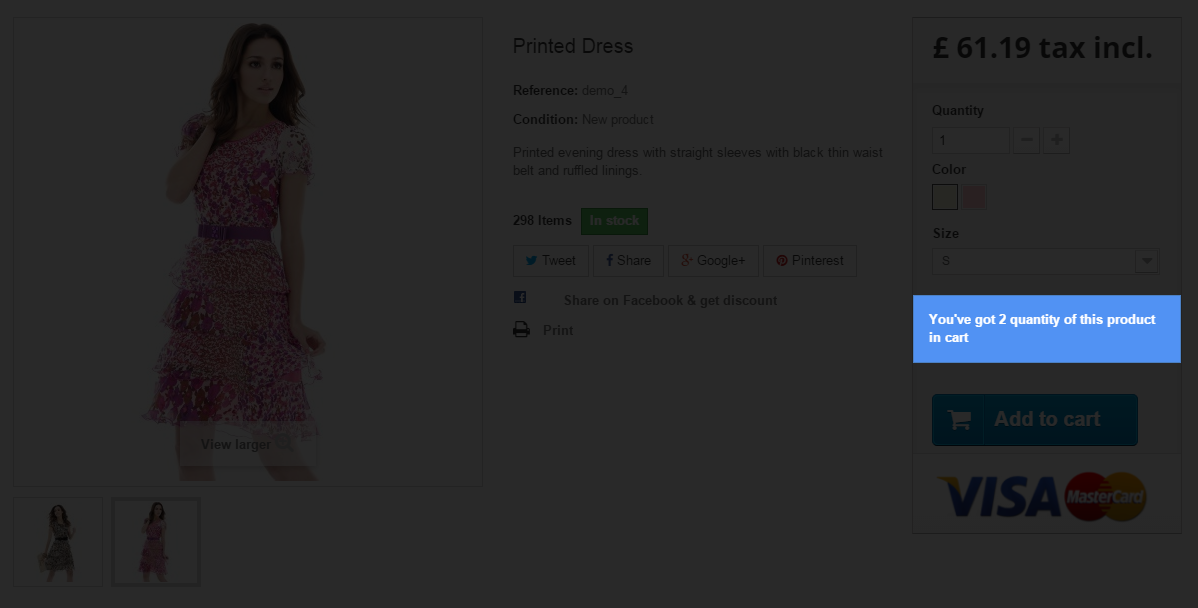
In this guide i will show you the way of how to add information "you have X quantity of this product in cart" notification that will appear above the "add to cart" button on product pages. Whole guide will be based on controller modification and on theme file: product.tpl modification. If your shop does not use combinations (products are without attributes) you will be able to achieve this without touching the controllers. If your shop has combinations - it will be necessary to alter cart class a little. So, the most of you uses controllers - so I decided to show you the way of how to achieve this with combinations. This method will work for everyone, so each of you can give it a try :) Let's go!
Modification of cart controller
So, as I already said in the introduction - we will have to alter the cart controller. By default it has function to check if product is in cart with function public function containsProduct. But unfortunately in this case it will work only for product without attributes (some technical aspects of this function - in context of feature that we want to implement - do not allow to check if product is in cart). Because of this we will create a copy of this function: public function containsProductNoAttribute with little modifications.
Open classes/Cart.php file. If you know how to create overrides in PrestaShop I strongly suggest to use overrides. Anyway, it depends on your needs. I only show the way of how to create such feature. So, as I said - open cart.php file and at the end of it, before closing bracket } paste this function:
    public function containsProductNoAttribute($id_product, $id_customization = 0, $id_address_delivery = 0)
    {

        $sql = 'SELECT cp.`quantity` FROM `'._DB_PREFIX_.'cart_product` cp';

        if ($id_customization) {
            $sql .= '
				LEFT JOIN `'._DB_PREFIX_.'customization` c ON (
					c.`id_product` = cp.`id_product`
					AND c.`id_product_attribute` = cp.`id_product_attribute`
				)';
        }

        $sql .= '
			WHERE cp.`id_product` = '.(int)$id_product.'
			AND cp.`id_cart` = '.(int)$this->id;
        if (Configuration::get('PS_ALLOW_MULTISHIPPING') && $this->isMultiAddressDelivery()) {
            $sql .= ' AND cp.`id_address_delivery` = '.(int)$id_address_delivery;
        }

        if ($id_customization) {
            $sql .= ' AND c.`id_customization` = '.(int)$id_customization;
        }

        return Db::getInstance()->getRow($sql);
    }
Save changes to the file and go to next step of tutorial related to modification of product.tpl theme file.
Modification of product page
Open file located in your theme directory: product.tpl. Path to file looks like /themes/your-theme/product.tpl. We want to put the notification above the add to cart button. In this case, search in file for this code:
<div class="box-cart-bottom">
<div{if (!$allow_oosp && $product->quantity <= 0) || !$product->available_for_order || (isset($restricted_country_mode) && $restricted_country_mode) || $PS_CATALOG_MODE} class="unvisible"{/if}>
<p id="add_to_cart" class="buttons_bottom_block no-print">
<button type="submit" name="Submit" class="exclusive">
<span>{if $content_only && (isset($product->customization_required) && $product->customization_required)}{l s='Customize'}{else}{l s='Add to cart'}{/if}</span>
</button>
</p>
</div>
{if isset($HOOK_PRODUCT_ACTIONS) && $HOOK_PRODUCT_ACTIONS}{$HOOK_PRODUCT_ACTIONS}{/if}
</div>
change it to:
<div class="box-cart-bottom">
<div{if (!$allow_oosp && $product->quantity <= 0) || !$product->available_for_order || (isset($restricted_country_mode) && $restricted_country_mode) || $PS_CATALOG_MODE} class="unvisible"{/if}>
{if Context::getContext()->cart->ContainsProductNoAttribute(Tools::getValue('id_product'))}
<div class="alert alert-info">{l s='You\'ve got %s quantity of this product in cart' sprintf=Context::getContext()->cart->ContainsProductNoAttribute(Tools::getValue('id_product'))}</div>
{/if}
<p id="add_to_cart" class="buttons_bottom_block no-print">
<button type="submit" name="Submit" class="exclusive">
<span>{if $content_only && (isset($product->customization_required) && $product->customization_required)}{l s='Customize'}{else}{l s='Add to cart'}{/if}</span>
</button>
</p>
</div>
{if isset($HOOK_PRODUCT_ACTIONS) && $HOOK_PRODUCT_ACTIONS}{$HOOK_PRODUCT_ACTIONS}{/if}
</div>
and now you can save changes to this file. Now you can try the feature. Just add product to cart and try to refresh product page that you added to cart. You should see the notification that you've got this product in cart now. If not - try to clear shop cache because it is probably a matter of caching

Article written byMilosz Myszczuk, PrestaShop expert. CEO and founder of the VEKIA interactive agency. Learn more.
If you like this article, support our work!

Sell optional checkout services your customers choose: gift wrapping, shipping insurance, express ha...
149.00 €

Conditional Order Validation lets you block or warn checkout when a cart breaks your rules. Set cond...
129.00 €

Apply conditional order discounts using native cart rules. Create BOGO deals, buy N get M free, spen...
149.00 €

Charge handling, service or packaging fees only when your rules match. Conditional Order Fees adds a...
129.00 €



