Read how to create full featured rich text editor in back office for product edit page. Use extended html markups like scripts, styles etc. enjoy!
Today i want to show you how to increase number of features in default prestashop rich editor on product edit page. With this tutorial you will be able to use extended TinyMCE options, and also use javascripts in the code. By default, rich editor is simple and doesn't allow to use extended html markups, you can't use also <script> tag and other html language commands like <style> etc.
Default prestashop rich editor on product edit page
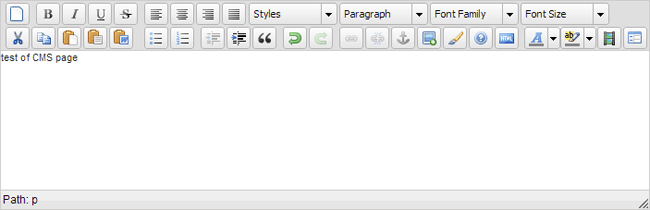
Extended rich editor which accepts scripts, styles and other html tags (all of them!)

Modification of admin theme
open ADMIN_DIR/themes/default/template/controllers/product/helpers/form.tpl file. This is file where you can find tinyMCE editor setup funciton. We need to extend it.
by default, main tinyMCE setup function looks like:
tinySetup({
editor_selector :"autoload_rte",
setup : function(ed) {
...
change it to (add highlighted lines)
tinySetup({
editor_selector :"autoload_rte",
theme_advanced_buttons1 : "save,newdocument,bold,italic,underline,strikethrough,justifyleft,justifycenter,justifyright,justifyfull,styleselect,formatselect, fontselect,fontsizeselect",
theme_advanced_buttons2 : "cut,copy,paste,pastetext,pasteword,search,replace,bullist,numlist,outdent,indent,blockquote,undo,redo,link,unlink,anchor,image,cleanup,help,codemagic,insertdate,inserttime,preview,forecolor,backcolor",
theme_advanced_buttons3 : "code,tablecontrols,hr,removeformat,visualaid,sub,sup,charmap,emotions,iespell,media,advhr,print,ltr,rtl,fullscreen",
theme_advanced_buttons4 : "styleprops,cite,abbr,acronym,del,ins,attribs,visualchars,nonbreaking,template,pagebreak,restoredraft,visualblocks",
theme_advanced_toolbar_location : "top",
theme_advanced_toolbar_align : "left",
theme_advanced_statusbar_location : "bottom",
theme_advanced_resizing : false,
extended_valid_elements: 'pre[*],script[*],style[*]',
valid_children: "+body[style|script],pre[script|div|p|br|span|img|style|h1|h2|h3|h4|h5],*[*]",
valid_elements : '*[*]',
force_p_newlines : false,
cleanup: false,
forced_root_block : false,
force_br_newlines : true,
setup: function(ed) {
...
Now it's time to modification of the Validate class, in this case you have to open /classes/Validate.php file and comment out lines mentioned below (with // comment method). If you're using prestashop 1.5.5 or higher.
//if (preg_match('/<[ \t\n]*script/ims', $html) || preg_match('/('.$events.')[ \t\n]*=/ims', $html) || preg_match('/.*script\:/ims', $html))
//return false;
Save changes. Now you can use extended tinyMCE editor and you can use all available html + js + css markups, only your imagination is the limit :)
If you're using older PrestaShop version (below the 1.5.5) please change this function:
	public static function isCleanHtml($html)
	{
		$events = 'onmousedown|onmousemove|onmmouseup|onmouseover|onmouseout|onload|onunload|onfocus|onblur|onchange';
		$events .= '|onsubmit|ondblclick|onclick|onkeydown|onkeyup|onkeypress|onmouseenter|onmouseleave|onerror|onselect|onreset|onabort|ondragdrop|onresize|onactivate|onafterprint|onmoveend';
		$events .= '|onafterupdate|onbeforeactivate|onbeforecopy|onbeforecut|onbeforedeactivate|onbeforeeditfocus|onbeforepaste|onbeforeprint|onbeforeunload|onbeforeupdate|onmove';
		$events .= '|onbounce|oncellchange|oncontextmenu|oncontrolselect|oncopy|oncut|ondataavailable|ondatasetchanged|ondatasetcomplete|ondeactivate|ondrag|ondragend|ondragenter|onmousewheel';
		$events .= '|ondragleave|ondragover|ondragstart|ondrop|onerrorupdate|onfilterchange|onfinish|onfocusin|onfocusout|onhashchange|onhelp|oninput|onlosecapture|onmessage|onmouseup|onmovestart';
		$events .= '|onoffline|ononline|onpaste|onpropertychange|onreadystatechange|onresizeend|onresizestart|onrowenter|onrowexit|onrowsdelete|onrowsinserted|onscroll|onsearch|onselectionchange';
		$events .= '|onselectstart|onstart|onstop';
		return (!preg_match('/<[ \t\n]*script/ims', $html) && !preg_match('/('.$events.')[ \t\n]*=/ims', $html) && !preg_match('/.*script\:/ims', $html));
	}
to this one:
	public static function isCleanHtml($html){
/*
		$events = 'onmousedown|onmousemove|onmmouseup|onmouseover|onmouseout|onload|onunload|onfocus|onblur|onchange';
		$events .= '|onsubmit|ondblclick|onclick|onkeydown|onkeyup|onkeypress|onmouseenter|onmouseleave|onerror|onselect|onreset|onabort|ondragdrop|onresize|onactivate|onafterprint|onmoveend';
		$events .= '|onafterupdate|onbeforeactivate|onbeforecopy|onbeforecut|onbeforedeactivate|onbeforeeditfocus|onbeforepaste|onbeforeprint|onbeforeunload|onbeforeupdate|onmove';
		$events .= '|onbounce|oncellchange|oncontextmenu|oncontrolselect|oncopy|oncut|ondataavailable|ondatasetchanged|ondatasetcomplete|ondeactivate|ondrag|ondragend|ondragenter|onmousewheel';
		$events .= '|ondragleave|ondragover|ondragstart|ondrop|onerrorupdate|onfilterchange|onfinish|onfocusin|onfocusout|onhashchange|onhelp|oninput|onlosecapture|onmessage|onmouseup|onmovestart';
		$events .= '|onoffline|ononline|onpaste|onpropertychange|onreadystatechange|onresizeend|onresizestart|onrowenter|onrowexit|onrowsdelete|onrowsinserted|onscroll|onsearch|onselectionchange';
		$events .= '|onselectstart|onstart|onstop';
		return (!preg_match('/<[ \t\n]*script/ims', $html) && !preg_match('/('.$events.')[ \t\n]*=/ims', $html) && !preg_match('/.*script\:/ims', $html));
*/
return $html;
	}
version 1.5.6+ has got additional param: $allow_iframe = false in function! don't forget about it!
public static function isCleanHtml($html, $allow_iframe = false)
so the final function:
public static function isCleanHtml($html, $allow_iframe = false){
    return true;
}

Article written byMilosz Myszczuk, PrestaShop expert. CEO and founder of the VEKIA interactive agency. Learn more.
If you like this article, support our work!

Sell optional checkout services your customers choose: gift wrapping, shipping insurance, express ha...
149.00 €

Charge handling, service or packaging fees only when your rules match. Conditional Order Fees adds a...
129.00 €

Apply conditional order discounts using native cart rules. Create BOGO deals, buy N get M free, spen...
149.00 €

Conditional Order Validation lets you block or warn checkout when a cart breaks your rules. Set cond...
129.00 €



