Übersetzung anzeigen

Prestashop UPC Filter in Produktliste im Backoffice

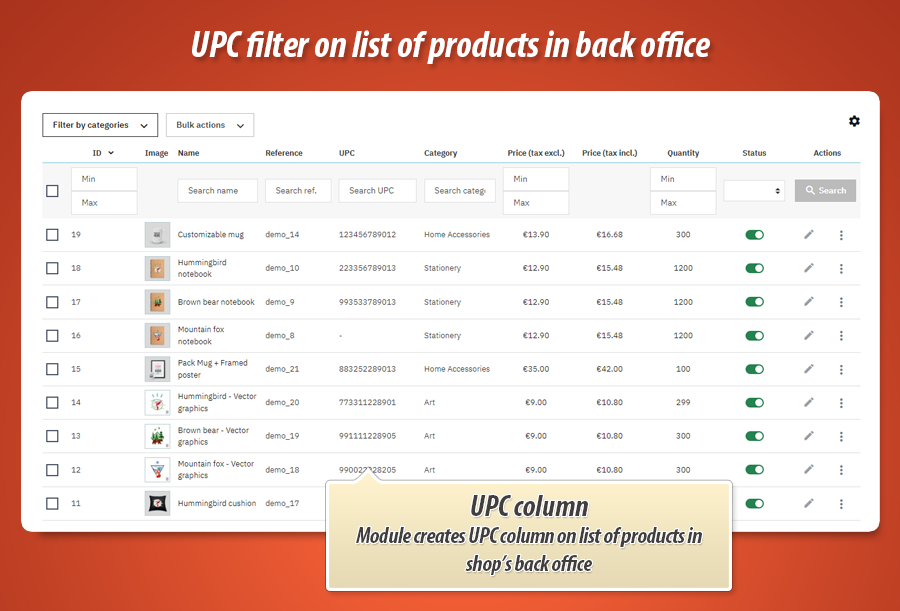
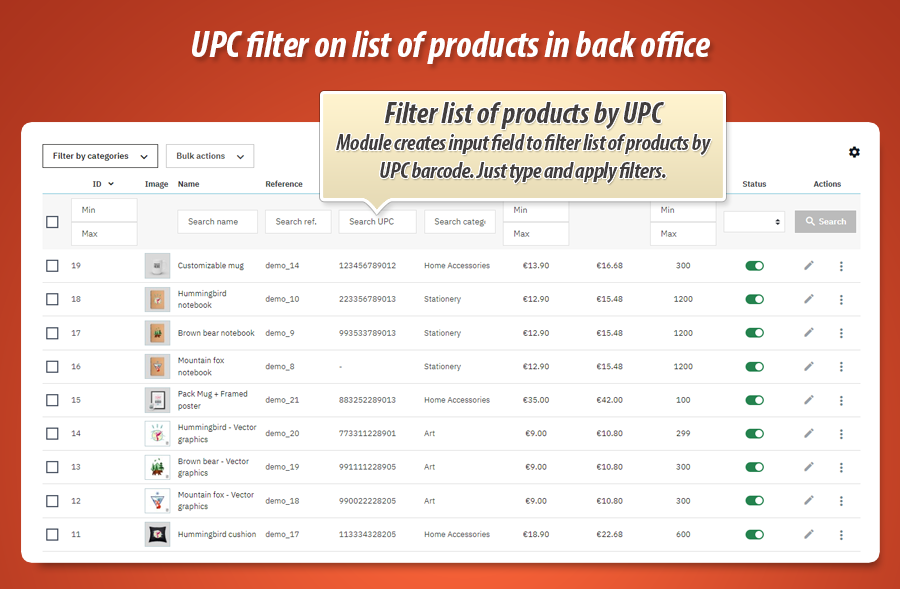
Mit diesem Modul fügen Sie der Produktliste im Backoffice Ihres Shops eine neue Spalte hinzu. Die Spalte enthält den Produkt-Barcode "UPC". Sie können die Liste auch nach diesem Feldwert filtern. Geben Sie einfach einen Teil des UPC-Codes ein und drücken Sie die Suche - das Modul zeigt Produkte an, die den von Ihnen eingegebenen Wert im UPC-Suchfeld enthalten.

Shop-Version 9.x, 8.x, 1.7.x PrestaShop 8.x & 9.x support Yes :-)
Verfügbare Übersetzungen dieses Modul UPC Filter in Produktliste im Backoffice ist vollständig übersetzt in: Slovenčina (sk)dieses Modul UPC Filter in Produktliste im Backoffice ist vollständig übersetzt in: Magyar (hu)dieses Modul UPC Filter in Produktliste im Backoffice ist vollständig übersetzt in: Čeština (cs)dieses Modul UPC Filter in Produktliste im Backoffice ist vollständig übersetzt in: Français (fr)dieses Modul UPC Filter in Produktliste im Backoffice ist vollständig übersetzt in: 中文 (zh)dieses Modul UPC Filter in Produktliste im Backoffice ist vollständig übersetzt in: Русский (ru)dieses Modul UPC Filter in Produktliste im Backoffice ist vollständig übersetzt in:  (sr)dieses Modul UPC Filter in Produktliste im Backoffice ist vollständig übersetzt in: Norsk (no)dieses Modul UPC Filter in Produktliste im Backoffice ist vollständig übersetzt in: Български (bg)dieses Modul UPC Filter in Produktliste im Backoffice ist vollständig übersetzt in: Íslenska (is)dieses Modul UPC Filter in Produktliste im Backoffice ist vollständig übersetzt in: Polski (pl)dieses Modul UPC Filter in Produktliste im Backoffice ist vollständig übersetzt in: Slovenščina (si)dieses Modul UPC Filter in Produktliste im Backoffice ist vollständig übersetzt in: हिन्दी (hi)dieses Modul UPC Filter in Produktliste im Backoffice ist vollständig übersetzt in: Lietuvių (lt)dieses Modul UPC Filter in Produktliste im Backoffice ist vollständig übersetzt in: Svenska (sv)dieses Modul UPC Filter in Produktliste im Backoffice ist vollständig übersetzt in: Українська (ua)dieses Modul UPC Filter in Produktliste im Backoffice ist vollständig übersetzt in: 日本語 (ja)dieses Modul UPC Filter in Produktliste im Backoffice ist vollständig übersetzt in: Ελληνικά (el)dieses Modul UPC Filter in Produktliste im Backoffice ist vollständig übersetzt in: Eesti (et)dieses Modul UPC Filter in Produktliste im Backoffice ist vollständig übersetzt in: Deutsch (de)dieses Modul UPC Filter in Produktliste im Backoffice ist vollständig übersetzt in: Nederlands (nl)dieses Modul UPC Filter in Produktliste im Backoffice ist vollständig übersetzt in: Dansk (da)dieses Modul UPC Filter in Produktliste im Backoffice ist vollständig übersetzt in: English (en)dieses Modul UPC Filter in Produktliste im Backoffice ist vollständig übersetzt in: Română (ro)dieses Modul UPC Filter in Produktliste im Backoffice ist vollständig übersetzt in: Italiano (it)dieses Modul UPC Filter in Produktliste im Backoffice ist vollständig übersetzt in: Bahasa Indonesia (id)dieses Modul UPC Filter in Produktliste im Backoffice ist vollständig übersetzt in: Latviešu (lv)dieses Modul UPC Filter in Produktliste im Backoffice ist vollständig übersetzt in: Português (pt)dieses Modul UPC Filter in Produktliste im Backoffice ist vollständig übersetzt in: Hrvatski (hr)dieses Modul UPC Filter in Produktliste im Backoffice ist vollständig übersetzt in: Suomi (fi)dieses Modul UPC Filter in Produktliste im Backoffice ist vollständig übersetzt in: Español (es)
Modulversion 1.2.1
  • Vertrauenswürdiger Modulentwickler UPC Filter in Produktliste im Backoffice
  • Unterstützung für das Modul UPC Filter in Produktliste im Backoffice
  • Kostenlose Updates des Moduls UPC Filter in Produktliste im Backoffice
  • Open Source - Sie können den Modulcode bearbeiten UPC Filter in Produktliste im Backoffice
  • Modul UPC Filter in Produktliste im Backoffice arbeitet mit PrestaShop 1.7
  • Modul UPC Filter in Produktliste im Backoffice arbeitet mit PrestaShop 8.0

Mehr Info: Prestashop UPC Filter in Produktliste im Backoffice

Wie Sie bereits wissen, erstellt dieses Add-on eine neue Spalte im Backend des Shops mit dem UPC-Barcode-Wert. Diese Spalte enthält ein Filterfeld, in dem Sie einen Teil des UPC-Codes eingeben können und das Modul nach Produkten mit diesem Wert im UPC-Feld sucht. Das Add-on ist ein Plug-and-Play-Add-on - installieren Sie es einfach und das Modul erledigt den Rest, Sie müssen nichts tun - es ist nicht erforderlich, Dateien manuell zu ändern.

Anwendungsbeispiele des Moduls: Prestashop UPC Filter in Produktliste im Backoffice

Zugehörige Videos: Prestashop UPC Filter in Produktliste im Backoffice

Derzeit keine verwandten Videoclips verfügbar

Modulbewertungen: Prestashop UPC Filter in Produktliste im Backoffice

Dieses Modul hat keine Bewertung

Häufig gestellte Fragen

Funktion in Arbeit

Zugehörige Blog-Beiträge

Derzeit keine verwandten Artikel

UPC Filter in Produktliste im Backoffice Änderungsprotokoll - Informationen zu Updates

Version 1.2.1

  • Full Compatibility with PrestaShop 9: The module has been completely refactored and thoroughly tested to ensure seamless integration and flawless performance with the latest e-commerce platform, PrestaShop 9. This update guarantees stability, security, and allows you to leverage the full potential of the newest features available in PrestaShop, future-proofing your online store.
  • Enhanced Back Office Workflow - UPC on Product Lists: For stores running on the newest PrestaShop versions (including PrestaShop 9), we have introduced a significant quality-of-life improvement. The Universal Product Code (UPC) for each product and combination can now be displayed as a dedicated column on the product listing page within the shop's back office. This enhancement streamlines your administrative tasks by:
    • Allowing for quicker product identification at a glance.
    • Simplifying inventory management and verification processes.
    • Improving the overall efficiency of your back-office workflow, as you no longer need to click into each product's edit page to find its UPC.
  • Expanded Internationalization - New Language Support: To better serve our global user base and improve the administrative experience for international teams, the module interface has been professionally translated into an extensive set of new languages. The module now offers full support for:
    • English
    • Polish (Polski)
    • Spanish (Español)
    • Italian (Italiano)
    • French (Français)
    • Czech (Čeština)
    • German (Deutsch)
    • Danish (Dansk)
    • Finnish (Suomi)
    • Greek (Ελληνικά)
    • Bulgarian (Български)
    • Lithuanian (Lietuvių)
    • Latvian (Latviešu)
    • Estonian (Eesti)
    • Indonesian (Bahasa Indonesia)
    • Hungarian (Magyar)
    • Hindi (हिन्दी)
    • Croatian (Hrvatski)
    • Icelandic (Íslenska)
    • Japanese (日本語)
    • Dutch (Nederlands)
    • Norwegian (Norsk)
    • Portuguese (Português)
    • Romanian (Română)
    • Serbian (Srpski)
    • Russian (Русский)
    • Swedish (Svenska)
    • Slovenian (Slovenščina)
    • Slovak (Slovenčina)
    • Ukrainian (Українська)
    • Chinese (中文)

Version 1.1.0

  • Released a production-ready version compatible with PrestaShop 8.x and PrestaShop 1.7.7.x. This release introduces support for the new, experimental product edit page in both versions, enhancing the module's integration with the latest PrestaShop features.
  • Improved compatibility and stability across PrestaShop 8.x and 1.7.7.x, ensuring seamless operation and minimizing potential conflicts.
  • Enhanced user experience within the new product edit page for a more streamlined workflow.

Version 1.0.0

  • Initial launch of the project on the MyPresta Addons Marketplace. This marks the first public release of the module, making it available to PrestaShop users worldwide.
  • Established foundational features and functionalities, laying the groundwork for future development and enhancements.
  • Implemented core module architecture and initial codebase.
29.99 €
In den Warenkorb

Galerie