


PrestaShop Homeslider on top
Default homeslider module modification. By default homeslider module don't allow to display slider on top, with this modification it is possible. This modification is absolutely free. You can download it now.

Galeria 1/3
PrestaShop Global Header Homeslider
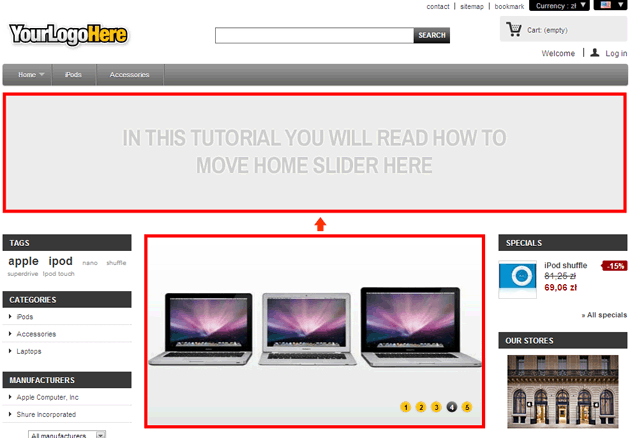
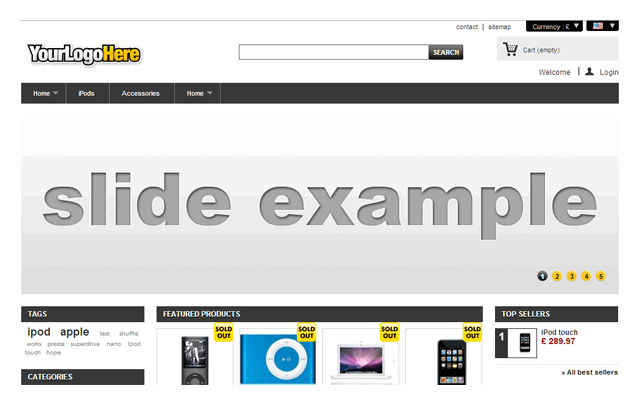
This PrestaShop module provides a professional enhancement to your store's layout by strategically relocating the default image slider. It effortlessly moves the slider to the header section, positioning it directly beneath the horizontal navigation menu. This modification is achieved through a simple module reinstallation, eliminating the need for complex manual file editing and minimizing error risk. The prominent placement immediately captures visitor attention, significantly improving visual appeal and user experience. Additionally, positioning key promotional content higher on the page can offer potential SEO benefits. All original functionalities of the standard slider are fully preserved, ensuring a seamless and effective visual upgrade for your online store.
This is a modified version of the standard PrestaShop image slider. This enhancement allows you to relocate the slider to the header section of your PrestaShop store, positioning it directly beneath the horizontal navigation menu. Reinstalling the module through your store's back office is all that's required. The slider will automatically appear in its new location.

All module functionalities remain consistent with the standard version. This module modification was implemented following the steps outlined in our tutorial. You can access the tutorial (English version) here:
- Simplified Slider Relocation: This enhancement streamlines the process of moving the default PrestaShop image slider. Instead of manually editing template files, which can be error-prone and time-consuming, this modification allows you to reposition the slider by simply reinstalling the module. This automated approach minimizes the risk of introducing errors and simplifies the customization process.
- Enhanced User Experience: Placing the slider directly below the navigation menu enhances the visual appeal and usability of your online store. This prominent positioning ensures that the slider, often showcasing key promotions or featured products, captures the visitor's attention immediately upon arrival. This strategic placement contributes to a more engaging and informative browsing experience.
- SEO Benefits of Header Placement: Positioning the slider in the header can contribute to improved Search Engine Optimization (SEO). Search engines prioritize content placed higher on the page, giving it more weight in ranking algorithms. By placing visually appealing and relevant content in the header, you can increase the visibility of your key offerings and potentially improve your search engine rankings.
- Preserved Functionality: This modification focuses solely on relocating the slider. All existing features and functionalities of the standard PrestaShop image slider module are fully preserved, ensuring a seamless transition and uninterrupted user experience.
- Easy Installation: The installation process is straightforward, involving a simple reinstallation of the module through the PrestaShop back office. This user-friendly approach makes the modification accessible to users of all technical skill levels.
How to move the default homeslider to the top in PrestaShop


Module Gallery 1/3
Why choose our module
Homeslider on top?
Optimization and Automation
This module automates and optimizes the visual layout of your store by simply relocating the image slider. It streamlines the customization process, eliminating manual edits and ensuring an error-free, optimized user experience and SEO.
Increased Sales
By placing key promotions and products prominently in the header, this module enhances user experience, captures immediate attention, and improves SEO visibility. This strategic positioning drives engagement and conversions, directly contributing to increased sales.
15 years of experience
Our 15 years of PrestaShop experience led to this streamlined module, effortlessly moving your homeslider to the header. This modification ensures enhanced visibility, SEO benefits, and preserved functionality without complex edits.
Extensive Customization
Offering extensive customization through simplified relocation, this module allows precise personalization of your PrestaShop store's header. It ensures a perfect fit for your unique design needs, streamlining configuration for optimal visual impact and user engagement.
Open Source Code
This module, a modification of the default PrestaShop slider, offers full access to its open source code. Developers can freely edit and integrate the repositioned slider, ensuring complete flexibility for advanced customizations and seamless store enhancements.
License and Updates
The module license allows unlimited use, ensuring your relocated PrestaShop slider always enhances user experience and maintains compatibility. Updates for this easy-to-install modification are typically free for a year, with renewal options.