
PrestaShop Conditional Payment Method Rules
Show or hide payment methods at checkout with powerful rule-based policies. Build AND/OR conditions on cart total, customer group, country, carrier and products, then control each gateway with merge strategies. Includes checkout simulator, audit log, analytics dashboard, JSON import/export and multilingual unavailable messages. For PrestaShop 1.7, 8 and 9.
79.00 €
Galeria 1/12
Conditional Payment Method Rules
Payment Method Rules for PrestaShop offers precise control over payment options displayed at checkout. This module allows you to define flexible, policy-based rules using a visual builder with nested AND/OR conditions across 12 cart and customer fields. You can individually control each payment gateway, including showing/hiding methods, setting display priority, and providing multilingual explanations for unavailable options. Features like the checkout simulator ensure rules behave as intended before deployment. Comprehensive audit logs and an analytics dashboard provide full visibility and traceability, ensuring an optimized and professional checkout experience for every customer across PrestaShop 1.7.x, 8.x, and 9.x.
Module version:
1.1.0
Shop versions:
9.x8.x1.7.x
Works with ThirtyBees:
No
Translations:


Show the right payment. Every checkout.
Conditional Payment Method Rules for PrestaShop.
Every cart is different. Every customer deserves payment options that match their context. Payment Method Rules is a full visibility engine for your checkout: build policies with nested AND/OR conditions, control each payment gateway individually, explain why a method is unavailable, simulate outcomes before go-live, and trace every decision in an audit log. One module. Total control over what your customers can pay with.
What Payment Method Rules delivers
These are the capabilities that turn payment visibility from a guessing game into a managed business rule. Built for shop owners who need precision at checkout — without touching code.
Policy-based engine
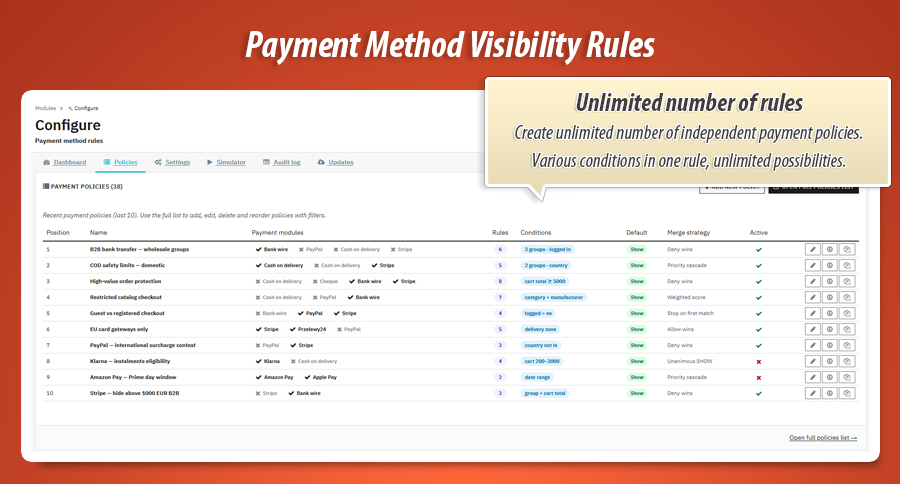
Create multiple named policies, order them by priority, activate or pause individually. Each policy holds its own condition tree and per-gateway rules.
Visual condition builder
Nested AND/OR groups with 12 cart and customer fields. Quick presets for common scenarios. Raw JSON escape hatch when you need it.
Per-gateway rules
One card per installed payment module. Set SHOW or HIDE, evaluation priority, display position and optional schedule windows per rule.
Five merge strategies
Deny wins, allow wins, priority cascade, weighted score or unanimous SHOW — pick how conflicting rules inside a policy resolve.
Checkout simulator
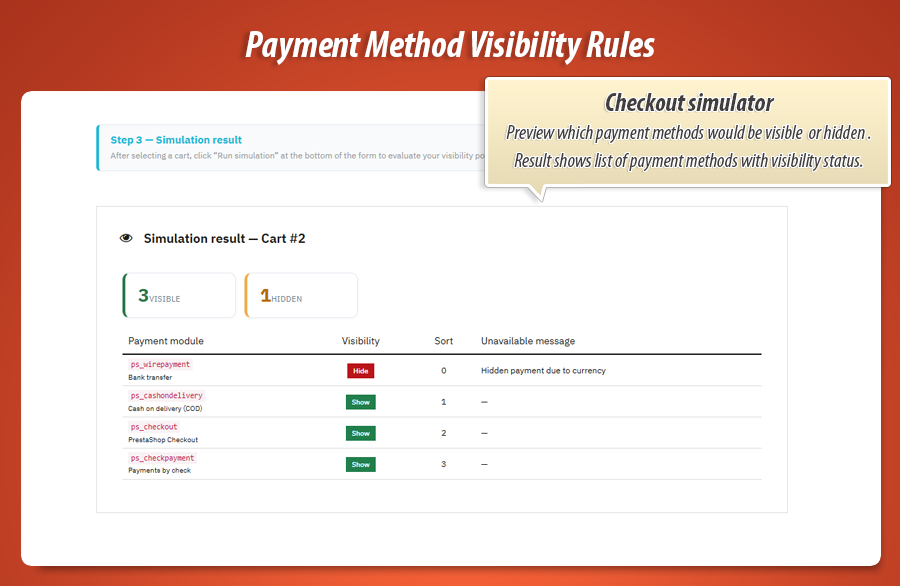
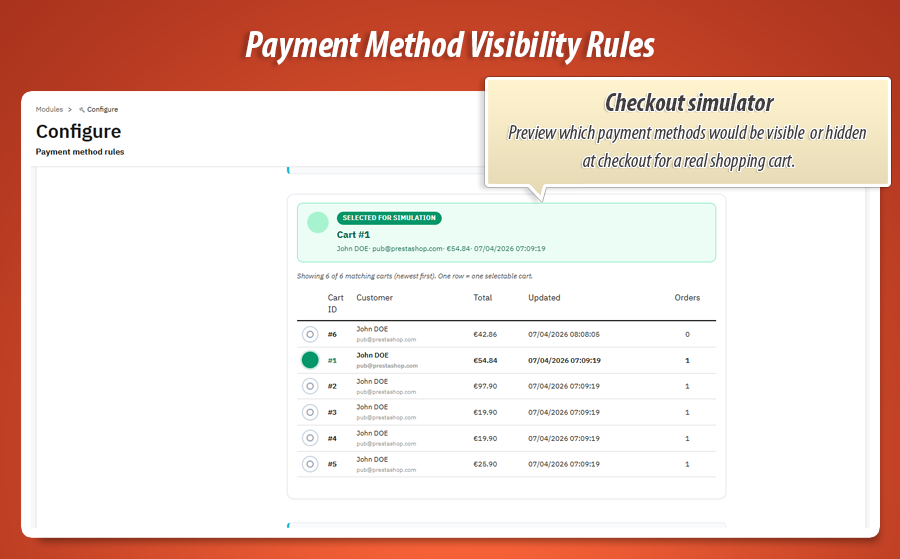
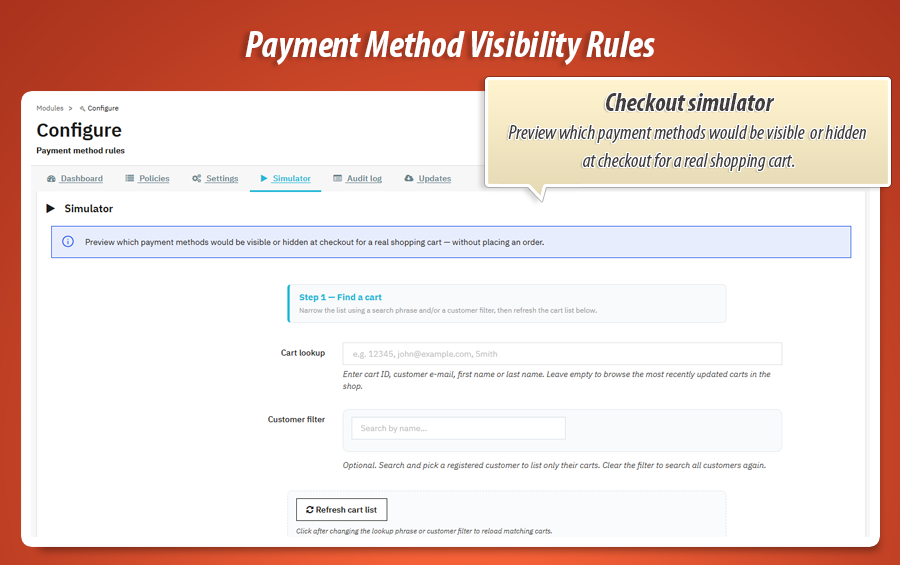
Pick a real shopping cart and customer from your store. See exactly which payment methods would appear — before a single order is placed.
Analytics dashboard
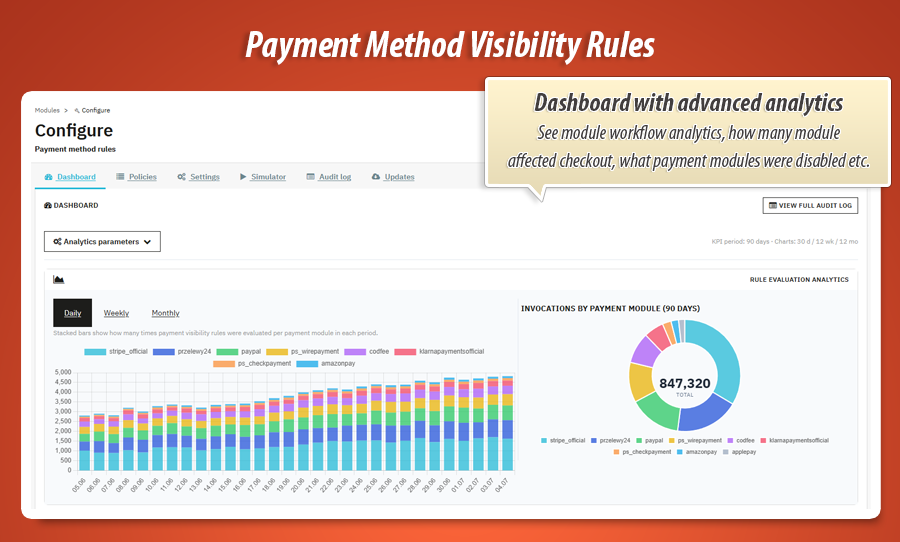
KPI cards, daily/weekly/monthly charts and per-payment-module breakdowns. Track how often each gateway is shown or hidden over time.
Unavailable messages
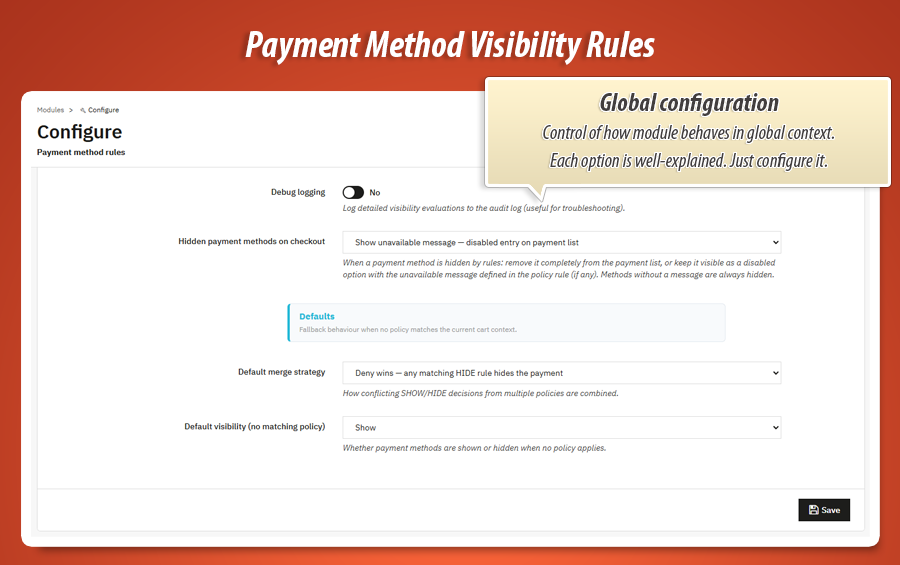
Keep a hidden method visible as a disabled option with a custom multilingual explanation — or remove it from the list entirely. Your choice per global setting.
Full audit log
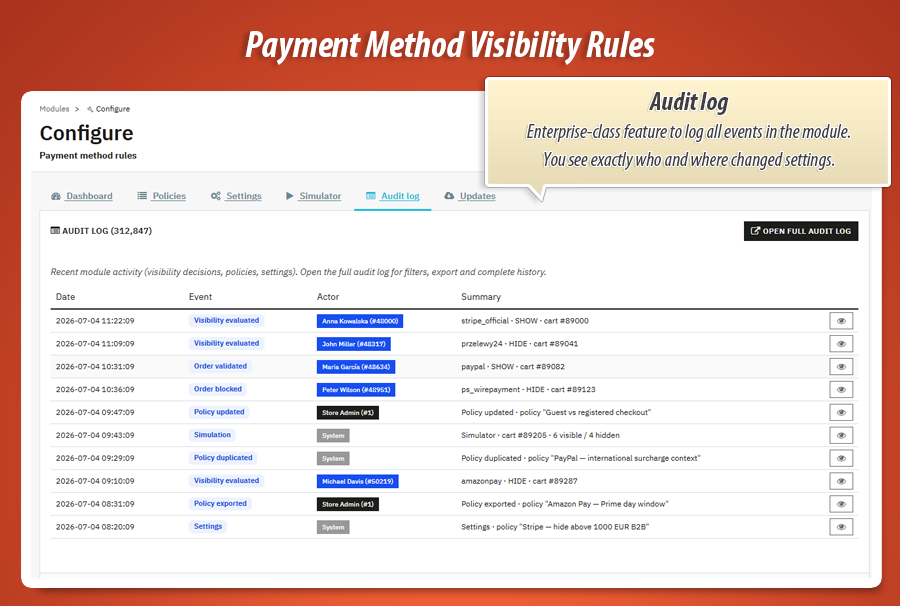
Every visibility evaluation, policy change, simulation run and order validation logged with timestamp, actor and detail preview. Export when you need a paper trail.
Import, export and duplicate
Download any policy as JSON, upload it to another shop, or duplicate with one click. Move configurations between environments without rebuilding from scratch.
Gamechanger
Visual condition builder with nested logic
Complex checkout rules should not require complex code. Payment Method Rules gives you a drag-and-drop condition tree right inside the policy editor.
12 real checkout fields
Cart total, products total, quantity, currency, delivery country, zone, customer group, carrier, login status, product, category and manufacturer — all with autocomplete search where it matters.
Nested AND / OR groups
Combine conditions into groups, nest groups inside groups, switch operators per level. Build rules like "cart over 500 EUR AND (country is DE OR country is AT)".
Presets and JSON
One-click quick presets for guests-only, B2B-only or minimum cart value. Load server presets or paste raw JSON when you need full manual control.
Why this matters: The condition builder is not a cosmetic add-on. It is the core of the evaluation engine — every field maps to live cart and customer data evaluated on every checkout load. You see the tree, the engine runs the tree.
Complete feature guide
Every feature explained in plain language for shop owners. No technical jargon. One by one, so you know exactly what Payment Method Rules does for your store.
Payment visibility at checkout
When a customer reaches the payment step, the module evaluates all active policies against the current cart, customer, delivery address and carrier. Each installed payment gateway receives a SHOW or HIDE decision before options are rendered.
On PrestaShop 8.1 and above, filtering runs through the native actionFilterPaymentOptions hook. On earlier versions, a compatibility layer applies the same logic without breaking your theme.
Policies and per-gateway rules
A policy is a named bundle of conditions plus a set of payment rules. Create as many policies as you need — for example one for B2B bank transfer, one for high-value COD restrictions, one for international cards.
Inside each policy, every installed payment module gets its own rule card. Toggle SHOW or HIDE, set evaluation priority, reorder display position and optionally restrict the rule to a date range.
Policies run in position order. Enable Stop on first match when you want the engine to halt after the first policy that matches the current cart context.
Merge strategies
When multiple rules inside one policy target the same payment module, the merge strategy decides the outcome:
- Deny wins — any matching HIDE rule hides the payment.
- Allow wins — any matching SHOW rule shows the payment.
- Priority cascade — the first matching rule by priority decides.
- Weighted score — SHOW adds +1, HIDE subtracts −1; net score determines visibility.
- Unanimous SHOW — all matching rules must be SHOW for the payment to appear.
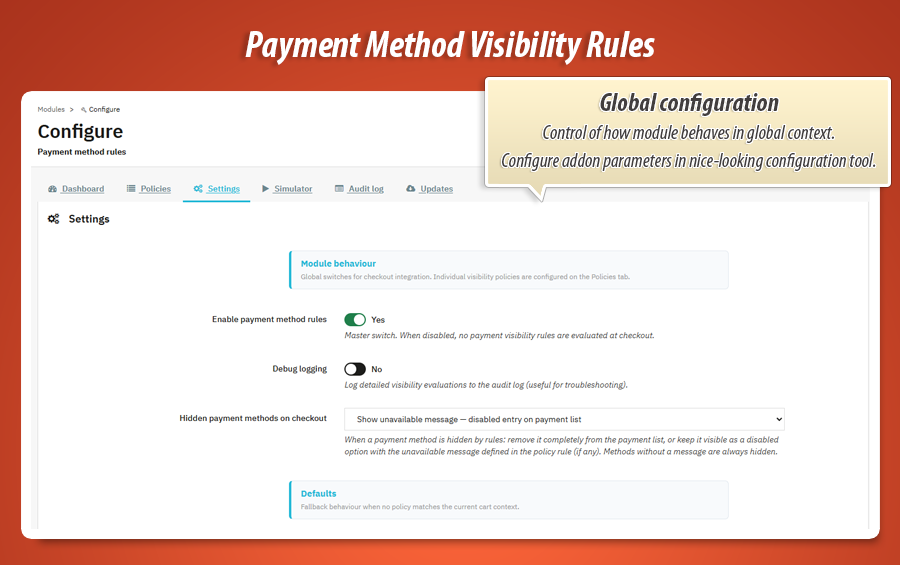
Set a default merge strategy globally in Settings, then override per policy when a specific scenario needs different conflict resolution.
Unavailable messages
Sometimes hiding a payment method without explanation frustrates customers. Payment Method Rules lets you write a per-rule, per-language message that appears when a method is blocked.
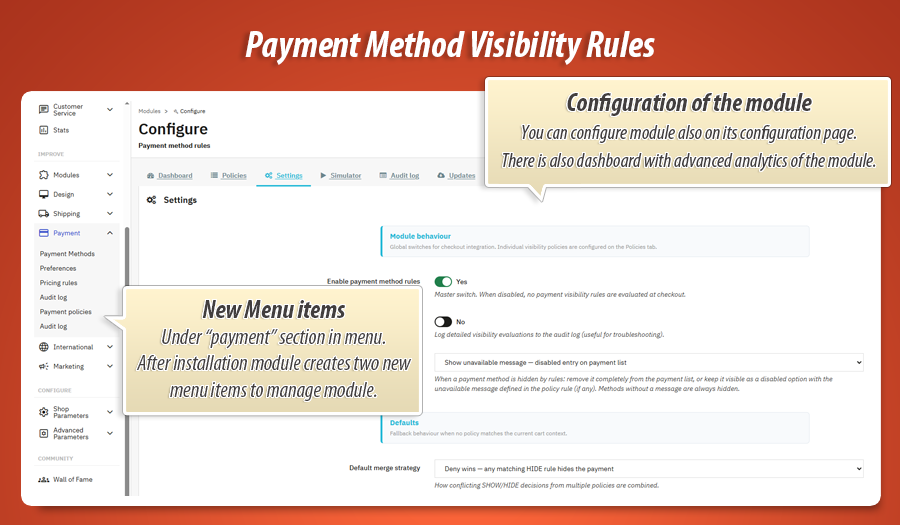
In Settings, choose between two behaviours: remove hidden methods from the list entirely, or keep them visible as disabled options with your custom message inline on the payment step.
Each rule card includes a multilingual input with a language flag selector — write the explanation once per language, the correct version shows automatically at checkout.
Checkout simulator
The Simulator tab lets you test rules against real data from your shop. Search and select an active shopping cart, optionally attach a customer, then run the evaluation.
Results show every payment module with its final visibility status, the policies that matched and any unavailable messages that would appear. No test order required. No customer impact.
Use the simulator after every policy change to confirm your rules behave exactly as intended before customers see them.
Dashboard and analytics
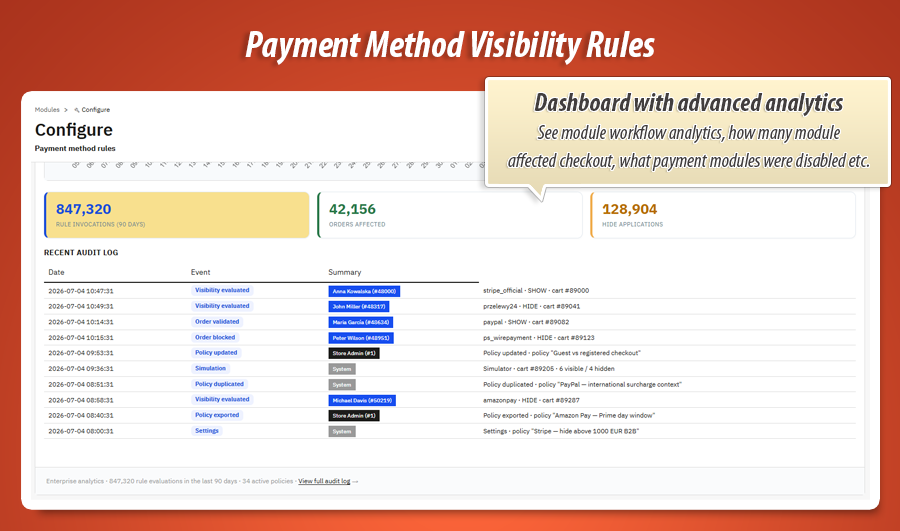
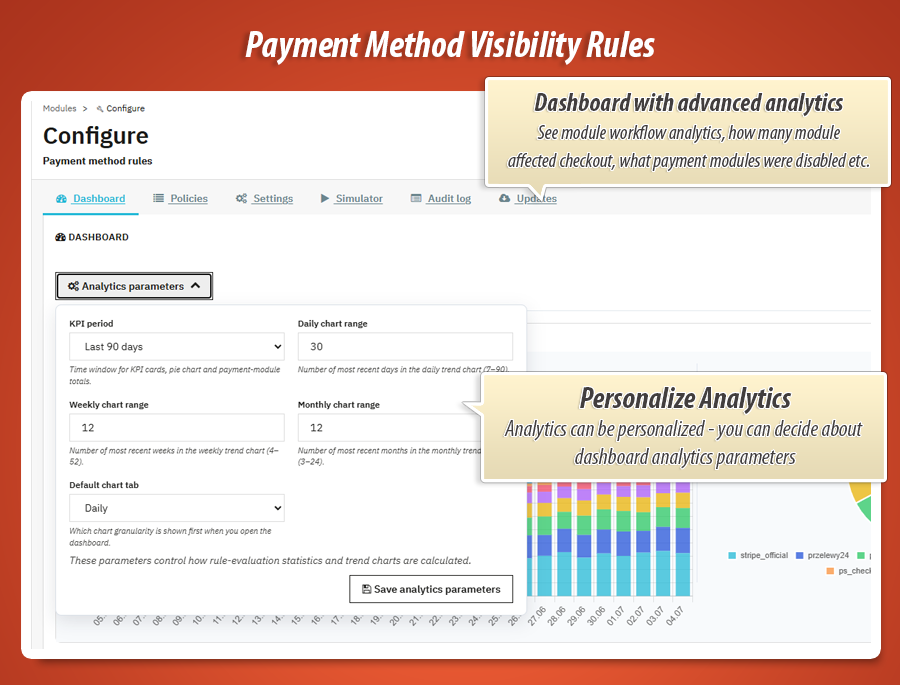
The Dashboard tab is your visibility control room. KPI cards summarise evaluations, hidden applications and active policies over a selectable period (30, 90, 180 or 365 days).
Chart.js trend charts break down activity daily, weekly or monthly. A per-payment-module table shows which gateways are hidden most often — useful when tuning rules or negotiating with payment providers.
Recent audit entries appear at the bottom of the dashboard for quick access to the latest decisions without leaving the overview.
Audit log
Every significant event is recorded: visibility evaluations at checkout, order validation blocks, policy create/update/delete, imports, exports, duplicates, settings changes and simulation runs.
The dedicated Audit log admin tab under Payments gives you filters by date, event type and payment module. Click preview on any row to see the full detail payload.
Export the log to CSV when compliance or internal review requires a complete history of who changed what and when.
Import, export and duplicate policies
Download any policy as a portable JSON file from the policy editor or the policies list. Upload JSON to create a new policy on the same shop or a staging environment.
The duplicate action copies the full policy — conditions, rules, merge strategy and multilingual messages — under a new name. Ideal for creating seasonal variants or testing changes safely.
Every import, export and duplicate action is logged in the audit trail.
Order validation guard
Rules are enforced twice: at payment option display and again when the order is validated. If a customer somehow reaches a hidden payment module's validation URL, the order is blocked before it is created.
A visibility snapshot is stored on the order record so you can see which payment methods were available at the moment of purchase — directly from the order detail page in the back office.
Six dedicated back office tabs
Everything is organised in clear sections. Open the module configuration and jump straight to where you need to be. Two additional native admin menus under Payments give you full list views for policies and audit history.
Rules and testing
-
PoliciesCreate, edit, reorder, duplicate and export payment visibility policies.
-
SimulatorRun evaluations against real carts and customers from your database.
-
SettingsGlobal defaults, unavailable message mode, analytics period and debug logging.
Insight and maintenance
-
DashboardKPIs, trend charts, per-module stats and recent activity feed.
-
Audit logFull event history with filters, preview modal and CSV export.
-
UpdatesModule version check and MyPresta update notifications.
Example conditions
Real policy setups you can build in minutes — each one combines a condition tree with multiple payment-module rules. Copy the logic, swap in your modules, publish.
Policy: B2B bank transfer Merge: Deny wins
Policy conditions (AND)
Customer logged in AND Customer group in [Wholesale, VIP B2B] AND Cart total ≥ 200 EUR
| Payment module | Rule | Extra rule conditions |
|---|---|---|
| Bank wire | SHOW | — |
| PayPal | HIDE | Cart total ≥ 1 000 EUR |
| Cash on delivery | HIDE | — |
Policy: COD safety limits Merge: Priority cascade
Policy conditions (OR)
Delivery country in [PL, CZ, SK] OR Delivery zone = Domestic
| Payment module | Rule | Extra rule conditions |
|---|---|---|
| Cash on delivery | SHOW | Cart total ≤ 300 EUR AND Product quantity ≤ 15 |
| Cash on delivery | HIDE | Cart total > 300 EUR OR Carrier in [Express, Same-day] |
| Stripe / card | SHOW | Cart total > 300 EUR |
Policy: High-value order protection Merge: Deny wins
Policy conditions (AND)
Cart total ≥ 5 000 EUR OR Products total between 3 000 – 10 000 EUR
| Payment module | Rule | Unavailable message |
|---|---|---|
| Cash on delivery | HIDE | "COD is not available for orders above €5,000." |
| Cheque | HIDE | — |
| Bank wire | SHOW | — |
| Stripe / card | SHOW | — |
Policy: Restricted catalog checkout Merge: Weighted score
Policy conditions (nested)
Category in cart in [Batteries, Electronics] OR (Manufacturer in cart in [Brand X] AND Product in cart not in [Approved SKU list])
| Payment module | Rule | Extra rule conditions |
|---|---|---|
| Cash on delivery | HIDE | — |
| PayPal | HIDE | Delivery country not in [DE, AT, CH] |
| Bank wire | SHOW | Customer logged in = Yes |
Policy: Guest vs registered checkout Stop on first match
Policy conditions
Customer logged in = No
| Payment module | Rule | Extra rule conditions |
|---|---|---|
| Bank wire | HIDE | — |
| PayPal | SHOW | — |
| Stripe / card | SHOW | — |
| Cash on delivery | HIDE | Cart total > 150 EUR |
Full list of available condition fields
Every field below is available in the visual builder — at policy level and per individual payment rule. Combine with 9 operators and nested AND/OR groups without limits.
| Condition field | What it checks | Operators |
|---|---|---|
| Cart total (tax incl.) | Full cart value including tax | = ≠ > ≥ < ≤ between |
| Products total | Sum of product lines only (no shipping) | = ≠ > ≥ < ≤ between |
| Product quantity in cart | Total number of items in the basket | = ≠ > ≥ < ≤ between |
| Currency | Active checkout currency | = ≠ in not in |
| Delivery country | Shipping address country | = ≠ in not in |
| Delivery zone | Geographic zone assigned to the address | = ≠ in not in |
| Customer group | Default or contextual customer group | = ≠ in not in |
| Carrier | Selected shipping method at checkout | = ≠ in not in |
| Customer logged in | Guest vs registered customer session | = ≠ |
| Product in cart | Specific SKU / product presence | in not in |
| Category in cart | Products belonging to selected categories | in not in |
| Manufacturer in cart | Brand / manufacturer of cart items | in not in |
12 fields. 9 operators. Nested AND/OR trees. Unlimited depth.
Stack as many policies as you need. Add as many rules per payment module as your business requires — each with its own sub-conditions, priority, schedule and multilingual message. Multiply that by 5 merge strategies, cross-policy ordering and stop-on-first-match…
The number of combinations is effectively unlimited. Your checkout rules can be as simple — or as sophisticated — as your business demands. WOW.
Real-world use cases
Payment Method Rules adapts to how your business actually sells — not the other way around.
B2B bank transfer for trusted groups only
Show bank wire payment only when the customer belongs to your wholesale group and is logged in. Everyone else never sees it — or sees it disabled with "Available for registered business customers".
COD limits by cart value and country
Hide cash on delivery when the cart exceeds your carrier's COD threshold, or when delivery country is outside your service area. Combine cart total and country in one AND group.
Restrict cards for high-risk categories
When the cart contains products from a restricted category, hide card payments and leave bank transfer available. Product and category conditions support in / not in operators.
Guest checkout payment control
Use the logged-in condition to limit certain gateways to registered customers. Guests see a streamlined payment list; returning buyers get their full options.
Statistics for nerds
Conditions evaluated at cart load. Orders blocked at validation. Every decision traced in audit rows. Here is the engineering behind the payment list your customers see.
12,000+
Lines of code
PHP, JavaScript, Smarty templates, CSS and SQL powering the evaluation engine, condition builder, dashboard analytics, simulator and audit logging.
17
Dedicated library classes
Engine, condition evaluator, tree repository, policy duplicator, dashboard, audit log, compatibility layer and admin renderer.
6
Back office tabs
Dashboard, Policies, Settings, Simulator, Audit log and Updates — plus native Payment policies and Audit log menus under Payments.
5
Merge strategies
Deny wins, allow wins, priority cascade, weighted score and unanimous SHOW — configurable globally and per policy.
Database layer
-
5 custom tables: policies, rules, rule translations, condition presets and audit log.
-
Order columns: visibility snapshot and payment module name stored on
ps_ordersfor post-purchase traceability. -
Multilingual rule messages in a dedicated lang table per rule and shop language.
Architecture
-
Up to 8 PrestaShop hooks: payment filtering, checkout assets, order validation guard and admin order display — with PS 8.1+ native filter hook support.
-
PaymethodrulesEngine evaluates policies in position order with merge strategies, stop-on-first-match and per-rule date windows.
-
PS 9 compatibility layer handles platform differences across PrestaShop 1.7, 8 and 9 from a single codebase.
-
Front AJAX simulator controller for live cart evaluation without page reload in the back office.
Chart.js
Dashboard analytics with daily, weekly and monthly evaluation trend charts.
12 fields
Cart, customer, delivery and product conditions with 9 comparison operators each.
v1.1.0
Current release. PrestaShop 1.7.x, 8.x and 9.x. One codebase, three platform generations.
Conditions evaluated at cart load. Orders blocked at validation. Decisions traced in audit rows. That is the engineering contract behind Payment Method Rules. Your customer sees a clean payment list. You control exactly what is on it.
12,000+ lines of code across 75+ module files and v1.1.0 of continuous development. A production-grade visibility engine your checkout can rely on when carts vary, customers differ and payment rules need to keep up.


79.00 €
Module Gallery 1/12
Why choose our module
Conditional Payment Method Rules?
Optimization and Automation
Conditional Payment Method Rules automates payment option display based on dynamic cart and customer data. This module optimizes checkout processes by enabling policy-based control over each gateway, streamlining management, and improving conversion rates through tailored visibility and robust decision tracing.
Increased Sales
Conditional Payment Method Rules boosts sales by intelligently tailoring payment options to each customer's specific cart and context. This module minimizes checkout friction, prevents abandonment by showing relevant choices, and can explain unavailable methods, resulting in a more efficient buying journey and increased conversions.
15 years of experience
Leveraging 15 years of PrestaShop expertise, Conditional Payment Method Rules offers unparalleled control over checkout. Its advanced visual builder, 12 condition fields, and five merge strategies address every complex scenario, ensuring precise payment visibility. This module reflects deep insight into diverse e-commerce needs, honed through years of platform mastery.
Extensive Customization
The Conditional Payment Method Rules module offers unparalleled customization. Build detailed policies using its visual AND/OR condition builder with 12 cart and customer fields. Tailor each payment method's visibility, order, and messaging, ensuring a perfect fit for your store's unique checkout needs.
Open Source Code
Conditional Payment Method Rules provides full source code access, empowering you to deeply customize its payment visibility engine. Modify underlying logic or integrate with other systems to perfectly align payment options with your PrestaShop store's advanced requirements.
License and Updates
"Conditional Payment Method Rules" offers a lifetime license with a one-time purchase. Enjoy a full year of free updates, ensuring your dynamic payment logic remains current across PrestaShop versions. Subsequent renewals for updates are available with discounts up to 90%.