
PrestaShop Conditional Shipping Method Rules
Control which shipping carriers customers see at checkout. Shipping Method Rules is a PrestaShop policy engine with nested AND/OR conditions, per-carrier SHOW/HIDE rules, shipping-aware order totals, five merge strategies, checkout simulator, audit log, order validation guard and multilingual unavailable messages. For PrestaShop 1.7, 8 and 9.
129.00 €
Galeria 1/15
PrestaShop Conditional Shipping Rules
Conditional Shipping Method Rules for PrestaShop offers unparalleled control over delivery options. This powerful module enables merchants to define complex, policy-based rules using a visual builder with nested AND/OR conditions. Crucially, it evaluates each carrier's eligibility by calculating the cart total including that specific carrier's shipping cost, preventing incorrect displays. Merchants can show or hide carriers, set priorities, and display multilingual unavailable messages. Features like the checkout simulator and audit log ensure precise configuration and traceability, guaranteeing customers always see the correct, enforced shipping methods for their orders.
Module version:
1.1.0
Shop versions:
9.x8.x1.7.x
Works with ThirtyBees:
No
Translations:


Show the right shipping method. Every checkout.
Conditional Shipping Method Rules for PrestaShop.
Every cart weighs differently. Every carrier costs differently. Conditional Shipping Method Rules is a full visibility engine for your delivery step: build policies with nested AND/OR conditions, control each carrier individually, evaluate rules with that carrier's own shipping cost, simulate outcomes before go-live, and trace every decision in an audit log. One module. Total control over which shipping methods your customers can choose.
What Conditional Shipping Method Rules delivers
These are the capabilities that turn carrier visibility from PrestaShop's static zones and price ranges into real business rules. Built for shops that need precision at the delivery step — without touching code.
Policy-based engine
Create multiple named policies, order them by priority, activate or pause individually. Each policy holds its own condition tree and per-carrier rules.
Per-carrier shipping math
Cart total conditions count products + that carrier's shipping cost. Express at €8.40 is evaluated differently from pickup at €0 — no false negatives on "cart > €50" rules.
Visual condition builder
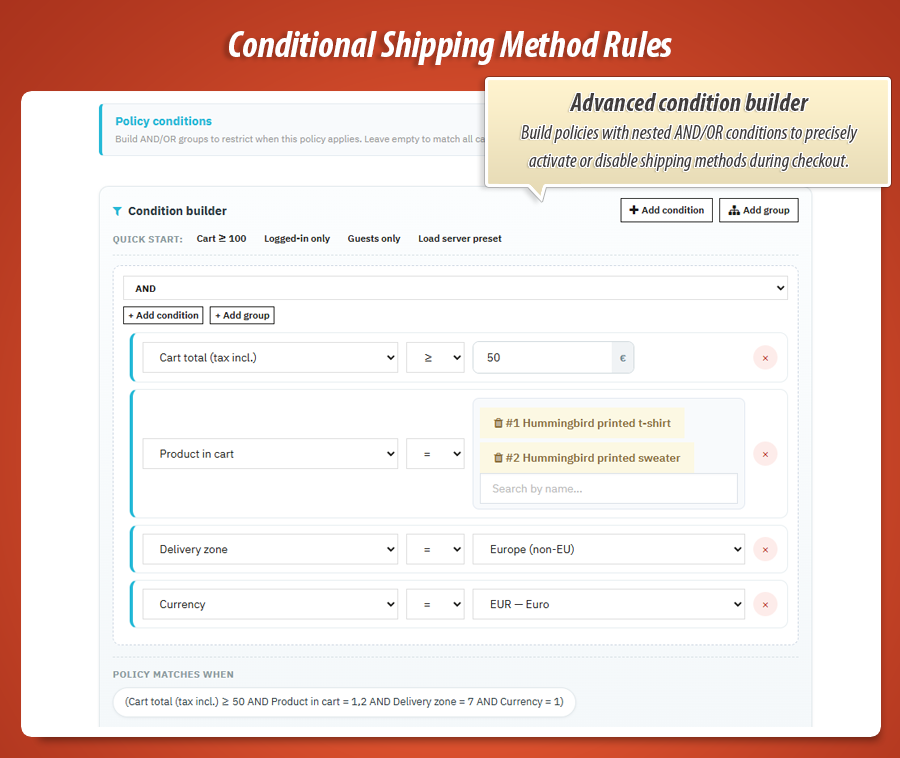
Nested AND/OR groups with 12 cart and customer fields. Quick presets for common scenarios. Raw JSON escape hatch when you need it.
Per-carrier rules
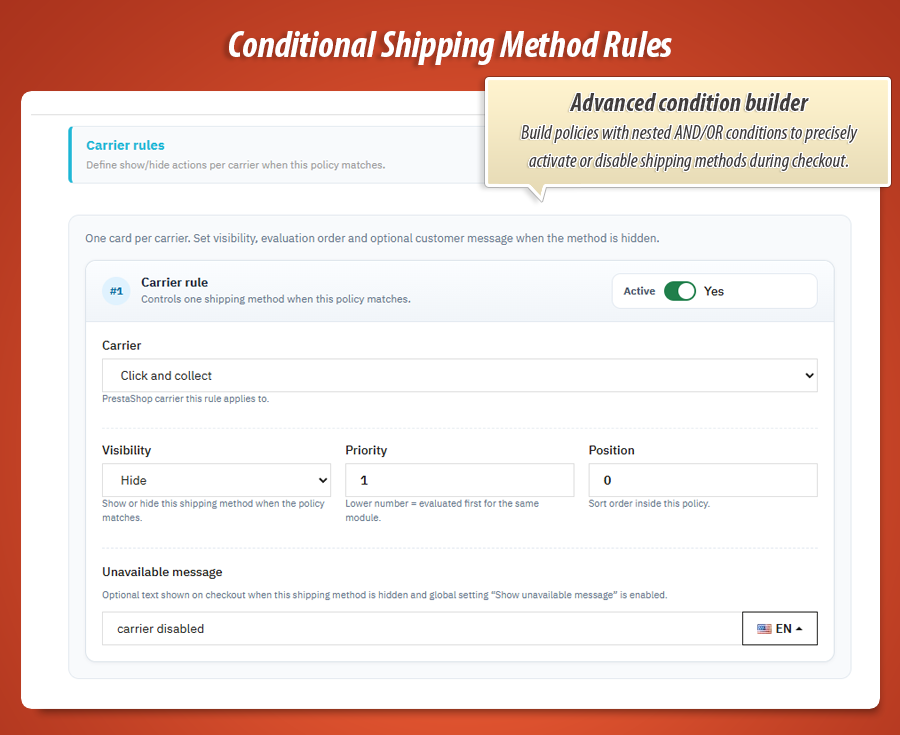
One card per PrestaShop carrier reference. Set SHOW or HIDE, evaluation priority, display position and optional multilingual unavailable messages.
Delivery list enforcement
Hidden carriers are stripped from the delivery option list before checkout renders. If the customer already picked a blocked method, the cart is synced — no silent auto-switch to another carrier.
Five merge strategies
Deny wins, allow wins, priority cascade, weighted score or unanimous SHOW — pick how conflicting rules inside a policy resolve.
Checkout simulator
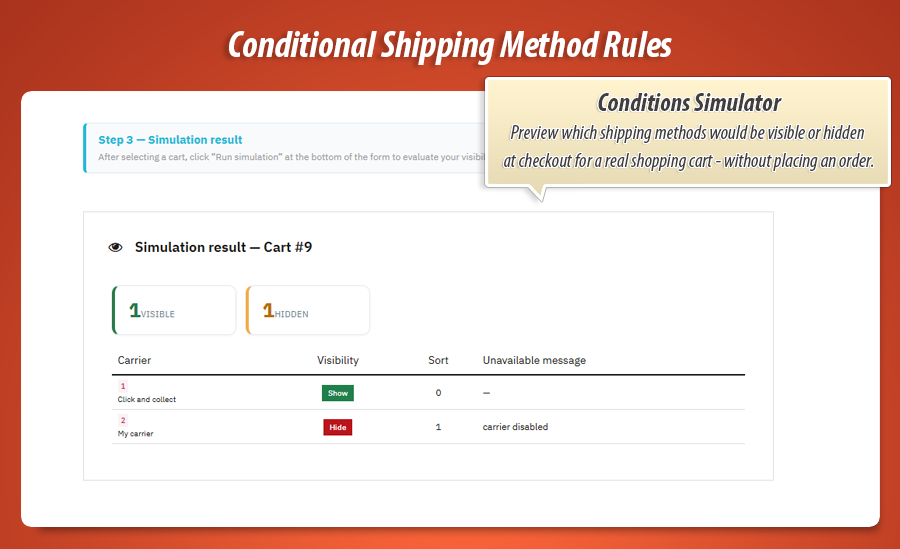
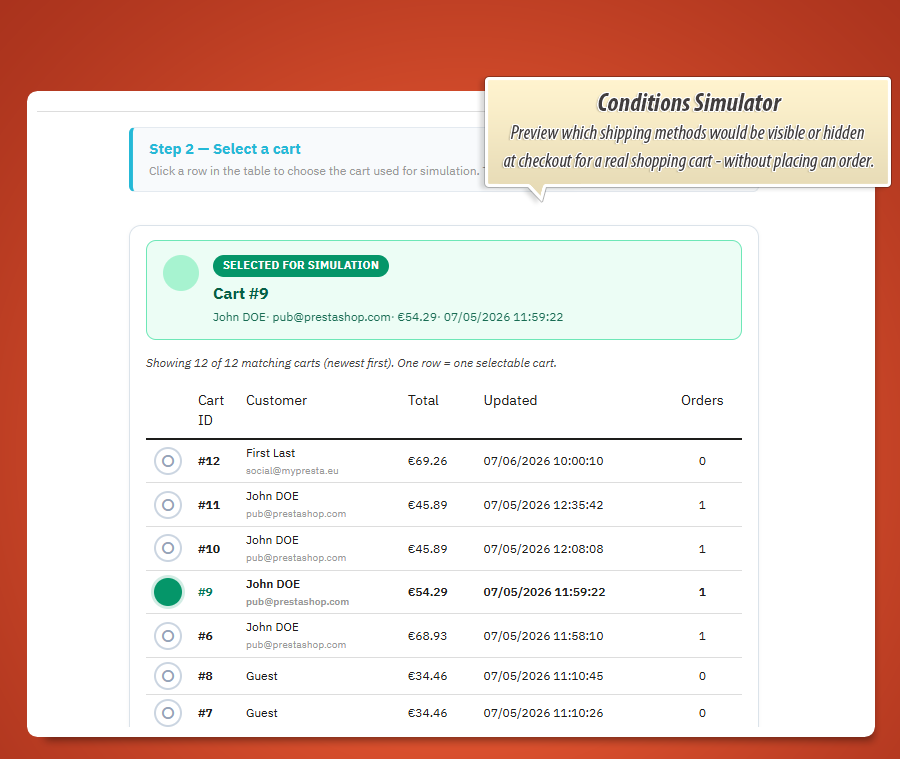
Pick a real shopping cart and customer from your store. See exactly which carriers would appear — with per-carrier totals — before a single order is placed.
Unavailable messages
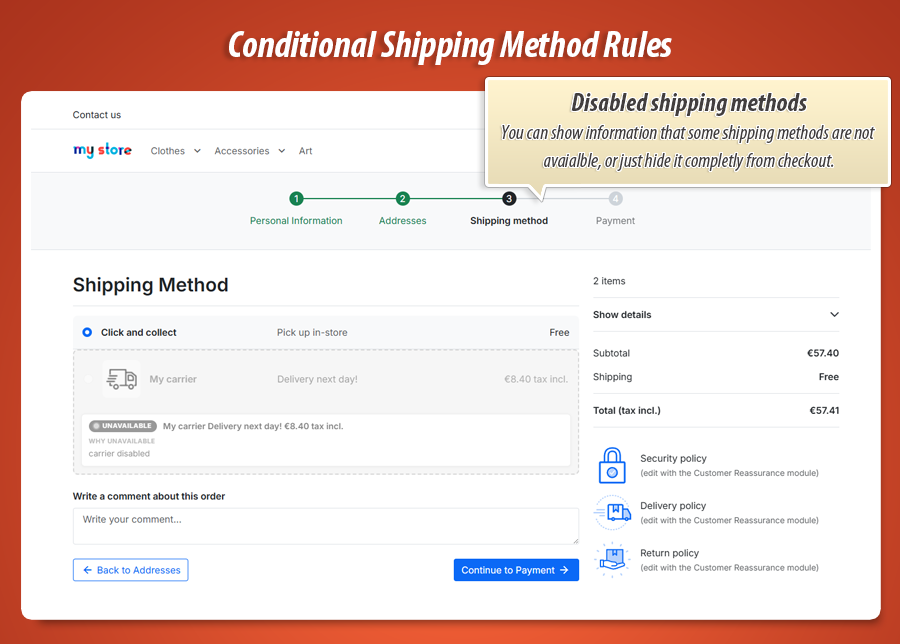
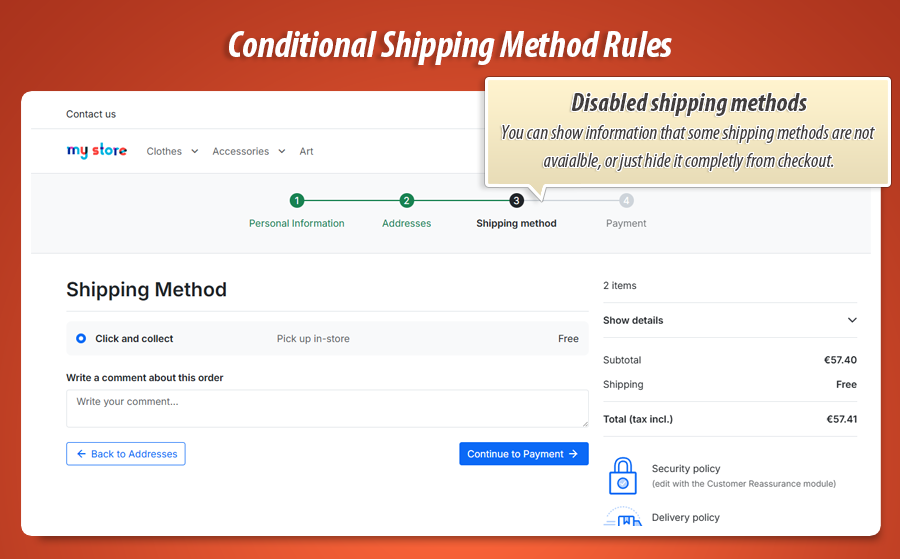
Keep a hidden carrier visible as a disabled option with a custom multilingual explanation — or remove it from the list entirely. Your choice per global setting.
Order visibility snapshot
Rich panel on the order detail page: selected carrier, cart totals, hidden and visible carriers at checkout, applied policies — stored on every order.
Gamechanger
Per-carrier shipping-aware evaluation
Other carrier modules check a single cart total or PrestaShop's static price ranges. Conditional Shipping Method Rules evaluates each carrier separately with products plus that carrier's own shipping cost.
The problem others miss
Products €48.90 + shipping €8.40 = €57.30. A naive "hide if cart > €50" rule that counts only products sees €48.90 — the expensive carrier stays visible and the order goes through. Your margin and carrier contract are broken.
How this module solves it
For every carrier on the delivery list the engine builds: products total + that carrier's shipping price. Express at €8.40 triggers the rule. Free pickup at €0 does not. Each option is judged on its real checkout total.
Enforced at checkout
The delivery list is filtered before the customer sees it. PrestaShop cannot silently swap them to another carrier. An order validation guard blocks bypass attempts if someone tampers with the form.
Why this is unbeatable: PrestaShop native carrier settings only know weight, zone and global price ranges. Simple hide-carrier plugins use one cart number for all methods. Only Conditional Shipping Method Rules combines enterprise policy logic with per-carrier shipping math and delivery-list enforcement at checkout — the exact scenario real shops hit every day.
Complete feature guide
Every feature explained in plain language for shop owners. No technical jargon. One by one, so you know exactly what Conditional Shipping Method Rules does for your store.
Carrier visibility at checkout
When a customer reaches the delivery step, the module evaluates all active policies against the current cart, customer and delivery address. Each carrier reference receives a SHOW or HIDE decision before options are rendered.
Filtering runs through PrestaShop's checkout lifecycle — delivery option list hooks, carrier display hooks and a front-office compatibility layer that keeps themes and one-page checkout modules working. The same policy engine drives every PrestaShop version from 1.7 through 9.
Policies and per-carrier rules
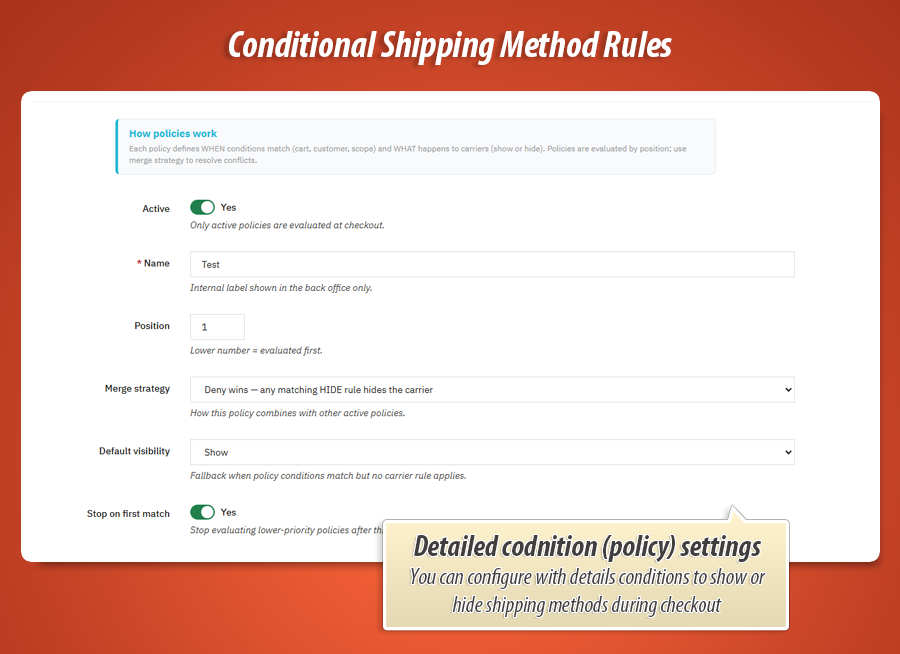
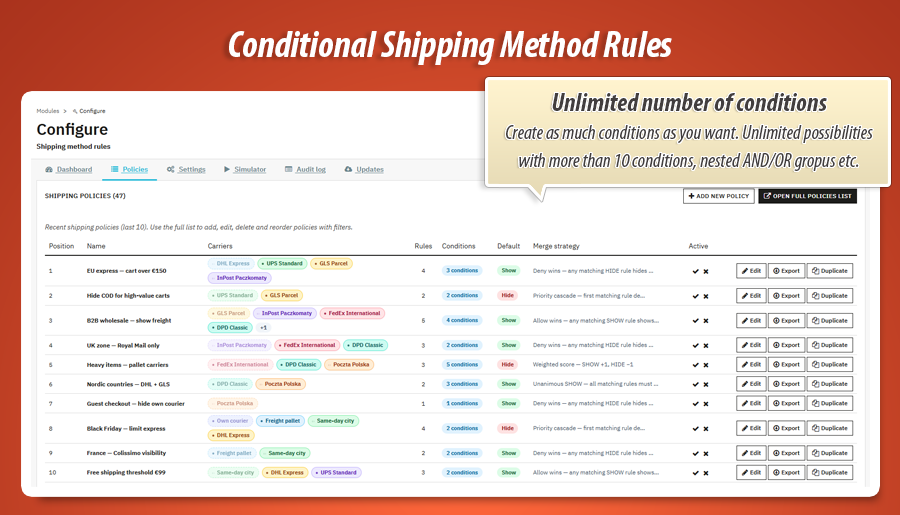
A policy is a named bundle of conditions plus a set of carrier rules. Create as many as you need — express limits, B2B-only methods, country restrictions, high-value order protection.
Inside each policy, every PrestaShop carrier gets its own rule card. Toggle SHOW or HIDE, set evaluation priority and reorder display position. Write optional unavailable messages per language.
Policies run in position order. Enable Stop on first match when the first matching policy should decide everything.
Cart total vs products total
Cart total (tax incl.) in this module means products plus the evaluated carrier's shipping — the number that matters for "order value" rules at the delivery step.
Products total counts product lines only, without shipping. Use it when you want to hide a method based on merchandise value alone — for example free shipping only below €100 of goods regardless of delivery price.
Both fields are available in the visual condition builder with full comparison operators. When a rule targets a specific carrier, Cart total automatically includes that carrier's shipping price in the evaluation.
Merge strategies
When multiple rules inside one policy target the same carrier, the merge strategy decides the outcome:
- Deny wins — any matching HIDE rule hides the carrier.
- Allow wins — any matching SHOW rule shows the carrier.
- Priority cascade — the first matching rule by priority decides.
- Weighted score — SHOW adds +1, HIDE subtracts −1; net score determines visibility.
- Unanimous SHOW — all matching rules must be SHOW for the carrier to appear.
Set a default merge strategy globally in Settings, then override per policy when a specific scenario needs different conflict resolution.
Unavailable messages
Sometimes hiding a shipping method without explanation frustrates customers. Conditional Shipping Method Rules lets you write a per-rule, per-language message that appears when a carrier is blocked.
In Settings, choose between two behaviours: remove hidden carriers from the list entirely, or keep them visible as disabled options with your custom message inline on the delivery step.
Each rule card includes a multilingual input with a language flag selector — write the explanation once per language, the correct version shows automatically at checkout.
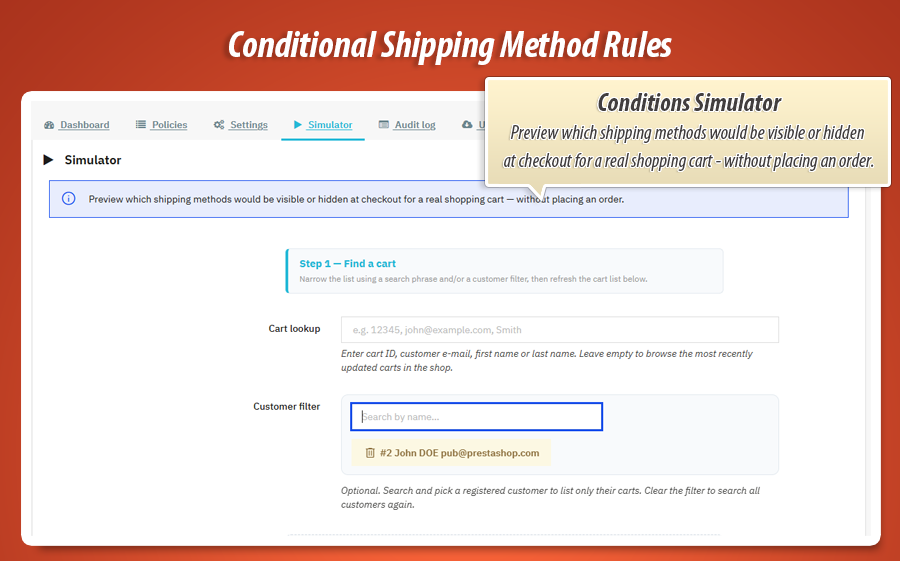
Checkout simulator
The Simulator tab lets you test rules against real carts from your shop. Search and select an active basket, optionally attach a customer, then run the evaluation.
Results show every carrier with its final visibility status, per-carrier shipping-aware totals, matched policies and unavailable messages. No test order required. No customer impact.
Use the simulator after every policy change to confirm your rules behave exactly as intended before customers see them.
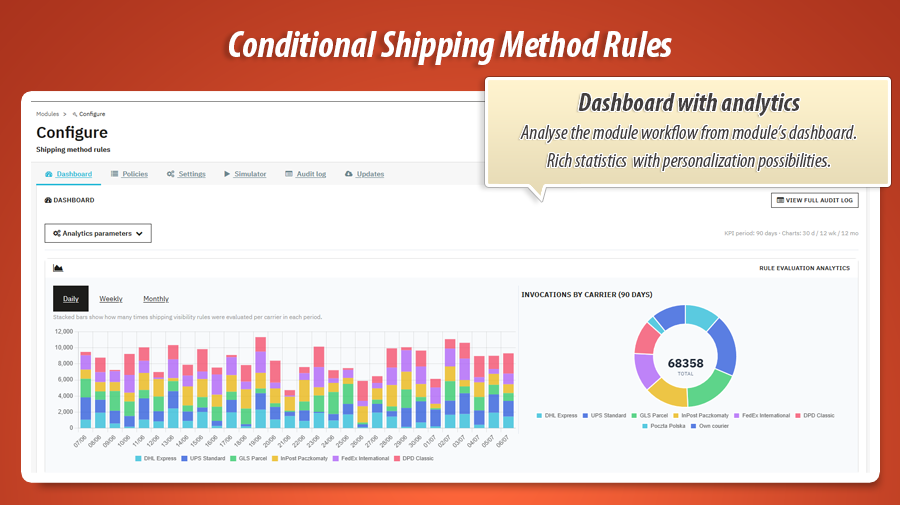
Dashboard and analytics
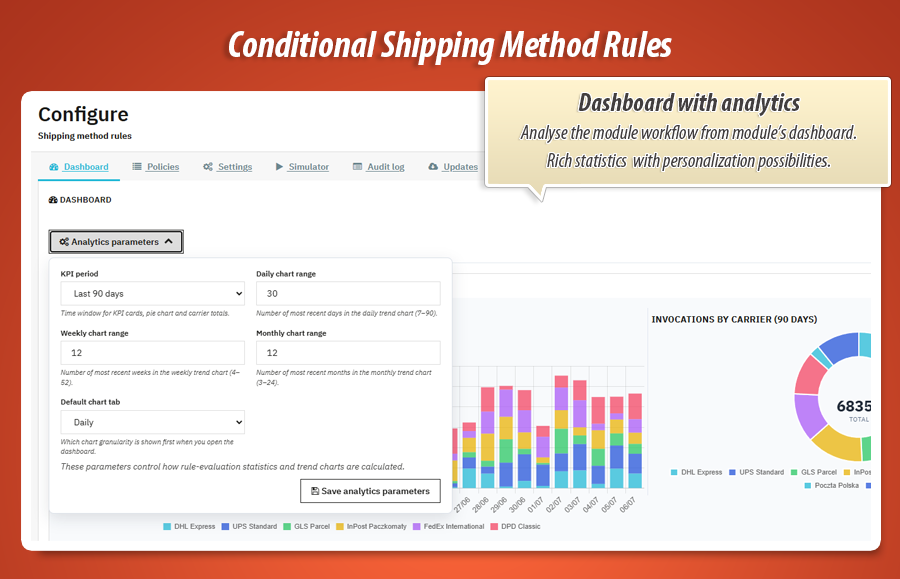
The Dashboard tab is your carrier visibility control room. KPI cards summarise evaluations, hidden applications and active policies over a selectable period (30, 90, 180 or 365 days).
Chart.js trend charts break down activity daily, weekly or monthly. A per-carrier table shows which shipping methods are hidden most often — useful when tuning rules or renegotiating carrier contracts.
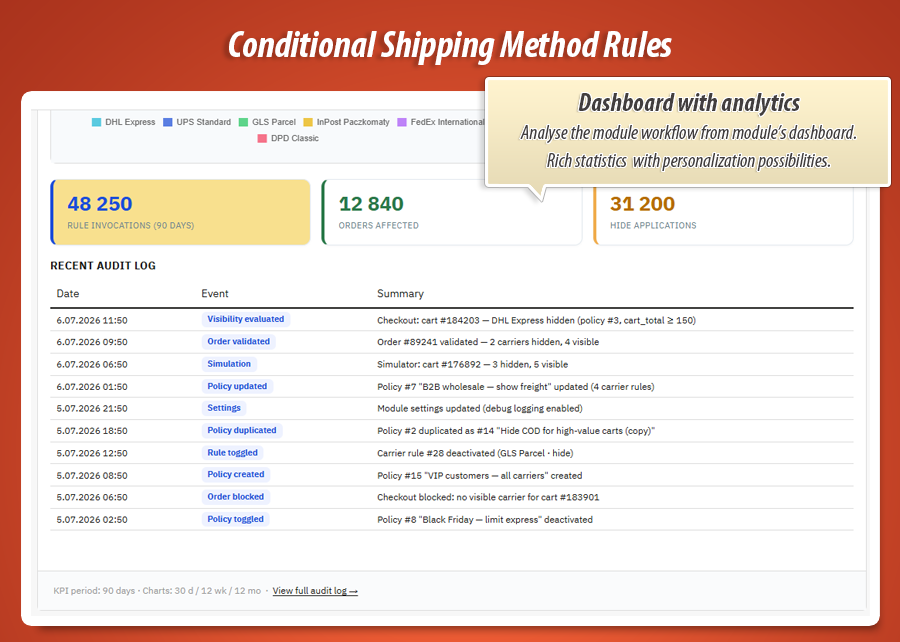
Recent audit entries appear at the bottom of the dashboard for quick access to the latest decisions without leaving the overview.
Audit log
Every significant event is recorded: visibility evaluations at checkout, order validation blocks, policy create/update/delete, imports, exports, duplicates, settings changes and simulation runs.
The dedicated Audit log admin tab under Shipping gives you filters by date, event type and carrier reference. Click preview on any row to see the full detail payload.
Export the log to CSV when compliance or internal review requires a complete history of who changed what and when.
Import, export and duplicate policies
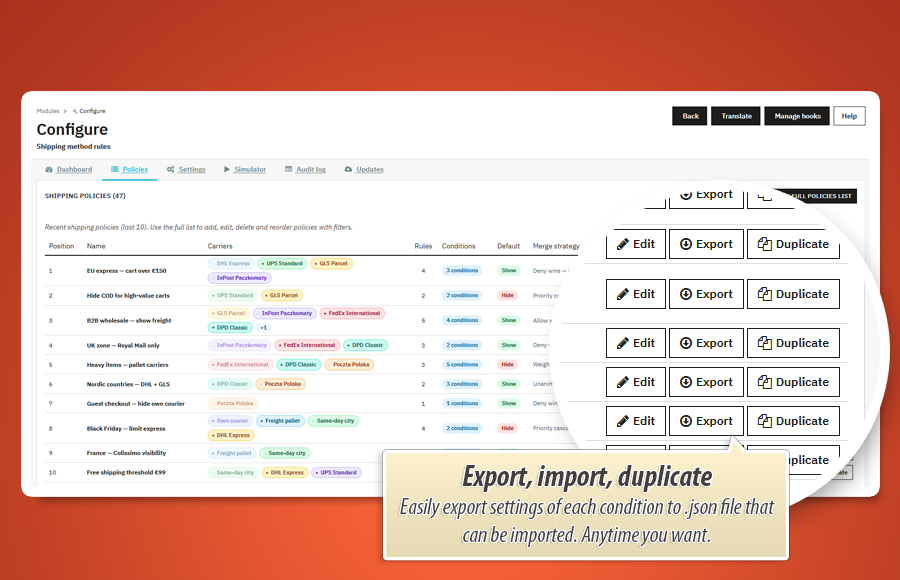
Download any policy as a portable JSON file from the policy editor or the policies list. Upload JSON to create a new policy on the same shop or a staging environment.
The duplicate action copies the full policy — conditions, carrier rules, merge strategy and multilingual messages — under a new name. Ideal for creating seasonal variants or testing changes safely.
Built-in condition presets speed up policy creation. Every import, export and duplicate action is logged in the audit trail.
Order validation guard
Rules are enforced at display and again when the order is validated. If a customer bypasses the delivery list, the order is blocked before it is created — with a redirect back to checkout and a clear error message.
A structured visibility snapshot is stored on every order so support can see which carriers were hidden, which were allowed and which policies applied — directly in the order detail panel.
Custom checkout theme support
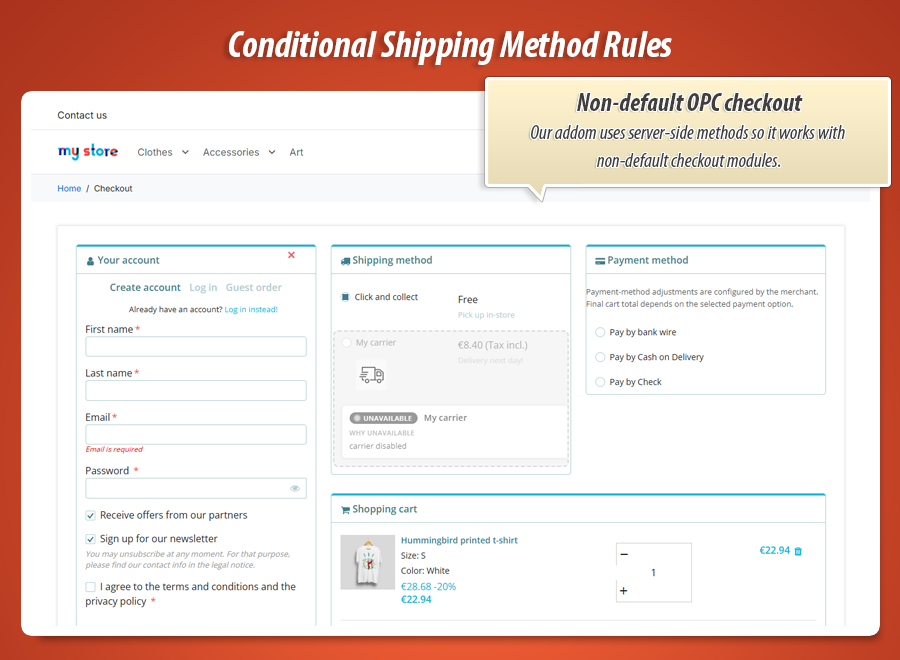
The module works with the default PrestaShop checkout out of the box. If your theme or a third-party one-page checkout module (OPC, Supercheckout, etc.) uses non-standard markup, optional custom CSS selectors in Settings let you point the front layer at your carrier radio buttons and row containers.
The same policy engine and visibility API power every integration path — standard checkout, custom themes and heavily modified delivery steps.
Six dedicated back office tabs
Everything is organised in clear sections. Open the module configuration and jump straight to where you need to be. Two additional native admin menus under Shipping give you full list views for policies and audit history.
Rules and testing
-
PoliciesCreate, edit, reorder, duplicate and export carrier visibility policies.
-
SimulatorRun evaluations against real carts with per-carrier shipping-aware totals.
-
SettingsGlobal defaults, unavailable message mode, custom DOM selectors, analytics period and debug logging.
Insight and maintenance
-
DashboardKPIs, trend charts, per-carrier stats and recent activity feed.
-
Audit logFull event history with filters, preview modal and CSV export.
-
UpdatesModule version check and MyPresta update notifications.
Native menus Shipping policies and Audit log under the Shipping section provide HelperList views with quick active toggles, condition summaries, carrier pills and bulk management.
Example conditions
Real policy setups you can build in minutes — each one combines a condition tree with multiple carrier rules. Copy the logic, swap in your carriers, publish.
Policy: Express cap with shipping-aware totals Merge: Deny wins
Policy conditions
Always match (no policy-level gate)
| Carrier | Rule | Extra rule conditions |
|---|---|---|
| Express courier | HIDE | Cart total > 50 EUR (products + this carrier's shipping) |
| Economy parcel | SHOW | — |
| In-store pickup | SHOW | Cart total ≤ 50 EUR on pickup (€0 shipping) |
Products €48.90 + Express €8.40 = €57.30 → Express hidden. Same products + Pickup €0 = €48.90 → pickup stays visible. Per-carrier math in action.
Policy: B2B contract logistics Merge: Deny wins
Policy conditions (AND)
Customer logged in AND Customer group in [Wholesale, VIP B2B] AND Products total ≥ 200 EUR
| Carrier | Rule | Extra rule conditions |
|---|---|---|
| Contract freight | SHOW | — |
| Retail express | HIDE | — |
| Cash-on-delivery parcel | HIDE | Cart total ≥ 1 000 EUR |
Policy: Regional carrier routing Merge: Priority cascade
Policy conditions (OR)
Delivery country in [DE, AT, CH] OR Delivery zone = DACH
| Carrier | Rule | Extra rule conditions |
|---|---|---|
| DHL Paket | SHOW | Product quantity ≤ 20 |
| DHL Paket | HIDE | Product quantity > 20 |
| Pallet freight | SHOW | Product quantity > 20 |
| Overnight courier | HIDE | Delivery zone not in [Urban hubs] |
Policy: Oversized catalogue routing Merge: Weighted score
Policy conditions (nested)
Category in cart in [Furniture, Oversized] OR (Manufacturer in cart in [Heavy brand] AND Product in cart not in [Flat-pack SKUs])
| Carrier | Rule | Unavailable message |
|---|---|---|
| Standard parcel | HIDE | "Parcel delivery not available for bulky items." |
| Pallet freight | SHOW | — |
| Locker pickup | HIDE | — |
Policy: Guest checkout delivery limits Stop on first match
Policy conditions
Customer logged in = No
| Carrier | Rule | Extra rule conditions |
|---|---|---|
| Scheduled delivery | HIDE | — |
| Standard parcel | SHOW | — |
| Express same-day | HIDE | Cart total > 150 EUR |
| Store pickup | SHOW | — |
Every condition field the builder understands
Use any field below at policy level or on individual carrier rules. Pair with nine comparison operators and unlimited nested AND/OR groups.
| Field | Evaluates against | Supported operators |
|---|---|---|
| Cart total (tax incl.) | Merchandise plus the shipping fee of the carrier being judged | equals, differs, above, at least, below, at most, range |
| Products total | Sum of product lines only — delivery fees excluded | equals, differs, above, at least, below, at most, range |
| Product quantity | Total units across all cart lines | equals, differs, above, at least, below, at most, range |
| Currency | ISO currency active during checkout | equals, differs, one of, none of |
| Delivery country | Country on the shipping address | equals, differs, one of, none of |
| Delivery zone | PrestaShop zone mapped to the delivery address | equals, differs, one of, none of |
| Customer group | Group membership at the moment of evaluation | equals, differs, one of, none of |
| Carrier | Carrier reference currently selected in the basket | equals, differs, one of, none of |
| Customer logged in | Whether the shopper has an authenticated session | equals, differs |
| Product in cart | Presence of specific product IDs in the basket | one of, none of |
| Category in cart | Whether cart items belong to chosen categories | one of, none of |
| Manufacturer in cart | Brands attached to products currently in the basket | one of, none of |
Twelve fields. Nine operators. Trees as deep as you need.
Stack as many policies as your logistics require. Add as many rules per carrier as your contracts demand — each with its own sub-conditions, priority, schedule and multilingual explanation. Multiply that by five merge strategies, cross-policy ordering and stop-on-first-match…
The combination space is practically infinite. Your delivery step can stay simple — or become as precise as your carrier agreements. WOW.
Real-world use cases
Conditional Shipping Method Rules adapts to how your logistics actually work — not the other way around.
Carrier contract value ceilings
Your express partner caps orders at €50 merchandise — but the real limit is order value including delivery. Hide express automatically when products plus that carrier's fee exceed the contract threshold.
Free-shipping threshold without loopholes
Show economy delivery only when the merchandise subtotal clears your free-shipping bar. Use Products total for the threshold and Cart total when the shipping fee itself must count toward limits.
Country-specific delivery portfolio
Blend delivery country, zone and customer group in one policy. German wholesale buyers see your contract carrier; retail visitors in other markets see standard parcel options only.
Transparent "why not available" messaging
Instead of a missing option, show express greyed out with "Not available for orders above €50 including delivery" — per language, per rule, without touching theme templates.
Remote-area overnight restrictions
Hide same-day and overnight carriers when the delivery zone is outside your hub network. Combine zone and country operators in nested OR groups for island and rural postcodes.
Seasonal pickup-only campaigns
During peak season, duplicate a policy, set date windows on carrier rules and show store pickup while hiding home delivery — then revert by toggling the seasonal policy off.
Hazmat and restricted catalogue routing
When the basket contains batteries, aerosols or other regulated categories, hide locker and parcel carriers and leave pallet freight or approved couriers visible.
Guest vs registered delivery options
Use the logged-in field to reserve scheduled delivery slots for registered customers. Guests see a lean carrier list; returning buyers unlock premium shipping methods.
Statistics for nerds
Per-carrier totals computed at filter time. Orders blocked at validation. Every decision traced in audit rows. Here is the engineering behind the carrier list your customers see.
14,000+
Lines of code
PHP, JavaScript, Smarty templates, CSS and SQL powering the evaluation engine, condition builder, dashboard analytics, simulator and audit logging.
19
Dedicated library classes
Engine, condition evaluator, tree repository, policy duplicator, dashboard, audit log, order snapshot, compatibility layer and admin renderer.
6
Back office tabs
Dashboard, Policies, Settings, Simulator, Audit log and Updates — plus native Shipping policies and Audit log menus under Shipping.
31
Translation packs
Full back-office and front-office string coverage across European, Asian and global shop languages.
Database layer
-
6 custom tables: policies, carrier rules, rule translations, carrier sort order, condition presets and audit log.
-
Order snapshot: structured visibility payload stored on every order for post-purchase support and dispute resolution.
-
Multilingual unavailable messages in a dedicated lang table per rule and shop language.
Architecture
-
10+ PrestaShop hooks: delivery filtering, carrier guards, checkout assets, order validation and admin order display — one compatibility layer across 1.7, 8 and 9.
-
ShipmethodrulesEngine evaluates policies in position order with merge strategies, stop-on-first-match, per-carrier shipping math and per-rule date windows.
-
7 front-office JS assets plus AJAX visibility and simulate controllers for live checkout refresh without page reload.
-
10 Smarty templates for policy editor, condition builder, dashboard, audit preview and order snapshot panel.
Chart.js
Dashboard analytics with daily, weekly and monthly evaluation trend charts.
5 strategies
Deny wins, allow wins, priority cascade, weighted score and unanimous SHOW.
12 fields
Cart, customer, delivery and catalog conditions with nine comparison operators.
v1.1.0
Current release. PrestaShop 1.7.x, 8.x and 9.x. One codebase, three platform generations.
Each carrier evaluated with its own shipping cost. Hidden carriers removed before checkout renders. Decisions traced on every order. That is the engineering contract behind Conditional Shipping Method Rules. Your customer sees a clean delivery list. You control exactly what is on it.
14,000+ lines of code across 110+ module files, 31 translation packs and v1.1.0 of continuous development. A production-grade visibility engine your checkout can rely on when carts vary, carriers differ and delivery rules need to keep up.
129.00 €
Module Gallery 1/15
Why choose our module
Conditional Shipping Method Rules?
Optimization and Automation
Conditional Shipping Method Rules optimizes delivery by automating carrier visibility. Its policy engine, visual builder, and per-carrier shipping cost evaluation automate complex decisions, ensuring precise delivery options are presented. This enhances checkout efficiency and accuracy, eliminating manual oversight.
Increased Sales
Conditional Shipping Method Rules boosts sales by presenting only relevant shipping options, reducing cart abandonment. Its per-carrier shipping-aware logic ensures accurate totals, building trust. Clear unavailable messages prevent frustration, guiding customers smoothly to conversion, and optimizing the shopping experience.
15 years of experience
Leveraging 15 years of PrestaShop insight, Conditional Shipping Method Rules offers unparalleled control over delivery options. This module precisely evaluates per-carrier shipping costs and enforces complex policies, reflecting a deep understanding of e-commerce logistics challenges often accumulated over extensive experience.
Extensive Customization
Conditional Shipping Method Rules provides extensive customization through its policy-based engine, visual condition builder with 12 fields and 9 operators, and per-carrier rules with five merge strategies. This allows unparalleled personalization of delivery options, perfectly matching your store's unique logistics and business requirements.
Open Source Code
Conditional Shipping Method Rules offers full source code access, enabling developers to deeply customize its powerful policy engine and visual condition builder. This ensures advanced modifications and seamless integrations are possible, providing total control over your dynamic shipping logic without limitations or hidden functions.
License and Updates
Updates for Conditional Shipping Method Rules ensure its advanced conditional logic and per-carrier shipping math always comply with current requirements. The license is a one-time purchase, allowing unlimited use. Free updates are included for a full calendar year; subsequent renewals offer discounts up to 90% to maintain precise delivery controls.