
PrestaShop Conditional Order Fees
Charge handling, service or packaging fees only when your rules match. Conditional Order Fees adds automatic cart-line surcharges in PrestaShop with policy rules, nested AND/OR conditions on cart value, customer, country, carrier and products. Custom labels per cart, simulator, audit log and analytics. For PrestaShop 1.7, 8 and 9.
129.00 €
Galeria 1/15
PrestaShop Advanced Conditional Fees
Conditional Order Fees for PrestaShop empowers merchants to implement highly flexible surcharges. Its robust policy engine enables creation of fees based on comprehensive criteria, including cart value, customer group, carrier, payment method, and product catalogue. Fees appear transparently as distinct cart line items, each with customizable multilingual labels. Merchants can define fixed or percentage amounts, set minimum/maximum caps, and assign specific tax rules. The module features a powerful visual condition builder, a cart simulator for thorough testing, and detailed audit logs, ensuring precise control over handling, service, and packaging fees to enhance profitability and customer clarity.
Module version:
1.2.0
Shop versions:
9.x8.x1.7.x
Works with ThirtyBees:
No
Translations:


Charge the right fee. Every cart. Every time.
Conditional Order Fees for PrestaShop.
Not every order costs the same to fulfil. Conditional Order Fees is a full policy engine for cart-line surcharges: build nested AND/OR conditions on cart value, customer, carrier, payment and catalogue, add fees as a transparent product line, show a custom multilingual label per cart, simulate outcomes before go-live, and trace every decision in an audit log. One module. Total control over when handling, service and packaging fees appear.
What Conditional Order Fees delivers
These are the capabilities that turn flat surcharges and manual workarounds into real business rules. Built for shops that need precise fee logic at checkout — without touching code.
Policy-based engine
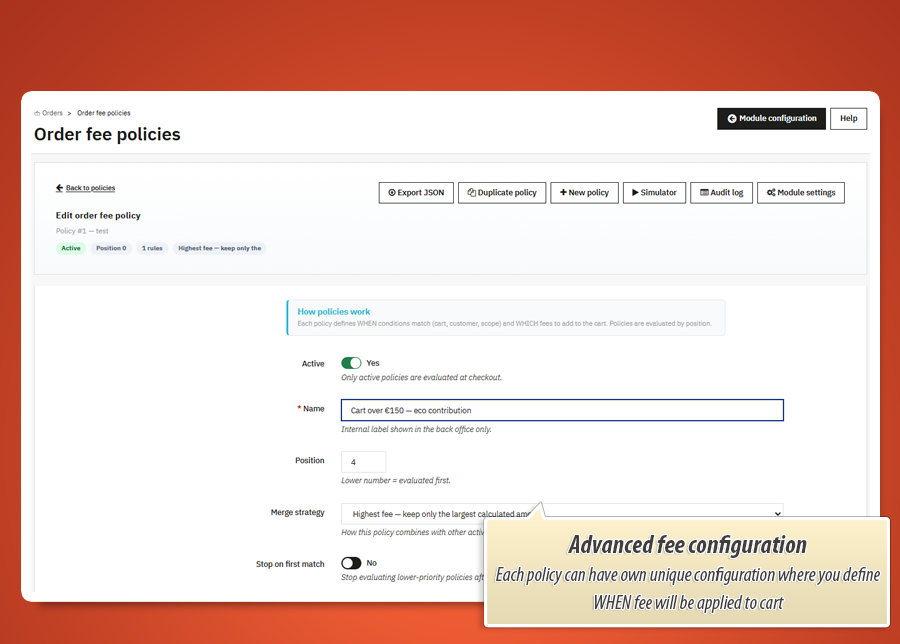
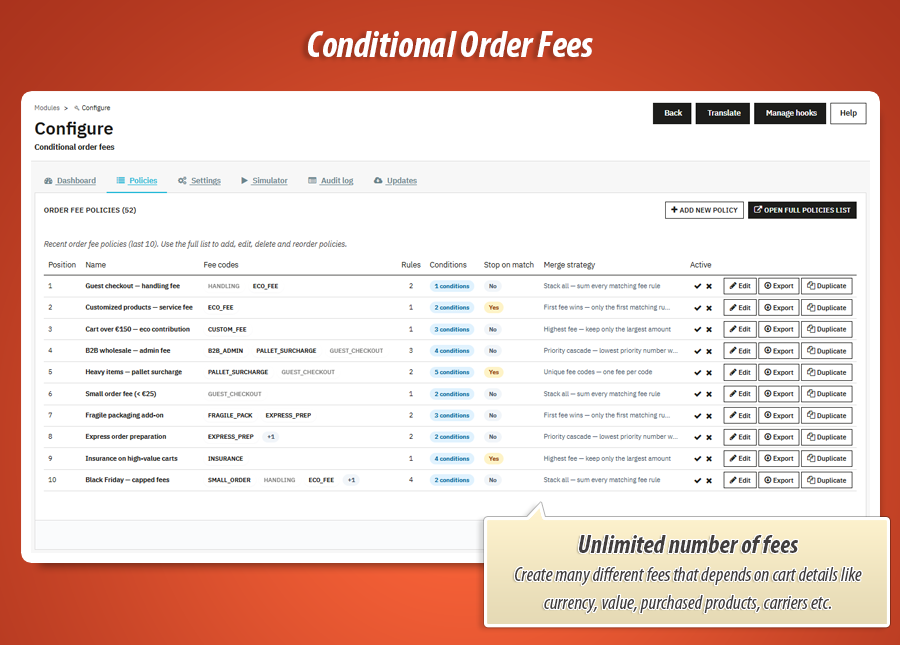
Create multiple named policies, order them by priority, activate or pause individually. Each policy holds its own condition tree and fee rules.
Transparent cart line fees
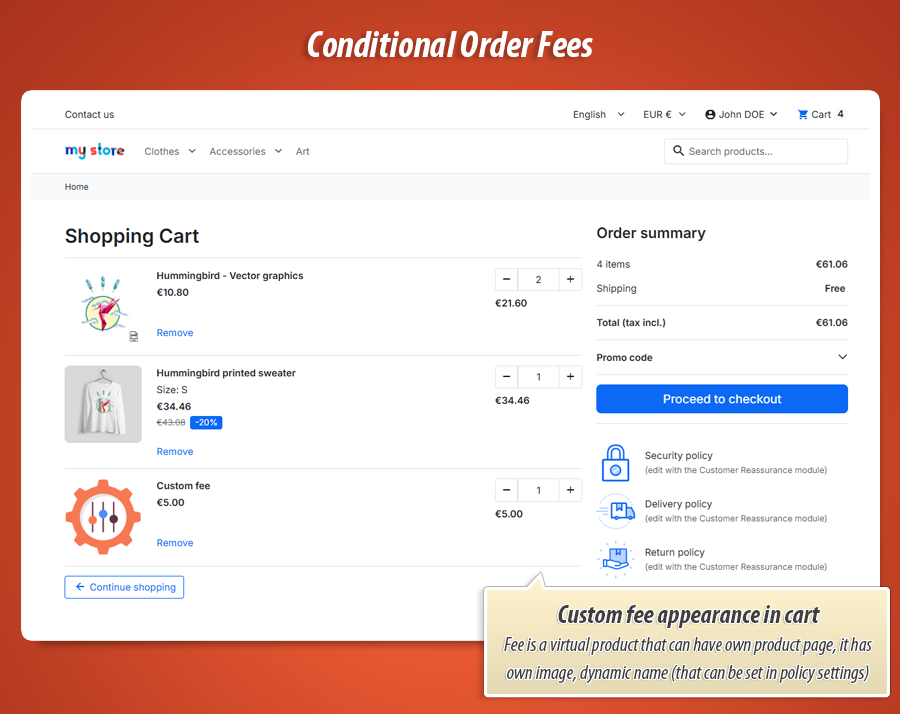
Fees materialise as a real cart product line with correct tax rules. Customers see the surcharge in cart, checkout summary and order confirmation — not a hidden total tweak.
Visual condition builder
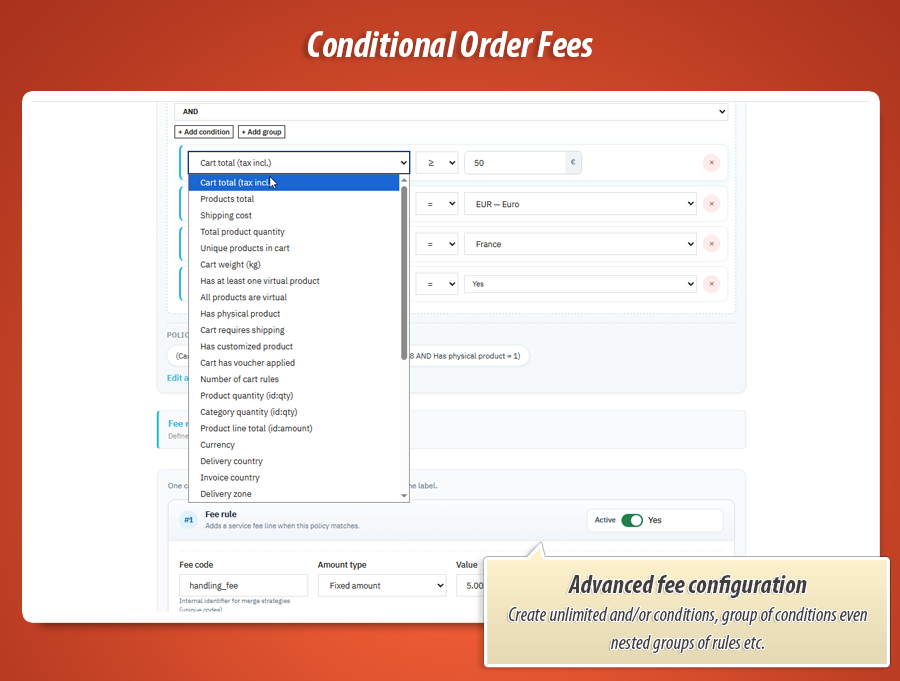
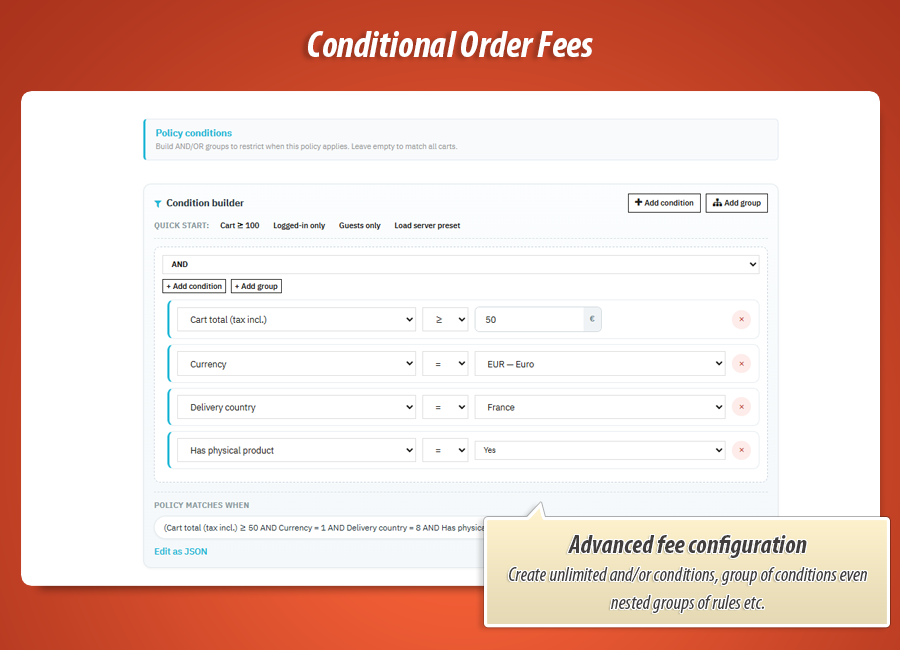
Nested AND/OR groups with 32 cart, customer, delivery, payment and catalogue fields. Quick presets for common scenarios. Raw JSON escape hatch when you need it.
Multilingual cart line labels
Write a customer-facing label per fee rule and language — "COD handling fee", "Gift wrapping", "Bulky goods surcharge". Labels are stored per cart, not on the shared fee product, so concurrent checkouts never overwrite each other.
Percent or fixed amounts
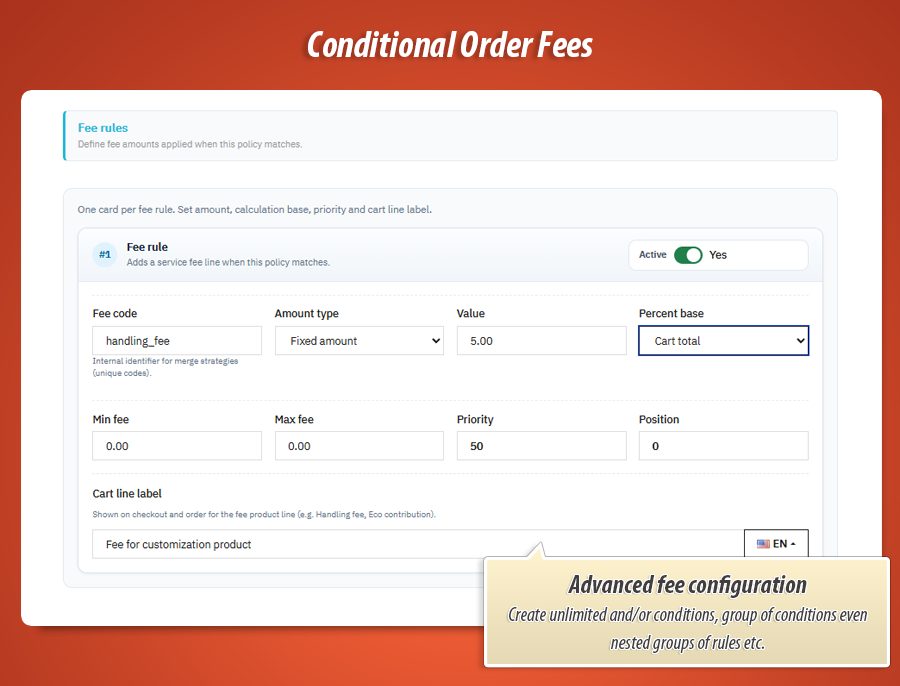
Charge a flat fee or a percentage of cart total, products total, shipping cost or weight. Set min and max caps per rule. Assign tax rules group per fee line.
Five merge strategies
Stack all matching fees, first fee wins, priority cascade, highest fee only, or unique fee codes — pick how conflicting rules inside a policy combine.
Cart simulator
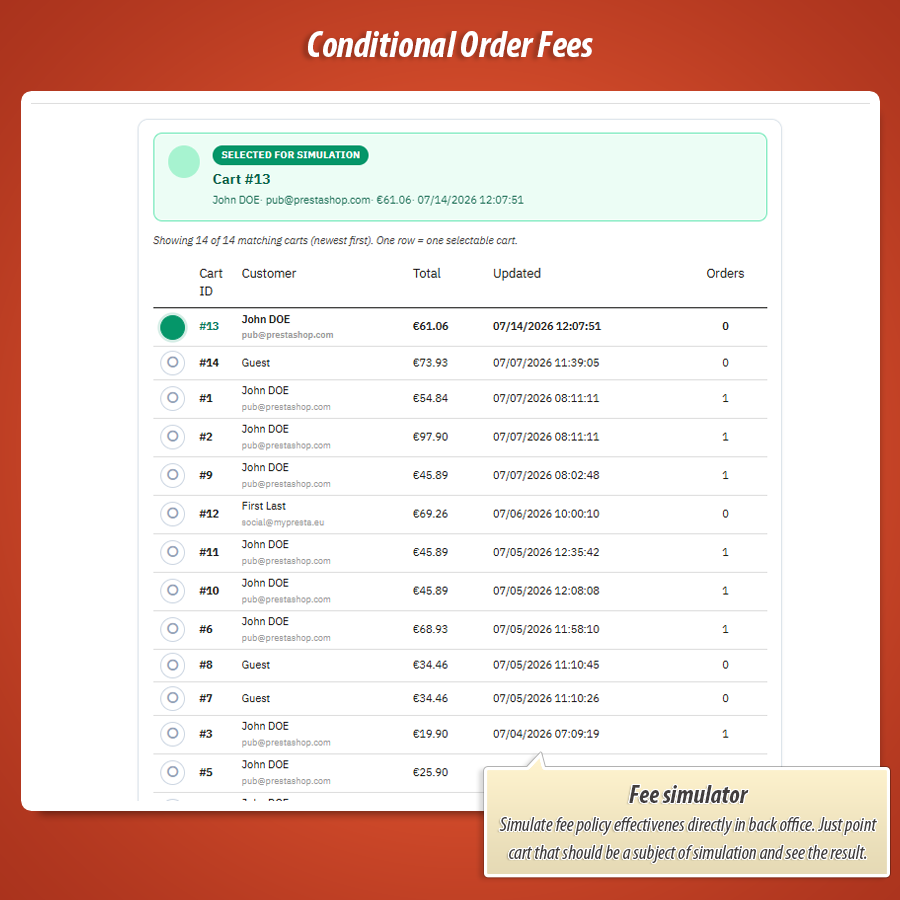
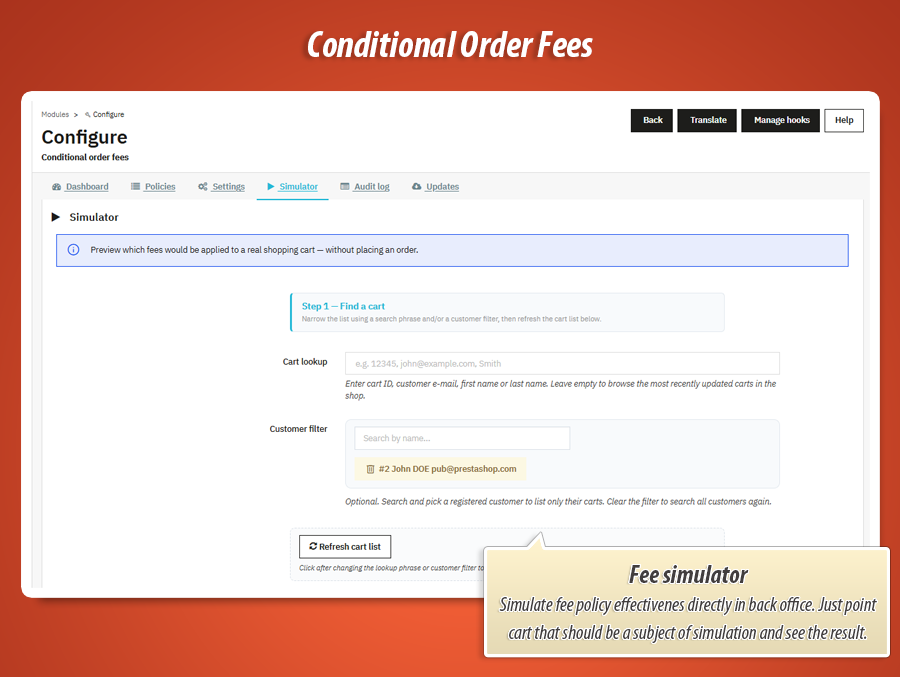
Pick a real shopping cart and customer from your store. See exactly which fees would apply and for how much — before a single order is placed.
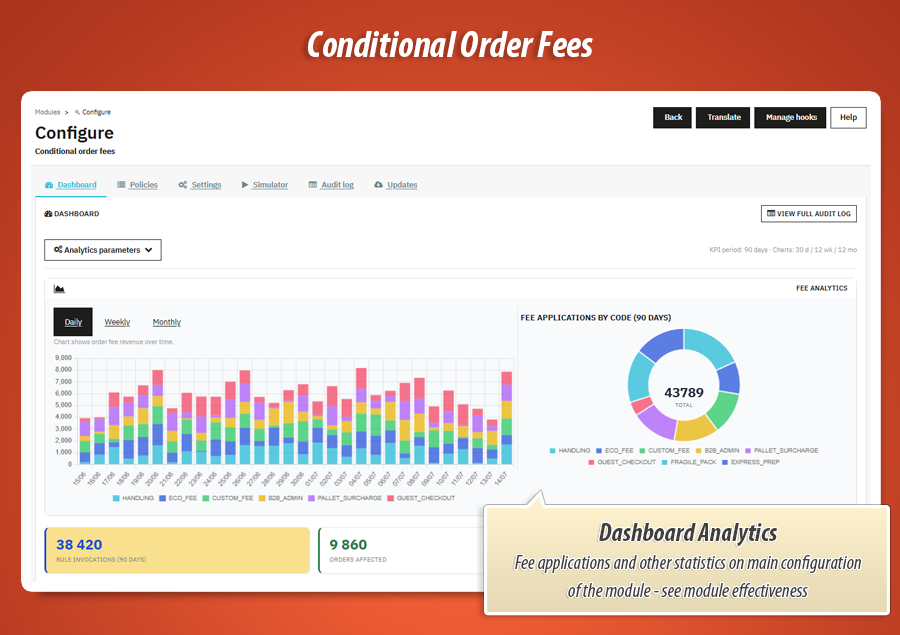
Dashboard and analytics
KPI cards, Chart.js trend charts and fee revenue breakdowns over selectable periods. See which policies drive the most surcharge income.
Order detail panel
Support sees the applied fee label and amount directly on the order page in back office. No digging through raw product rows.
Gamechanger
32 condition fields. Trees as deep as your pricing model.
Flat surcharge plugins stop at one threshold. PrestaShop cart rules cannot express nested fee logic per payment method, carrier and catalogue. Conditional Order Fees gives you a visual condition builder with 32 fields, 14 operators and unlimited AND/OR nesting — at policy level and on every individual fee rule.
32
Condition fields
Cart, customer, delivery, payment, catalogue
14
Operators
=, ≠, ranges, in, regex, contains
∞
Nesting depth
AND/OR groups inside groups
2×
Policy + rule level
Gate + sub-conditions per fee rule
01
What flat fees cannot express
One rule — if cart > €50, add €2 — cannot tell COD from card, wholesale from retail, or bulky furniture from digital downloads. Real pricing needs context, not a single number.
02
Build elaborate condition trees
Stack nested AND/OR groups in the back office. Combine payment module, customer group, cart weight and catalogue in one tree — then add sub-conditions on each fee rule inside the same policy.
03
Multiply across policies
No cap on policies or fee rules. Order by position, stop on first match, pick a merge strategy. Duplicate, export JSON, simulate on real carts — publish a model as precise as your contracts.
Group · OR
Payment module in cashondelivery, codpro
Products total ≥ 1.00 EUR
Nested · AND
Category in cart in Furniture, Oversized
Cart weight > 30 kg
Fields used: Payment Cart value Category Weight + 28 more
Combination space
32 fields × 14 operators × ∞ nesting × policies × fee rules × 5 merge strategies
Why this is unbeatable: The combination space is practically infinite. Cart rules and manual products cannot get there. Only Conditional Order Fees turns that complexity into one clear fee line your customer understands.
Complete feature guide
Every feature explained in plain language for shop owners. No technical jargon. One by one, so you know exactly what Conditional Order Fees does for your store.
Automatic cart line sync
When cart contents change — product added, quantity updated, carrier or address switched — the module re-evaluates active policies and syncs the fee line automatically. No manual refresh. No theme JavaScript hacks.
If no policy matches anymore, the fee product is removed cleanly. If the amount changes, the line updates through PrestaShop's native cart mechanics with price override hooks.
Per-cart multilingual labels
Each cart stores its own customer-facing label in conorderfee_cart — not on the shared hidden fee product. Cart #1042 can show "COD handling fee" while Cart #1043 shows "Gift wrapping surcharge" at the same time, with no label leaking between sessions.
Presentation hooks inject the correct text per cart through PrestaShop's native product listing and cart product presenters. The fee product stays generic in the catalogue; concurrent checkouts and AJAX cart updates remain safe at scale.
Policies and fee rules
A policy is a named bundle of conditions plus one or more fee rules. Create as many as you need — COD surcharges, small-order fees, packaging for bulky goods, payment-method handling.
Each fee rule defines amount type (fixed or percent), calculation base, min/max caps, tax rules group, priority, optional date window and its own sub-conditions. Write a multilingual cart line label customers actually see.
Policies run in position order. Enable Stop on first match when the first matching policy should decide everything.
Calculation bases
Products total — sum of merchandise lines only, fee product excluded from the base automatically.
Cart total — full basket value including shipping, still excluding the fee line itself to avoid circular math.
Shipping cost and cart weight bases let you charge packaging or handling proportional to delivery size — not just order value.
Merge strategies
When multiple fee rules inside one policy match, the merge strategy decides the outcome:
- Stack all — sum every matching fee rule.
- First fee wins — only the first matching rule applies.
- Priority cascade — lowest priority number wins.
- Highest fee — keep only the largest calculated amount.
- Unique fee codes — one fee per code, highest priority wins per code.
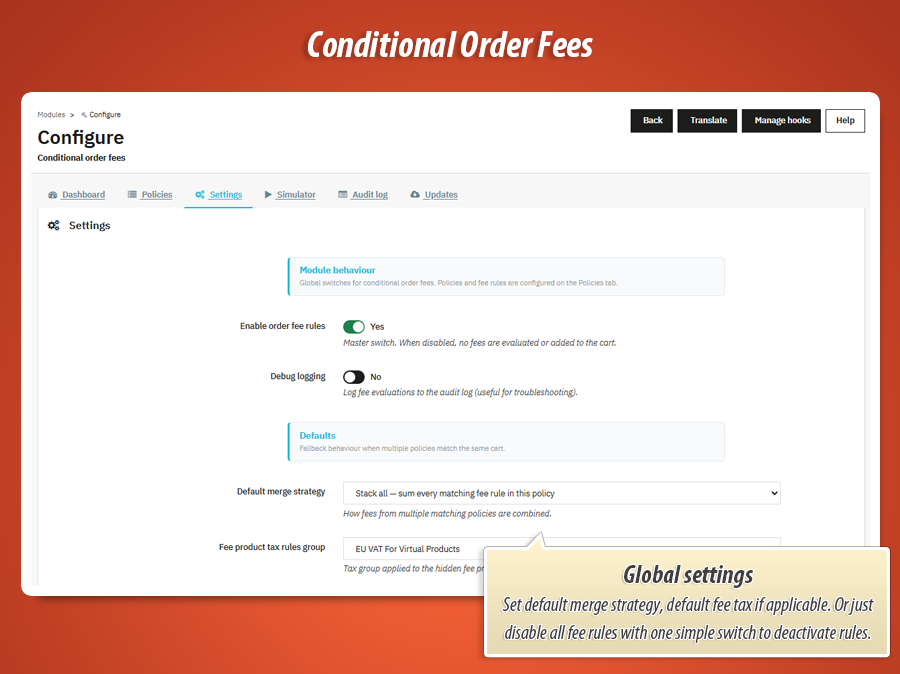
Set a default merge strategy globally in Settings, then override per policy when needed.
Cart simulator
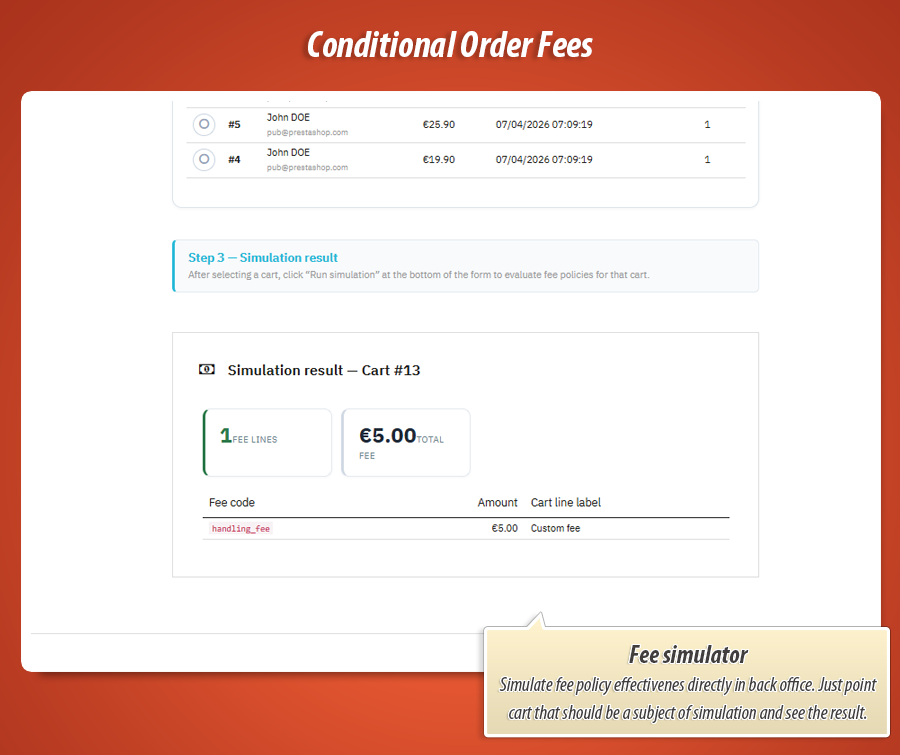
The Simulator tab lets you test rules against real carts from your shop. Search baskets, optionally attach a customer, then run the evaluation.
Results show matched policies, fee lines with amounts and labels, and the total surcharge — no test order required.
Use the simulator after every policy change to confirm fees behave exactly as intended before customers see them.
Dashboard and analytics
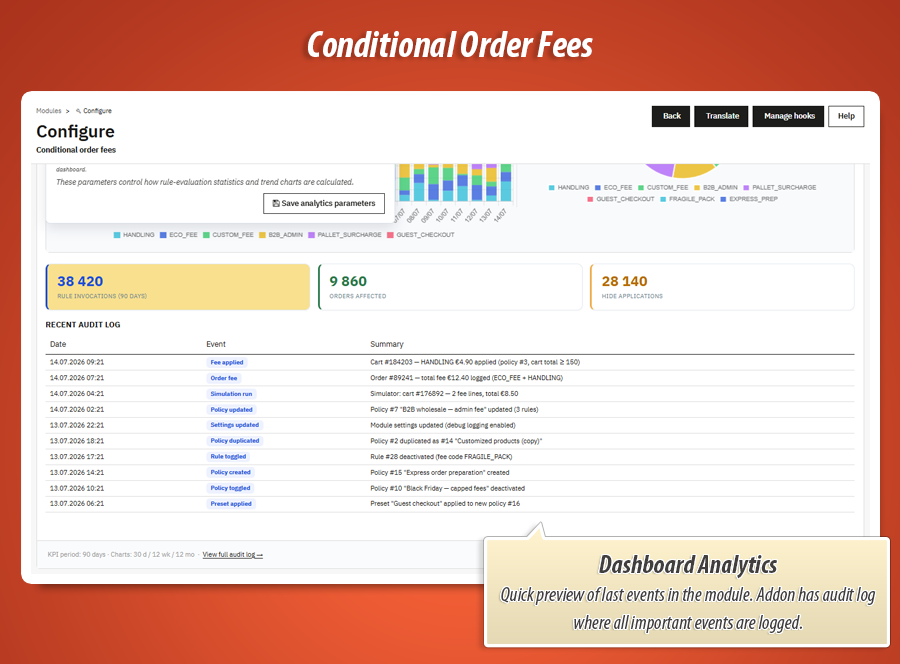
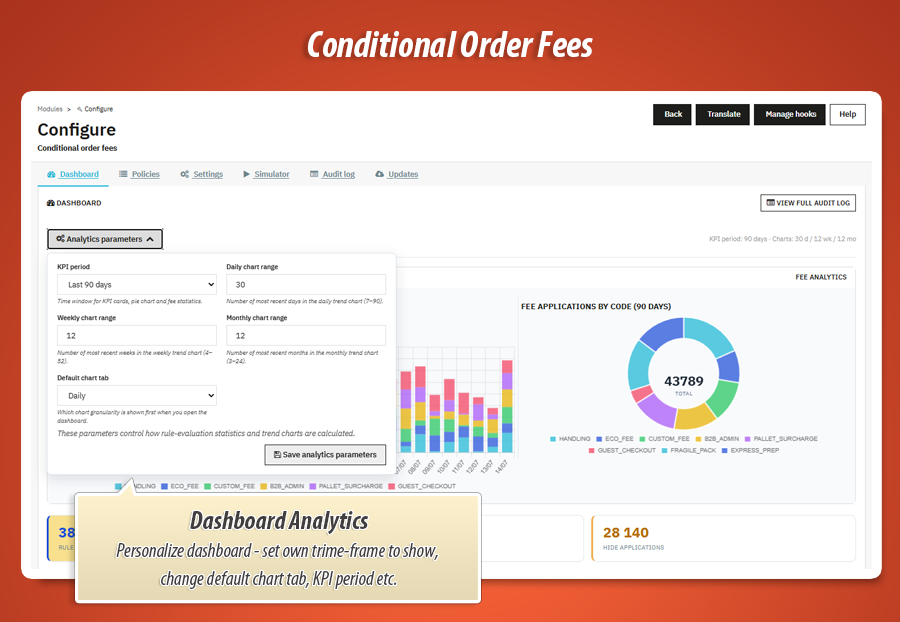
The Dashboard tab is your fee revenue control room. KPI cards summarise applied fees, active policies and evaluation volume over a selectable period.
Chart.js trend charts break down fee activity daily, weekly or monthly. Recent audit entries appear at the bottom for quick access to the latest decisions.
Audit log
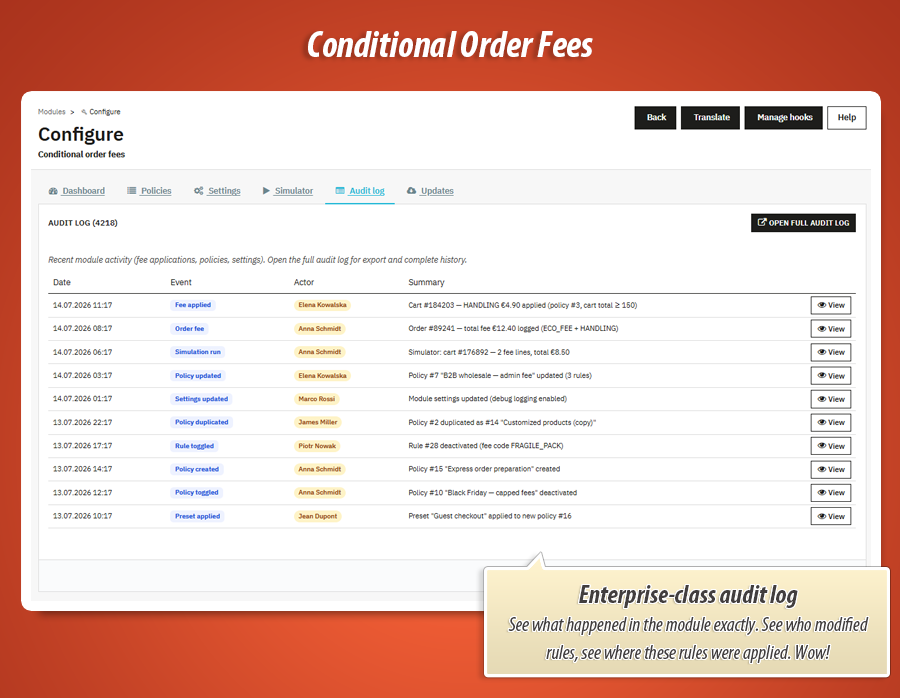
Every significant event is recorded: fee applied or cleared, policy create/update/delete, imports, exports, duplicates, settings changes and simulation runs.
The dedicated Audit log admin menu gives you filters by date and event type. Click preview on any row to see the full detail payload.
Export the log to CSV when compliance or internal review requires a complete history.
Import, export and duplicate policies
Download any policy as portable JSON from the policy editor or policies list. Upload JSON to create a new policy on the same shop or a staging environment.
The duplicate action copies the full policy — conditions, fee rules, merge strategy and multilingual labels — under a new name. Ideal for seasonal variants or safe testing.
Six dedicated back office tabs
Everything is organised in clear sections. Open the module configuration and jump straight to where you need to be. Two additional native admin menus give you full list views for policies and audit history.
Rules and testing
- Policies — create, edit, reorder, duplicate and export fee policies with visual condition builder and fee rule cards.
- Simulator — run evaluations against real carts with matched policies and fee breakdown.
- Settings — enable module, default merge strategy, fee product tax group, analytics period and debug logging.
Insight and maintenance
- Dashboard — KPIs, trend charts and recent activity feed.
- Audit log — full event history with filters, preview modal and CSV export.
- Updates — module version check and MyPresta update notifications.
Native menus Order fee policies and Audit log provide HelperList views with quick active toggles, condition summaries and bulk management.
Example conditions
Real policy setups you can build in minutes — each one combines a condition tree with one or more fee rules. Copy the logic, adjust amounts, publish.
Policy: Cash on delivery surcharge Merge: Stack all
Policy conditions (AND)
Payment module in [cashondelivery, codpro] AND Products total ≥ 1 EUR
| Fee rule | Amount | Cart line label |
|---|---|---|
| COD handling | Fixed 4.99 EUR | "Cash on delivery fee" |
| COD percent (large orders) | 2% of products total, min 4.99, max 29.99 | "COD service charge" |
Customers paying on delivery see a transparent surcharge in the cart — before they confirm the order. No surprise at the door.
Policy: Small order fee Merge: First fee wins
Policy conditions
Products total < 30 EUR AND Cart requires shipping = Yes
| Fee rule | Amount | Extra rule conditions |
|---|---|---|
| Minimum order surcharge | Fixed 2.50 EUR | Products total < 15 EUR |
| Low basket fee | Fixed 1.50 EUR | Products total between 15–29.99 EUR |
First fee wins ensures only one small-order charge applies — tiered by basket size without stacking both rules.
Policy: Bulky goods packaging Merge: Highest fee
Policy conditions (OR)
Category in cart in [Furniture, Oversized] OR Cart weight > 30 kg
| Fee rule | Amount | Cart line label |
|---|---|---|
| Standard packaging | Fixed 8.00 EUR | "Bulky item packaging" |
| Heavy freight prep | 5% of cart weight base, min 12.00 | "Heavy goods handling" |
| Pallet surcharge | Fixed 25.00 EUR | "Pallet preparation fee" |
Highest fee keeps only the largest matching charge — so a pallet order gets the pallet fee, not packaging plus weight plus pallet stacked together.
Policy: B2B vs retail handling Merge: Priority cascade
Policy conditions
Customer logged in = Yes AND Customer group in [Wholesale, VIP B2B]
| Fee rule | Priority | Amount |
|---|---|---|
| VIP waived | 1 | Fixed 0.00 EUR — Customer group in [VIP B2B] |
| Wholesale admin | 5 | Fixed 5.00 EUR — Products total < 500 EUR |
Policy: Weekend express handling Stop on first match
Policy conditions (AND)
Day of week in [6, 7] AND Selected carrier in [Express overnight]
| Fee rule | Amount | Date window |
|---|---|---|
| Weekend dispatch | Fixed 6.50 EUR | Always active |
Combine datetime fields with carrier selection to charge weekend handling only when express delivery is actually chosen.
Every condition field the builder understands
Use any field below at policy level or on individual fee rules. Pair with fourteen comparison operators and unlimited nested AND/OR groups.
| Field | Evaluates against | Typical operators |
|---|---|---|
| Cart total (tax incl.) | Full basket value including shipping | =, ≠, >, ≥, <, ≤, between |
| Products total | Merchandise lines only — fee product excluded | =, ≠, >, ≥, <, ≤, between |
| Shipping cost | Selected carrier delivery price | =, ≠, >, ≥, <, ≤, between |
| Total product quantity | Sum of units across all cart lines | =, ≠, >, ≥, <, ≤, between |
| Unique products in cart | Count of distinct product IDs | =, ≠, >, ≥, <, ≤, between |
| Cart weight (kg) | Total physical weight of the basket | =, ≠, >, ≥, <, ≤, between |
| Virtual / physical flags | Has virtual, all virtual, has physical, requires shipping, has customization, has voucher | presence (yes/no) |
| Number of cart rules | How many vouchers are applied | =, ≠, >, ≥, <, ≤, between |
| Product / category quantity | Minimum qty for a specific product or category (id:qty) | =, ≥, > |
| Product line total | Minimum line amount for a product (id:amount) | =, ≥, >, between |
| Currency | Active checkout currency | =, ≠, in, not in |
| Delivery / invoice country | Country on shipping or billing address | =, ≠, in, not in |
| Delivery zone | PrestaShop zone for the delivery address | =, ≠, in, not in |
| Delivery postcode | Postcode string on shipping address | =, contains, starts with, regex |
| Customer group | Group membership at evaluation time | =, ≠, in, not in |
| Selected carrier | Carrier reference in the current basket | =, ≠, in, not in |
| Payment module | Payment method module name at checkout | =, ≠, in, not in |
| Customer logged in / guest | Authentication state of the shopper | =, ≠ (yes/no) |
| Customer orders / lifetime spent | Completed order count and total revenue | =, ≠, >, ≥, <, ≤, between |
| Product / category / brand / supplier | Catalog membership in the current basket | in, not in |
| Day of week / hour / date | Server datetime at evaluation — for time-based fees | =, in, between |
32 fields. 14 operators. Trees as deep as you need.
Stack as many policies as your business requires. Add as many fee rules per policy as your pricing model demands — each with its own sub-conditions, priority, date window and multilingual cart line label. Multiply that by five merge strategies, cross-policy ordering and stop-on-first-match…
The combination space is practically infinite. Your customers see one clear fee line. You control exactly when it appears and how much it costs.
Real-world use cases
Conditional Order Fees adapts to how your pricing actually works — not the other way around.
Cash on delivery recovery
Charge a fixed or percentage COD fee when the customer selects pay-on-delivery. Label it clearly in the cart so the surcharge is never a surprise at the door.
Minimum order handling fee
When the merchandise subtotal falls below your profitable threshold, add a small handling charge. Use Products total so shipping discounts do not accidentally waive the fee.
Payment-method-specific surcharges
Target the payment module field to add fees for invoice, bank transfer reconciliation or high-risk gateways — without editing each payment module separately.
Bulky and heavy goods packaging
When furniture, oversized categories or cart weight cross your limits, add a packaging or pallet preparation fee proportional to weight or as a fixed surcharge.
B2B tiered administration fees
Wholesale buyers below a contract minimum get an admin fee; VIP groups get zero. Priority cascade picks the right rule automatically.
Regional compliance surcharges
Blend delivery country, zone and postcode with regex matching to add export documentation or remote-area handling fees only where regulations require them.
Weekend and peak-season dispatch
Use day-of-week and date fields to charge weekend handling or peak-season surcharges. Duplicate the policy, set date windows on fee rules, toggle off when the season ends.
Guest vs returning customer fees
Guests pay a small account-setup fee; logged-in customers with order history do not. Combine logged-in, guest and customer orders fields in one policy tree.
Statistics for nerds
Per-cart labels stored in the database. Fee amounts overridden at calculation time. Every decision traced in audit rows. Here is the engineering behind the cart line your customers see.
13,800+
Lines of code
PHP, JavaScript, Smarty templates, CSS and SQL powering the evaluation engine, condition builder, dashboard analytics, simulator and audit logging.
18
Dedicated library classes
Engine, condition evaluator, tree repository, policy duplicator, dashboard, audit log, cart state, fee product, compatibility layer and admin renderer.
6
Back office tabs
Dashboard, Policies, Settings, Simulator, Audit log and Updates — plus native Order fee policies and Audit log admin menus.
82
Module files
Controllers, models, hooks, upgrade scripts, mail templates, browser demo simulator and full back-office asset stack.
Database layer
-
6 custom tables: policies, fee rules, rule translations, per-cart state, condition presets and audit log.
-
Per-cart label storage:
conorderfee_cart.cart_line_labelkeeps the customer-facing text isolated per session — no catalogue name pollution. -
Order snapshot columns on the orders table store fee amount and JSON payload for post-purchase support.
Architecture
-
13+ PrestaShop hooks: cart save, price calculation, product presentation (listing + cart product), order validation and admin order display — one compatibility layer across 1.7, 8 and 9.
-
ConorderfeeEngine evaluates policies in position order with merge strategies, stop-on-first-match, fixed/percent calculation bases and per-rule date windows.
-
5 back-office JS assets for dashboard charts, condition builder, policy rule cards, simulator and search tool integration.
-
9 Smarty templates for policy editor, condition builder, dashboard, audit preview and order fee panel.
Chart.js
Dashboard analytics with daily, weekly and monthly fee revenue trend charts.
5 strategies
Stack all, first fee wins, priority cascade, highest fee and unique fee codes.
32 fields
Cart, customer, delivery, payment and catalog conditions with fourteen comparison operators.
v1.2.0
Current release. PrestaShop 1.7.x, 8.x and 9.x. One codebase, three platform generations.
One hidden fee product. Per-cart labels at presentation time. Amounts synced on every cart save. Decisions traced on every order. That is the engineering contract behind Conditional Order Fees. Your customer sees one honest line item. You control exactly when it appears, what it says and how much it costs.
129.00 €
Module Gallery 1/15
Why choose our module
Conditional Order Fees?
Optimization and Automation
Conditional Order Fees optimizes your pricing strategy by automating dynamic surcharges. Its policy engine and visual builder allow precise fee application based on varied conditions, eliminating manual adjustments and ensuring seamless, error-free checkout processes for greater operational efficiency.
Increased Sales
Conditional Order Fees directly boosts sales through transparent, context-aware pricing. Clear, multilingual fee labels build customer trust, minimizing cart abandonment. It enables profitable offering of diverse products and services, ultimately increasing conversions and revenue.
15 years of experience
With 15 years of PrestaShop expertise, Conditional Order Fees is engineered for precision. It leverages 13+ core hooks across versions 1.7-9.x for transparent cart line surcharges, mastering complex conditions, and providing deep, stable platform integration.
Extensive Customization
The 'Conditional Order Fees' module delivers extensive customization for your pricing. Craft detailed policies with nested AND/OR conditions using 32 fields like cart value, customer, and payment. Set fixed or percentage fees with various merge strategies, perfectly fitting your store's unique needs.
Open Source Code
Conditional Order Fees provides unrestricted access to its PHP, JavaScript, and Smarty source code. This ensures full transparency and enables advanced modifications or custom integrations, free from hidden functions or obfuscation, giving total control over your fee logic.
License and Updates
Conditional Order Fees offers a perpetual license, ensuring your precise fee logic always functions seamlessly. Enjoy free updates for one full year, keeping your surcharge policies current across PrestaShop versions. Access renewals for future enhancements and compliance at up to 90% off.