
PrestaShop Sticky Cart Bar PRO
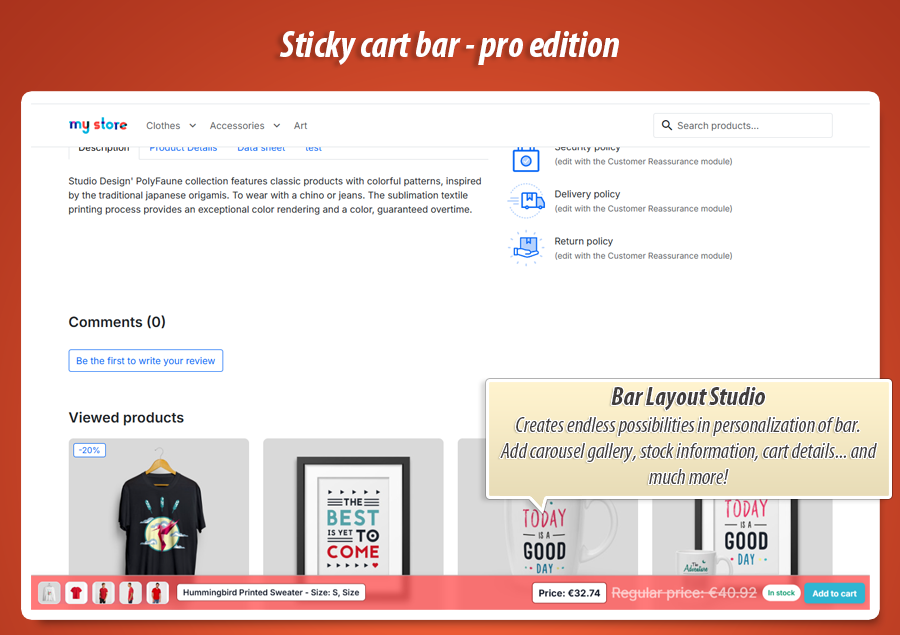
Turn your product page into a conversion engine with Sticky Cart Bar PRO. Keep the "Add to cart" button visible and boost sales with features: mini-cart, variant picker, FOMO timers, and cross-sell popups. Design using a drag-and-drop Layout Studio with 30+ presets. Target customers and measure success with built-in A/B tests and detailed analytics to maximize your revenue.
60.00 €
Galeria 1/19
PrestaShop Sticky Cart Bar & Product Page Conversion PRO
Sticky Cart Bar PRO for PrestaShop is a comprehensive conversion toolkit designed to optimize product pages. It features an intuitive visual layout studio, allowing merchants to easily create custom sticky bars with drag-and-drop elements and over 30 presets. Key functionalities include an in-bar variant picker, FOMO timers, low-stock counters, and mini-cart summaries, streamlining the purchase process. The module also provides advanced growth tools such as targeted multi-bar display rules and post-add cross-sell popups. With built-in A/B testing and robust analytics, Sticky Cart Bar PRO ensures continuous optimization, driving sales and enhancing the average order value professionally.
Module version:
1.1.0
Shop versions:
9.x8.x1.7.x
Works with ThirtyBees:
No
Translations:


Turn scrolling into sales.
Sticky Cart Bar PRO for PrestaShop.
A sticky bar is not just a floating button anymore. Sticky Cart Bar PRO is a complete conversion toolkit for product pages: design bars visually, let customers pick variants without scrolling back up, show urgency and mini-cart info, trigger cross-sell after add to cart, and prove what works with built-in A/B tests and analytics.
Why PRO when a basic sticky bar is not enough
Keeping the Add to cart button visible while the customer scrolls is a strong first step. But real product pages are long: descriptions, reviews, size guides, cross-sells. On mobile, the main buy button disappears fast — and if the shopper wants another size or colour, they must scroll all the way back up.
A plain sticky strip cannot answer that. It also cannot show a different message on sale categories, test whether a red button sells better than green, or offer accessories the second someone adds to cart. Those are the moments where revenue is won or lost.
Sticky Cart Bar PRO turns the bar into an active sales assistant: you build the layout in a visual studio, add conversion blocks (variants, FOMO, mini-cart, gallery), assign bars with smart rules, measure clicks and cart adds, and optimise with A/B tests — without editing theme files.
What PRO adds on top of a simple sticky bar
-
Layout Studio:
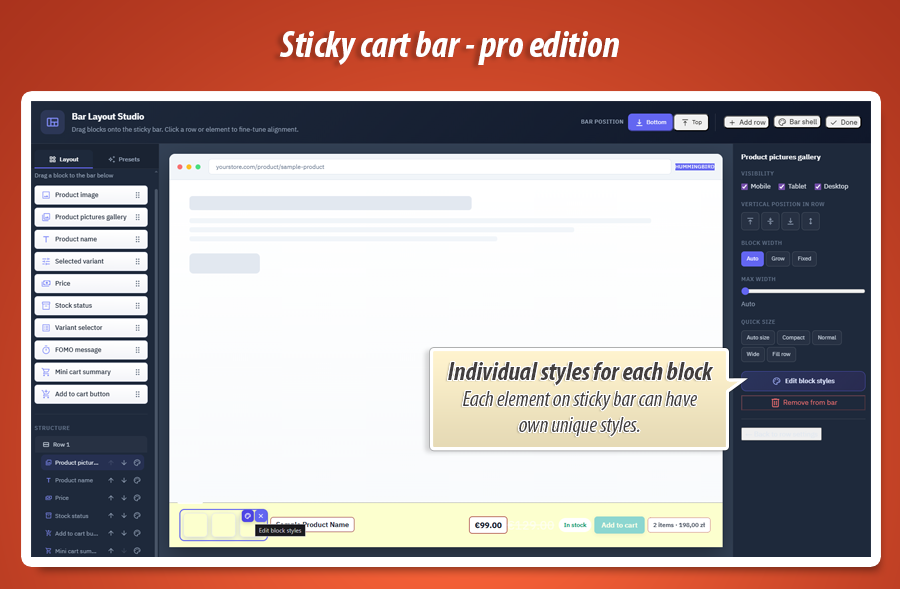
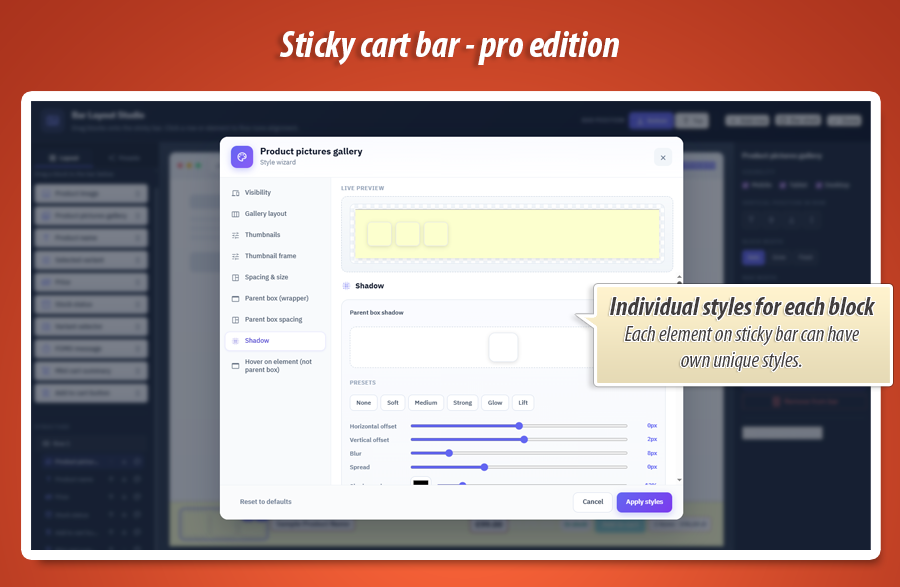
Drag-and-drop rows and blocks, 30+ presets, per-element colours, spacing, fonts, shadows and hover styles. -
Conversion blocks:
Variant picker in the bar, product gallery, FOMO timer or low-stock counter, live mini-cart summary. -
Growth tools:
Multiple bars with targeting rules, post-add cross-sell popup, analytics dashboard, A/B tests, GA4 and Matomo.
Core capabilities for growing shops
Visual Layout Studio
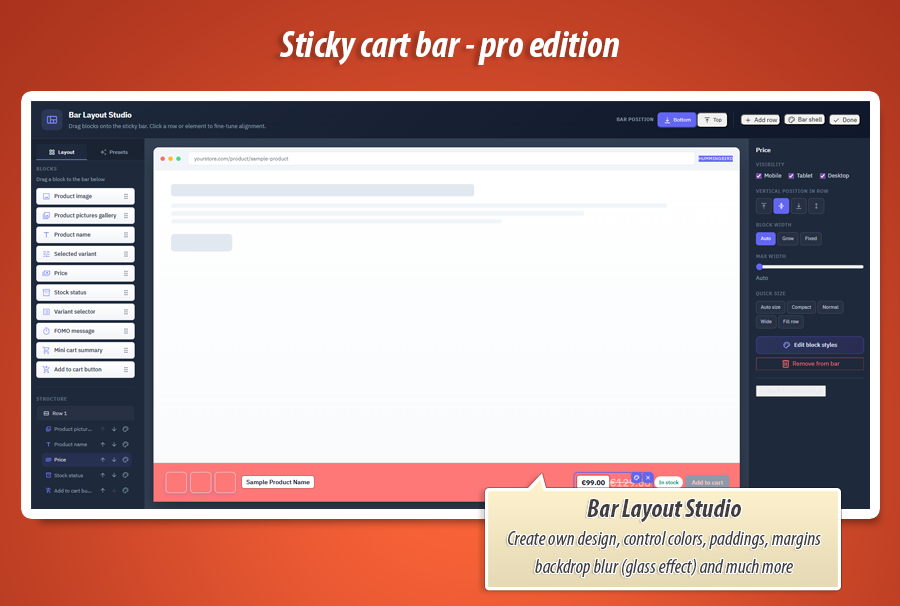
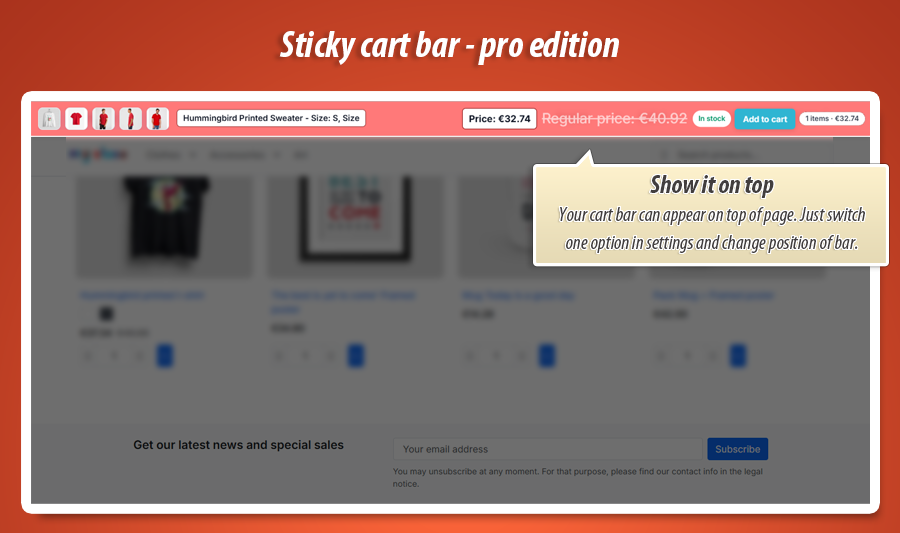
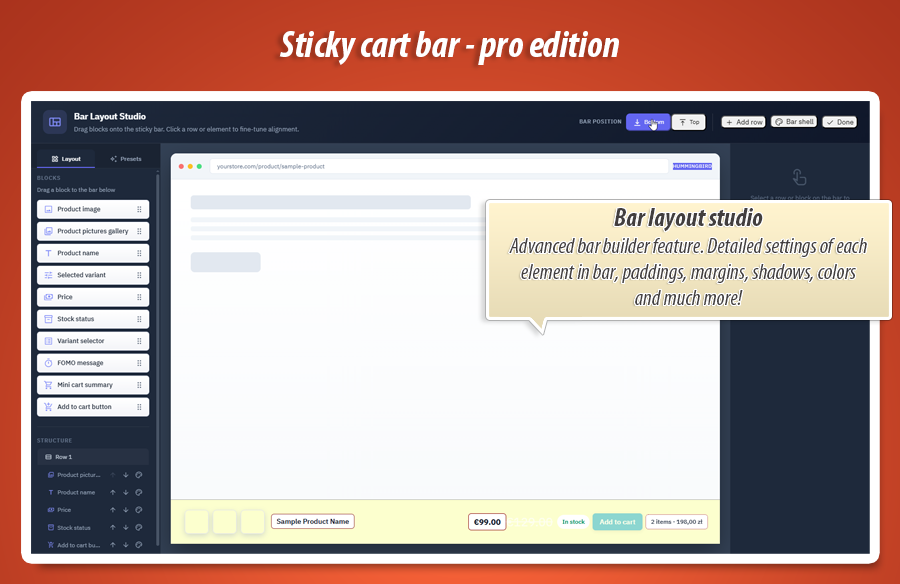
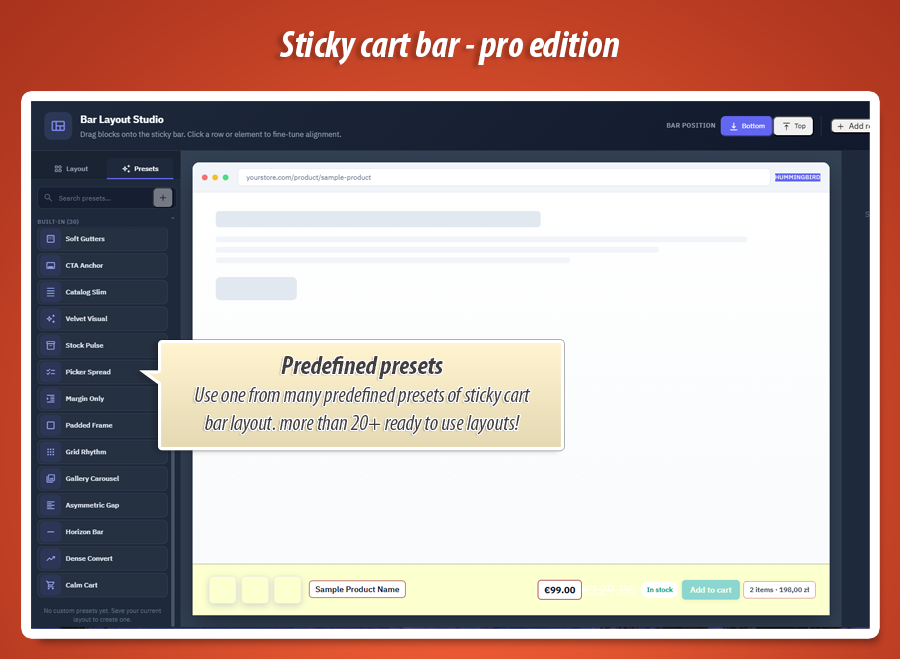
Build bars in the back office: choose rows, place blocks (gallery, name, price, variants, stock, FOMO, mini-cart, button), pick from 30+ presets or fine-tune every detail. Bar at top or bottom of the screen.
Buy without scrolling back
Customers change size or colour in the sticky bar. Price, stock, thumbnail and combination label update live — same rules as the main product form, including out-of-stock blocking.
Measure & optimise
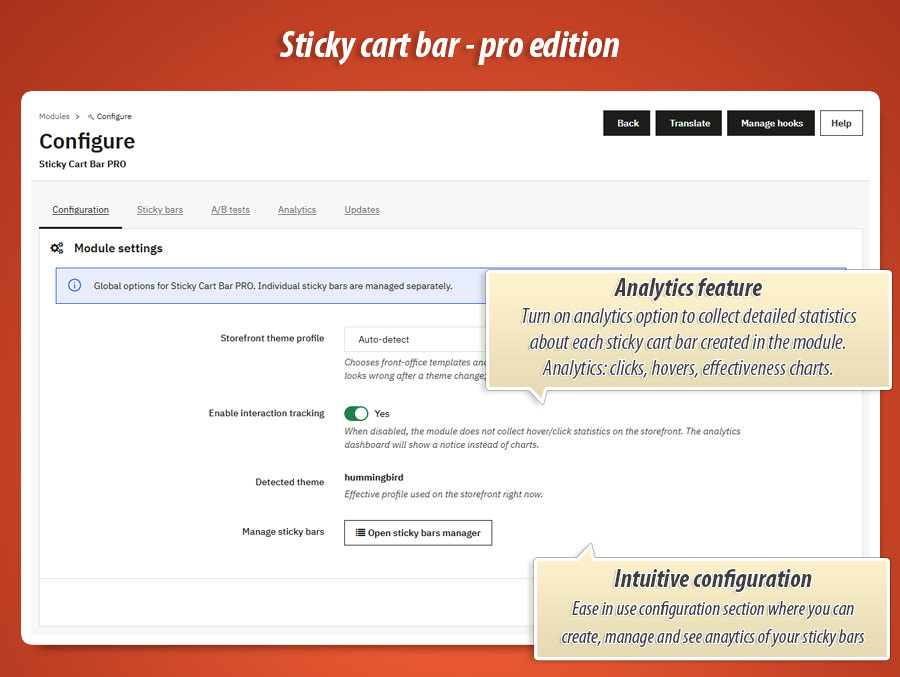
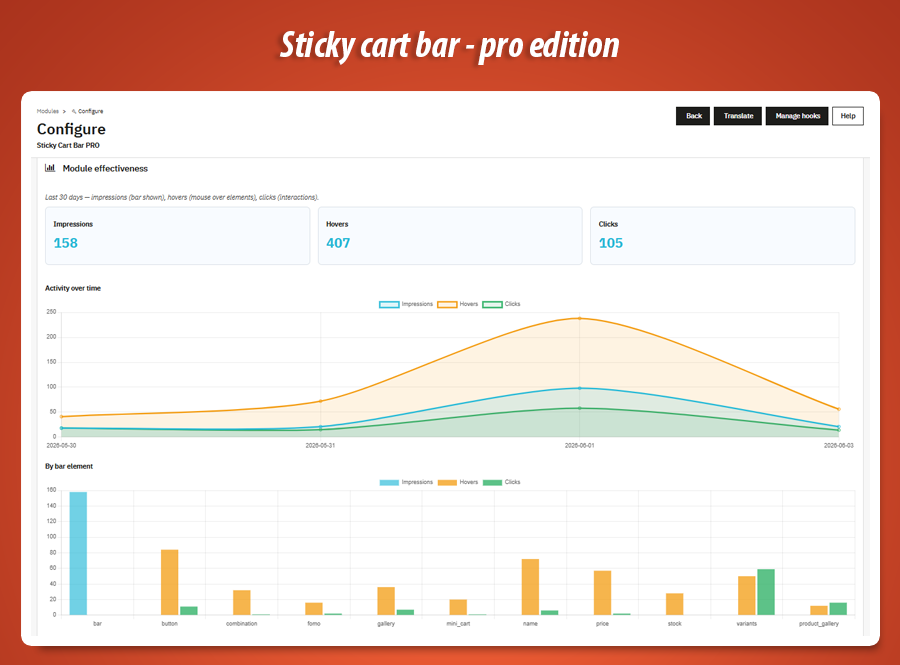
Built-in analytics (views, clicks, add to cart), A/B tests on live traffic, optional GA4 and Matomo events — see which bar design actually sells.
Layout Studio
Design bars like a pro — no theme coding.
Your bar, your layout — in minutes
Open the dedicated Sticky bars manager in your back office. For each bar you control which blocks appear, in which row, and in what order: product thumbnail or image strip, title, combination line, price, stock, variant dropdowns, FOMO chip, mini-cart summary, and the buy button.
Start from scratch or apply one of 30+ built-in presets (compact mobile strips, gallery-first layouts, urgency-focused rows, premium spacing and more). Each preset sets sensible padding, margins and alignment — then you adjust colours, border radius, shadows, typography and hover effects per element.
-
Bar position: stick the bar to the top or bottom of the viewport.
-
Live preview: see changes in the admin before you publish to the storefront.
-
Save custom presets: duplicate and reuse layouts across bars or shops.
Conversion blocks
Everything the customer needs to decide — right in the bar.
Variants, urgency and cart context — without leaving the bar
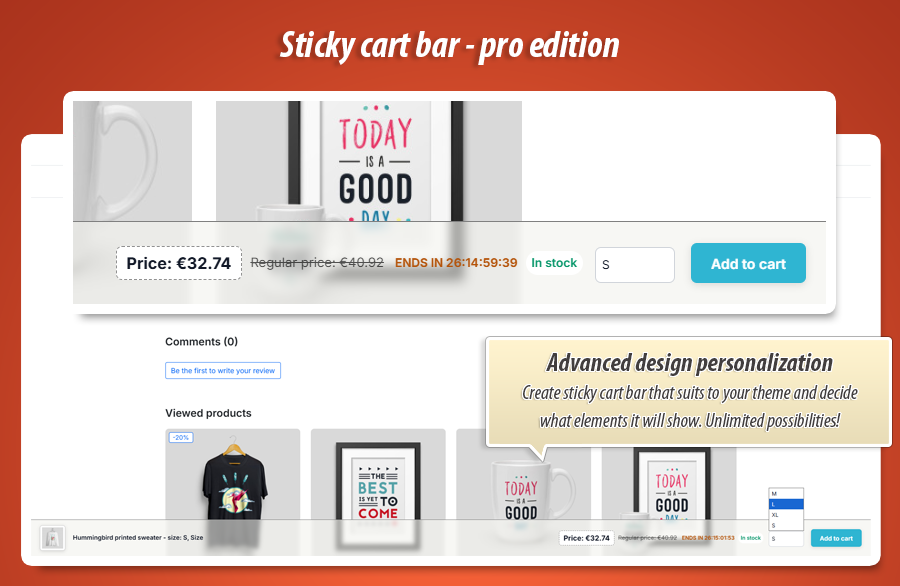
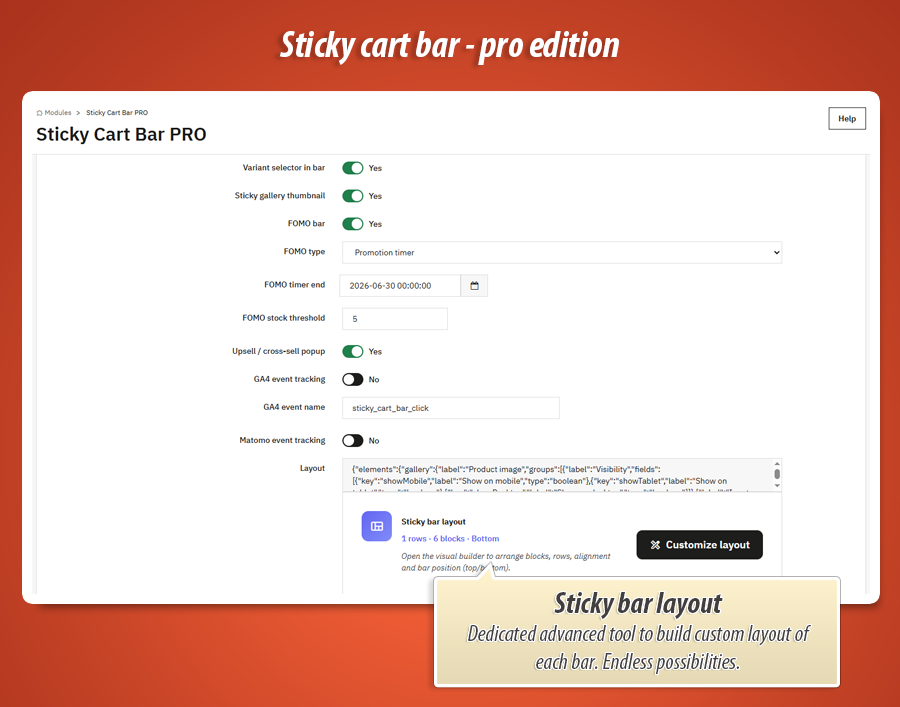
Variant picker: add dropdowns for size, colour or other attributes directly in the sticky bar. When the customer changes a option, the module updates price, stock message, combination text and product image — the same way as on the main product page. No “scroll up, change size, scroll down again”.
FOMO & stock urgency: show a promotion countdown or a “only X left” style message next to the buy button. You control colours and padding so it matches your brand — not a generic red banner.
Mini-cart summary: after add to cart, remind shoppers what is already in the basket (item count and total) so they feel progress toward checkout.
Product gallery: display a thumbnail that follows the selected variant, or a small horizontal strip of product images inside the bar for visual products (fashion, furniture, decor).
Targeting & multiple bars
The right bar for the right product and customer.
One bar for the whole shop? Not anymore.
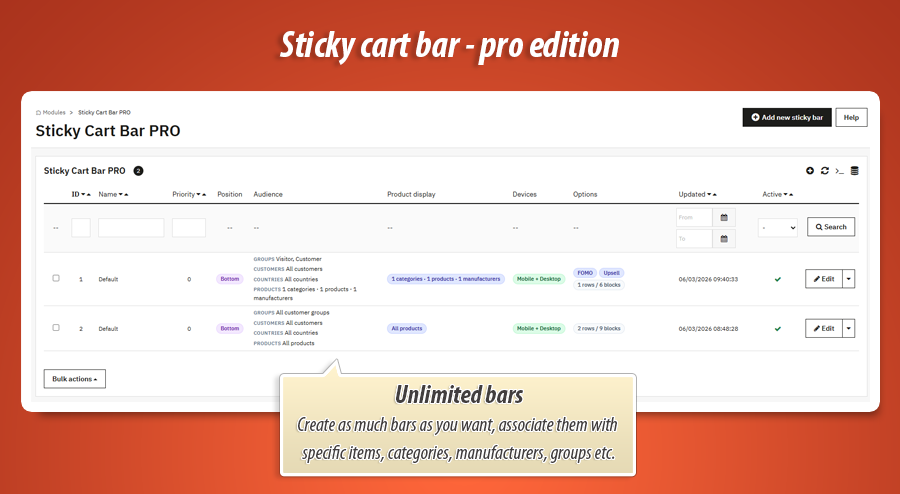
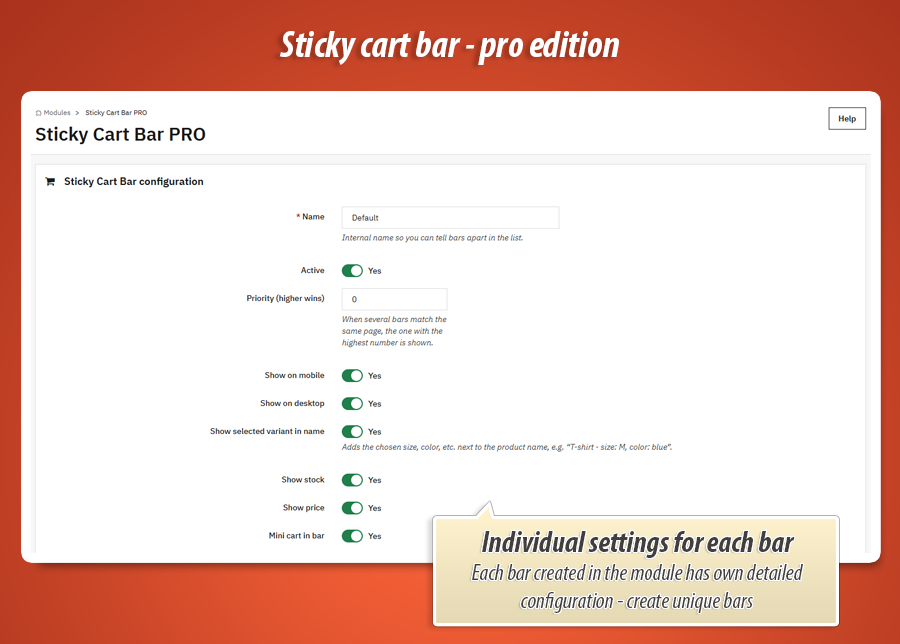
Create unlimited sticky bars, each with its own layout, style and display rules. Examples that merchants use every day:
-
A minimal bar on mobile and a rich bar with variants on desktop.
-
A urgency-heavy bar only on products in the “Sale” category.
-
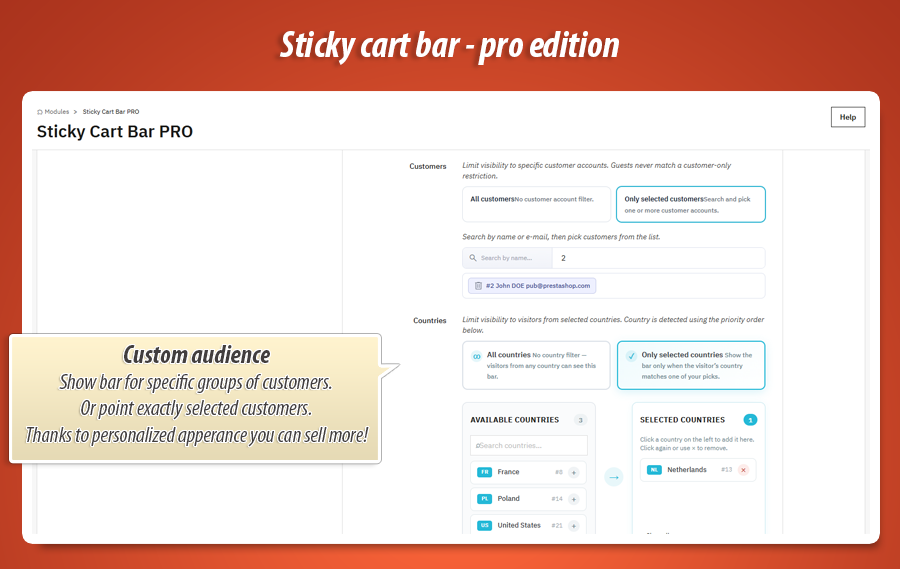
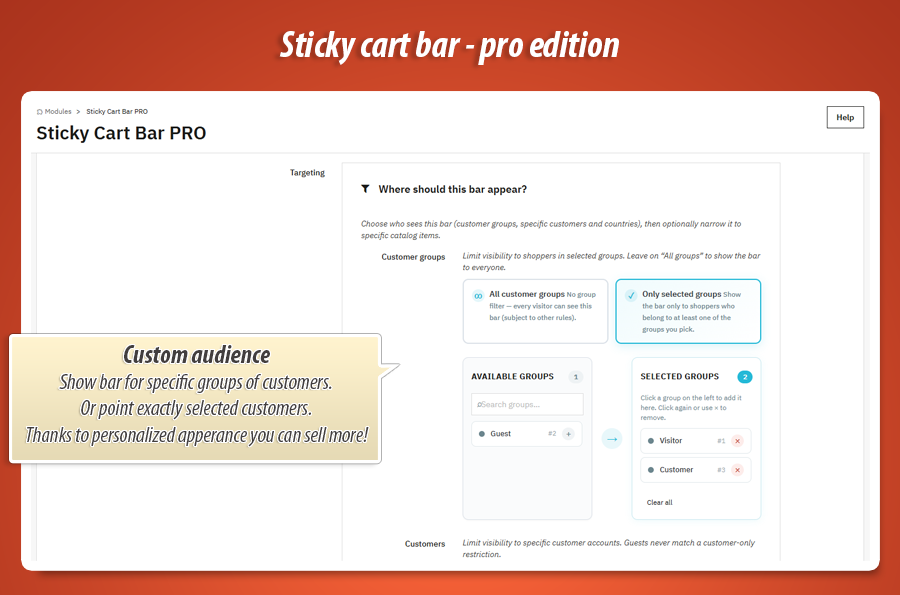
A VIP-only message or bar layout for selected customer groups.
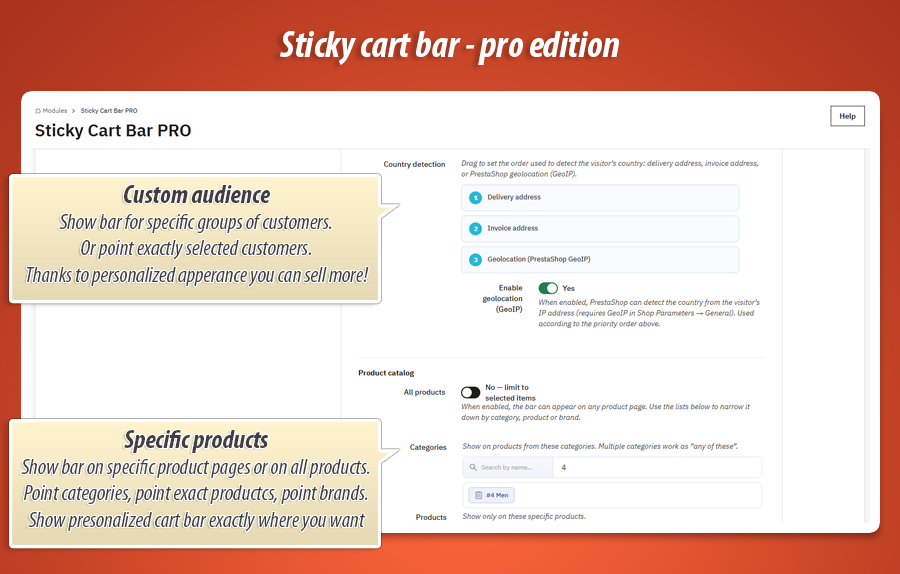
Display rules can combine conditions: category, product, manufacturer, product feature, attribute, customer group, country, and more. The module picks the matching bar automatically on the product page — you set the strategy once.
Multistore: run separate bars and rules per shop in a multistore setup, from one back office.
A/B tests & analytics
Stop guessing — measure clicks and cart adds.
Know which bar design actually sells
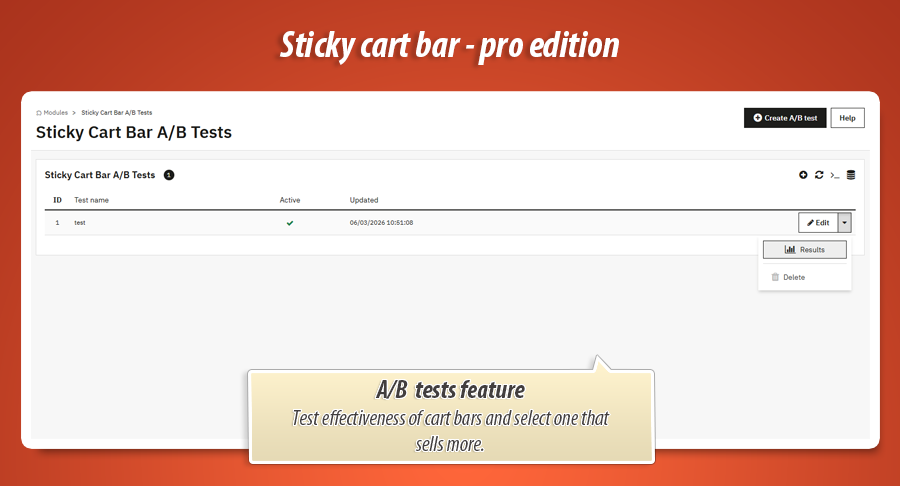
Run A/B tests between two bar versions on live product traffic: different button text, colours, with or without FOMO, compact vs full layout. The module splits visitors and tracks views, bar clicks and add-to-cart events so you can pick a winner based on data.
The analytics dashboard in your back office shows trends over time — no spreadsheet exports required for day-to-day decisions. Enable optional GA4 or Matomo tracking to feed bar interactions into your existing marketing reports.
Post-add upsell
Raise average order value at the perfect moment.
Cross-sell the second the product hits the cart
When upselling is enabled, a customer who adds to cart from the sticky bar can see a cross-sell or bundle popup with related products (accessories, matching items, frequently bought together). You choose which products to offer — the timing is automatic.
That is the highest-intent moment on the product page: the shopper already said “yes”. PRO helps you turn that yes into a bigger basket without sending them away to another category page.
How you work with the module in the back office
Everything is managed from PrestaShop admin — no FTP, no template overrides for a standard setup. The module adds a clear workflow merchants understand in one sitting.
Sticky bars manager
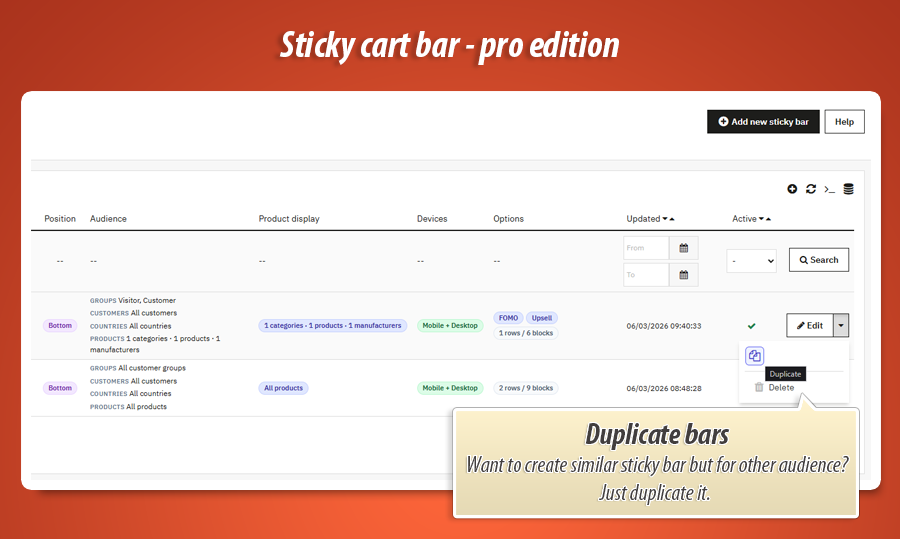
- Create, duplicate and enable/disable bars
- Layout Studio: rows, blocks, presets, element styling
- Targeting rules per bar (category, product, group, country…)
- Upsell popup configuration per bar
A/B tests tab
- Create experiments linking two bar variants
- Compare performance on live product pages
Analytics tab
- Dashboard: views, clicks, add to cart over time
- Optional GA4 and Matomo event tracking
Global settings
- Classic / Hummingbird theme profile (auto-detect)
- Enable or disable analytics tracking
- MyPresta update checker
Technical specification & compatibility
Standard PrestaShop module ( stickycartbarpro ). Hooks into product pages. No core overrides. Styles and scripts load only where a bar is shown.
New to sticky bars?
Try Sticky Cart Bar FREE first — one shop-wide bar with live price, stock and combination sync. When you are ready for Layout Studio, targeting, analytics and upsell, upgrade to PRO in one click from the same module family.
60.00 €
Module Gallery 1/19
Why choose our module
Sticky Cart Bar PRO?
Optimization and Automation
This PRO module optimizes product page conversions through dynamic sticky bars, automating variant selection, urgency displays, and post-add cross-sells. Its built-in A/B tests and analytics continually refine strategies, ensuring automated optimization of your sales funnel and boosting average order value.
Increased Sales
Sticky Cart Bar PRO dramatically boosts sales by simplifying purchases directly from the bar with variant selection. It creates urgency via FOMO and low-stock alerts. Post-add upsells maximize average order value. Robust A/B testing and analytics ensure continuous conversion optimization for higher revenue.
15 years of experience
Leveraging 15 years of PrestaShop expertise, Sticky Cart Bar PRO addresses critical e-commerce challenges. This advanced module offers intuitive variant selection, urgency builders, A/B testing, and targeted cross-sells, transforming product pages into conversion powerhouses, built on deep understanding of merchant needs and platform best practices.
Extensive Customization
Sticky Cart Bar PRO offers extensive customization via its Visual Layout Studio, featuring drag-and-drop blocks and 30+ presets. Fine-tune every detail, from colors and fonts to spacing. Create unlimited, unique sticky bars with advanced targeting rules for perfect store personalization.
Open Source Code
Built as a standard PrestaShop module, Sticky Cart Bar PRO provides unencrypted, accessible source code. Its design, free from core overrides, enables full developer control for custom enhancements and integrations.
License and Updates
The module includes a MyPresta update checker, ensuring your "Sticky Cart Bar PRO" stays current with PrestaShop 1.7.x, 8.x, and 9.x. Regular updates guarantee optimal functionality and ongoing compatibility, preserving its advanced conversion toolkit.