


PrestaShop Product expert - Specialist Business Cards
Show trusted product specialists on every PrestaShop product page. Assign them by product, category, brand or supplier, with customizable business cards—photo, role, bio and contacts (email, phone, WhatsApp, LinkedIn). Visual Business Card Designer, grid/list/carousel layouts and a GDPR-ready contact form—perfect when expert advice, B2B or technical support should boost conversions and buyer confidence.
50.00 €
Galeria 1/26
Product Expert Contact Cards
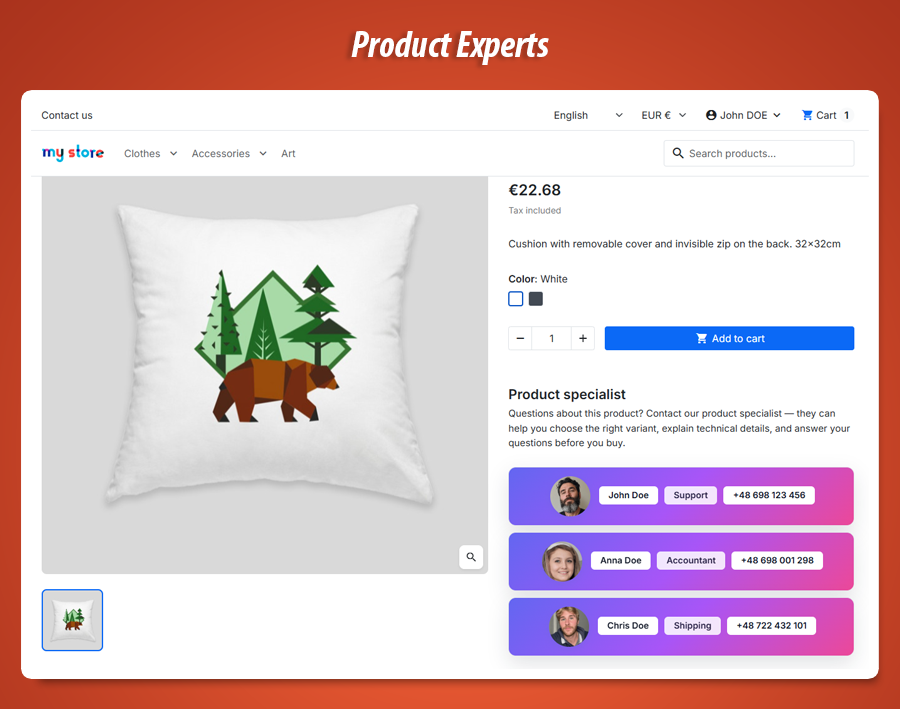
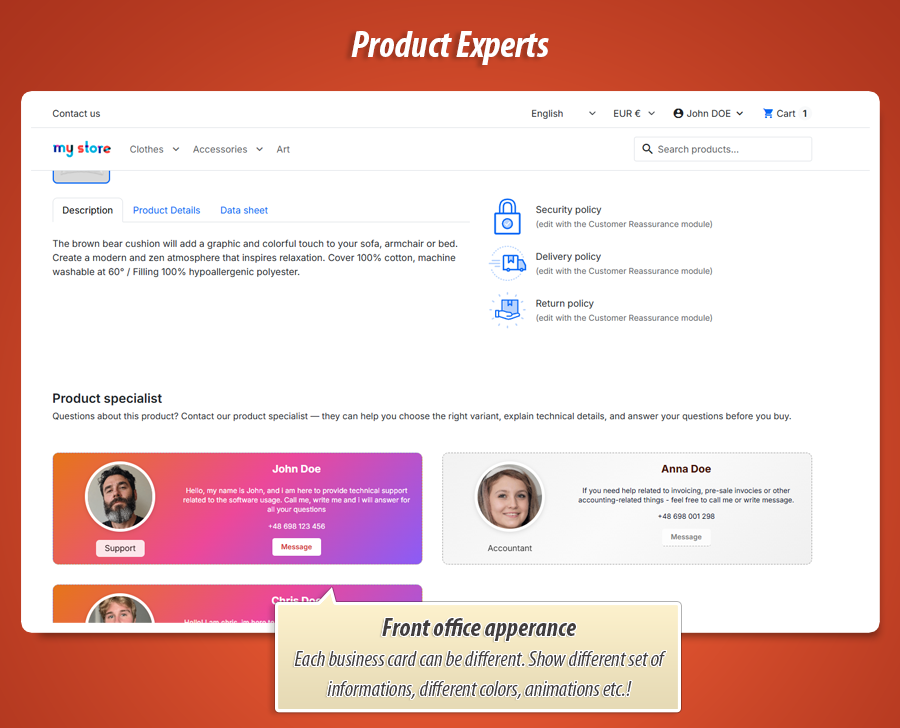
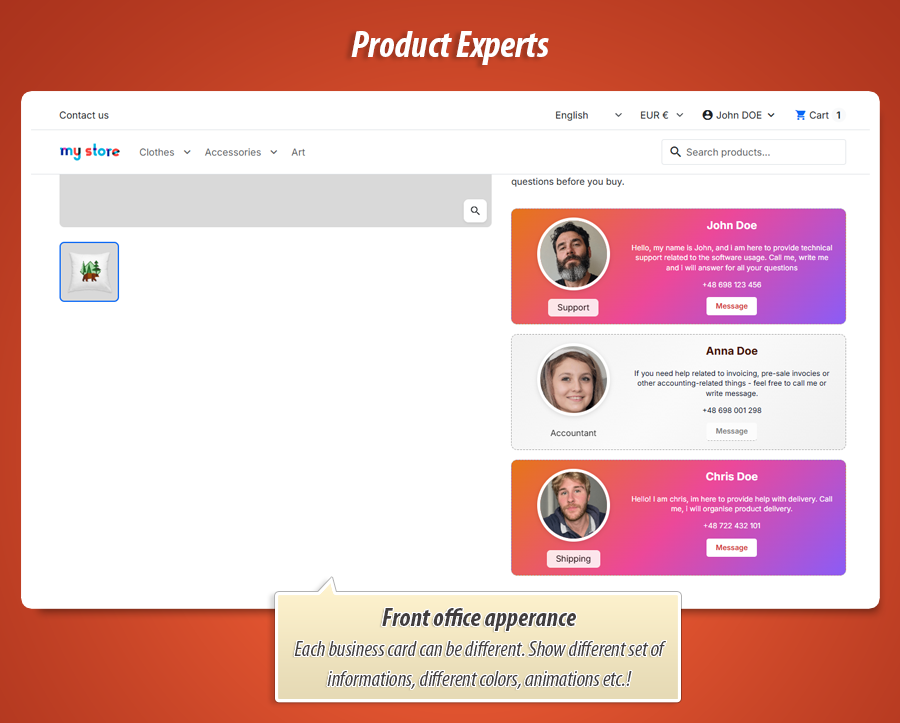
The "Product Expert" module for PrestaShop revolutionizes customer engagement by displaying specialist business cards directly on product pages. It allows assigning sales representatives, technical advisors, or category managers to specific products, categories, or brands, humanizing the shopping experience. Users can leverage the intuitive Business Card Designer and Style Studio to craft custom, branded digital cards with photos, roles, bios, and diverse contact options. The List Layout Studio elegantly presents multiple experts in a responsive grid, list, or carousel. This module fosters trust, offers direct contact forms (GDPR-ready), and provides deep visual customization without coding, transforming generic inquiries into personalized, professional interactions.


Put a real face behind every product.
Product Expert - Specialist Business Cards for PrestaShop.
Show who customers should talk to before they buy: your sales reps, technical advisors, category managers or after-sales team - right on the product page, on polished digital business cards you design yourself. No generic “contact us” footer. A clear list of people responsible for this product.
You’ve seen this elsewhere - and your customers expect it too
On many serious B2B and specialist shops, each product (or product line) comes with named people you can reach: someone for delivery questions, someone for technical specs, someone for quotes or accounting. It builds trust fast. The buyer thinks: “I’m not shouting into a generic inbox - I know who owns this product.”
Product Expert brings exactly that to PrestaShop: a professional, good-looking list of staff linked to the product - shown as employee business cards with photo, role, short bio and contact options. Your store stops feeling anonymous; it feels staffed and accountable.
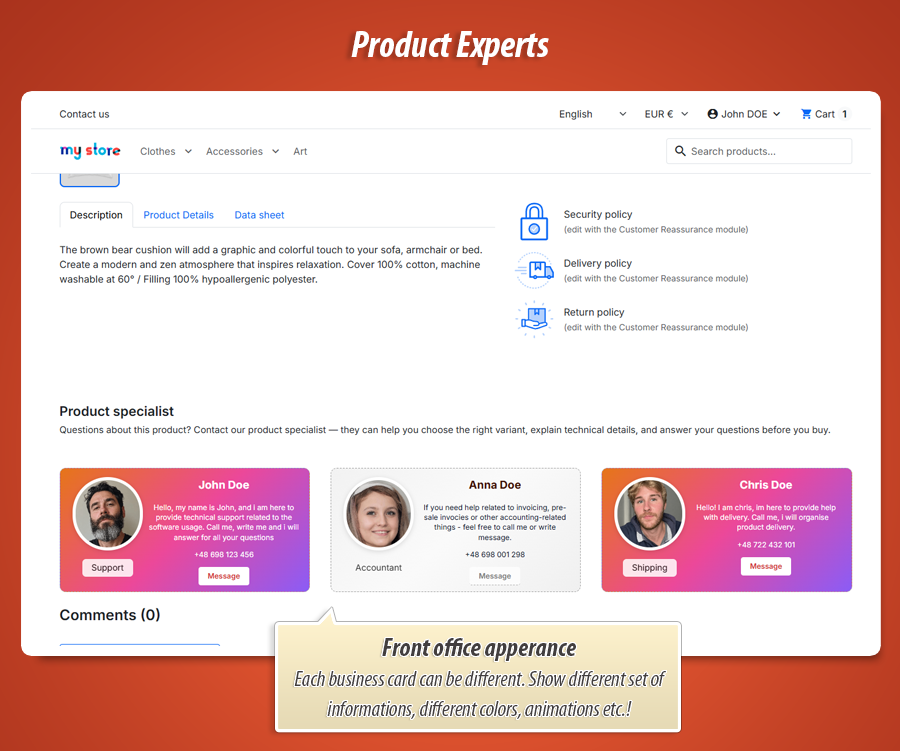
You decide who appears, where on the product page the block sits, and how each card looks. Two powerful visual studios (card layout + list layout) plus a deep style editor mean you’re not stuck with one ugly box theme developers forgot to style.
Perfect when you sell like this:
-
Industrial & technical catalogs where buyers need a human before placing a large order.
-
B2B with assigned account managers per category, brand or key account.
-
High-ticket products (machinery, medical, IT solutions) where reassurance converts.
-
After-sales & spare parts - show the technician or service desk, not only sales.
At a glance: what you are buying
-
People & rules: expert profiles, multilingual fields, assignments (shop / category / brand / supplier / product), sort order, conflict modes.
-
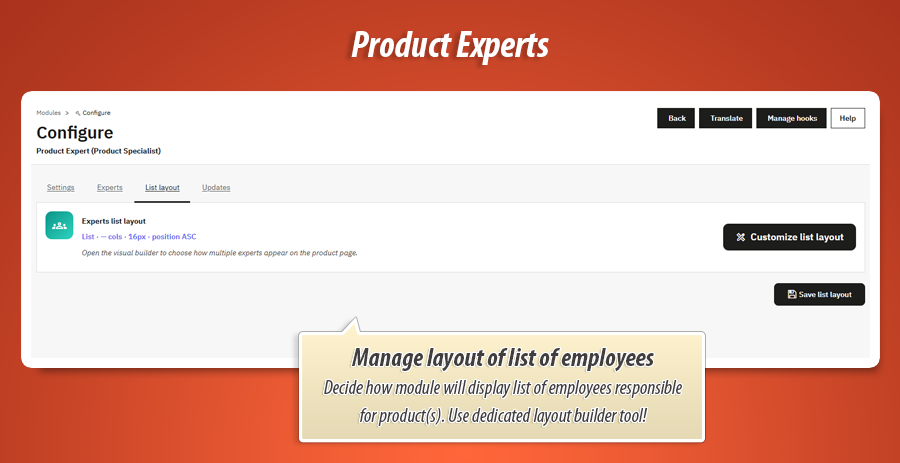
List Layout Studio: grid, list or carousel; columns, gap, density, alignment, sort, carousel autoplay & loop.
-
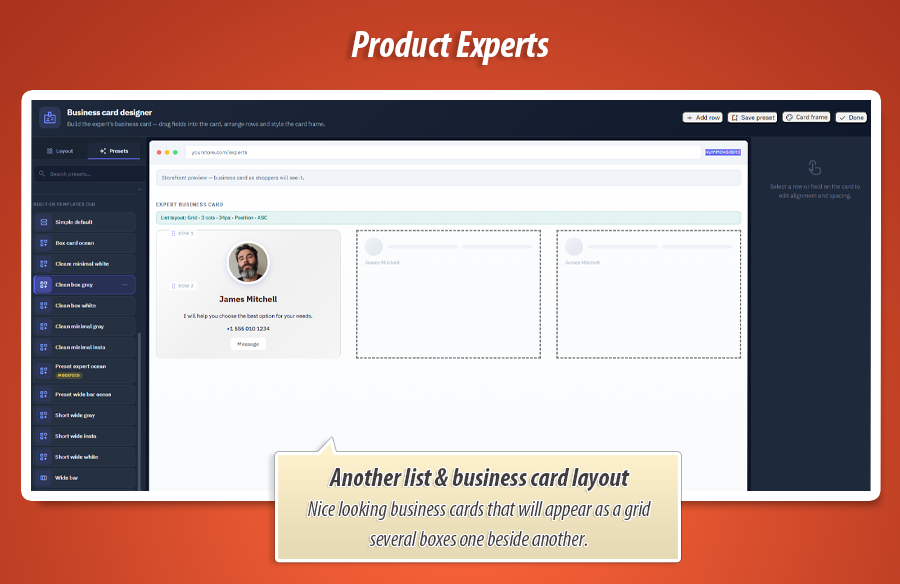
Business Card Designer: drag-and-drop rows, nested rows, bands, 10 block types, presets, live preview, card frame.
-
Style Studio: typography, colours, gradients, per-edge borders, shadows, spacing, placement in row, visibility, hover.
-
Contact & GDPR: modal form or mailto, optional hidden e-mail, shop copy, CMS policy link.
-
Placement: six configurable product-page hooks + custom hook; Classic / Hummingbird / auto theme profile.
Who shows up on the product page - and why
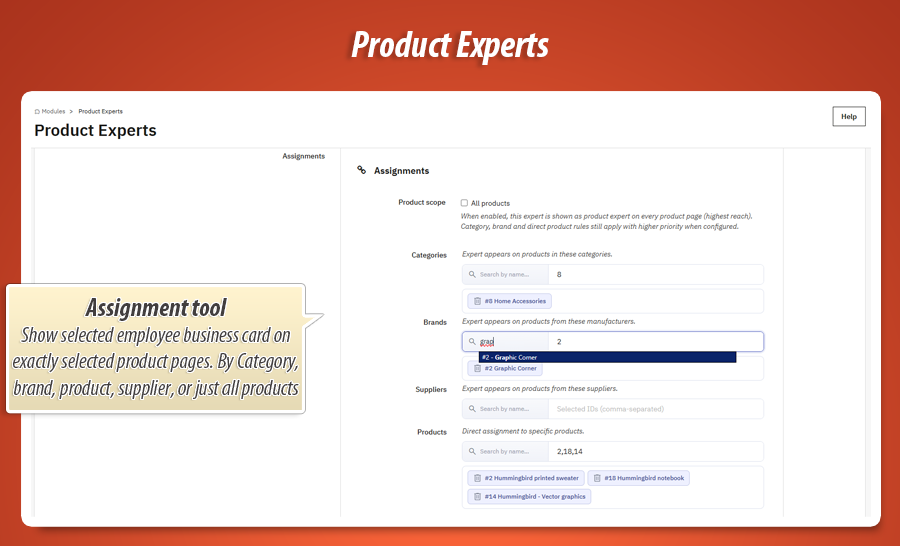
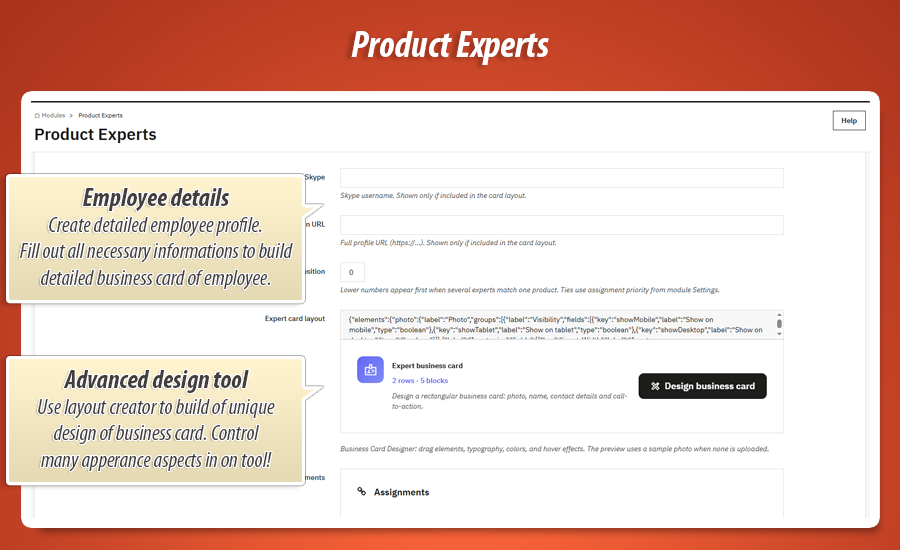
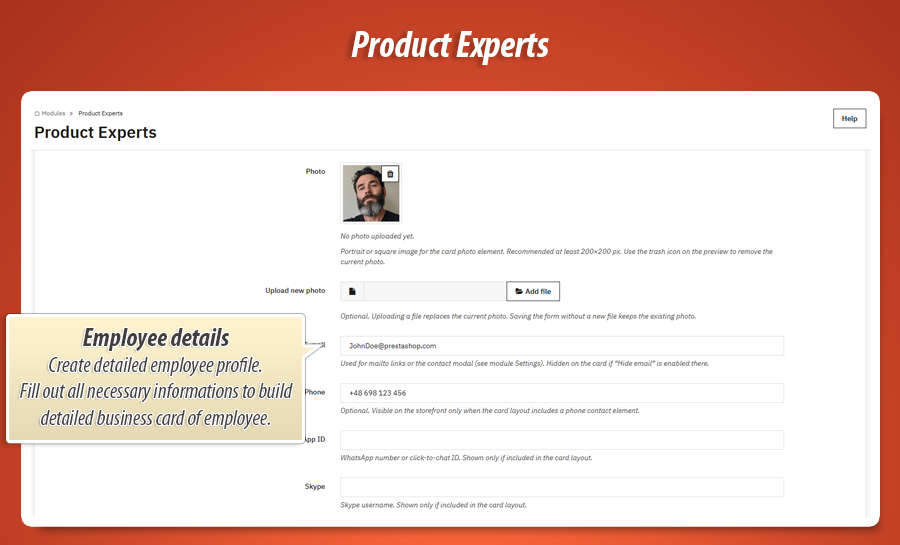
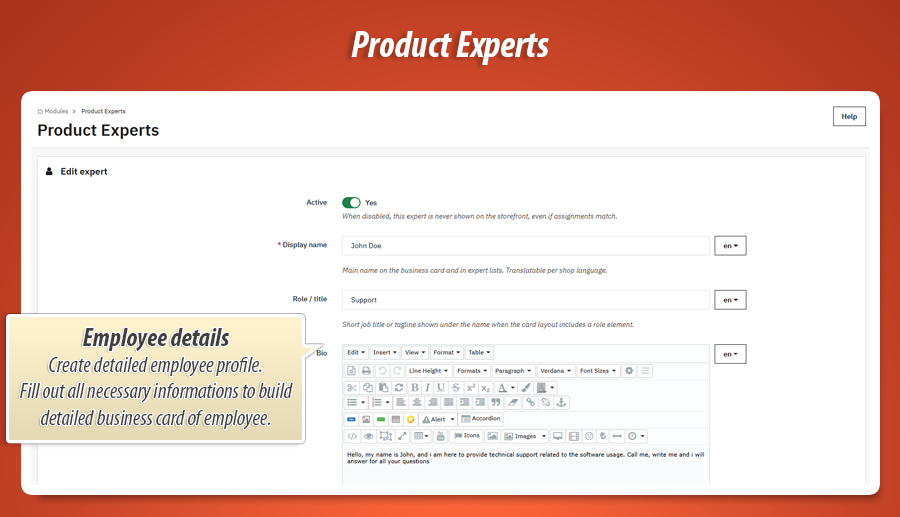
Create expert profiles once in the back office: photo, name, job title, bio, phone, e-mail, WhatsApp, Skype, LinkedIn. Then link experts to what you sell - a single product, whole categories, manufacturers (brands), suppliers, or your entire catalog when someone is the global contact.
When a customer opens a product, the module picks the right people using your rules. For example: if Product A has its own specialist, show them first; otherwise fall back to the category manager. You stay in control instead of dumping every employee on every page.
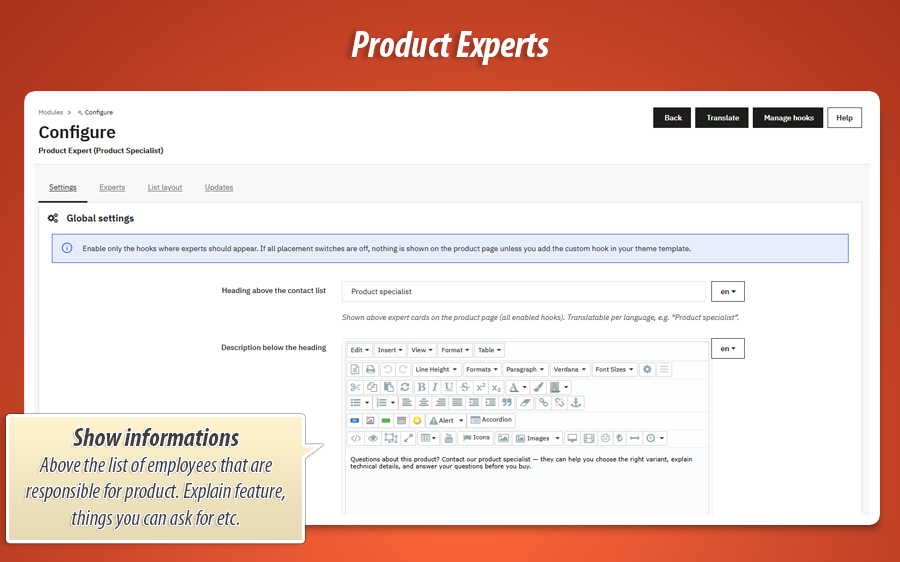
Add a translatable heading and optional intro text above the cards (“Your product specialists”, “Questions about delivery or specs?”). Set vertical alignment when text sits beside the heading. Small details - but they make the block feel like part of your theme, not a plugin afterthought.
The visual studios - your competitive edge
Business Card Designer
Build each employee’s card visually - drag, drop, done.
This is the heart of the module - and it’s genuinely impressive
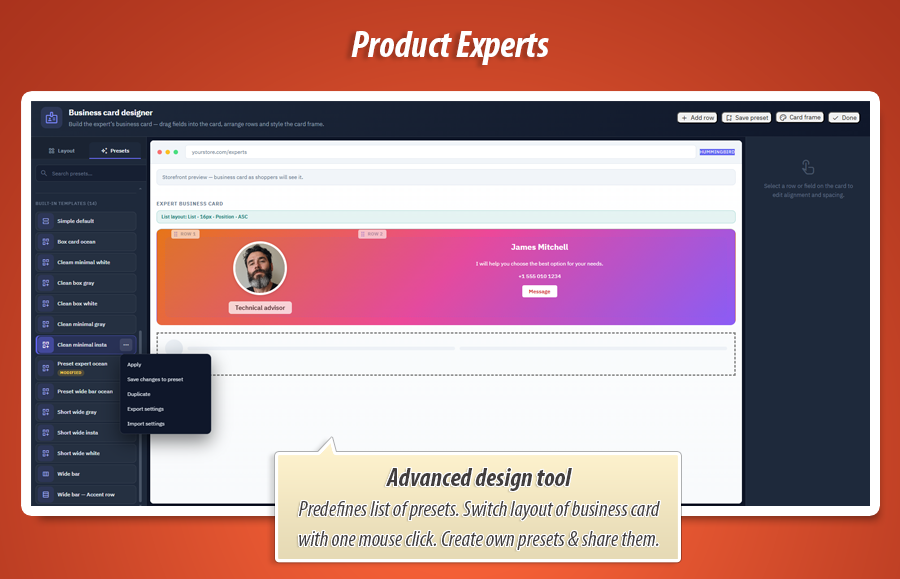
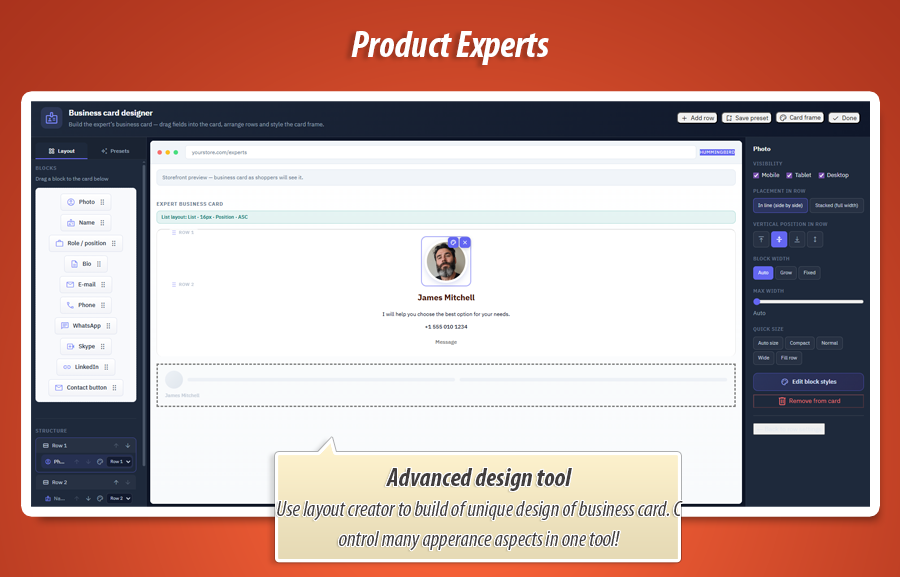
Forget filling boring text fields and hoping the front office looks OK. Open the Business Card Designer: a full-screen studio where you compose each expert’s card like a mini landing page. Drag blocks from a library - photo, name, role, bio, phone, e-mail, WhatsApp, Skype, LinkedIn, contact button - and drop them into rows you add and reorder.
Need a photo left and details right? One row, two blocks. Want the contact button under the bio? Stack blocks vertically. Use nested rows when the layout needs an extra level (for example a sidebar column inside a wider card). Switch a block to full-width stack when it should break to its own line - handy for mobile-friendly cards without touching code.
The studio shows a live preview while you work, including how the card will sit among others on the product page (grid or carousel context). Built-in and custom layout presets let you start from a polished design in one click, then save your own presets when you’ve nailed your brand look. Style the card frame too - padding, background, border, shadow - so the whole tile feels premium, not just the photo.
Per block you control placement in the row (width, grow, alignment). Per expert you open the Style Studio (below) for colours, fonts, borders and spacing. Layout and look are separated on purpose: you won’t break the structure when you tweak brand colours - and you won’t fight the grid when you add a row.
Style Studio
Deep styling without writing CSS.
Personalisation power users will love (and beginners can use presets)
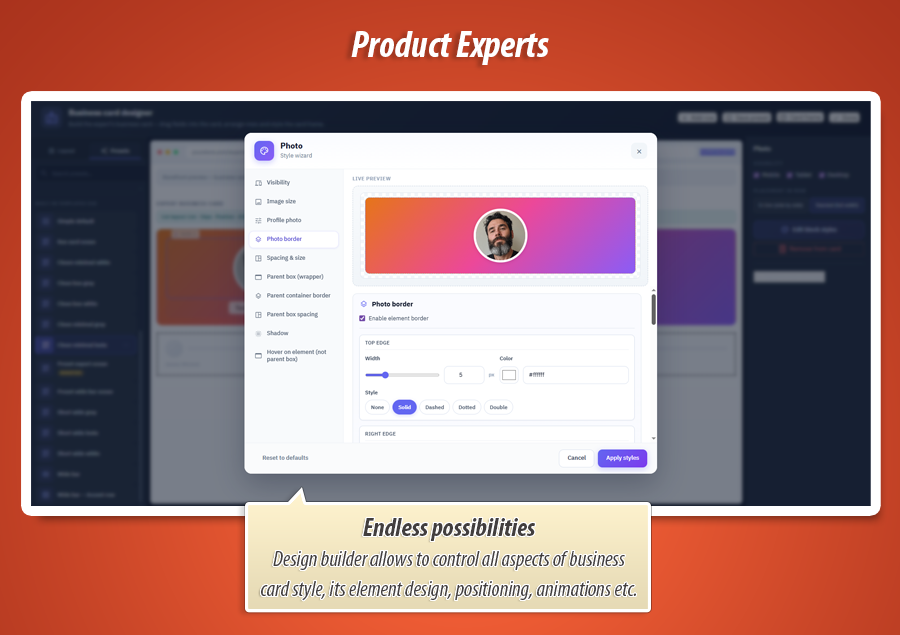
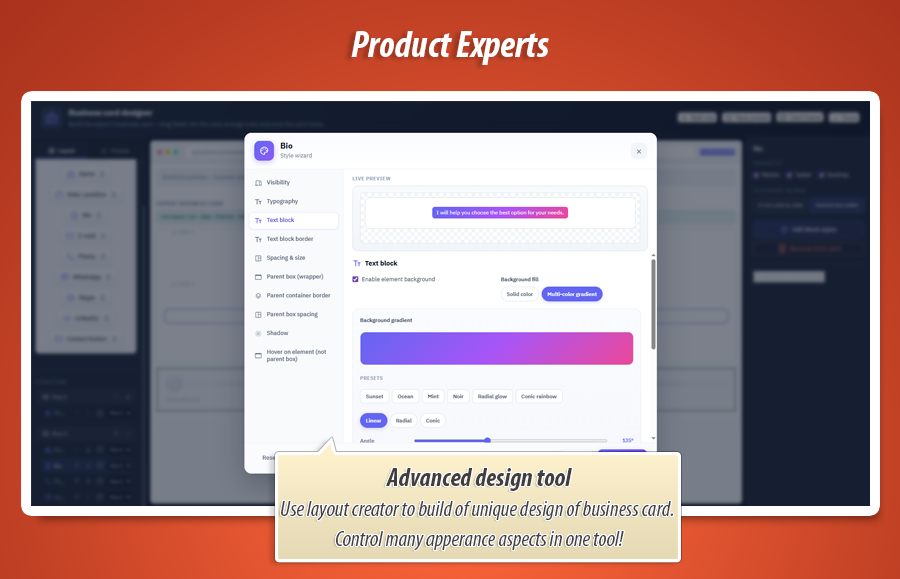
Click any block on the card and open the Style Studio - a side panel organised into clear tabs: typography, colours, spacing, borders, shadows, backgrounds, hover effects, visibility per device. Change the photo frame, button shape, name font size, link colour, tile background gradient - with a live preview on a sample card so you see results before saving.
Borders are a standout: set each edge separately (top, right, bottom, left) with width, colour and line style, or round each corner on its own. Use one uniform corner radius for the whole card when you want simplicity - the studio clears conflicting corner fields automatically so “all corners” always works on the storefront.
Go further with solid or gradient backgrounds, opacity, box shadows, inner padding and margins on the wrapper vs the content box. Control how the element sits in its row (width, flex grow) separately from how content sits inside the element (alignment, fixed height, fixed width). That’s the kind of control designers ask for in Figma - here it’s built in for shop owners.
Hover states for buttons, optional hide on mobile/tablet/desktop, multilingual button labels - the module treats expert cards as a branding surface, not a static HTML snippet. Once you’ve styled one card, copy presets or reuse saved layout templates for the next hire in minutes.
List Layout Studio
One product, many experts - laid out beautifully.
How multiple cards appear together matters
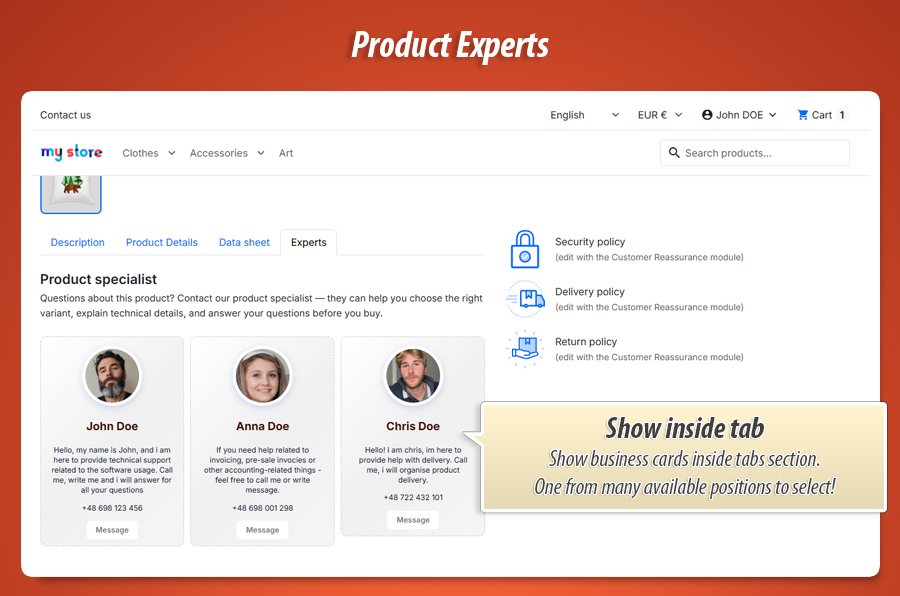
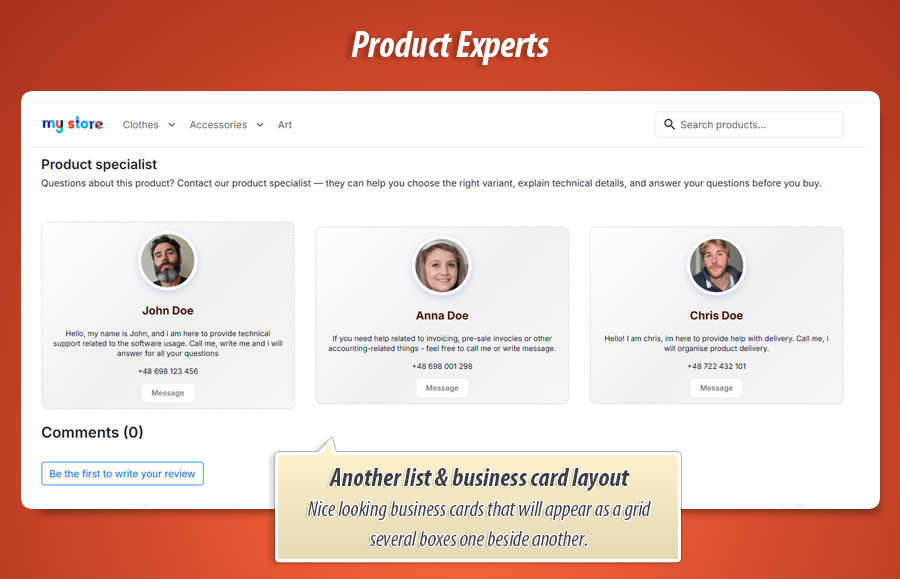
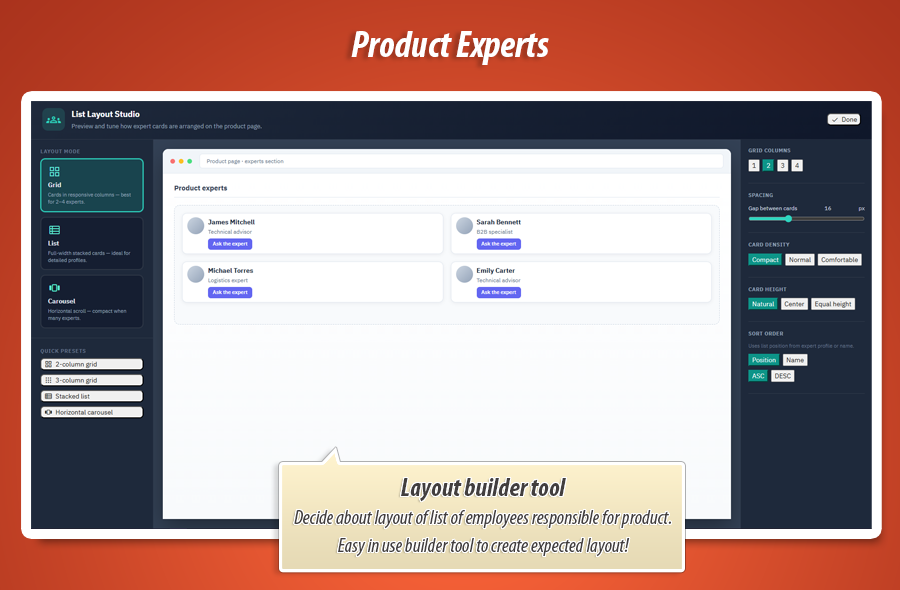
A product might have two specialists - or six. The List Layout Studio controls the whole group: responsive grid (choose column count), vertical list, or horizontal carousel for many contacts without endless scrolling.
Tune gap between cards, sort order (by position or name), density (compact vs comfortable), and vertical alignment so cards of different heights still look tidy. Quick presets (“2-column grid”, “carousel”) give you a sensible starting point; preview in the studio shows roughly how shoppers will see it on the product page.
This is store-level branding: one decision applies everywhere, while each employee card keeps its individual design from the Business Card Designer.
Contact that converts
Reach the right person - not a black hole inbox.
From curiosity to conversation in one click
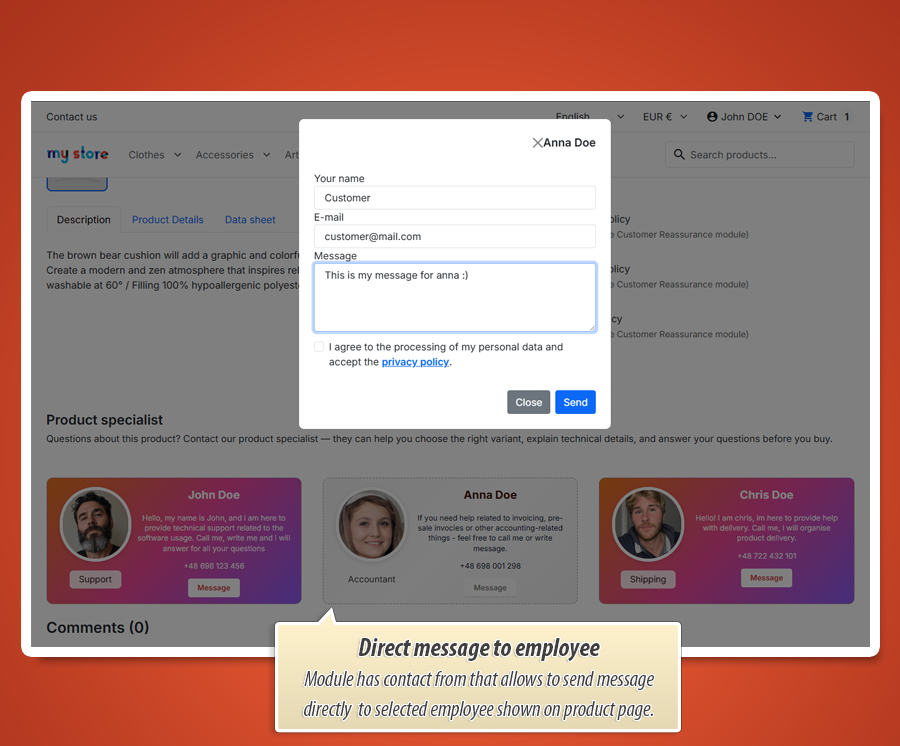
Add a “Contact specialist” button on the card. Choose direct e-mail link or a modal contact form (recommended): the customer stays on the product page, writes a message, and the enquiry is tied to the right expert and product.
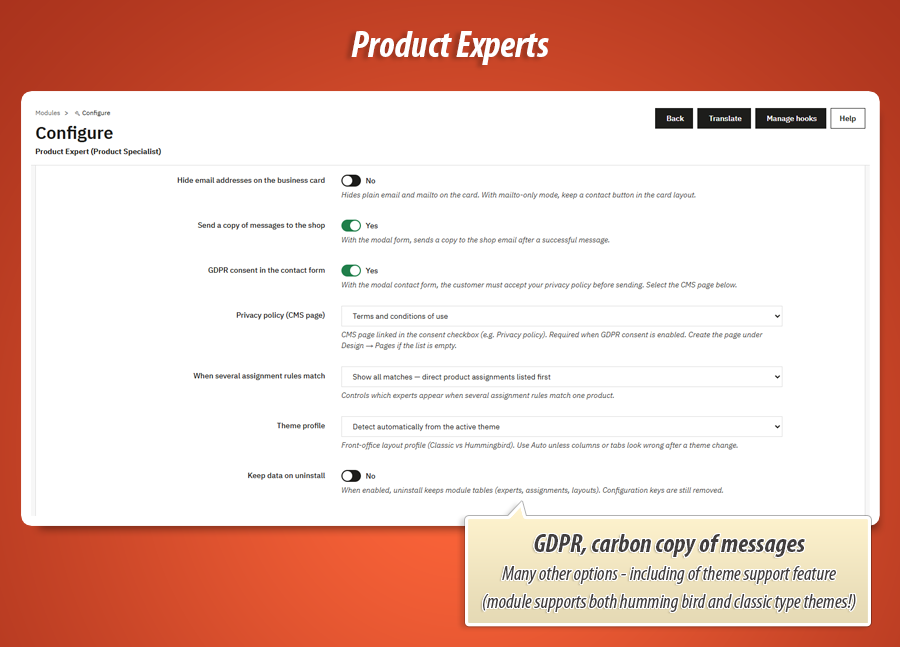
Enable GDPR consent with a link to your privacy policy CMS page. Optionally hide raw e-mail addresses on the card while still allowing contact. Send a copy of messages to the shop mailbox so nothing gets lost if someone is on leave.
The form opens reliably even when several experts appear on the same page - no broken overlay, no missing dialog - so the experience stays professional at scale.
Complete configuration reference
Below is a practical map of every setting you can change in the back office - grouped so you can see the full scope of the module.
1. Expert profiles & assignments
Each expert is a full profile in the back office - not just a name in a CMS page.
Profile fields (multilingual where it matters)
- Active / inactive - turn someone off without deleting their card design.
- Display name - shown on the card and in lists (per language).
- Role / job title - short line under the name (optional block on the card).
- Bio - rich text description when you add a bio block to the layout.
- Photo - upload, preview, replace or remove; used by the photo block (sample image in designer if empty).
- E-mail, phone, WhatsApp, Skype, LinkedIn - each appears only if you place that block on the card.
- List sort position - control order when several experts match one product (lower number = higher priority).
Where experts are linked (flexible rules)
- Entire shop - global contact for all products (e.g. head of sales).
- Specific categories - category managers for furniture, spare parts, etc.
- Brands / manufacturers - brand ambassadors per manufacturer.
- Suppliers - useful when supplier lines need a direct line.
- Individual products - dedicated specialist for one SKU or configurable product.
- From the product edit screen - assign experts while editing a product in PrestaShop.
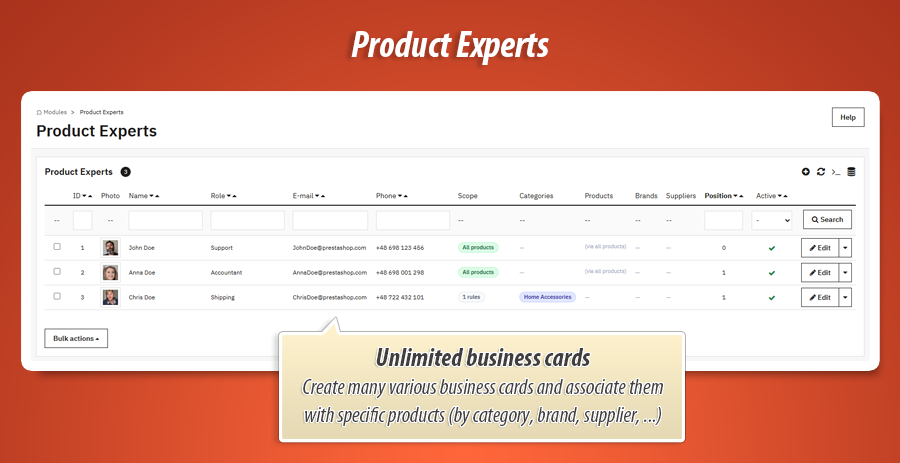
The experts list shows assignment summaries at a glance (categories, products, brands, suppliers). Duplicate an expert to clone their card layout and assignments, then tweak - the copy starts inactive so you do not publish by accident.
2. Global module settings (storefront behaviour)
Under Modules → Product Expert → Configuration you control how the whole feature behaves on the product page.
Intro above the cards
- Heading - translatable (e.g. “Your product specialists”).
- Description - rich HTML intro per language; leave empty to hide.
- Description layout - below the heading (recommended) or beside it.
- Vertical alignment - when intro is beside the heading, align heading and text to top, middle or bottom.
Who appears when rules overlap
- Show all matches - direct product assignments listed first (default): category/brand experts plus product-specific ones, with direct links on top.
- Only experts assigned directly to the product (if any exist) - hide category/brand matches when the product has its own people.
- Show all matches - same listing behaviour without re-sorting by assignment type.
Theme & data
- Theme profile - auto-detect, Classic (PS 1.7) or Hummingbird (PS 8+).
- Keep data on uninstall - preserve experts and designs when you temporarily remove the module.
3. Where the block appears on the product page
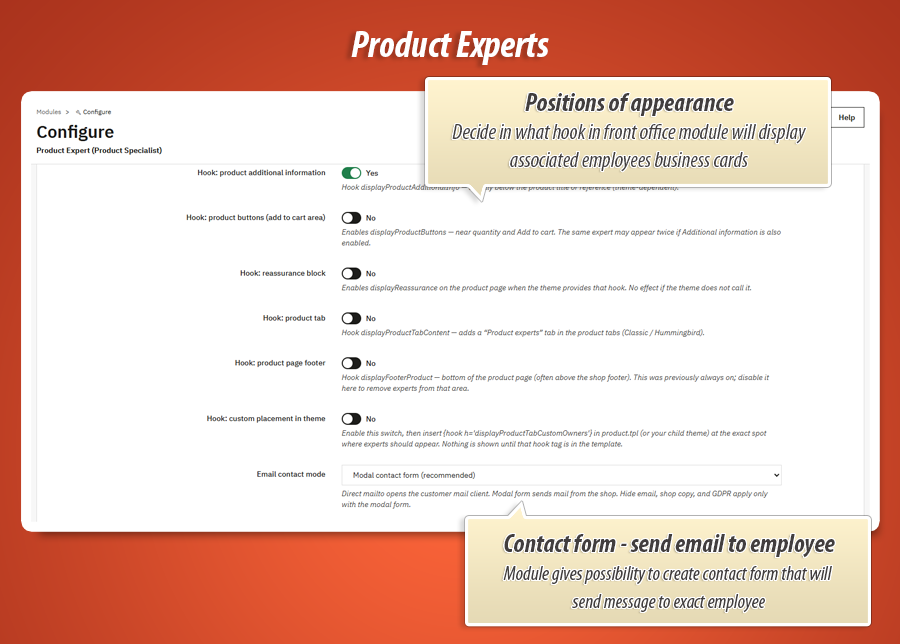
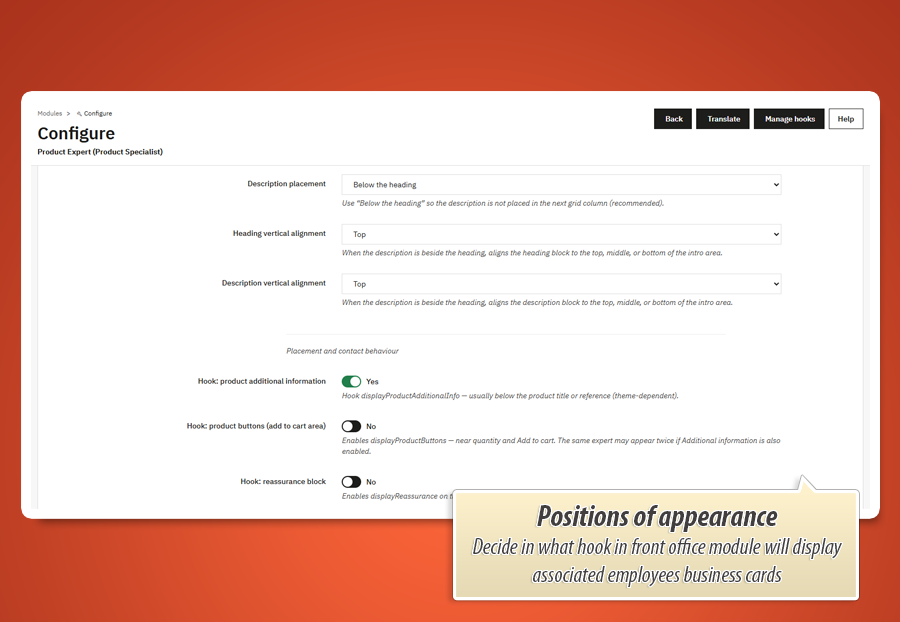
Enable only the positions that fit your theme - each is a simple on/off switch with a short explanation of where it usually renders.
- Additional product information - typically under title/reference area.
- Product buttons zone - near quantity / Add to cart (avoid doubling with “additional info” if both enabled).
- Reassurance block - when your theme exposes that hook.
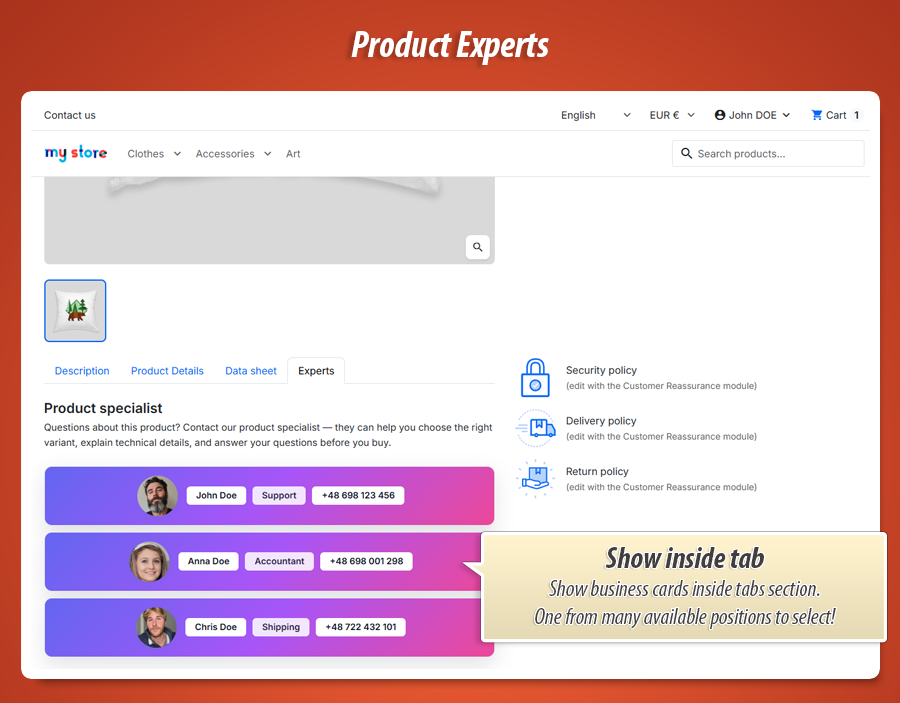
- Dedicated product tab - “Experts” tab with full-width content.
- Product page footer - bottom of the product template.
- Custom theme hook - paste the hook name in your template for pixel-perfect placement.
4. Contact options & GDPR
- E-mail contact mode - open the visitor’s mail app (mailto) or show a modal contact form on the product page (recommended). The form knows which expert and which product the shopper is viewing.
- Hide e-mail on the card - still allow contact via button/form without publishing the address visibly.
- Copy messages to the shop - optional BCC-style copy to your shop mailbox for oversight.
- GDPR consent - required checkbox in the form with link to a CMS privacy policy page you select.
The contact button label can be customised per language in the Style Studio (e.g. “Ask the expert”, “Request a quote”). Works reliably even when many experts and cards appear on the same product page.
5. List Layout Studio - how multiple experts look together
One product often has more than one specialist. The List Layout Studio (separate tab in module configuration) controls the whole group independently from individual card designs. Full-screen visual builder with a live preview that mimics the product page context.
Layout modes
- Grid - responsive columns (1-4), best for 2-4 experts side by side.
- List - full-width stacked cards, ideal for detailed profiles.
- Carousel - horizontal scroll when you have many contacts without a long page.
Quick presets
One click: 2-column grid, 3-column grid, stacked list, horizontal carousel - then fine-tune in the inspector.
Inspector controls
- Grid columns - 1 to 4 columns.
- Gap - space between cards.
- Card density - compact, normal or comfortable padding feel.
- Vertical alignment - align cards of different heights (top / center / stretch).
- Sort - by list position or name, ascending or descending.
- Carousel options - autoplay on/off and loop.
6. Business Card Designer - build each card like a mini page
This is the module’s showpiece: a full-screen Business Card Designer on every expert profile. You compose the card visually - no JSON, no code. Drag blocks from a library, drop them into rows, reorder, nest structure, style the outer frame, and save. A live CSS preview updates as you work, including how the card sits among others (list context).
Blocks you can place on the card
Photo - portrait with size & fit control in Style Studio.
Name - main heading text.
Role - job title line.
Bio - longer description.
Phone - clickable tel link.
E-mail - mailto or hidden when using form-only contact.
WhatsApp / Skype / LinkedIn - optional channels.
Contact button - opens modal form or mailto; label per language.
Layout power features
- Rows - add, remove, reorder horizontal rows of content.
- Nested rows - build columns inside columns (e.g. photo left, details right, button below).
- Multi-column “bands” - split a row into side-by-side zones with adjustable width ratio.
- Stack mode per block - force a block to full width on its own line (mobile-friendly layouts).
- Placement in row (per block inspector) - fixed width in pixels, flex grow in the row, or full width; vertical align in the row (start / center / end / stretch).
- Row & block visibility - hide a row or block on mobile, tablet or desktop.
- Card frame (“Card frame” button) - style the outer shell: padding, background, border, shadow, optional glass backdrop effect.
- Row-level styling - open Style Studio on a whole row for background, borders and spacing around a group of blocks.
- Layout presets library - built-in designs + save your own presets; search, apply, reset to original; duplicate your custom layouts across experts.
Why shop owners love this studio: it replaces hours of theme developer work. You get drag-and-drop composition, preset starting points, and pixel-level control later in the Style Studio - without learning CSS.
7. Style Studio - deep styling for every block (and row)
Click any block (or row) and open the Style Studio - a organised panel with live preview on a sample card. This is not “pick a colour and hope”. It is a structured design system with dozens of options per element, grouped so you can find what you need.
Shared styling tools (available across blocks)
Spacing & size
- Element height: auto, fixed pixels, or fill parent box
- Horizontal / vertical position of content inside the parent box
- Element width: auto, fixed px, min/max width, or fill
- Inner padding & margin (per side or X/Y shortcuts)
Parent box (wrapper)
- Solid or gradient background + opacity
- Per-edge border (top/right/bottom/left): width, style, colour
- Corner radius: all corners together or each corner separately
- Wrapper padding & margin (per side)
- Box shadow with visual editor + presets
Element surface & border
- Inner background (solid / gradient) for chips, buttons, photo frame
- Separate inner border per edge + corner radii
- Inner shadow where relevant
Hover effects
- Scale, brightness, background, text & border colour on hover
- Custom hover shadow
- Transition duration in milliseconds
Visibility
Show or hide the block on mobile, tablet and desktop - useful for simplified mobile cards or desktop-only extras.
Per block type extras
- Photo - width, height, corner radius, object-fit (cover/contain/fill), photo-specific borders and shadows.
- Name, role, bio - full typography: size, weight, italic, colour, line height, letter spacing, align, uppercase/capitalize, ellipsis for long text, text shadow on name.
- Phone, e-mail, social lines - same typography control as text blocks.
- Contact button - multilingual button label, typography, inner button background/border, min width/height, disabled opacity, rich hover states.
Card frame styling (outer shell)
Separate from blocks - style the card container itself:
- Card padding (all sides or each side)
- Card background solid or gradient + opacity
- Card border per edge + corner radius (same powerful border editor as elements)
- Optional glass backdrop (blur, saturation, brightness, contrast)
- Card box shadow
The bottom line on styling: you can make cards look like branded HR visit cards, minimal grey corporate tiles, or bold sales CTAs - with gradients, per-side borders, and hover polish that usually requires a designer + custom CSS. The module generates the CSS for the storefront automatically from what you configure.
8. Row styling in the card designer
Rows are not just containers - you can style them as first-class elements:
- Minimum and maximum row height
- Row padding and margin (per side)
- Row background (solid / gradient)
- Row border per edge + corner radius
- Row shadow
- Row hover effects (background, border colour, shadow)
- Row visibility per device (mobile / tablet / desktop)
9. Day-to-day back office workflow
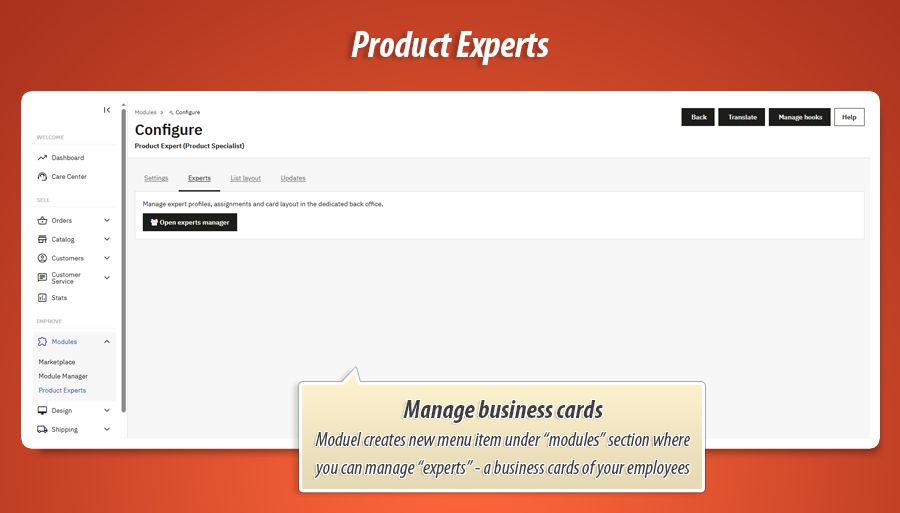
Module menu tabs
- Configuration - intro text, hooks, contact, GDPR, assignment rules, theme.
- List layout - open List Layout Studio for the whole shop.
- Experts - link to the dedicated experts manager (list, add, edit).
- Updates - built-in update checker in the back office.
Experts manager
- Searchable list with photo thumbnail and assignment summaries
- Bulk delete selected experts
- Full expert form: profile, photo, Business Card Designer, assignments panel with search tools for categories/products/brands
- Works with multistore (per-shop experts)
Who gains the most?
B2B & industrial Account managers per line
Technical trade Pre-sales & support contacts
High consideration Human face before expensive purchase
Large catalogs Category/brand owners surfaced automatically
Bottom line for the shop owner
Product Expert turns “Who do I call about this product?” into a clear, attractive answer on every product page. The visual designers are the real differentiator: you’re not buying a static contact box - you’re buying business cards for your team, with layout and styling tools that would cost serious money as custom theme work. Your customers get human faces, direct lines, and confidence to buy or ask. You get fewer vague contact form messages and more qualified conversations.
Technical capabilities and developer benefits
JSON layout engine
Per-expert card structure (ExpertCardLayout) and shop-wide list settings (ProductExpertListLayout) stored as JSON in configuration - edited visually, rendered on the front via Smarty.
Server-generated CSS
ExpertCardElementStyles compiles admin Style Studio values into scoped storefront CSS (wrapper vs inner shell, per-edge borders, hover). Live preview uses the same pipeline via AJAX (PecStylePreview).
Hooks only - no overrides
Product display, admin product tab, footer (single contact modal), and front assets via standard PrestaShop hooks. No core file modifications; multistore-aware expert records.
Nerd stuff (technical specs)
Standard PrestaShop module: dedicated admin controller, visual studios in JavaScript, relational assignment tables, and optional data retention on uninstall.
ps_versions_compliancy).displayProductAdditionalInfo, displayProductButtons, displayReassurance, displayFooterProduct, displayProductTabContent, displayProductTabCustomOwners, displayFooter (modal once).AdminProductExpert, module configure tabs (pe_tab), displayAdminProductsExtra on product form, assignment AJAX search.productexpert/ajax for form submit; GDPR CMS page ID in config; e-mail mode direct / form.PE_LIST_LAYOUT_JSON, conflict PE_CONFLICT_MODE, theme PE_THEME_TYPE, hook toggles PE_HOOK_*.admin-layout-studio.js, admin-element-editor.js, front.js, generated pe-expert-card-front.css; layout presets via ExpertCardLayoutPresets.
50.00 €
Module Gallery 1/26
Why choose our module
Product expert - Specialist Business Cards?
Optimization and Automation
Product Expert automates displaying the right sales, technical, or after-sales specialist directly on product pages. This optimizes customer engagement by connecting them with relevant experts instantly, reducing generic inquiries, and streamlining the path to qualified conversions through rules-based assignments.
Increased Sales
This module significantly boosts sales by building trust and confidence. It connects customers directly with product experts, transforming anonymous shopping into personalized conversations and leading to higher conversion rates, especially for complex or high-value products.
15 years of experience
Leveraging 15 years of PrestaShop insight, this module offers unparalleled flexibility. Its visual studios for card and list design, robust assignment rules, and "hooks only" integration reflect deep platform understanding, ensuring stable, customizable expert showcasing without complex coding for versions 1.7 to 9.
Extensive Customization
Product Expert offers extensive customization through powerful visual studios. Craft unique expert business cards via drag-and-drop elements, customizing typography, colors, and hover effects. Arrange multiple cards in flexible grids, lists, or carousels, ensuring seamless, branded integration.
Open Source Code
This module integrates purely via standard PrestaShop hooks, requiring no core file modifications. Its JSON layout and generated CSS offer robust customization, allowing for advanced modifications and seamless integrations by developers, preserving upgrade paths.
License and Updates
The module features a built-in update checker in the back office, ensuring continued compatibility with PrestaShop 1.7, 8, and 9. This keeps the 'Product Expert' functionality, including its visual designers, seamlessly integrated and up-to-date with your store's platform.