
PrestaShop Material Icons + Font Awesome
Module allows to quickly add missing icons libraries like Font Awesome and/or Material icons. This feature is useful when your theme does not include some of these libraries - it causes problems with icons in modules. Thanks to this module you can add missing files so in effect all icons will appear properly.
0.00 €
Download for PrestaShop 1.6Download for PrestaShop 1.7Download for PrestaShop 8.xDownload for PrestaShop 9 and newer
Dlaczego jest kilka wersji modułu?
This is due to the fact that different PrestaShop releases use different programming solutions. Features working e.g. in PrestaShop 1.7 may not work in PrestaShop 9. Hence the need to release different versions of the module, which will ensure operation in many different versions of the shop.
This is due to the fact that different PrestaShop releases use different programming solutions. Features working e.g. in PrestaShop 1.7 may not work in PrestaShop 9. Hence the need to release different versions of the module, which will ensure operation in many different versions of the shop.
We develop the module for free - if you want - support us!
Galeria 1/2
Free PrestaShop Font Awesome Material Icons Integration
This PrestaShop module seamlessly integrates Font Awesome and/or Material Icons, resolving common issues of missing icons due to template limitations. It ensures consistent and professional iconography across your entire site, significantly enhancing the visual user experience. By simplifying icon integration, the module reduces development time and maintenance efforts. Users can easily install and configure it, selecting their preferred popular icon set. This not only guarantees a uniform and polished look but also contributes to improved site accessibility by providing clear visual cues for all visitors, making your online store more functional and user-friendly.
Module version:
1.2.5
Shop versions:
9.x8.x1.7.x1.6.x
Works with ThirtyBees:
Yes
Translations:


No more broken icons.
Font Awesome & Material Icons for PrestaShop—front and back office.
Your theme doesn’t ship Font Awesome or Material Icons. So third‑party modules that rely on them show empty squares, wrong glyphs, or layout shifts. This free module injects one or both icon libraries globally: enable them for the front office, the back office, or both. One install, four toggles, consistent iconography everywhere. No manual CSS, no theme edits.

Why your store shows missing or wrong icons
Many PrestaShop themes don’t include Font Awesome or Material Icons. When you install modules that expect these libraries—payment icons, social buttons, feature lists, menus—the front office and back office can show empty placeholders, wrong characters, or broken layout. You’re left either editing the theme, adding CSS by hand, or avoiding those modules altogether.
You don’t need to touch theme files or maintain your own icon assets. Font Awesome + Material Icons is a lightweight, drop‑in module: it registers on displayHeader (front) and actionAdminControllerSetMedia (back), and injects only the CSS you enable. Turn on Font Awesome for the shop, Material Icons for the admin, or both—per area. One screen, four switches, no code.
Result: every module that uses these icon sets gets the correct fonts. Consistent look on the storefront and in the back office, better accessibility through recognizable icons, and zero manual integration. Free, and built to work with any PrestaShop 1.7+, 8.x, or 9.x store.
What you get with this module
-
Front and back office:
Enable Font Awesome and/or Material Icons separately for the shop and for the admin. No conflict with themes that already load one of them. -
Two popular icon sets:
Font Awesome and Material Icons are widely used by modules and themes. One module gives you both, on demand. -
No core overrides:
All assets live in the module folder. Safe for PrestaShop upgrades and compatible with multistore.
What the module delivers
Front office icons
Enable Font Awesome and/or Material Icons on the storefront with two toggles. The module adds the corresponding CSS in displayHeader. Any module or theme that uses these classes will display icons correctly—payment methods, social links, feature blocks, menus.
Back office icons
Two separate toggles load Font Awesome and/or Material Icons in the admin panel (actionAdminControllerSetMedia). Dashboards, module config screens, and custom BO pages that use these icon fonts will render properly without editing core or theme.
Consistent iconography & accessibility
When every module has access to the same icon sets, the storefront and back office look coherent. Recognizable icons also improve usability and accessibility for all users, including those using assistive technologies or relying on clear visual cues.
Four clear toggles
Turn Font Awesome and Material Icons on or off for the front office and for the back office—independently. No code, no file edits.
Control where icons load
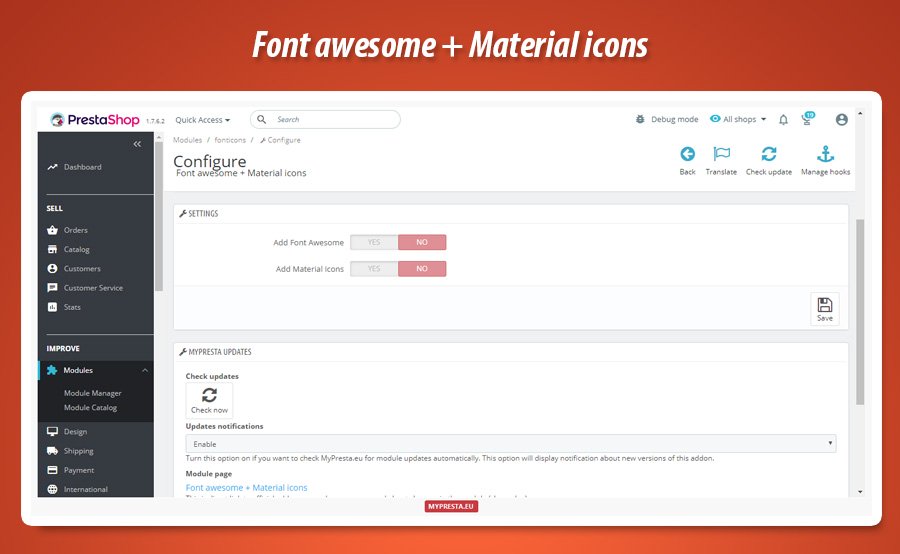
The configuration screen has four switches: Add Font Awesome (front), Add Material Icons (front), Add Font Awesome to BACK OFFICE, and Add Material Icons to BACK OFFICE. Enable only what you need. If your theme already includes Font Awesome on the front, leave that off and use the module only for the back office or for Material Icons. You avoid duplicate CSS and keep the front light.
Two libraries in one module
Font Awesome and Material Icons are bundled inside the module. No CDN, no extra downloads. Choose one or both per area.
Simplified icon integration
Instead of manually adding and maintaining icon CSS in your theme or core overrides, this module handles everything. It loads the correct stylesheet(s) on the right hooks. Development and maintenance stay simple; you focus on content and other customisations. Modules that depend on these fonts work out of the box after you enable the right toggles.
Easy install & updates
Standard PrestaShop module: install, configure, save. Built-in MyPresta update checker notifies you when a new version is available.
One screen, no clutter
The back office form is a single “Settings” panel with the four toggles and a Save button. No tabs, no advanced options—just enable or disable each icon set for the front and for the back office. The module uses native PrestaShop configuration and Bootstrap switches (or radio buttons on older PS), so it fits any supported PrestaShop version and stays safe during upgrades.
Simple configuration in the back office
One screen with four switches: enable Font Awesome and/or Material Icons for the front office and for the back office. Save—done. No theme or core changes required.
Front office
- Add Font Awesome (on/off)
- Add Material Icons (on/off)
- Loaded via
displayHeader
Back office
- Add Font Awesome to BACK OFFICE (on/off)
- Add Material Icons to BACK OFFICE (on/off)
- Loaded via
actionAdminControllerSetMedia
Technical specification & compatibility
Standard PrestaShop module. No core overrides. Only adds CSS on the appropriate hooks. Safe for updates and multistore.
displayHeader (adds CSS for front office).actionAdminControllerSetMedia (adds CSS for back office).views/css/. MyPresta update checker included.


0.00 €
Download for PrestaShop 1.6Download for PrestaShop 1.7Download for PrestaShop 8.xDownload for PrestaShop 9 and newer
Dlaczego jest kilka wersji modułu?
This is due to the fact that different PrestaShop releases use different programming solutions. Features working e.g. in PrestaShop 1.7 may not work in PrestaShop 9. Hence the need to release different versions of the module, which will ensure operation in many different versions of the shop.
This is due to the fact that different PrestaShop releases use different programming solutions. Features working e.g. in PrestaShop 1.7 may not work in PrestaShop 9. Hence the need to release different versions of the module, which will ensure operation in many different versions of the shop.
We develop the module for free - if you want - support us!
Module Gallery 1/2
Why choose our module
Material Icons + Font Awesome?
Optimization and Automation
Automate icon library integration and ensure consistent visual design with Font Awesome and Material Icons. Optimize development time and enhance site accessibility.
Increased Sales
Boost sales by ensuring a professional, visually consistent store. This module eliminates missing icons and enhances accessibility, building user trust and simplifying the shopping journey. This reduces abandonment and drives higher conversion rates.
15 years of experience
Having witnessed PrestaShop's evolution for 15 years, we understand the importance of consistent iconography. This module guarantees seamless Font Awesome/Material Icons integration, enhancing user experience and site accessibility.
Extensive Customization
The module grants unparalleled design freedom by seamlessly integrating vast Font Awesome and Material Icons libraries, enriching customization possibilities for a unique, personalized look.
Open Source Code
Full access to unencrypted source code for Font Awesome and Material Icons integration allows modifications, extensions, and custom integrations to suit your project's needs.
License and Updates
This module provides a perpetual license for unlimited use. Stay current with free updates for a year. Enjoy substantial renewal discounts, up to 90%, for continued access to the latest features and compatibility.